
AmerAlreyahi/OpenCircle
AmerAlreyahi/OpenCircle has 45 GitHub stars and 2 forks. GitHot measured +7 stars in 24 hours and +36 in 7 days. Last checked 2026-11-09 11:28 UTC. Last push 2026-11-04.
Open-source alternative to Google's Circle to Search for Windows & Linux: circle anything to search, translate the whole screen in place (great for games), ask AI, or snip & annotate. Rust, private, lightweight.
Measured star growth
- in 24h
- +7
- in 7 days
- +36
- in 15 days
- Update delayed
- in 1 month
- Update delayed
Net star changes over overlapping periods, not daily totals. Missing measurements are left blank. Stars measure attention, not software quality.
README.md
Original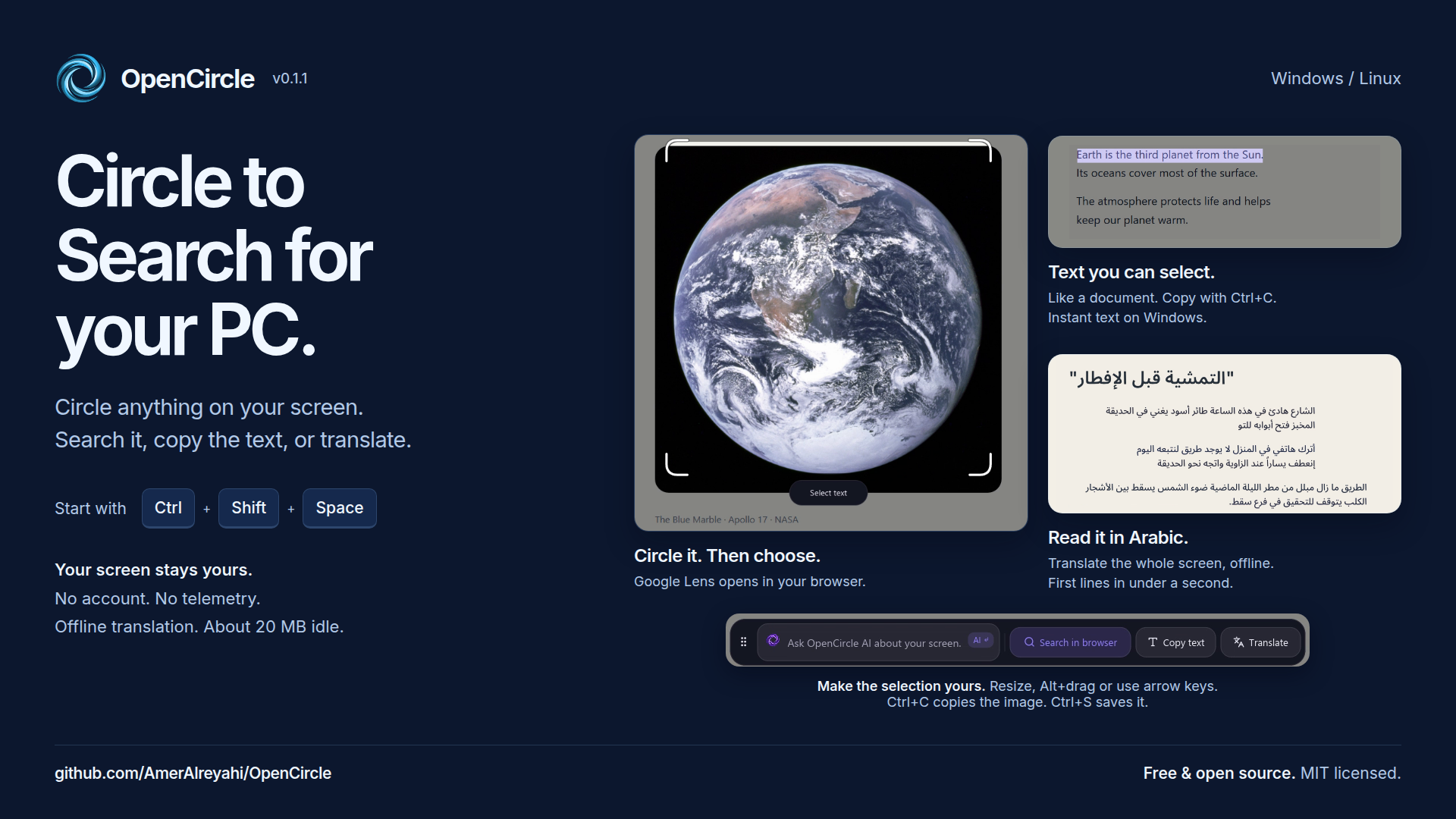
OpenCircle
Circle to Search for Windows and Linux. Free and open source.
Circle anything on your screen to search it, read it, translate it in place,
or ask an AI about it. Snip and mark up screenshots. Fast, private and light.
OpenCircle is one small native program for Windows and Linux that puts search, text reading, in-place translation, AI questions and a screenshot tool behind a few shortcuts. It never uploads your screen on its own: search and AI Mode open in your own browser, only when you choose them, and translation runs on your PC by default. It is free, MIT licensed, and has no account and no telemetry.


See it
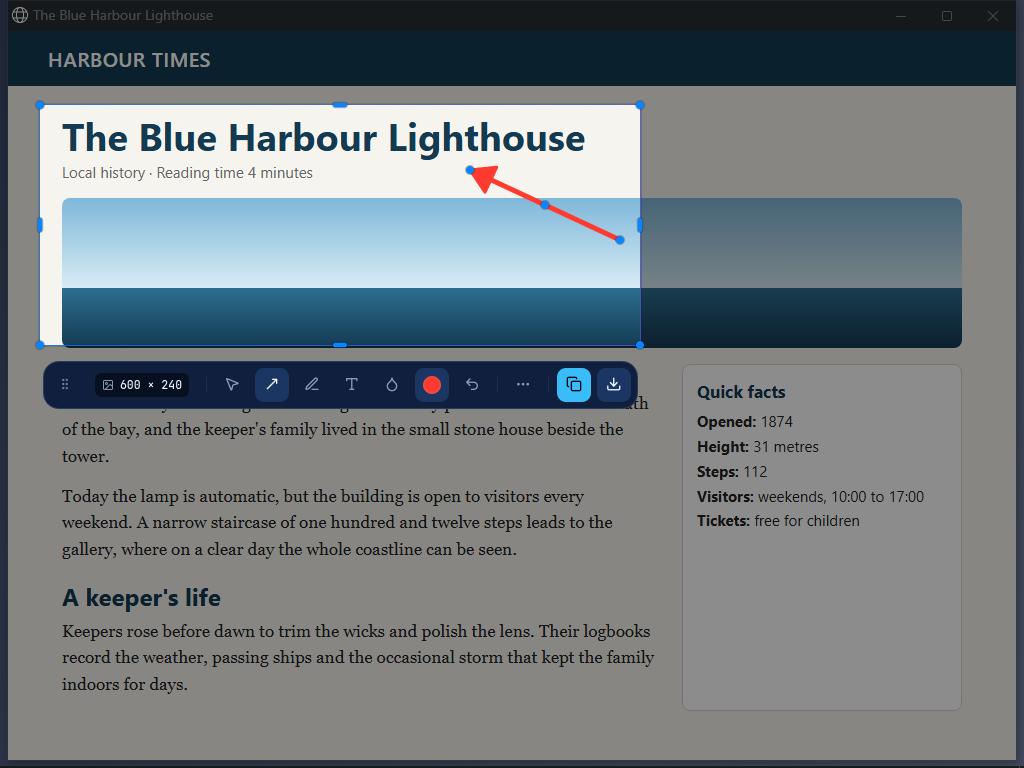
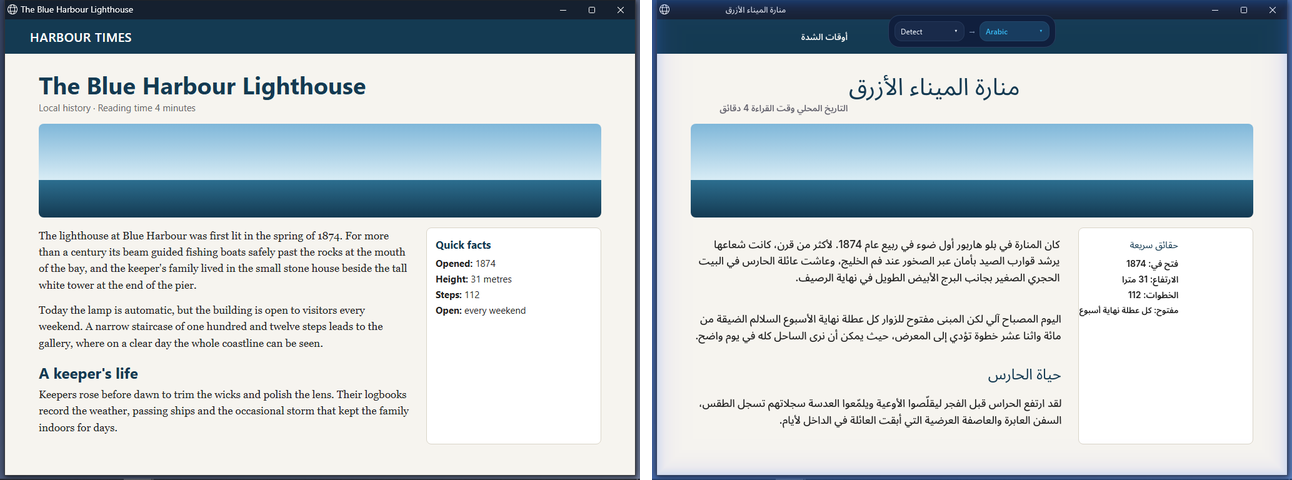
More in the gallery and the feature guides.
The clips are short recordings of the real app; third-party material in them is
credited in NOTICE and in Settings > About.
What works by default
- Circle, then choose. Press
Ctrl+Shift+Space, draw a circle or a box around anything, then pick what to do: Search in browser (the picture goes to Google Lens, selected text to a Google search), Copy text, Translate, or ask AI. Nothing is sent until you pick. The stroke snaps to a clean box that you can move, resize by its edges, or nudge with the arrow keys (Alt+drag moves it even over text). It opens on the screen your mouse is on, and all screens stay selectable. - Select text like on a desktop. Drag over words to copy, translate or search them. On Windows the text is readable at once with Windows' own text recognition; otherwise (and for Arabic or games) OpenCircle offers a one-time download of about 30 MB. Settings > Text reading > Engine chooses.
- Translate in place. Press
Ctrl+Shift+Tto translate the whole screen. The original text is erased and the translation is drawn in its place, with matching colour and size; browser address bars and file names are left alone, and big outlined subtitles are erased and redrawn at their size. It runs offline by default after a one-time model download (49 direct models, and other pairs go through English); Arabic is the default target. Direct models into and out of Arabic make it faster. See Translate. - Snip and annotate. Press
Alt+A: the screen freezes, hover a window and click it, or drag an area (Entertakes the full screen). The pick is already on the clipboard at its original size, with one grouped toolbar beside it: shapes, arrows, text, callouts, numbered steps, spotlight, magnifier, Blur (a fine pixel mosaic that hides text for good) and a solid Redact. Long capture: scroll the page yourself and OpenCircle stitches it. Steps keeps several snips on a slim strip and copies them as one numbered image. Also a colour picker, a screen ruler, Pin and Share. Details: Snip and annotate. - One bottom bar. Ask OpenCircle AI about your screen, then Search in
browser, Copy text, Translate and Snip.
Ctrl+Ccopies the selection as an image (or the picked words as text),Ctrl+Ssaves it; a small pill confirms. Drag the bar to any of six spots. - Ask AI about your selection. No key needed: the question opens in Google AI Mode in your browser. Or add your own key for a chat inside OpenCircle with markdown and follow-ups: OpenRouter, OpenAI, Anthropic, Gemini, Groq, Mistral, DeepSeek, xAI, a local Ollama or LM Studio, or your own server. A follow-up pins the chat so it stays above other apps. History is text only and stays on this PC.
- Shortcuts for everything. Give any action its own key and skip the bar.
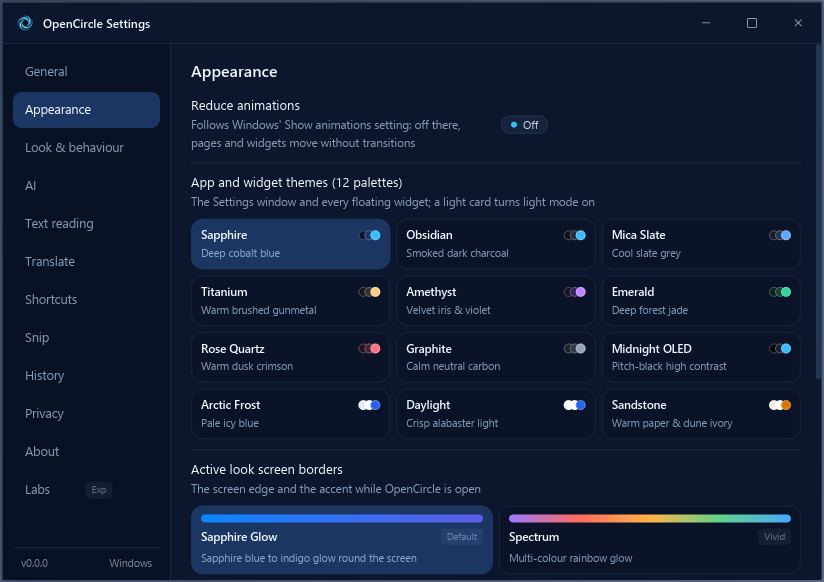
- 12 themes and Active Look. Pick a card in Settings > Appearance (light and dark; until you do, it follows the system). Sapphire Glow, a soft glow round the screen edge, is the default look; its colours also outline the snip area.
- Updates that check a signature. Quiet, opt-in on first run, with release notes after each update.
Optional Labs features
Song search, search history, live pins and live translate are unfinished, off by default and hidden until enabled in Settings > Labs. Live translate is planned for a later release.
Private by design
- Nothing leaves your computer unless you choose an action.
- No account, no telemetry, no image-hosting service.
- Snips stay in memory until you save them; only what you copy or save leaves the app.
- A small log stays on your PC (
logs/in your local data folder) to help fix problems; nothing is sent. Settings > About has Copy diagnostics and Report a problem. - AI and song-search keys live in your system's keyring, never in a file.
- Search and AI Mode open in your own browser, only when you press them. The picture goes from your browser to Lens; OpenCircle uploads it nowhere else.
Details: Privacy.
How it compares
- Private by default. No image-hosting service sits in between, nothing is sent automatically, and translation and text reading can run fully offline.
- One flow. Search, read, translate and ask AI come from the same selection and the same bar, instead of separate tools.
- Windows and Linux with one native binary and no browser engine inside.
- Honest limits. Search in browser and AI Mode are Google's services, opened in your browser, so they need the web and follow Google's own policies. Some features are Labs (unfinished).
Install
Download from the Releases page.
| System | Files |
|---|---|
| Windows 10 / 11 | OpenCircle-Setup-<version>-x64.exe (the setup: one click, or pick the folder; for IT: OpenCircle-Setup-<version>-x64.exe /quiet /dir="C:\Apps\OpenCircle", uninstall with /uninstall /quiet), OpenCircle-<version>-x64-portable.exe (no install) |
| Linux | .AppImage, .deb, .rpm |
On Linux, one command downloads the latest AppImage, checks its signature, installs it
to ~/.local/bin (no sudo), adds the app-menu entry and starts it:
curl -fsSL https://raw.githubusercontent.com/AmerAlreyahi/OpenCircle/main/scripts/install.sh | sh
Remove it again with ... | sh -s -- --uninstall. Read the script first if you like:
scripts/install.sh.
Check a download with SHA256SUMS.txt from the same release:
sha256sum -c SHA256SUMS.txt --ignore-missing
Windows SmartScreen may say "Windows protected your PC" because the installers are not code-signed yet (the project is free). Click More info, then Run anyway. See Signing to sign your own build.
Windows 11 Smart App Control. Where Smart App Control is on, Windows blocks unsigned programs outright and there is no "Run anyway". Until OpenCircle is code-signed (see below), either turn Smart App Control off in Windows Security > App & browser control > Smart App Control settings (Windows does not let you turn it back on afterwards, on some versions), or build from source. It is off on many PCs, and Windows 10 does not have it.
OpenCircle starts with Windows by default (tray only, no window). Turn that off in Settings.
The Getting started guide walks through the first run.
Code signing policy
We have applied to SignPath Foundation for free code signing (code signing by SignPath.io, certificate by SignPath Foundation). Until it is approved, the installers are unsigned and SmartScreen may warn.
- Committers and reviewers: AmerAlreyahi
- Approvers: AmerAlreyahi
Every release is built by GitHub Actions from a tagged commit in this repository, and each one is approved by hand before it is published.
Privacy: this program will not transfer any information to other networked systems unless specifically requested by the user or the person installing or operating it. See the Privacy page.
Shortcuts
| Action | Shortcut |
|---|---|
| Circle to search | Ctrl+Shift+Space |
| Translate the whole screen | Ctrl+Shift+T |
| Live translate on / off (Labs, unfinished) | Ctrl+Shift+L |
| Circle, then explain with AI | Ctrl+Shift+E |
| Circle, then copy its text | Ctrl+Shift+X |
| Snip | Alt+A |
Colour picker and screen ruler have no default key. All of them change in Settings. Full list and details: Shortcuts.
Platforms
- Windows 10 and 11: the full feature set.
- Linux: X11 and Wayland. On Wayland the desktop owns the keys and the screen capture; picking a window and long capture are not offered, and Share is Windows only. See Linux notes.
Games must run in borderless or windowed mode for live translate (Labs, unfinished). Linux text reading is slower than Windows OCR; on Wayland the overlay can take about half a second to appear and popups are square. AI-provider translation can be slower than the offline engine and may show the whole result at once.
Lightweight
One native program written in Rust, with no browser engine inside. The interface is drawn by iced. The goal is under 40 MB of RAM while idle. Reading text, translating and Lens start short helper processes that exit when they finish.
Build from source
Requires a recent stable Rust toolchain.
cargo build --release
Linux build dependencies (Debian/Ubuntu):
sudo apt-get install libxkbcommon-dev libwayland-dev libxcb1-dev libxrandr-dev libdbus-1-dev libpipewire-0.3-dev libgtk-3-dev libxdo-dev
ARCHITECTURE.md describes how the code is organised.
Guides
Getting started · Shortcuts · Translate · Snip and annotate · Feature guides · Gallery · AI setup · Song search (Labs) · Privacy · Linux notes · Signing
About and credits
Settings > About lists the project, the licence, and every component OpenCircle
uses that is made by others, with its licence. Text-reading and translation
models are downloaded on first use under their own licences; see NOTICE.
The translation models come from Hugging Face (Xenova's ONNX exports of the
Helsinki-NLP OPUS-MT models) and, for the five direct Arabic models we
converted ourselves, from
AmerAlreyahi/OpenCircle-models.
Contributing
Issues and pull requests are welcome. Run the checks before sending one:
cargo fmt --check && cargo clippy --all-targets -- -D warnings && cargo test
License
Media exception: the preview clips (assets/previews: the stills bundled in the
app, the full clips downloaded when you play a preview) show
third-party material under its own terms, which the app's MIT licence does not
relicense. Each clip's credit and licence is listed in NOTICE and in
Settings > About.
OpenCircle is an independent project and is not affiliated with or endorsed by Google. "Google", "Google Lens" and "Circle to Search" are trademarks of Google LLC, used here only to describe the feature OpenCircle is an alternative to and the services it can open for you.
Explore related projects
codecrafters-io/build-your-own-x
Master programming by recreating your favorite technologies from scratch.
561,398 starspublic-apis/public-apis
A collective list of free APIs
497,679 starsmorluto/rea
Reverse engineer anything with agents, from app behavior down to native binaries.
447,495 starsopenclaw/openclaw
The AI that really does things. Any OS. Any Platform. The lobster way. 🦞
394,261 stars