
AlphaaCode/Popbook
AlphaaCode/Popbook has 16 GitHub stars and 3 forks. GitHot measured 0 stars in 24 hours. Last checked 2026-11-09 17:12 UTC. Last push 2026-11-04.
Turn any course PDF into an interactive 3D pop-up textbook with your own AI (Claude, OpenAI, Gemini, Ollama or Claude Code). Runs locally, open source.
Measured star growth
- in 24h
- 0
- in 7 days
- Update delayed
- in 15 days
- Update delayed
- in 1 month
- Update delayed
Net star changes over overlapping periods, not daily totals. Missing measurements are left blank. Stars measure attention, not software quality.
README.md
OriginalPopBook Studio




Turn any course PDF into an interactive 3D pop-up textbook in your browser, using your own AI: an API key, a local model, or a coding agent such as Claude Code. Inspired by Every Joule by Techartist.
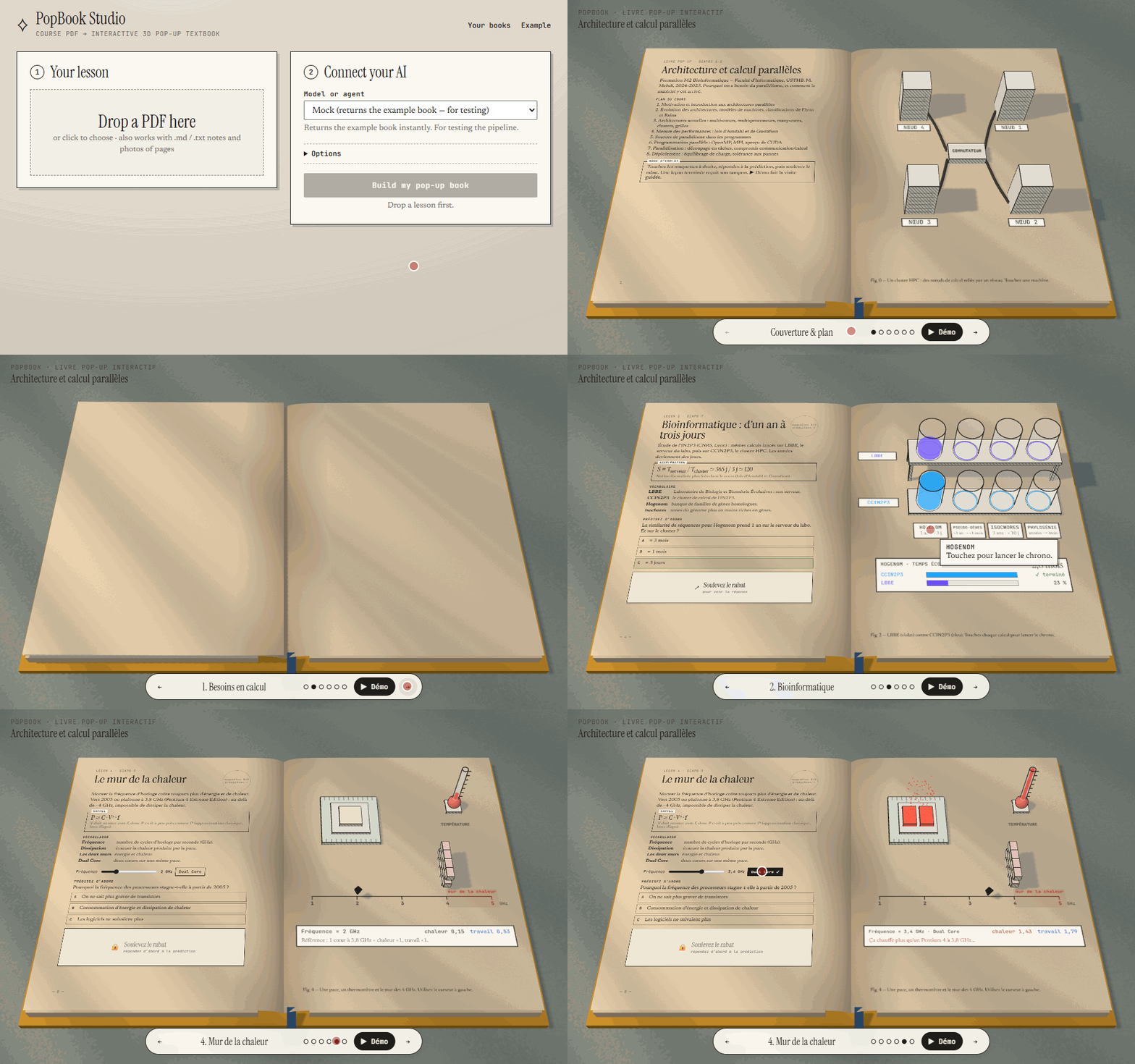
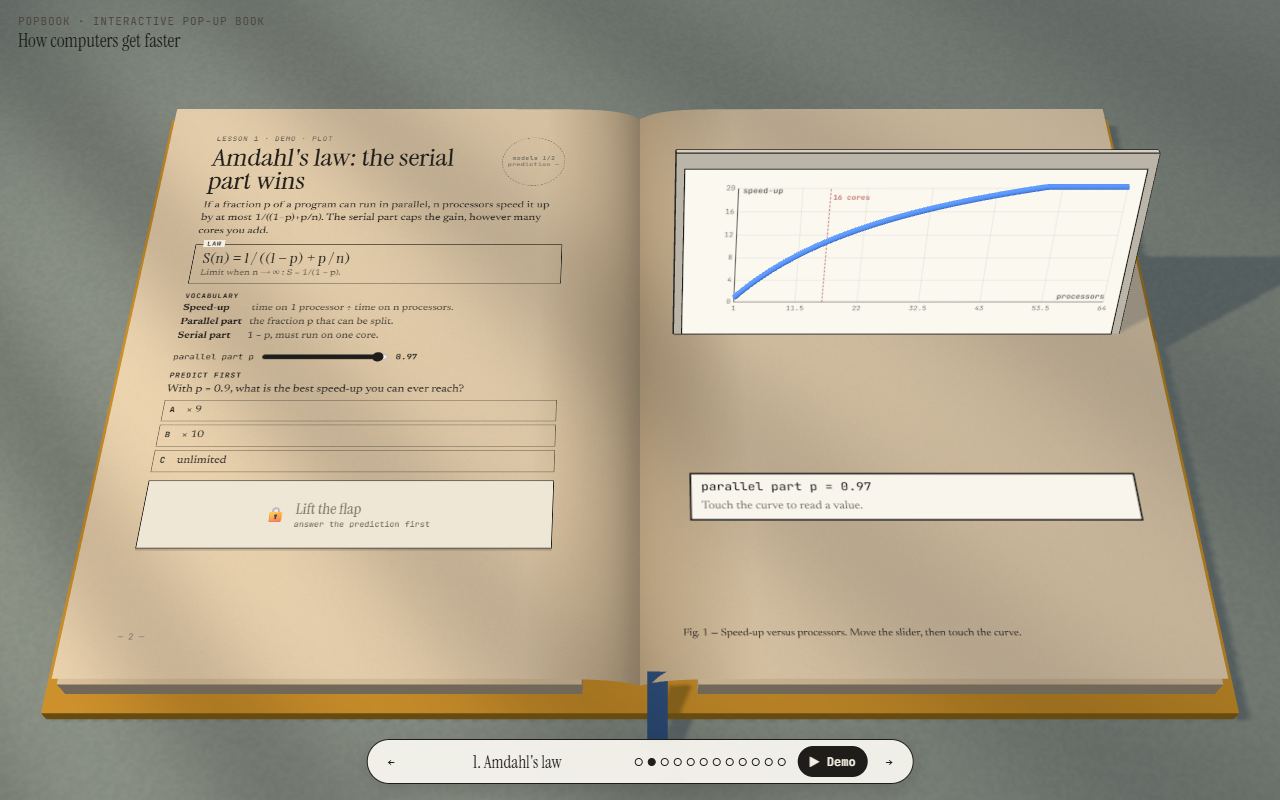
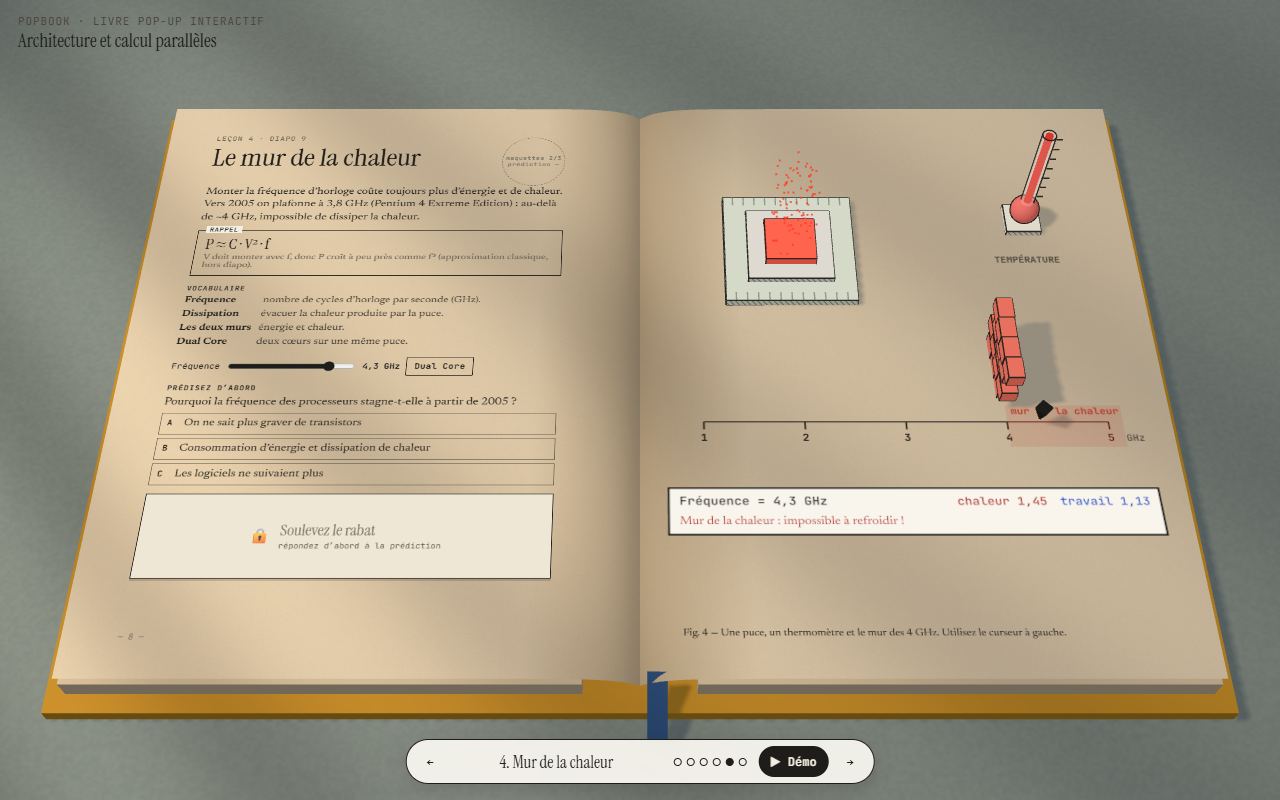
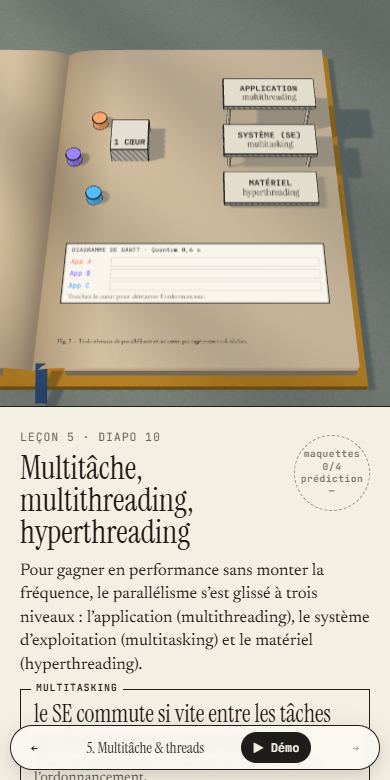
Each spread is a lesson. The left page is printed text: concept, key formula, vocabulary, a predict first quiz and a lift-the-flap answer. The right page holds a paper-craft 3D model you poke at to see the idea work. Answer the quiz and touch every part of the model, and the lesson gets its stamp.
Not a developer? The beginner's guide (PDF) explains every step — installing Node.js, downloading PopBook, connecting an AI and making your first book — with no coding needed.
 |
 |
 |
 |
Quick start
You need Node.js 18.17 or newer.
git clone https://github.com/AlphaaCode/Popbook.git
cd Popbook
npm install
npm start
Open http://localhost:5173, then:
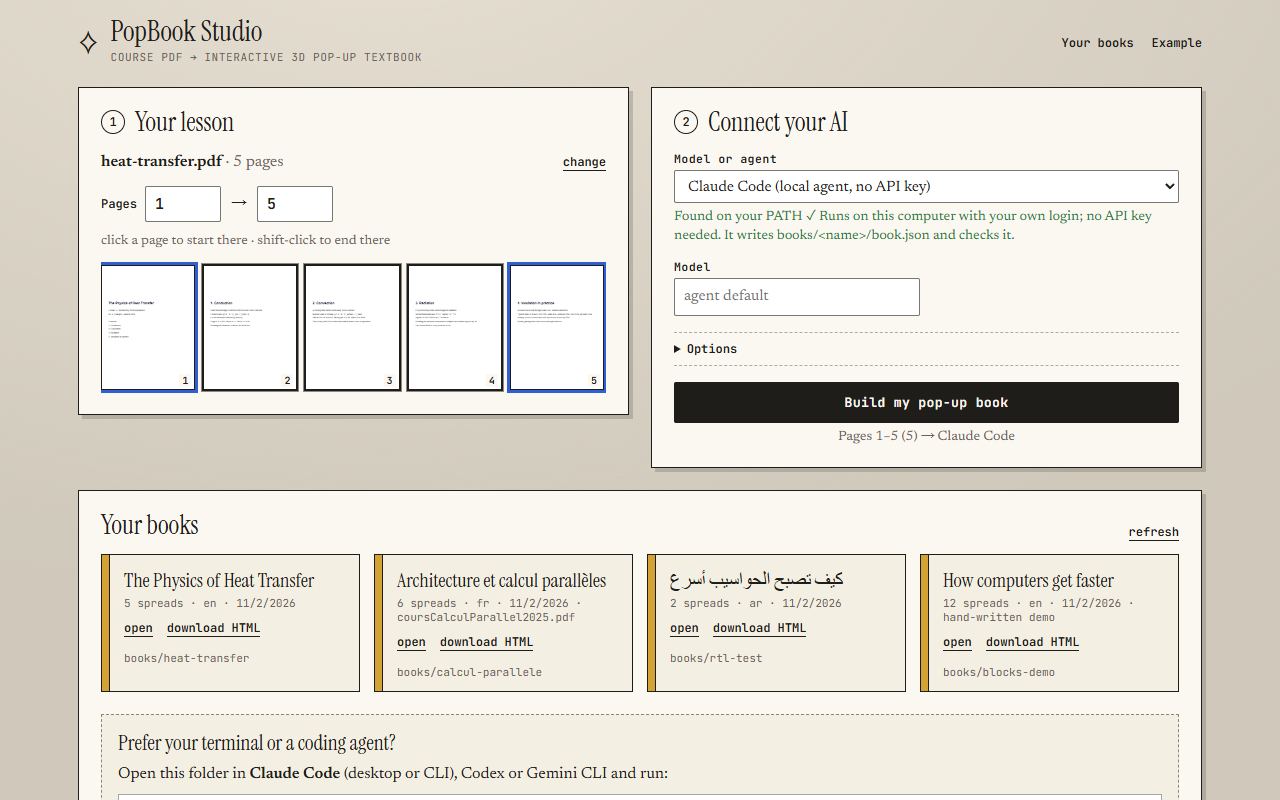
- Your lesson. Drop a PDF (or
.md/.txtnotes, or photos of pages). Click a thumbnail to start the range there; shift-click to end it. - Connect your AI. Pick a provider (see below) and paste a key if it needs one.
- Build. Follow the live log, then Open the book or Download as one HTML file.
Two books ship with the repo: calcul-parallele, a French parallel-computing course, and blocks-demo, which uses
every scene block. Open them from Your books or directly at
http://localhost:5173/viewer/?book=blocks-demo.
How it works
The AI never writes 3D code. It writes one file, book.json, in a strict format
(prompts/system.md is exactly what the model reads). A hand-written engine renders any valid
book, so results stay reliable even with small models.
PDF pages ──► model / agent ──► book.json ──► validate (+ up to 2 repair rounds) ──► books/<slug>/ ──► 3D viewer
Long ranges are sent in batches (15 pages per call by default) and the spreads are merged. If an answer fails validation, the errors and the previous answer go back to the model, up to two times.
AI options
| Option | What you need | Default model | What gets sent |
|---|---|---|---|
| Claude API | ANTHROPIC_API_KEY |
claude-opus-5-5 |
the page range as a real PDF document (sliced with pdf-lib) + extracted text |
| OpenAI API | OPENAI_API_KEY |
gpt-6-astra |
page images (rendered in your browser) + text, JSON mode |
| Gemini API | GEMINI_API_KEY |
gemini-4-argon |
the page range as an inline PDF + text, JSON response type |
| OpenAI-compatible | a base URL (+ key if the server wants one) | qwen2.5:14b |
text, plus page images if you tick send page images (vision models only) |
| Claude Code | claude on your PATH, logged in |
your Claude Code default | nothing leaves your machine except through the agent itself |
| Codex CLI | codex on your PATH |
the CLI's default | same |
| Gemini CLI | gemini on your PATH |
the CLI's default | same |
Keys. Put them in .env (copy .env.example) or paste them in the studio. A pasted key is
sent only to the local server for that job and is never written to disk. Tick remember on this computer to keep it
in this browser's localStorage.
Models. Defaults come from .env (ANTHROPIC_MODEL, OPENAI_MODEL, GEMINI_MODEL, COMPAT_MODEL) and can
be changed per build in the studio. The defaults are each provider's current flagship with PDF or image input (checked November 2026); claude-sonnet-5-5 is a cheaper Claude option. Stronger models make better books, especially for picking scene blocks and
writing faithful, concise text.
OpenAI-compatible base URLs:
| Server | Base URL |
|---|---|
| Ollama | http://localhost:11434/v1 |
| LM Studio | http://localhost:1234/v1 |
| OpenRouter | https://openrouter.ai/api/v1 |
| Groq | https://api.groq.com/openai/v1 |
Local agents. The studio finds claude, codex and gemini on your PATH and runs them in the repo folder.
They read CLAUDE.md / AGENTS.md, write books/<slug>/book.json, run the checker and fix their own errors; their
output streams into the build log. Claude Code runs with
--permission-mode acceptEdits --allowedTools "Read,Write,Edit,MultiEdit,Glob,Grep,Bash(node tools/check.mjs:*),Bash(node tools/pdf2pages.mjs:*)".
To change a command, set AGENT_CMD_CLAUDE, AGENT_CMD_CODEX or AGENT_CMD_GEMINI in .env; the prompt is
appended as the last argument.
Testing without any AI: POPBOOK_MOCK=1 npm start adds a Mock provider that returns the example book.
Agent mode (no studio)
Open this folder in Claude Code (CLI or desktop) and run:
/popup-book path/to/lesson.pdf 1-10
Or ask any coding agent to "follow AGENTS.md to make a pop-up book from lesson.pdf, pages 1–10". By hand:
node tools/pdf2pages.mjs lesson.pdf --pages 1-10 --out books/my-lesson   # text per page + source.pdf
# write books/my-lesson/book.json following prompts/system.md
node tools/check.mjs books/my-lesson                                     # repeat until OK
open http://localhost:5173/viewer/?book=my-lesson
Agents may also write custom scenes, hand-made 3D modules, when no built-in block fits an idea. CLAUDE.md
documents the kit API; books/blocks-demo/scenes/pendulum.js is an example.
Scene blocks
| Block | The idea is about… | The reader… | Stamp targets |
|---|---|---|---|
race |
A vs B on up to 4 cases | starts a simulated clock; two shelves of glass jars fill (cubic time-lapse), a card shows elapsed time and % per machine | each item id |
bars |
growth over ordered items | grows the towers, flips log/linear; optional dashed growth law v₀·factor^((x−x₀)/every) | play, bar, scale |
model |
a knob that drives an outcome with a limit | drags a slider that drives formulas, flips a toggle, hits a glowing threshold wall; visuals chip (dies, heat particles, thermometer), tank, dial |
param, threshold, toggle |
plot |
exploring y = f(x, p) | moves a parameter that rebuilds a 3D curve on a standing panel, clicks the curve to read values | param, curve |
flow |
a pipeline or algorithm | sends a glowing token through step blocks, or clicks steps | play + step ids |
stack |
levels of abstraction | clicks stepped floors to read each | level ids |
scheduler |
sharing one resource | starts a core that serves task tokens, live Gantt chart, quantum slider, optional hyperthreading and levels | core + level ids |
network |
connected machines | sets packets flowing between racks and a switch | network |
showcase |
1–4 objects or domains | clicks procedural models: globe (grid refines per step), head (scan slice), layers (geology + wells), server, chip, molecule, dna, gear, flask, cube, pyramid, sphere, cylinder | each item id |
custom |
anything (agent mode only) | whatever the module does | declared by the module |
Model expressions (expr, when) use a small safe evaluator (lib/expr.js): numbers,
+ − * / % ^, comparisons, && || !, ?:, min max abs sqrt log log10 log2 exp pow round floor ceil sin cos tan,
pi, e. There is no eval.
Adding a new block
- Engine: write
function myblock(sc, ctx) { … return { G, pops, update, controls, demo } }inviewer/blocks.jsand add it to theBLOCKSexport. Use the helpers fromviewer/kit.jsso it matches the pen-and-ink look, setuserData = { tip, click, target }on clickable meshes, and callctx.touch(id)for every stamp target. - Validator: add the name to
BLOCKSinlib/validate.js, normalize its fields in theswitch, and return its target ids fromsceneTargets(). - Prompt: document it in
prompts/system.md, with a JSON example, limits, interactive ids and a row in the "idea → block" table. Models only use what is documented there. - Demo + test: add a spread to
books/blocks-demo/book.json, then runnpm testand open the spread in the viewer.
The viewer
The viewer shows an open hardback on a desk under warm, striped sunlight. Use ← → or the keyboard arrows to turn
pages, #p3 deep-links to a spread, and ▶ Demo flies the camera to each model and runs it. Progress (stamps) is
saved in localStorage. In portrait or on phones, the 3D model sits on top and the lesson scrolls underneath. Arabic
and other RTL languages are supported ("lang": "ar"). Interface strings live in
viewer/i18n.js (en, fr, ar), and a book can override any of them with "ui": { … }.
Export
Download as one HTML file (or node tools/export.mjs books/<slug> out.html) produces a single file. It inlines
the CSS, the engine modules (as data: URLs in an import map), the book JSON and any custom scenes. three.js
([email protected] from jsDelivr) and the Google fonts load from a CDN, so the file needs to be online the first time
it opens. It works from file://, email attachments and any static host.
Commands
npm start |
studio + viewer on http://localhost:5173 |
npm run dev |
same, restarts on server changes |
npm test |
unit tests (validator, expressions, JSON extraction, provider streams) |
npm run check |
validate every book (or node tools/check.mjs books/<slug>) |
npm run pages -- <pdf> --pages 1-10 --out books/<slug> |
extract page text |
npm run export -- books/<slug> [out.html] |
single-file export |
Project layout
server.js           local server (no framework), 127.0.0.1:5173, proxies all AI calls
app/                the studio
viewer/             engine.js (book, camera, page turn, left page), blocks.js, kit.js, i18n.js
lib/                validate.js, expr.js, providers.js, generate.js, export.js, env.js
prompts/system.md   the instructions given to the model
books/<slug>/       book.json, source.pdf, pages/, scenes/ (custom, agent mode)
tools/              check.mjs, pdf2pages.mjs, export.mjs
Troubleshooting
- "CORS" or "failed to fetch" with an API. The browser never calls the AI directly; the local server proxies every request, so CORS does not apply. A failed build shows the provider's own error message in the log, usually a bad key, an unknown model name or exhausted credit.
- Ollama answers are cut off or ignore the instructions. Ollama's default context window is small. Start it
with a larger one, for example
OLLAMA_CONTEXT_LENGTH=32768 ollama serve, and use base URLhttp://localhost:11434/v1. Small local models often fail validation; lower pages per call (5–8), or use a bigger model. - "The JSON in the answer is cut off". The model hit its output limit. Lower pages per call.
- An agent is "not installed". The command must be on the PATH of the terminal that runs
npm start. Runclaude --version(orcodex,gemini) there first, and log in once interactively. - Windows. Everything works from PowerShell, cmd or Git Bash. npm-installed agent CLIs (
.cmdshims) are started through the shell; the agent prompt is written tobooks/<slug>/PROMPT.mdso no quoting is involved. If port 5173 is taken:$env:PORT=5174; npm start(PowerShell) orset PORT=5174 && npm start(cmd). - Scanned PDFs (no text layer). Claude and Gemini read the PDF itself; for OpenAI-compatible models tick send page images and use a vision model.
- A blank 3D page. WebGL is required. Check
chrome://gpuor try another browser. - Another device on my network can't connect. That's by design: the server only listens on 127.0.0.1 and
rejects requests that are not addressed to localhost. Set
HOST=0.0.0.0only if you understand that anyone on your network could then run builds with your keys.
Contributing
Bug reports, ideas for new scene blocks, translations and pull requests are all welcome. Start with CONTRIBUTING.md; questions go to Discussions. Please report security issues privately (see SECURITY.md). Changes are listed in CHANGELOG.md.
License
MIT. See LICENSE. Not affiliated with Techartist; Every Joule was the inspiration for the look.
Explore related projects
affaan-m/ECC
The agent harness performance optimization system. Skills, instincts, memory, security, and research-first development for Claude Code, Codex, Opencode, Cursor and beyond.
300,694 starsNousResearch/hermes-agent
The agent that grows with you
262,399 starsmultica-ai/andrej-karpathy-skills
A single CLAUDE.md file to improve Claude Code behavior, derived from Andrej Karpathy's observations on LLM coding pitfalls.
231,805 starsfirecrawl/firecrawl
Supercharge your AI agents with data from the web and beyond. Building the library for superintelligence. 🔥
200,444 stars