
AlexTatiyants/pev has 2,803 GitHub stars and 187 forks. GitHot measured 0 stars in 24 hours. Last checked 2026-11-06 20:33 UTC. Last push 2026-10-08.
Postgres Explain Visualizer
What you can do
- three views of a plan: a zoomable tree (cards shaded by the chosen metric, links sized by rows), a flame chart of where the time went, and an outline that fits phone screens
- graph time, rows, cost or buffers across the whole plan
- plain-language findings, like filters that throw away most of their rows, hashes and sorts that spill to disk, bad row estimates and cold caches
- a details panel for each node: self vs. total time, estimates, filters, buffers, parallel workers, and the matching part of the SQL query
Measured star growth
- in 24h
- 0
- in 7 days
- Update delayed
- in 15 days
- Update delayed
- in 1 month
- Update delayed
Net star changes over overlapping periods, not daily totals. Missing measurements are left blank. Stars measure attention, not software quality.
README.md
OriginalPostgres Explain Visualizer (pev)
Postgres Explain Visualizer (pev) is designed to make EXPLAIN output easier to grok. It creates a graphical representation of the plan. You can read about it on my blog.
Pev is heavily influenced by the excellent explain.depesz.com.
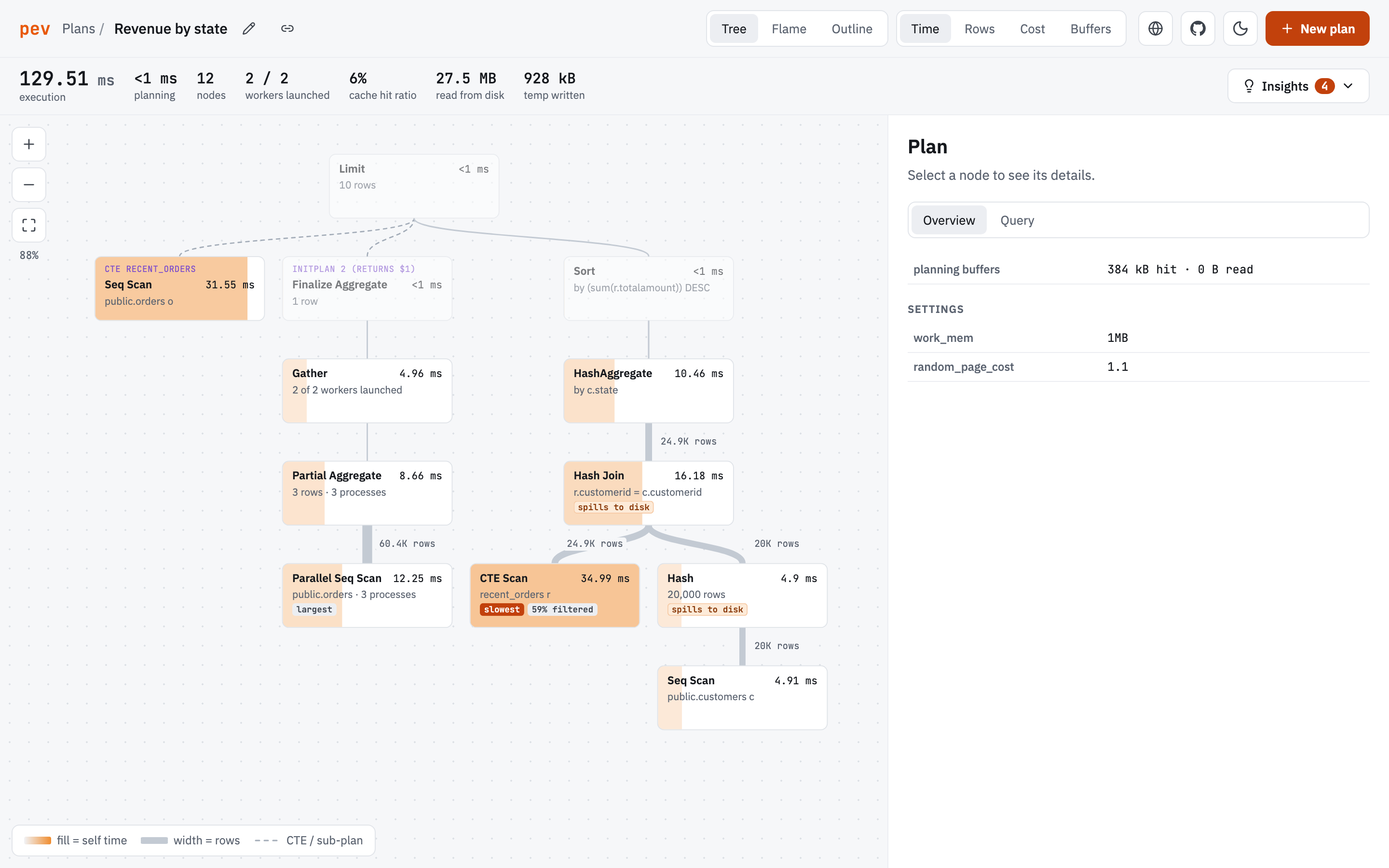
Features
- three views of a plan: a zoomable tree (cards shaded by the chosen metric, links sized by rows), a flame chart of where the time went, and an outline that fits phone screens
- graph time, rows, cost or buffers across the whole plan
- plain-language findings, like filters that throw away most of their rows, hashes and sorts that spill to disk, bad row estimates and cold caches
- a details panel for each node: self vs. total time, estimates, filters, buffers, parallel workers, and the matching part of the SQL query
- accepts plans in JSON or text format, pasted straight from psql, pgAdmin, DBeaver and friends, or from
auto_explainlog entries (which bring the query along) - opens plans from a link, so scripts can send a plan straight to pev, and any plan can be shared as a link
- understands parallel query (Gather / Gather Merge and their workers), CTEs, InitPlans and SubPlans, and attributes their time to the node that ran them
- light and dark themes, and layouts for desktop, tablet and phone
For best results, generate plans with:
EXPLAIN (ANALYZE, COSTS, VERBOSE, BUFFERS, SETTINGS, FORMAT JSON) <your query>;
Plans are stored in your browser's localStorage and never leave your machine.
Opening a plan from a link
https://tatiyants.com/pev/#/import?plan=...&query=...&name=... opens a plan directly. Everything after the # stays in the browser: it is never sent to the server. plan and query take plain URI-encoded text, or use plan_gz and query_gz for gzipped, base64-encoded values, which keeps links to big plans short. For example, from a shell:
psql -XqAt -c "EXPLAIN (ANALYZE, BUFFERS, VERBOSE, FORMAT JSON) SELECT ..." > plan.json
open "https://tatiyants.com/pev/#/import?plan_gz=$(gzip -c plan.json | base64 | tr -d '\n' | tr '+/' '-_' | tr -d '=')"
The link button next to a plan's name copies such a link for any plan you have open.
Development
Pev is a React + TypeScript app built with Vite. It requires Node 20 or later.
npm install
npm run dev
Other scripts:
npm testruns the unit tests (Vitest)npm run typechecktype-checks the projectnpm run buildproduces a static build indist/that can be hosted anywhere (it uses relative paths, so it works under a sub-path like/pev/)
The interesting code lives in src/lib:
parse.tsandtextParser.tsturn JSON or text EXPLAIN output into a common shapeanalyze.tscomputes per-node metrics (exclusive time, buffers, estimates) and tags outliersinsights.tsturns the analysis into plain-language findingslayout.tsandflame.tslay out the tree and flame viewshighlight.tsmaps plan nodes back to the SQL queryshare.tsreads and builds plan links
Explore related projects
codecrafters-io/build-your-own-x
Master programming by recreating your favorite technologies from scratch.
560,541 starspublic-apis/public-apis
A collective list of free APIs
496,818 starsmorluto/rea
Reverse engineer anything with agents, from app behavior down to native binaries.
438,945 starsopenclaw/openclaw
The AI that really does things. Any OS. Any Platform. The lobster way. 🦞
394,094 stars