
Akegarasu/lora-scripts
Akegarasu/lora-scripts has 6,213 GitHub stars and 687 forks. GitHot measured +1 stars in 24 hours. Last checked 2026-11-07 12:34 UTC. Last push 2026-11-02.
SD-Trainer. LoRA & Dreambooth training scripts & GUI use kohya-ss's trainer, for diffusion model.
Measured star growth
- in 24h
- +1
- in 7 days
- Update delayed
- in 15 days
- Update delayed
- in 1 month
- Update delayed
Net star changes over overlapping periods, not daily totals. Missing measurements are left blank. Stars measure attention, not software quality.
README.md
OriginalSD-Trainer
LoRA-scripts (SD-Trainer) is a local training and dataset workspace built on kohya-ss/sd-scripts. The v2 interface brings training configuration, caption generation, manual tag editing, job logs and metrics into one application.
中文 · Human guide · MCP setup · Agent usage · Agent development
Training workspace
Choose a trainer, configure model assets and datasets, and inspect parameter help and validation before starting a job. The form follows each trainer's supported parameters, with common and full parameter views, search, and a configuration checklist.
The current catalog includes SD, SDXL, SD3, FLUX.1, Chroma, Lumina, HunyuanImage 2.1, Anima and MOSS-Image Base / SFT LoRA. Experimental trainers are marked in the interface. Training code is vendored under scripts/dev and tracks sd-scripts v0.12.3; see the MOSS-Image setup guide for its model and dependency requirements.
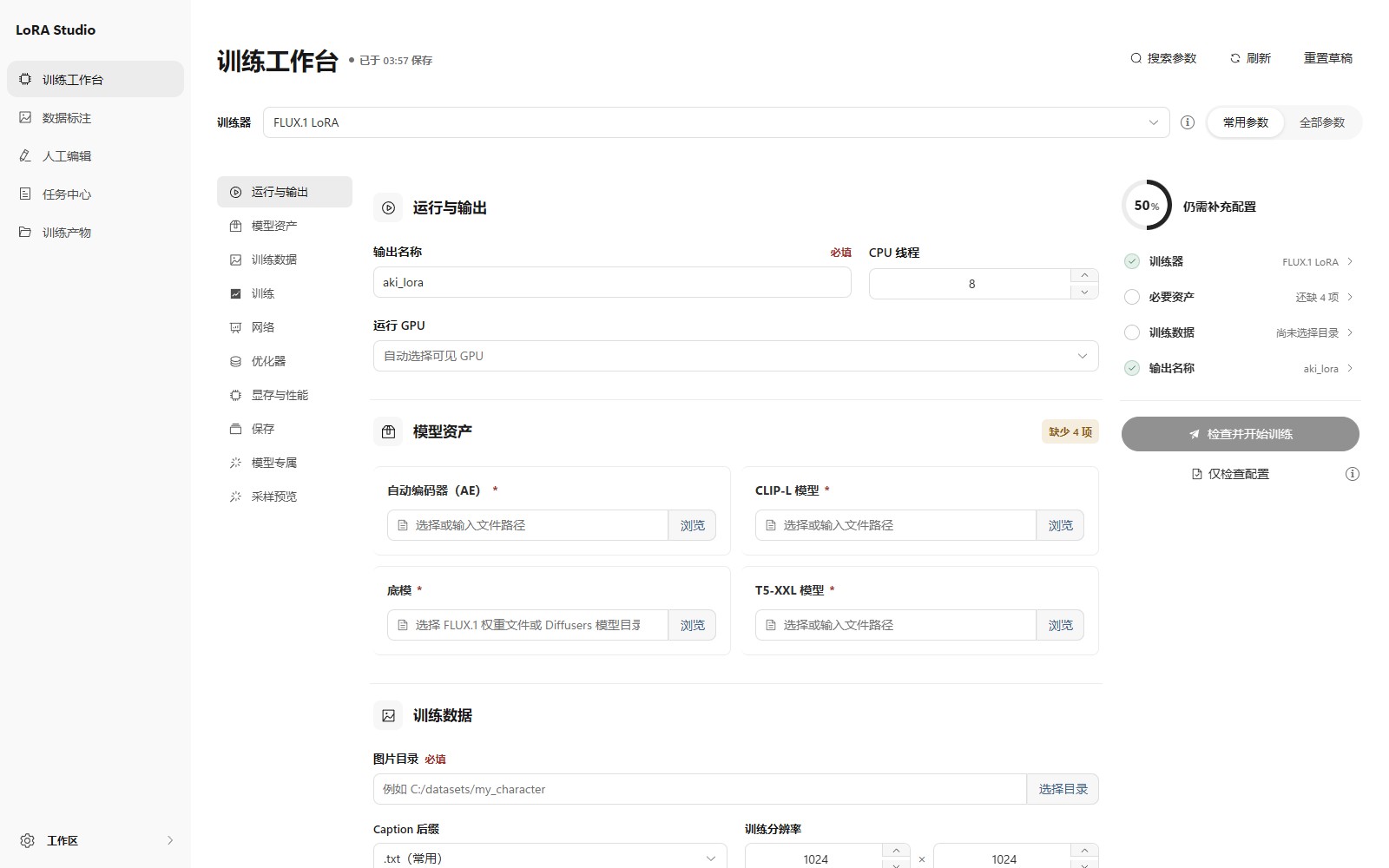
Jobs retain their configuration, status and logs. Loss and learning-rate charts are displayed in job details using TensorBoard-compatible event files; the application does not need a separate TensorBoard server.
Caption and Tag Editor
The Caption workspace scans datasets and generates tags or natural-language descriptions using WD/CL taggers, BLIP/GIT-family models and supported chat VLMs. It skips existing captions by default, supports optional image selection and review before writing, and shares the GPU queue with training. Model availability and dependency requirements are shown before execution.
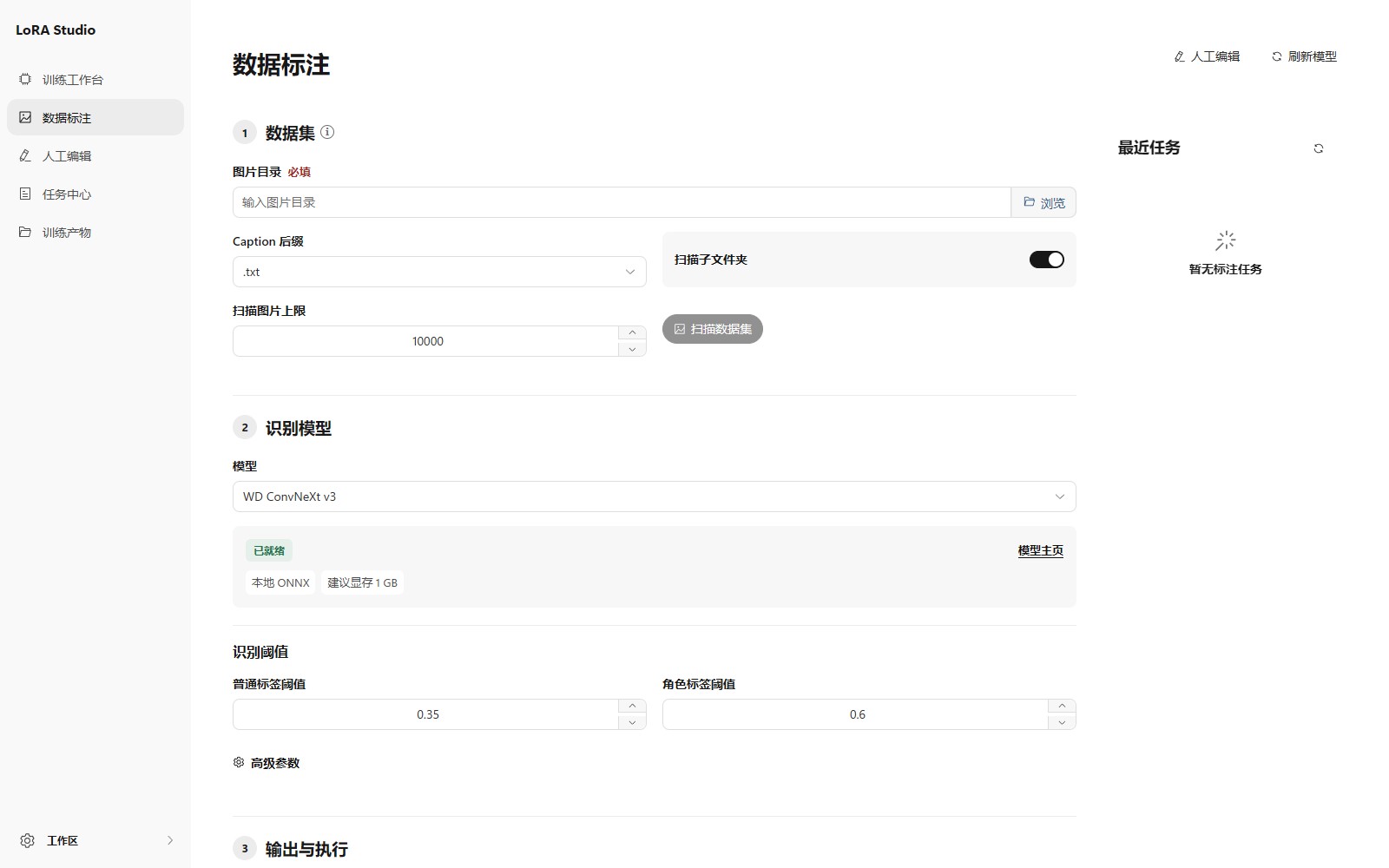
The separate Tag Editor supports individual edits, filtering, tag suggestions, batch add/remove, text or regular-expression replacement, and normalization. Preview changes before applying them; backups and conflict checks support safe rollback when files have not been edited externally.
MCP for agents
Starting the GUI also enables the built-in MCP server by default. Connect a local MCP client using Streamable HTTP at http://127.0.0.1:28000/mcp/, or copy the actual address from GUI settings if the port differs. The settings switch takes effect immediately and is remembered on restart. Agents share the existing training queue and can inspect datasets, submit experiments, monitor logs and metrics, and read output images. See MCP setup for connection details and the optional standalone stdio entrypoint.
Windows NVIDIA portable
Download lora-scripts_windows_portable_nvidia.7z from Releases, extract the complete archive, and double-click run_gui.bat inside it.
The default package includes Python 3.11.9, PyTorch 2.14.1 / CUDA 13.0 and the built frontend. A CUDA 12.8 fallback is available as lora-scripts_windows_portable_nvidia_cu128.7z, with PyTorch 2.11.0. Both include the matching ONNX GPU runtime and need Windows x64 plus a compatible NVIDIA driver; no separate Python, Node.js or CUDA Toolkit installation is required.
The default CUDA 13 package needs an R580 or newer driver. The cu128 package offers a different CUDA/driver combination; both packages require Turing or newer GPUs, so it does not restore Pascal or Volta support. Model weights and datasets are supplied separately. See portable operation and troubleshooting.
Install from source
Python 3.11 x64 is the recommended and tested version for the default CUDA 13.0 installation. Python 3.10 source installations must select the cu128 profile. Git is required for the source checkout. Building the frontend requires Node.js 22 LTS (at least 22.12) or 24+ with Corepack; Node.js is not needed to run a built frontend.
The default installer provides PyTorch 2.14.1, torchvision 0.29.1 and xFormers 0.0.35 for CUDA 13.0. Select -Cuda cu128 on Windows or --cuda cu128 on Linux for PyTorch 2.11.0 / torchvision 0.26.0. To keep another compatible PyTorch build, install it into the project environment first and pass -SkipTorch or --skip-torch; PyTorch must be at least 2.6. Startup selects ONNX Runtime to match the installed CUDA PyTorch build.
git clone https://github.com/Akegarasu/lora-scripts
cd lora-scripts
Build the frontend
The current development version has frontend.autoDownload disabled in version.json. Build the frontend before starting a source checkout, and rebuild it after frontend changes:
cd frontend
corepack pnpm install --frozen-lockfile
corepack pnpm run build
cd ..
Corepack uses the pnpm version pinned in frontend/package.json. The build writes frontend/dist and its version metadata.
Windows
Run from the repository root in PowerShell:
.\scripts\install.ps1
.\scripts\run_gui.ps1
Use .\scripts\install-cn.ps1 instead for the installation mirrors in mainland China.
For the CUDA 12.8 profile, use .\scripts\install.ps1 -Cuda cu128 or .\scripts\install-cn.ps1 -Cuda cu128.
Linux
Run from the repository root:
bash scripts/install.bash
source venv/bin/activate
bash scripts/run_gui.sh
The GUI shell script uses the active Python environment, so activate venv in each new terminal. Open http://127.0.0.1:28000 after startup.
Use bash scripts/install.bash --cuda cu128 to install the CUDA 12.8 profile.
After updating Python dependencies, rerun the installer and restart the GUI. Released versions with frontend auto-download enabled can obtain their matching frontend from GitHub Release, Jihulab or a static mirror. Development checkouts still use the build steps above; see frontend versioning and distribution.
Docker
The Dockerfile builds the frontend and packages this checkout with PyTorch 2.14.1 / CUDA 13.0:
docker build -t lora-scripts:local .
docker run --gpus all -p 28000:28000 lora-scripts:local
To build the CUDA 12.8 variant, set both build arguments:
docker build --build-arg PYTORCH_IMAGE=pytorch/pytorch:2.11.0-cuda12.8-cudnn9-runtime --build-arg CUDA_FLAVOR=cu128 -t lora-scripts:cu128 .
The host needs a compatible NVIDIA driver and NVIDIA Container Toolkit. Mount datasets, model files and outputs into the corresponding directories under /app/lora-scripts to preserve them outside the container.
Training scripts
For script-based training, edit and run scripts/train.ps1 on Windows or scripts/train.sh on Linux from the repository root. Install dependencies first; on Linux, activate venv before running the script. These entrypoints use the same vendored training code as the GUI.
GUI arguments
Pass these to python gui.py in the active environment, or to the portable run_gui.bat.
| Argument | Default | Description |
|---|---|---|
--host |
127.0.0.1 |
Server bind address |
--port |
28000 |
Server port |
--listen |
off | Listen on all network interfaces |
--skip-prepare-environment |
off | Skip dependency checks and preparation |
--skip-prepare-onnxruntime |
off | Skip ONNX Runtime preparation |
--disable-auto-mirror |
off | Disable automatic package mirror selection |
--dev |
off | Enable backend auto-reload and skip frontend auto-download |
--frontend-source |
configuration, then github |
github, jihulab/cn, static, auto, or off |
--frontend-static-base-url |
unset | Base URL of a static frontend mirror |
--skip-frontend-download |
off | Skip frontend auto-download |
--force-frontend-download |
off | Reinstall the matching frontend artifact |
License
GNU AGPL v3. Vendored components and downloaded models retain their respective licenses.
Explore related projects
codecrafters-io/build-your-own-x
Master programming by recreating your favorite technologies from scratch.
560,800 starspublic-apis/public-apis
A collective list of free APIs
497,028 starsmorluto/rea
Reverse engineer anything with agents, from app behavior down to native binaries.
441,107 starsopenclaw/openclaw
The AI that really does things. Any OS. Any Platform. The lobster way. 🦞
394,147 stars