
AirtestProject/Airtest
AirtestProject/Airtest has 9,642 GitHub stars and 1,457 forks. GitHot measured +2 stars in 24 hours. Last checked 2026-11-07 07:18 UTC. Last push 2026-03-23.
UI Automation Framework for Games and Apps
What you can do
- Write Once, Run Anywhere: Airtest provides cross-platform APIs, including app installation, simulated input, assertion and so forth. Airtest uses image recognition technology to locate UI elements so that you can automate games and apps without injecting any code.
- Fully Scalable: Airtest cases can be easily run on large device farms, using commandline or python API. HTML reports with detailed info and screen recording allow you to quickly locate failure points. NetEase builds Airlab on top of the Airtest Project.
- AirtestIDE: AirtestIDE is an out of the box GUI tool that helps to create and run cases in a user-friendly way. AirtestIDE supports a complete automation workflow: create -> run -> report.
- Poco: Poco adds the ability to directly access object(UI widget) hierarchy across the major platforms and game engines. It allows writing instructions in Python, to achieve more advanced automation.
Measured star growth
- in 24h
- +2
- in 7 days
- Collecting history
- in 15 days
- Collecting history
- in 1 month
- Collecting history
Net star changes over overlapping periods, not daily totals. Missing measurements are left blank. Stars measure attention, not software quality.
README.md
OriginalAirtest · 
Cross-Platform UI Automation Framework for Games and Apps
跨平台的UI自动化框架,适用于游戏和App (中文版点这里)
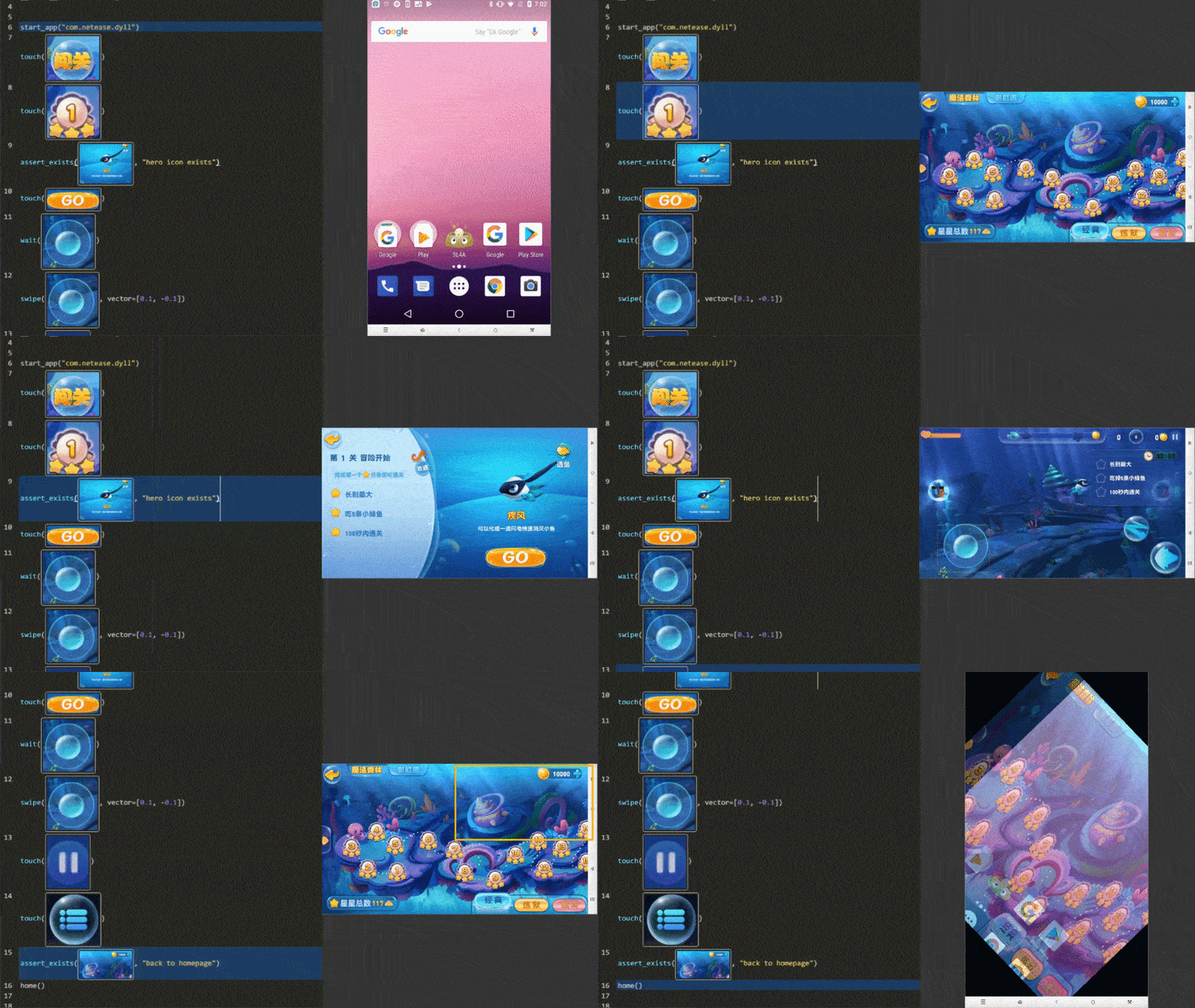
Features
Write Once, Run Anywhere: Airtest provides cross-platform APIs, including app installation, simulated input, assertion and so forth. Airtest uses image recognition technology to locate UI elements so that you can automate games and apps without injecting any code.
Fully Scalable: Airtest cases can be easily run on large device farms, using commandline or python API. HTML reports with detailed info and screen recording allow you to quickly locate failure points. NetEase builds Airlab on top of the Airtest Project.
AirtestIDE: AirtestIDE is an out of the box GUI tool that helps to create and run cases in a user-friendly way. AirtestIDE supports a complete automation workflow:
create -> run -> report.Poco: Poco adds the ability to directly access object(UI widget) hierarchy across the major platforms and game engines. It allows writing instructions in Python, to achieve more advanced automation.
Get started from airtest homepage
Supported Platforms
Installation
Use pip to install the Airtest python library.
pip install -U airtest
On MacOS/Linux platform, you need to grant adb execute permission.
# for mac
cd {your_python_path}/site-packages/airtest/core/android/static/adb/mac
# for linux
# cd {your_python_path}/site-packages/airtest/core/android/static/adb/linux
chmod +x adb
Download AirtestIDE from our homepage if you need to use the GUI tool.
Documentation
You can find the complete Airtest documentation on readthedocs.
Examples
Airtest aims at providing platform-independent API so that you can write automated cases once and run it on multiple devices and platforms.
- Using connect_device API you can connect to any android/iOS device or windows application.
- Then perform simulated input to automate your game or app.
- DO NOT forget to make assertions of the expected result.
from airtest.core.api import *

# connect an android phone with adb
init_device("Android")
# or use connect_device api
# connect_device("Android:///")

install("path/to/your/apk")
start_app("package_name_of_your_apk")
touch(Template("image_of_a_button.png"))
swipe(Template("slide_start.png"), Template("slide_end.png"))
assert_exists(Template("success.png"))
keyevent("BACK")
home()
uninstall("package_name_of_your_apk")
For more detailed info, please refer to Airtest Python API reference or take a look at API code
Running .air cases from CLI
Using AirtestIDE, you can easily create automated cases as .air directories.
Airtest CLI provides the possibility to execute cases on different host machines and target device platforms without using AirtestIDE itself.
# run cases targeting on Android phone connected to your host machine via ADB
airtest run "path to your .air dir" --device Android:///

# run cases targeting on Windows application whose title matches Unity.*
airtest run "path to your .air dir" --device "Windows:///?title_re=Unity.*"

# generate HTML report after running cases
airtest report "path to your .air dir"

# or use as a python module
python -m airtest run "path to your .air dir" --device Android:///
Try running provided example case: airtest/playground/test_blackjack.air and see Usage of CLI. Here is a multi-device runner sample.
Contribution
Pull requests are very welcome.
Thanks
Thanks for all these great works that make this project better.
Explore related projects
n8n-io/n8n
Fair-code workflow automation platform with native AI capabilities. Combine visual building with custom code, self-host or cloud, 400+ integrations.
209,737 starslanggenius/dify
Build Agentic workflows, RAG pipelines, with rich AI model and tool support on one collaborative workspace. Deploy on cloud, VPC, or self-hosted, so teams move from prototype to production without rebuilding the stack.
160,568 starsmicrosoft/PowerToys
Microsoft PowerToys is a collection of utilities that supercharge productivity and customization on Windows
140,669 starsstablyai/orca
Orca is the place for working with a fleet of agents (e.g. Grok Bot, Claude Code). Run any coding agent with your own subscription. Available on desktop, mobile and remote runtime.
118,078 stars