AgaMiko/pixel_character_generator
AgaMiko/pixel_character_generator has 140 GitHub stars and 13 forks. GitHot measured 0 stars in 24 hours. Last checked 2026-11-10 03:08 UTC. Last push 2026-11-03.
Generating 64×64 retro pixel game characters with DCGAN, conditional DCGAN and autoencoders. Includes the TinyHero dataset. (2020 project)
Measured star growth
- in 24h
- 0
- in 7 days
- Collecting history
- in 15 days
- Collecting history
- in 1 month
- Collecting history
Net star changes over overlapping periods, not daily totals. Missing measurements are left blank. Stars measure attention, not software quality.
README.md
OriginalPixel Character Generator
Generating 64×64 retro pixel game characters with generative adversarial networks (GANs) and autoencoders. The repository includes TinyHero, a dataset of 3648 pixel characters seen from four angles, and Jupyter notebooks that build the dataset and train four models: a DCGAN, a conditional DCGAN that generates a character from a chosen angle, a convolutional autoencoder, and a GAN combined with an autoencoder.
Note: this is a project from 2020. In 2026 it got small updates only: new figures, a clearer README, a
requirements.txt, and fixes for a few bugs in the notebooks. The dataset and the models are unchanged.


Table of Contents
Dataset TinyHero

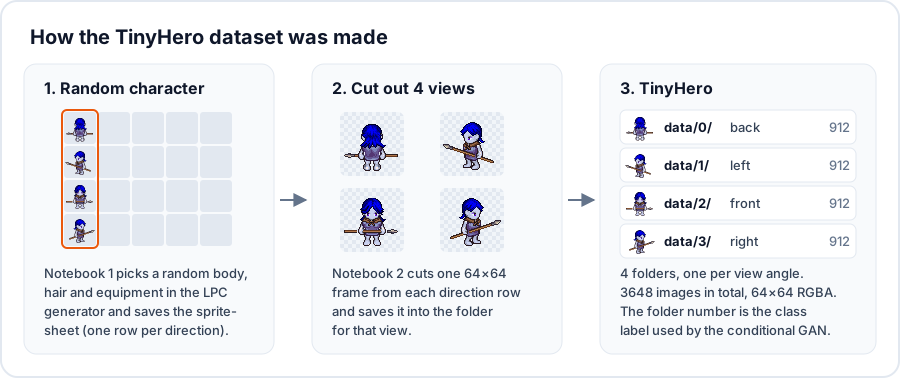
TinyHero contains 64×64 retro pixel characters. All characters were made with the Universal LPC spritesheet by makrohn. Each character has a random sex, body type, skin colour and equipment, and is shown from 4 angles.
| Image size | Dataset size | Source | Download |
|---|---|---|---|
| 64×64 | 3648 images (912 per class) | LPC Spritesheet | data.zip |
The images are in data.zip, in one folder per view angle:
| Folder | View |
|---|---|
data/0/ |
back |
data/1/ |
left |
data/2/ |
front |
data/3/ |
right |
The same character has the same file name in all four folders. For example, data/0/58.png and data/2/58.png show one character from the back and from the front.
The dataset was built with two notebooks:
1_download_random_spritesheet.ipynbopens the online LPC character generator in Chrome with Selenium, picks a random sex, body, hair and 7 to 20 pieces of equipment, and saves the spritesheet.2_extract_character.ipynbcuts one 64×64 frame from each of the four direction rows of every spritesheet and saves it into the folder for that view.


Models
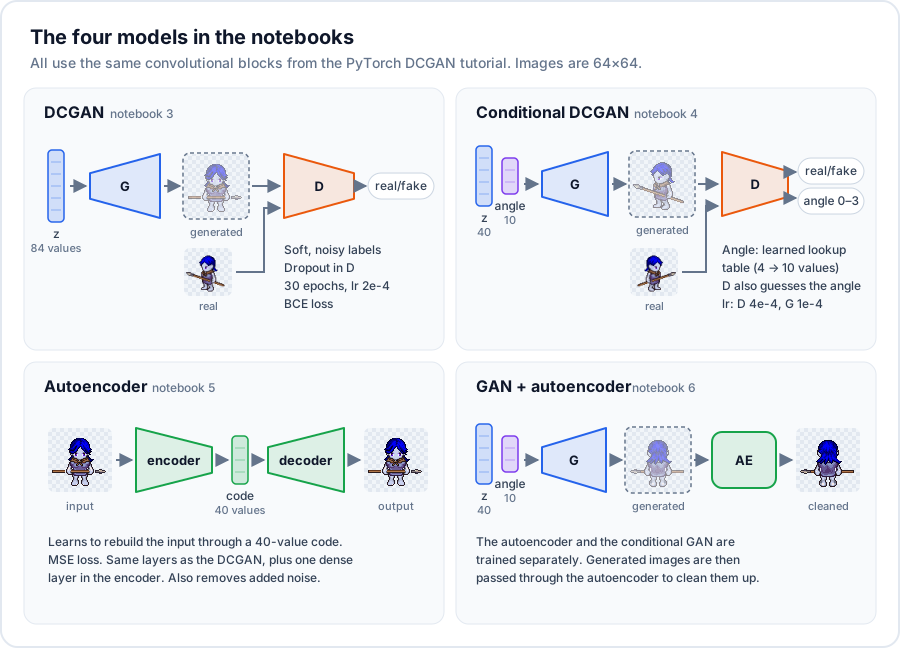
All models use the convolutional generator and discriminator from the PyTorch DCGAN tutorial, with changes listed below. All of them train on 64×64 images normalised to the range -1 to 1.
DCGAN
Notebook 3: DCGAN · Open in Colab
Changes compared to the tutorial:
- Tested different latent sizes (generator input) and feature map sizes. The final notebook uses a latent size of 84 and 48 feature maps.
- Soft and noisy labels: real images get a random label between 0.95 and 1.05, fake images between 0 and 0.1. This makes the discriminator less sure of itself and keeps training more stable.
- Dropout (0.2) in the discriminator.
- Binary cross-entropy loss. A Wasserstein loss function is defined in the notebook as an option for mode collapse (about Wasserstein loss), but the training loop does not use it.
Training: 30 epochs, batch size 64, Adam with learning rate 2e-4.
Example results

Conditional DCGAN
Notebook 4: Conditional DCGAN · Open in Colab
A conditional DCGAN that generates a character seen from a chosen angle (back, left, front or right).
- The generator gets the angle from a trainable lookup table (embedding), which turns the angle number into 10 values. These are joined with the 40-value random input.
- The discriminator has two outputs: real or fake, and which of the 4 angles the image shows. The angle loss is computed on real images and added to the discriminator loss with weight 0.5.
- Different learning rates: 4e-4 for the discriminator and 1e-4 for the generator.
- Soft labels: real images get a random label between 0.8 and 1.1.
- Colour jitter on the training images (brightness, contrast, saturation and hue).
Training: 200 epochs, batch size 100.

DC Autoencoder
Notebook 5: DC Autoencoder · Open in Colab
A deep convolutional autoencoder with the same layers as the DCGAN above. The only difference is an extra fully connected layer at the end of the encoder, which turns the convolutional output into a code of the chosen size.
- A code of 40 values is enough for a good-quality reconstruction.
- The autoencoder removes noise well: it rebuilds clean characters from images with strong added noise.
- It is easier and more stable to train than a GAN.
Training: mean squared error loss, Adam with learning rate 1e-4, multiplied by 0.995 after each epoch.

GAN + autoencoder
Notebook 6: GAN + autoencoder · Open in Colab
This notebook trains the autoencoder and the conditional GAN separately. The GAN generates new characters, and the autoencoder then rebuilds them, which removes some of the GAN's noise and artifacts.
Running the notebooks
The model notebooks (3 to 6) were written for Google Colab with a GPU:
- Open a notebook with its Open in Colab link.
- Run the upload cell and select
data.zipfrom this repository. The next line unzips it intodata/. - Run the remaining cells.
To run them locally instead:
pip install -r requirements.txt
cd notebooks
unzip ../data.zip
jupyter notebook
Then skip the google.colab upload cell in each notebook.
Notebook 1 also needs Google Chrome and a matching chromedriver. Set CHROME_DIR and DOWNLOAD_DIR at the top of the notebook. You only need notebooks 1 and 2 to build a new dataset. TinyHero is already in data.zip.
Repository structure
├── data.zip                                  # TinyHero dataset
├── notebooks/
│   ├── 1_download_random_spritesheet.ipynb   # downloads random LPC spritesheets
│   ├── 2_extract_character.ipynb             # cuts the 4 views from each spritesheet
│   ├── 3_DCGAN.ipynb
│   ├── 4_Conditional_DCGAN.ipynb
│   ├── 5_DC_Autoencoder.ipynb
│   └── 6_DCGAN_and_Autoencoder.ipynb
├── images/                                   # README images
├── requirements.txt
├── cc-by-sa-3.0.txt
└── gpl-3.0.txt
License
Under the rules of the LPC, all art submissions are dual licensed under GNU GPL 3.0 and CC-BY-SA 3.0. The work in this repository is licensed under the same terms.
- CC-BY-SA 3.0: http://creativecommons.org/licenses/by-sa/3.0/ (see cc-by-sa-3.0.txt)
- GNU GPL 3.0: http://www.gnu.org/licenses/gpl-3.0.html (see gpl-3.0.txt)
Explore related projects
tensorflow/tensorflow
An Open Source Machine Learning Framework for Everyone
201,427 starshuggingface/transformers
🤗 Transformers: the model-definition framework for state-of-the-art machine learning models in text, vision, audio, and multimodal models, for both inference and training.
168,711 starsAUTOMATIC1111/stable-diffusion-webui
Stable Diffusion web UI
165,274 starsComfy-Org/ComfyUI
The most powerful and modular diffusion model GUI, api and backend with a graph/nodes interface. The fastest local inference engine in the world.
146,024 stars