
Adamovix/ComfyUI-Character-Helper
About
Custom node for ComfyUI that helps with creating coherent prompt for character including distinctive features, pose, scenery and much more, using danbooru-style tags.
Creative & MediaMeasured star growth
- in 24h
- 0
- in 7 days
- +1
- in 15 days
- Collecting history
- in 1 month
- Collecting history
Net star changes over overlapping periods, not daily totals. Missing measurements are left blank. Stars measure attention, not software quality.
README.md
OriginalComfyUI-Character-Helper
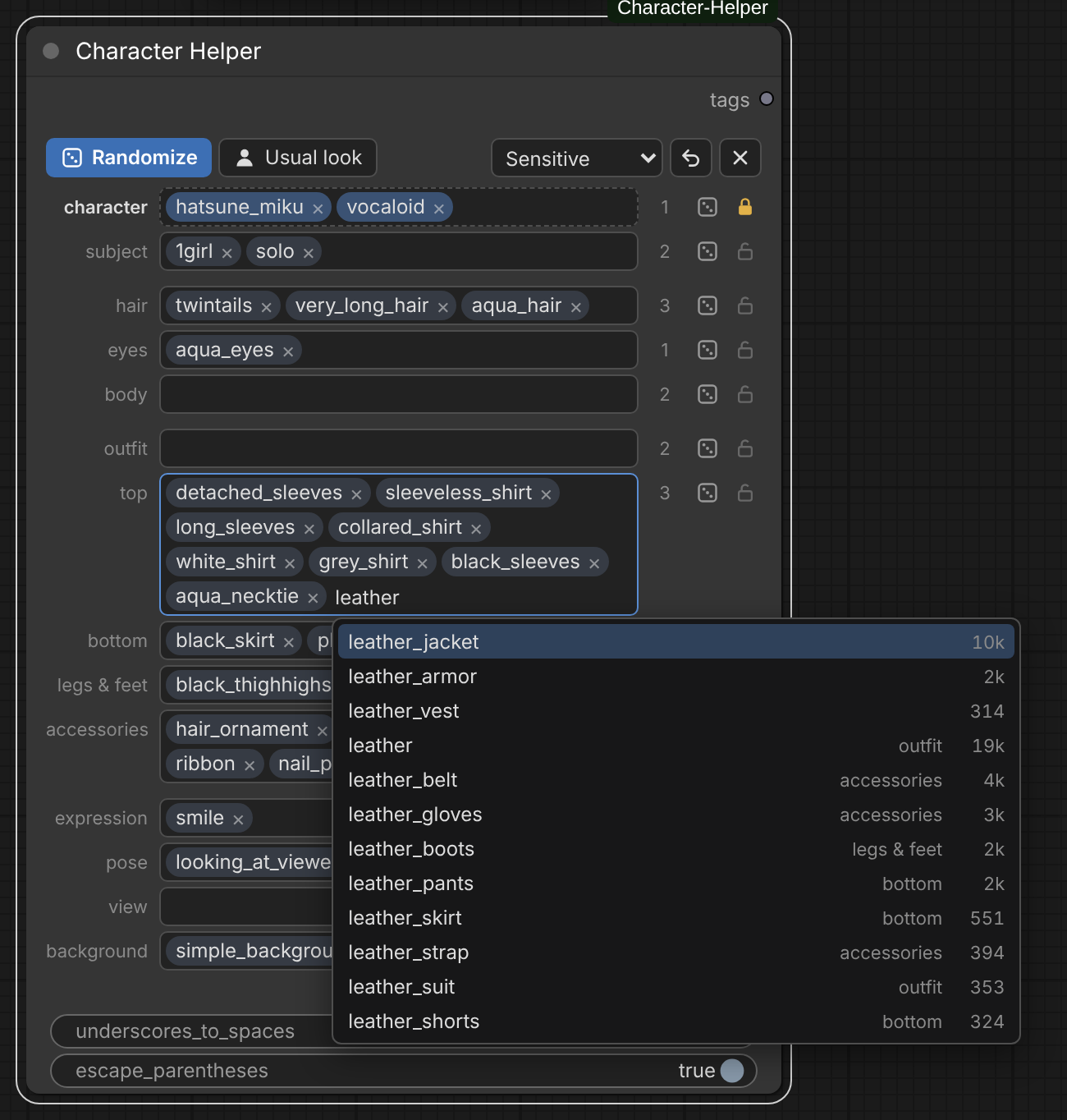
A ComfyUI node that builds a coherent Danbooru-style tag prompt for a character. Pick a character and the node can fill in their usual look – hair, eyes, outfit, accessories – as editable tags. Swap what you want, or roll the dice.
What it does
- Character autocomplete – type
hatsuneand pickhatsune_miku(39,000 characters). Like every other field, this changes only the character. - Usual look – fills the other fields with the tags most often seen on that character.
- Edit as chips – click
×to remove a tag, click a tag to edit it, type to add one. Every field has its own autocomplete (17,000 tags), sorted by popularity. - Suggestions – click into an empty field to see what goes well with the rest of the prompt (for a character: their other common tags, with percentages).
- Dice per field – rolls tags for that one field that fit everything else. The number next to it is how many tags you get. The character dice rolls a character and leaves the rest alone, so you can try several on the same look.
- Randomize – rolls every unlocked field at once. The look is taken from one real picture, so outfit, pose and scene belong together.
- Locks – a locked field is left alone by Randomize, Usual look and Clear. Picking a character locks the character field for you.
- Undo – every change can be taken back.
The output is one comma separated string:
1girl, solo, hatsune miku, vocaloid, twintails, very long hair, aqua hair, aqua eyes, detached sleeves, ...
Install
Search for Character Helper in ComfyUI Manager, or clone into ComfyUI/custom_nodes
and restart ComfyUI:
git clone https://github.com/Adamovix/ComfyUI-Character-Helper
No extra dependencies (only numpy, which ComfyUI already has). The tag database
(13 MB) ships with the repository – nothing is downloaded at runtime.
Add the node with Add Node → utils → prompt → Character Helper and connect tags
to any text input.
Fields
| Field | Holds | Example |
|---|---|---|
| character | character and series | hatsune_miku, vocaloid |
| subject | who is in the picture | 1girl, solo |
| hair | colour, length, style | aqua_hair, very_long_hair, twintails |
| eyes | colour, pupils, eyebrows | aqua_eyes |
| body | ears, horns, tail, wings, build, marks | goat_horns, pointy_ears |
| outfit | whole-body clothing | school_uniform, white_dress |
| top | shirts, jackets, sleeves, neckwear | grey_shirt, detached_sleeves, aqua_necktie |
| bottom | skirts, trousers | black_skirt, pleated_skirt |
| legs & feet | legwear and footwear | black_thighhighs, thigh_boots |
| accessories | headwear, jewellery, gloves, held items | hair_ornament, headphones |
| expression | face | smile |
| pose | posture, gestures, gaze | standing, looking_at_viewer |
| view | framing and camera angle | cowboy_shot |
| background | setting, lighting, props | simple_background, white_background |
Options
- General / Sensitive / Questionable / Explicit – the highest Danbooru rating the dice and suggestions draw from. Milder ratings are always included, so Questionable also uses General and Sensitive pictures. Default: Sensitive.
- underscores_to_spaces –
aqua_hair→aqua hair(what Illustrious, NoobAI and Anima expect). Emoticons such as^_^are left alone. - escape_parentheses –
ganyu_(genshin_impact)→ganyu \(genshin impact\), so ComfyUI doesn't read the brackets as prompt weighting.
How the suggestions are made
- Character looks come from 11.7 million Danbooru posts. For each character only
solo pictures rated General or Sensitive, without
alternate_costumeand similar tags, are counted, so the result is their usual look. A tag makes it into the preset when it appears on enough of those pictures; of hair colours, eye colours and hair lengths only the most common one is kept, andwhite_shirtreplaces the plainshirt. - Dice draw from a pool of 160,000 well-tagged solo pictures. The node looks for pictures that share the most (and the most telling) tags with your other fields and takes the field's tags from one of them. Only tags with at least 1,000 posts are used, since image models rarely know rarer ones.
- With a character set, Randomize keeps their subject, hair, eyes and body and rolls the rest. Clear the character field (or set its number to 0) for a fully random original character.
Data sources
| Dataset | Used for | Licence |
|---|---|---|
| nyanko-devs/danbooru2026 | post metadata: tag counts, character statistics, picture pool | MIT |
| Mexes/danbooru-tag-taxonomy | sorting tags into fields, aliases | CC BY 4.0 |
| itterative/danbooru_wikis_full | Danbooru wiki tag groups, tag implications | MIT |
| Jio7/danbooru-tags-classified | second opinion for unsorted tags | MIT |
Tags, aliases and counts originate from Danbooru and its community.
Rebuilding the database
Only needed if you want fresher data or different rules
(tools/field_rules.py decides which tag goes into which field):
pip install pyarrow numpy
python tools/build_db.py --work /path/to/scratch
This downloads about 4 GB, needs roughly 8 GB of RAM and takes about ten minutes.
Tests
python -m pytest tests
Explore related projects
Loading…