
AbadOrangeCat/TheALL
AbadOrangeCat/TheALL has 37 GitHub stars and 0 forks. GitHot measured -5 stars in 24 hours and -46 in 7 days. Last checked 2026-11-09 16:38 UTC. Last push 2026-11-02.
TheAll — a native macOS AI workspace for Claude Code and OpenAI Codex, with saved conversations, model switching, and an iOS/Android web companion.
Measured star growth
- in 24h
- -5
- in 7 days
- -46
- in 15 days
- Update delayed
- in 1 month
- Update delayed
Net star changes over overlapping periods, not daily totals. Missing measurements are left blank. Stars measure attention, not software quality.
README.md
Original

TheAll
Claude Code and Codex. One workspace for Mac and Windows.
Keep your projects, AI conversations, and models together. Continue from your phone.




Download for macOS & Windows · Windows guide · Website · Mobile setup · 简体中文
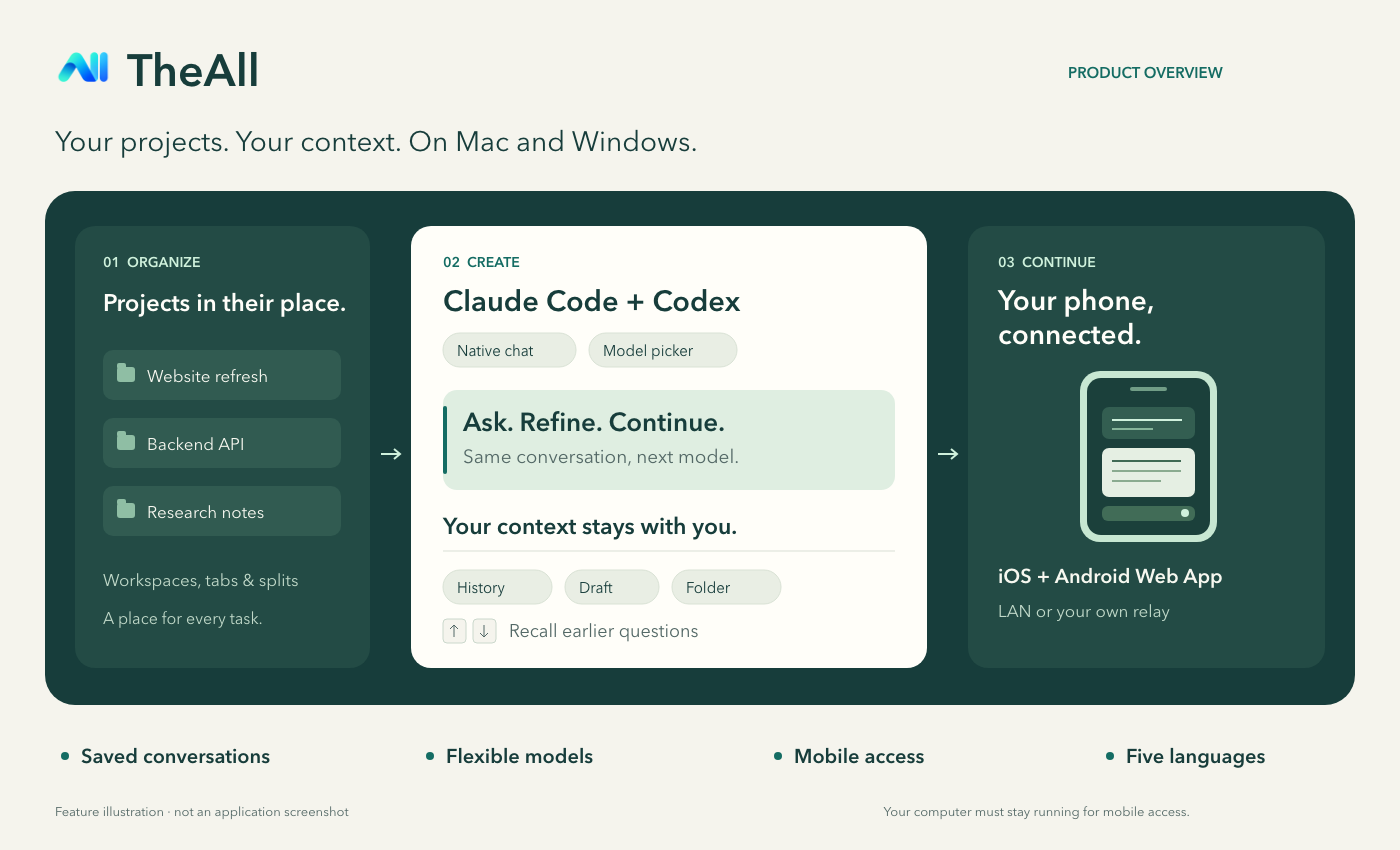
Feature illustration; not an application screenshot.
An AI coding workspace that keeps your context
TheAll is a desktop app for Claude Code and OpenAI Codex on macOS and Windows. It brings a graphical chat interface to these coding agents, with workspaces, tabs, split panes, saved conversations, model and reasoning-effort pickers, attachments, and phone access. Bring your own API connection, choose a project folder, and start working.
| Work the way you think | What TheAll does |
|---|---|
| Keep projects organized | Workspaces, tabs, and splits; a workspace gets a name from your first question. |
| Change models, keep the conversation | Choose a model and reasoning effort beside the composer without losing chat history or an unsent draft. Official endpoints and compatible custom Base URLs are supported. |
| Pick up where you left off | Reopen saved conversations, working folders, model choices, and desktop drafts. Use ↑ / ↓ to recall previous questions. |
| Share files and photos | Use one attachment button, drag files into chat, or paste. Attach up to 5 files and 4 photos, with saved drafts and history. Photos require an image-capable model. |
| Steer work as it happens | Add instructions and attachments during a running task without losing its context; keep a separate Stop control. |
| Read the answer clearly | Distinct question cards, conversation dividers, collapsible thinking and progress, and a jump-to-latest button. Each finished turn shows when it completed and how long it took. |
| Continue from your phone | An iOS/Android Web App can read history, reply, start conversations, and stop tasks running on your Mac or Windows PC. Opt into task-completion alerts; compatible watches mirror them. |
| Stay up to date | Update checks run automatically; download and install from the button above Connect Phone. Installation waits for running tasks and saves drafts. |
| Make it yours | Choose from about 500 bundled Ghostty color themes and adjust opacity, blur and fonts. |
| Use your language | English, 简体中文, Français, 日本語, and 한국어 on desktop and mobile. |
API connections are saved through macOS Keychain on Mac and Windows system encryption on Windows. Chat history stays on your computer; conversations are sent to the AI endpoint you configure. The Mac app uses SwiftUI, AppKit, and Ghostty's terminal engine; the Windows preview in desktop/ uses Electron with the same workspace, tab, split-pane and chat layout.
Get started
| macOS | Windows (preview) | |
|---|---|---|
| System | macOS 14 or later | Windows 10 version 1809 or later, or Windows 11 (recommended) |
| Processor | Apple Silicon (arm64) | x64; ARM64 is also available |
| v0.1.10 downloads | DMG · ZIP | x64: installer · portable EXE · ZIP ARM64: installer · portable EXE · ZIP |
Both platforms need an API connection and the Claude Code CLI or Codex CLI for your chosen provider, installed separately on the same computer. Claude Code and Codex run locally on Windows; no Mac or WSL is needed. See the Windows guide for CLI setup.
- Install TheAll. Mac: move TheAll.app to Applications. Windows: run the installer or portable EXE, or extract the full ZIP and run
TheAll.exe. - Open TheAll, create a workspace, and select a working folder and Claude / OpenAI.
- Enter your API key and, if needed, a custom Base URL. Later conversations can reuse the saved connection.
- Choose a model, optionally a reasoning effort, and send your first question. The folder control and the model and effort pickers stay beside the composer.
About this release:
- macOS: v0.1.10 is signed with a local development certificate and is not notarized by Apple. macOS may block the first launch. After verifying the download and choosing to trust it, follow Apple’s guidance and use System Settings → Privacy & Security → Open Anyway if macOS offers it. Keep system security protections enabled. The Mac build is arm64 only.
- Windows: the preview packages are unsigned. Windows may show a SmartScreen notice, and organization policy may prevent them from running. ARM64 is cross-built and not device-tested. Windows CI covers the x64 runtime and credential/history restoration; installed-package upgrades, real provider CLIs and physical phone/watch delivery still need device acceptance.
- SHA-256 checksums cover both platforms.
- Automatic update checks and a download/install button above Connect Phone are included. Mac v0.1.7 and Windows v0.1.8 or later update in the app; older releases need one manual installation. Active tasks and drafts are saved before installation.
Execution behavior: coding-agent tools run automatically, including file changes, deletion, dependency installation, and Git pushes. Use a project and API connection you intend the agent to operate. Questions that require your answer still pause for input.
New in v0.1.10
Readable answers across Mac, Windows and mobile:
- Tables: clear headers, aligned columns, row separators and horizontal scrolling within narrow chats. Blank lines between table rows are handled without changing stored messages.
- Code: language labels, preserved indentation and line breaks, and one-click copying.
- Images: proportional previews that open on click. External Markdown images remain explicit links; your current theme and colors stay the same.
Previously in v0.1.9
The Windows app now looks and works like the Mac app:
- Integrated window: the sidebar and content reach the top edge, with Windows' native minimize, maximize and close buttons over the tab row.
- Mac icons and layout: line icons replace text symbols. The sidebar, tabs, provider chooser, connection form, chat header and composer follow the Mac sizes, spacing and wording.
- Tabs and panes like the Mac: tabs have no close button; middle-click or use the tab's right-click menu. Panes have no toolbar; split and close them from the tab menu or with Ctrl+D, Ctrl+Shift+D and Ctrl+W.
- System font for chat: new Windows installations use Segoe UI, as the Mac chat uses its system font. Existing installations keep their saved font; choose Segoe UI in Settings → Font to match.
That release changed only the Windows interface; this release also improves the native Mac chat renderer.
Added in v0.1.7 and v0.1.8:
- Files and photos together: one attachment button with mixed selection, drag/drop and paste on desktop and mobile. Ordinary files are copied privately and retained with drafts/history; send up to 5 files, 10 MiB each and 20 MiB total.
- Steer running tasks: send additional instructions with text, files or photos while Claude Code/Codex works. The current task keeps its model, elapsed time and conversation context. Stop also cancels queued Claude instructions.
- Updates in the app: automatic checks on Mac and Windows, with a visible download/install action above Connect Phone. Installation waits for work to finish and drafts to save. Mac updates use a signed Sparkle feed; Windows downloads are checked against the published asset digest.
- Windows startup repair: the certificate-library dependencies missing from 0.1.7 are included, and every package is launched from an isolated directory before release.
Files and photos
Use the attachment button, drag files or images into the desktop chat, or paste with ⌘V (Ctrl+V on Windows). Attach up to 5 ordinary files (10 MiB each, 20 MiB combined) and 4 photos. Send attachments with text or on their own. Desktop photo imports accept up to 20 MiB per source and create smaller copies with orientation corrected and original metadata removed. Originals remain unchanged, and failed sends preserve the draft.
Chats containing ordinary files require v0.1.7 or later. Update a self-hosted relay alongside the desktop app to support the larger uploads. See attachment details and steering during a task.
Your computer, reachable from your phone
Use TheAll Mobile in a browser on iPhone, iPad, and Android. HTTPS connections also support home-screen Web App installation. Your Mac or Windows PC runs the agents; the phone controls the same conversations.
| Connection | Setup |
|---|---|
| Same Wi-Fi / LAN | Click Connect phone in the desktop sidebar, then scan and open the QR link. Quick connect needs no certificate, server, or domain. Use trusted Wi-Fi; optional HTTPS is in Advanced settings. |
| Away from home | Deploy the included relay on your own server and domain. The desktop app connects out over WSS; the phone uses HTTPS. No extra VPN app or router port forwarding required. |
Over HTTPS, turn on task-completion alerts: iPhone needs the Home Screen Web App, Android a Push-capable browser, and compatible watches mirror the phone's notifications. Quick HTTP pairing cannot deliver background alerts.
Pair a phone with access to all workspaces or just one, and choose read-only or control access. Revoke devices from the desktop app. API keys are not sent to the phone. The computer must stay running and awake; a self-hosted relay can read the traffic it forwards, so deploy it on infrastructure you trust. No hosted relay service is included.
Mobile connection guide · Relay deployment
A few useful keys
| Action | Mac | Windows |
|---|---|---|
| Send a message, or steer the running task | ⌘ Return | Ctrl Enter |
| Insert a new line | Return | Enter |
| Recall an older / newer question | ↑ on the first line · ↓ on the last line | same |
| New workspace · New tab | ⌘N · ⌘T | Ctrl N · Ctrl T |
| Split left/right · top/bottom | ⌘D · ⇧⌘D | Ctrl D · Ctrl Shift D |
| Close pane | ⌘W | Ctrl W |
| Focus next / previous pane | ⌥⌘→ / ⌥⌘← | Ctrl Alt → / Ctrl Alt ← |
| Next / previous tab | ⇧⌘] / ⇧⌘[ | Ctrl Shift ] / Ctrl Shift [ |
| Workspace 1–9 · Tab 1–9 | ⌘1–9 · ⌥⌘1–9 | Ctrl 1–9 · Ctrl Alt 1–9 |
| Settings | ⌘, | Ctrl , |
Recalled questions are editable copies; original messages stay intact, and multiline editing and input-method selection remain native. Middle-click a tab or use its right-click menu to close it; on Windows the tab menu also splits and closes panes.
Build and explore
macOS: building locally also requires Xcode, XcodeGen, and Ghostty build dependencies. See the build guide for toolchain and signing details.
# Only when the Ghostty build artifacts are missing
./scripts/build-vendor.sh
xcodegen generate
# Only when Local.xcconfig does not exist; keep this identity across rebuilds
bash scripts/setup-local-signing.sh
xcodebuild -project TheAll.xcodeproj -scheme TheAll -configuration Debug build
Debug builds display TheAll dev. Keep existing local signing configuration and credentials when rebuilding; follow the migration guidance before changing application identifiers.
Windows: use Node.js 24. See Build from source for tests and packaging.
npm ci --prefix desktop
npm start --prefix desktop
AI chat behavior · Architecture · Testing · Report an issue
License
The source is publicly available for inspection. Use and distribution of both source code and binary downloads are governed by LICENSE and any separately granted permissions; public availability does not grant a general license. See LICENSE; separately granted written permissions and third-party component licenses remain applicable. Third-party components retain their respective licenses; see the component notices and corresponding source. Check permissions before reusing code or proposing contributions.
Explore related projects
codecrafters-io/build-your-own-x
Master programming by recreating your favorite technologies from scratch.
561,398 starspublic-apis/public-apis
A collective list of free APIs
497,679 starsmorluto/rea
Reverse engineer anything with agents, from app behavior down to native binaries.
447,495 starsopenclaw/openclaw
The AI that really does things. Any OS. Any Platform. The lobster way. 🦞
394,261 stars