
ASLP-lab/SongFormer
About
1Audio, Speech and Language Processing Group (ASLP@NPU),School of Computer Science, Northwestern Polytechnical University 2Hong Kong University of Science and Technology 3Northwestern University 4Cornell University 5University of New South Wales 6Multimodal Art Projection (M-A-P)
Developer ToolsWhat you can do
- ✨ State-of-the-art accuracy on both Western and Chinese music datasets
- ⚡ Blazing fast inference - faster than comparable models
- 💰 Cost-effective - No API fees, runs locally on single GPU
Measured star growth
- in 24h
- 0
- in 7 days
- Collecting history
- in 15 days
- Collecting history
- in 1 month
- Collecting history
Net star changes over overlapping periods, not daily totals. Missing measurements are left blank. Stars measure attention, not software quality.
README.md
Original
SongFormer: Scaling Music Structure Analysis with Heterogeneous Supervision


Chunbo Hao1*, Ruibin Yuan2,6*, Jixun Yao1, Qixin Deng3,6,
Xinyi Bai4,6, Yanbo Wang5, Wei Xue2, Lei Xie1†
*Equal contribution †Corresponding author
1Audio, Speech and Language Processing Group (ASLP@NPU),
School of Computer Science, Northwestern Polytechnical University
2Hong Kong University of Science and Technology
3Northwestern University
4Cornell University
5University of New South Wales
6Multimodal Art Projection (M-A-P)
[ English | 中文 ]
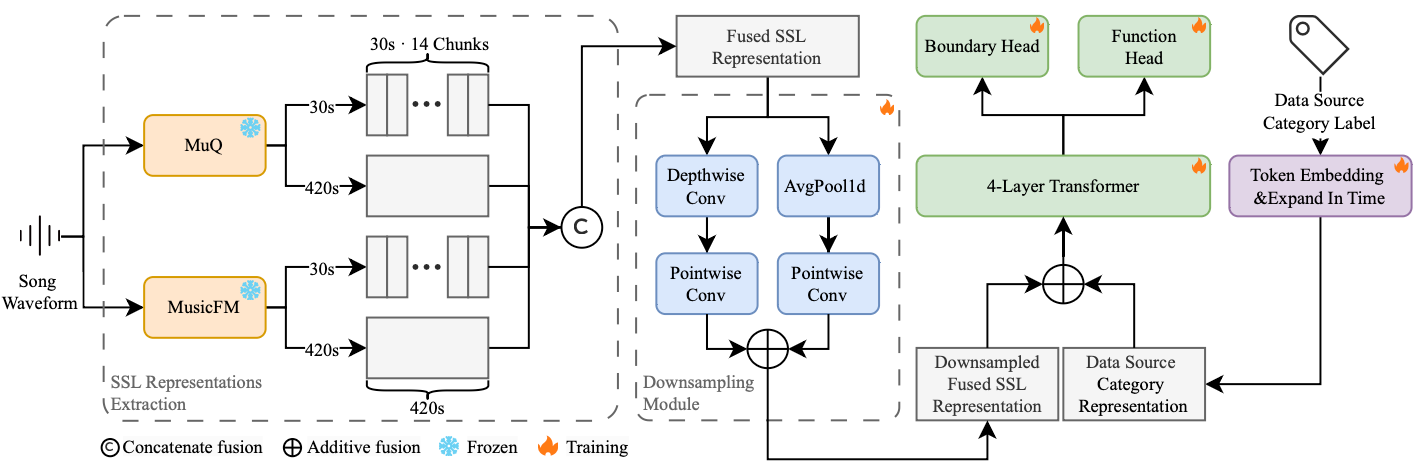
SongFormer is a music structure analysis framework that leverages multi-resolution self-supervised representations and heterogeneous supervision, accompanied by the large-scale multilingual dataset SongFormDB and the high-quality benchmark SongFormBench to foster fair and reproducible research.
📢 News and Updates
🔥 October 3, 2025
Open-sourced Training and Evaluation Code – We have released the full training and evaluation code to support and promote community development and further research.
🔥 October 2, 2025
One-Click Inference on Hugging Face Launched – Successfully deployed our one-click inference feature on the Hugging Face platform, making model testing and usage more accessible and user-friendly.
🔥 September 30, 2025
SongFormer Inference Package Released – The complete SongFormer inference code and pre-trained checkpoint models are now publicly available for download and use.
🔥 September 26, 2025
SongFormDB and SongFormBench Launched – We introduced our large-scale music dataset SongFormDB and comprehensive benchmark suite SongFormBench, both now available on Hugging Face to facilitate research and evaluation in Music structure analysis.
🚀 QuickStart
This model supports Hugging Face's from_pretrained method. To quickly get started with this code, you need to do two things:
- Follow the instructions in
Setting up Python Environmentto configure your Python environment - Visit our Hugging Face model page, and run the code provided in the README
🌟 Key Highlights
We've achieved breakthrough performance in music structure analysis, setting new benchmarks across the board:
- ✨ State-of-the-art accuracy on both Western and Chinese music datasets
- ⚡ Blazing fast inference - faster than comparable models
- 💰 Cost-effective - No API fees, runs locally on single GPU
⏱️ Speed Comparison
Process entire songs in just 2-4 seconds! Here's how we stack up:
| Model | Processing Time | Note |
|---|---|---|
| 🏆 SongFormer (Ours) | 2-4 seconds | |
| LinkSeg-7Labels | 3-5 seconds | |
| All-In-One | 9-12 seconds | |
| SongPrep Fine-tuned | 9-12 seconds | |
| SongPrep End2End | 22-26 seconds | Contains lyrics |
| Gemini 2.5 Pro | 30-90 seconds | Contains lyrics |
Benchmarked on NVIDIA L40 GPU (excluding model loading)
📊 Performance Metrics
- ACC: Overall boundary detection accuracy
- HR.5F: Hit Rate with 0.5-second tolerance (fine-grained precision)
- HR3F: Hit Rate with 3-second tolerance
SongFormBench-HarmonixSet
| Method | ACC | HR.5F | HR3F |
|---|---|---|---|
| Baseline Methods | |||
| Harmonic-CNN* | 0.680 | 0.559 | — |
| SpecTNT (24s)* | 0.701 | 0.570 | — |
| SpecTNT (36s)* | 0.723 | 0.558 | — |
| All-In-One | 0.740 | 0.596 | 0.730 |
| MusicFM-Zhang et al.* | 0.725 | 0.640 | 0.729 |
| MuQ_iter* | 0.772 | — | — |
| LinkSeg-7Labels | 0.780 | 0.630 | 0.762 |
| TA (Zhang et al., 2025)* | 0.787 | 0.610 | 0.801 |
| Gemini 2.5 Pro | 0.748 | 0.423 | 0.813 |
| SongFormer (Ours) | |||
| SongFormer (HX) | 0.795 | 0.703 | 0.784 |
| SongFormer (HX+E+H) | 0.806 | 0.697 | 0.780 |
| SongFormer (HX+E+H+G) | 0.807 | 0.696 | 0.780 |
SongFormBench-CN
| Method | ACC | HR.5F | HR3F |
|---|---|---|---|
| Baseline Methods | |||
| All-In-One | 0.834 | 0.563 | 0.771 |
| LinkSeg-7Labels | 0.828 | 0.518 | 0.757 |
| Gemini 2.5 Pro | 0.806 | 0.412 | 0.833 |
| SongFormer (Ours) | |||
| SongFormer (HX) | 0.848 | 0.675 | 0.856 |
| SongFormer (HX+E+H) | 0.890 | 0.690 | 0.852 |
| SongFormer (HX+E+H+G) | 0.891 | 0.688 | 0.851 |
RWC-Pop
| Method | ACC | HR.5F | HR3F |
|---|---|---|---|
| Baseline Methods | |||
| Harmonic-CNN* | 0.646 | 0.571 | — |
| SpecTNT (24 s, CTL)* | 0.675 | 0.623 | — |
| MusicFM-Zhang et al.* | 0.680 | 0.636 | 0.764 |
| LinkSeg | 0.747 | 0.648 | 0.786 |
| TA (Zhang et al., 2025)* | 0.779 | 0.506 | 0.691 |
| SongFormer (Ours) | |||
| SongFormer (HX) | 0.787 | 0.651 | 0.795 |
| SongFormer (HX+E+H) | 0.814 | 0.650 | 0.804 |
| SongFormer (HX+E+H+G) | 0.812 | 0.650 | 0.800 |
- Results marked with * are taken from original papers due to unavailable implementations
- Dataset abbreviations: HX (HarmonixSet), E, H, G refer to different training datasets as stated in the paper
Installation
Setting up Python Environment
git clone https://github.com/ASLP-lab/SongFormer.git

# Get MuQ and MusicFM source code
git submodule update --init --recursive

conda create -n songformer python=3.10 -y
conda activate songformer
For users in mainland China, you may need to set up pip mirror source:
pip config set global.index-url https://pypi.mirrors.ustc.edu.cn/simple
Install dependencies:
pip install -r requirements.txt
We tested this on Ubuntu 22.04.1 LTS and it works normally. If you cannot install, you may need to remove version constraints in requirements.txt
Download Pre-trained Models
cd src/SongFormer
# For users in mainland China, you can modify according to the py file instructions to use hf-mirror.com for downloading
python utils/fetch_pretrained.py
After downloading, you can verify the md5sum values in src/SongFormer/ckpts/md5sum.txt match the downloaded files:
md5sum ckpts/MusicFM/msd_stats.json
md5sum ckpts/MusicFM/pretrained_msd.pt
md5sum ckpts/SongFormer.safetensors
# md5sum ckpts/SongFormer.pt
Inference
1. One-Click Inference with HuggingFace Space
Available at: https://huggingface.co/spaces/ASLP-lab/SongFormer
2. Gradio App
First, change directory to the project root directory and activate the environment:
conda activate songformer
You can modify the server port and listening address in the last line of app.py according to your preference.
If you're using an HTTP proxy, please ensure you include:
export no_proxy="localhost, 127.0.0.1, ::1"
export NO_PROXY="localhost, 127.0.0.1, ::1"
Otherwise, Gradio may incorrectly assume the service hasn't started, causing startup to exit directly.
When first running app.py, it will connect to Hugging Face to download MuQ-related weights. We recommend creating an empty folder in an appropriate location and using export HF_HOME=XXX to point to this folder, so cache will be stored there for easy cleanup and transfer.
And for users in mainland China, you may need export HF_ENDPOINT=https://hf-mirror.com. For details, refer to https://hf-mirror.com/
python app.py
3. Python Code
You can refer to the file src/SongFormer/infer/infer.py. The corresponding execution script is located at src/SongFormer/infer.sh. This is a ready-to-use, single-machine, multi-process annotation script.
Below are some configurable parameters from the src/SongFormer/infer.sh script. You can set CUDA_VISIBLE_DEVICES to specify which GPUs to use:
-i              # Input SCP folder path, each line containing the absolute path to one audio file
-o              # Output directory for annotation results
--model         # Annotation model; the default is 'SongFormer', change if using a fine-tuned model
--checkpoint    # Path to the model checkpoint file
--config_pat    # Path to the configuration file
-gn             # Total number of GPUs to use — should match the number specified in CUDA_VISIBLE_DEVICES
-tn             # Number of processes to run per GPU
You can control which GPUs are used by setting the CUDA_VISIBLE_DEVICES environment variable.
Notes
- You may need to modify line 121 in
src/third_party/musicfm/model/musicfm_25hz.pyto:S = torch.load(model_path, weights_only=False)["state_dict"]
Evaluation
1. Preparing MSA TXT Format for GT Annotations and Inference Results
The MSA TXT file format follows this structure:
start_time_1 label_1
start_time_2 label_2
....
end_time end
Each line contains two space-separated elements:
- First element: Timestamp in seconds (float type)
- Second element: Label (string type)
Conversion Notes:
- SongFormer outputs can be converted using the utility script
src/SongFormer/utils/convert_res2msa_txt.py - Other annotation tools require custom conversion to this format
- All MSA TXT files should be stored in a folder with consistent naming between ground truth (GT) and inference results
2. Supported Labels and Definitions
| ID | Label | Description |
|---|---|---|
| 0 | intro | Opening section, typically appears at the beginning, rarely in middle or end |
| 1 | verse | Main narrative section with similar melody but different lyrics across repetitions; emotionally moderate, storytelling-focused |
| 2 | chorus | Climactic, highly repetitive section that forms the song's memorable hook; features diverse instrumentation and elevated energy |
| 3 | bridge | Contrasting section appearing once after 2-3 choruses, providing variation before returning to verse or chorus |
| 4 | inst | Instrumental section with minimal or no vocals, occasionally featuring speech elements |
| 5 | outro | Closing section, typically at the end, rarely appearing in beginning or middle |
| 6 | silence | Silent segments, usually before intro or after outro |
| 26 | pre-chorus | Transitional section between verse and chorus, featuring additional instruments and building emotional intensity |
| - | end | Timestamp marker for song conclusion (not a label) |
Important Note: While our model generates 8 categories, mainstream evaluation uses 7 categories. During evaluation, pre-chorus labels are mapped to verse according to our mapping rules.
3. Running the Evaluation
The main evaluation script is located at src/SongFormer/evaluation/eval_infer_results.py. You can use the shell script src/SongFormer/eval.sh for streamlined evaluation.
Parameter Configuration
| Parameter | Description | Default Setting |
|---|---|---|
ann_dir |
Ground truth directory | Required |
est_dir |
Inference results directory | Required |
output_dir |
Output directory for evaluation results | Required |
prechorus2what |
Mapping strategy for pre-chorus labels:• verse: Map to verse• chorus: Map to chorus• None: Keep original |
Map to verse |
merge_continuous_segments |
Merge consecutive segments with identical labels | Disabled |
Training
Before starting, ensure you have the necessary dependencies installed and your environment properly configured.
Step 1: Extract SSL Representations
The SSL representation extraction code is located in src/data_pipeline. Navigate to this directory first:
cd src/data_pipeline
For each song, you need to extract 4 different representations:
- MuQ - 30s: Short-term features with 30-second windows
- MuQ - 420s: Long-term features with 420-second windows
- MusicFM - 30s: Short-term features with 30-second windows
- MusicFM - 420s: Long-term features with 420-second windows
For 30-second representations, the extraction process employs a window size and hop size of 30 seconds, with features concatenated after extraction, resulting in a sequence length matching that of the 420-second version.
Run the following scripts after configuring them for your environment:
# MuQ representations
bash obtain_SSL_representation/MuQ/get_embeddings_30s_wrap420s.sh
bash obtain_SSL_representation/MuQ/get_embeddings.sh

# MusicFM representations
bash obtain_SSL_representation/MusicFM/get_embeddings_mp_30s_wrap420s.sh
bash obtain_SSL_representation/MusicFM/get_embeddings_mp.sh
Step 2: Configure Training Parameters
Edit src/SongFormer/configs/SongFormer.yaml to set:
train_dataset: Training dataset configurationeval_dataset: Evaluation dataset configurationargs: Model settings and experiment name
For the dataset_abstracts class, configure these parameters:
| Parameter | Description |
|---|---|
internal_tmp_id |
Unique identifier for the dataset instance |
dataset_type |
Dataset ID from src/SongFormer/dataset/label2id.py (see DATASET_LABEL_TO_DATASET_ID) |
input_embedding_dir |
Space-separated paths to four SSL representation folders |
label_path |
Path to JSONL file with labels (see example format) |
split_ids_path |
Text file with one ID per line specifying data to use (IDs not in this file will be ignored) |
multiplier |
Data balancing factor - repeats small datasets to match larger ones |
Update src/SongFormer/train/accelerate_config/single_gpu.yaml with your desired accelerate settings, and configure src/SongFormer/train.sh accordingly:
- Your Weights & Biases (wandb) API key
- Other training-specific settings
Step 3: Run Training
Navigate to the SongFormer directory and execute the training script:
cd src/SongFormer
bash train.sh
- The relevant training dashboard will be displayed on
wandb - Checkpoints will be located in
src/SongFormer/output
Citation
If our work and codebase is useful for you, please cite as:
@misc{hao2026songformerscalingmusicstructure,
      title={SongFormer: Scaling Music Structure Analysis with Heterogeneous Supervision},
      author={Chunbo Hao and Ruibin Yuan and Jixun Yao and Qixin Deng and Xinyi Bai and Yanbo Wang and Wei Xue and Lei Xie},
      year={2026},
      eprint={2510.02797},
      archivePrefix={arXiv},
      primaryClass={eess.AS},
      url={https://arxiv.org/abs/2510.02797},
}
License
Our code is released under CC-BY-4.0 License.
Contact Us
We welcome your feedback and contributions! You can reach us through:
- Report Issues: Found a bug or have a suggestion? Please open an issue directly in this GitHub repository. This is the best way to track and resolve problems.
- Join Our Community: For discussions and real-time support, join our Discord server: https://discord.gg/rwcqh7Em
We look forward to hearing from you!

Explore related projects
Loading…