
AIPMAndy/PPTskill
AIPMAndy/PPTskill has 58 GitHub stars and 4 forks. GitHot measured 0 stars in 24 hours. Last checked 2026-11-16 04:25 UTC. Last push 2026-11-12.
Measured star growth
- in 24h
- 0
- in 7 days
- Update delayed
- in 15 days
- Update delayed
- in 1 month
- Update delayed
Net star changes over overlapping periods, not daily totals. Missing measurements are left blank. Stars measure attention, not software quality.
About
AI 生成原生可编辑 PPTX 的 Skill:Claude Code/Codex/Cursor 一句话出 PPT,形状文字都能直接改|AI PowerPoint generator (editable .pptx)
ProductivityREADME_EN.md
Original🎨 PPTskill
AI-Powered Native Editable PPTX Generation — Professional Presentations Without Design Skills


English | 简体中文
🆚 Why PPTskill?
| Feature | Traditional PPT | Online AI PPT | PPTskill |
|---|---|---|---|
| Native Editable | ✅ | ❌ Image/SVG | ✅ Real Shapes |
| AI-Powered | ❌ | ✅ | ✅ |
| Local/Private | ✅ | ❌ | ✅ Privacy First |
| Workflow Integration | ❌ | ❌ | ✅ OpenClaw/Cursor |
| Open Source | ❌ | ❌ | ✅ MIT License |
| Multiple Styles | ⚠️ Manual | ⚠️ Limited | ✅ 10+ Templates |
Key Difference: Outputs real PowerPoint objects (DrawingML), not images or embedded SVGs. Click any element to edit directly.
🚀 Quick Start (30 seconds)
# 1. Clone repository
git clone https://github.com/AIPMAndy/PPTskill.git
cd PPTskill

# 2. Install dependencies
pip install -r requirements.txt

# 3. Export example PPT
python3 skills/ppt-master/scripts/svg_to_pptx.py examples/ppt169_顶级咨询风_构建有效AI代理_Anthropic -s final

# ✅ Done! Find generated .pptx in examples/ directory
Output:
project_timestamp.pptx— Native editable version (recommended)project_timestamp_svg.pptx— SVG reference version
💡 Core Features
1️⃣ Multiple Input Formats
- 📄 PDF — Research papers, reports
- 📝 DOCX — Word documents
- 🌐 URL — Web pages, blog posts
- 📋 Markdown — Technical documentation
2️⃣ 10+ Professional Templates
- 🏢 Consulting Style — McKinsey/BCG inspired
- 🎓 Academic Style — Thesis defense, research
- 🌙 Zen Style — Minimalist Eastern aesthetics
- 🎨 Magazine Style — Photo-rich layouts
- 💻 Tech Style — SaaS/product launches
- 🌿 Nature Style — Documentary aesthetics
3️⃣ AI Editor Integration
| Tool | Rating | Notes |
|---|---|---|
| Claude Code | ⭐⭐⭐ | Best results — native Opus, largest context |
| Cursor | ⭐⭐ | Great alternative |
| VS Code + Copilot | ⭐⭐ | Mainstream choice |
| OpenClaw | ⭐⭐⭐ | Recommended — workflow automation |
4️⃣ OpenClaw Workflow Integration
You: Generate a PPT from this quarterly report

AI:  Sure. Let me confirm the design spec:
     [Template] Consulting Style
     [Format]   PPT 16:9
     [Pages]    8-10 pages
     ...

     ✅ Generated: Q3_Report_20260407.pptx
📖 Use Cases
- 🎯 Business Reports — Quarterly reviews, strategic planning
- 🎓 Academic Defense — Thesis presentations, research talks
- 📊 Data Analysis — Visualization reports
- 🚀 Product Launches — New product intros, pitch decks
- 📚 Training Materials — Corporate training, teaching
- 📝 Content Marketing — White papers, case studies
🎨 Example Gallery
See examples/ — 15 projects, 229 pages of verified examples:
- Consulting Style × 5 (Anthropic AI, Psychology, Finance, etc.)
- Academic Style × 2 (Thesis format, Medical research)
- Zen Style × 1 (Buddhist scripture study)
- Tech Style × 3 (Git intro, AI coding tools comparison)
- Nature Style × 1 (Wildlife documentary)
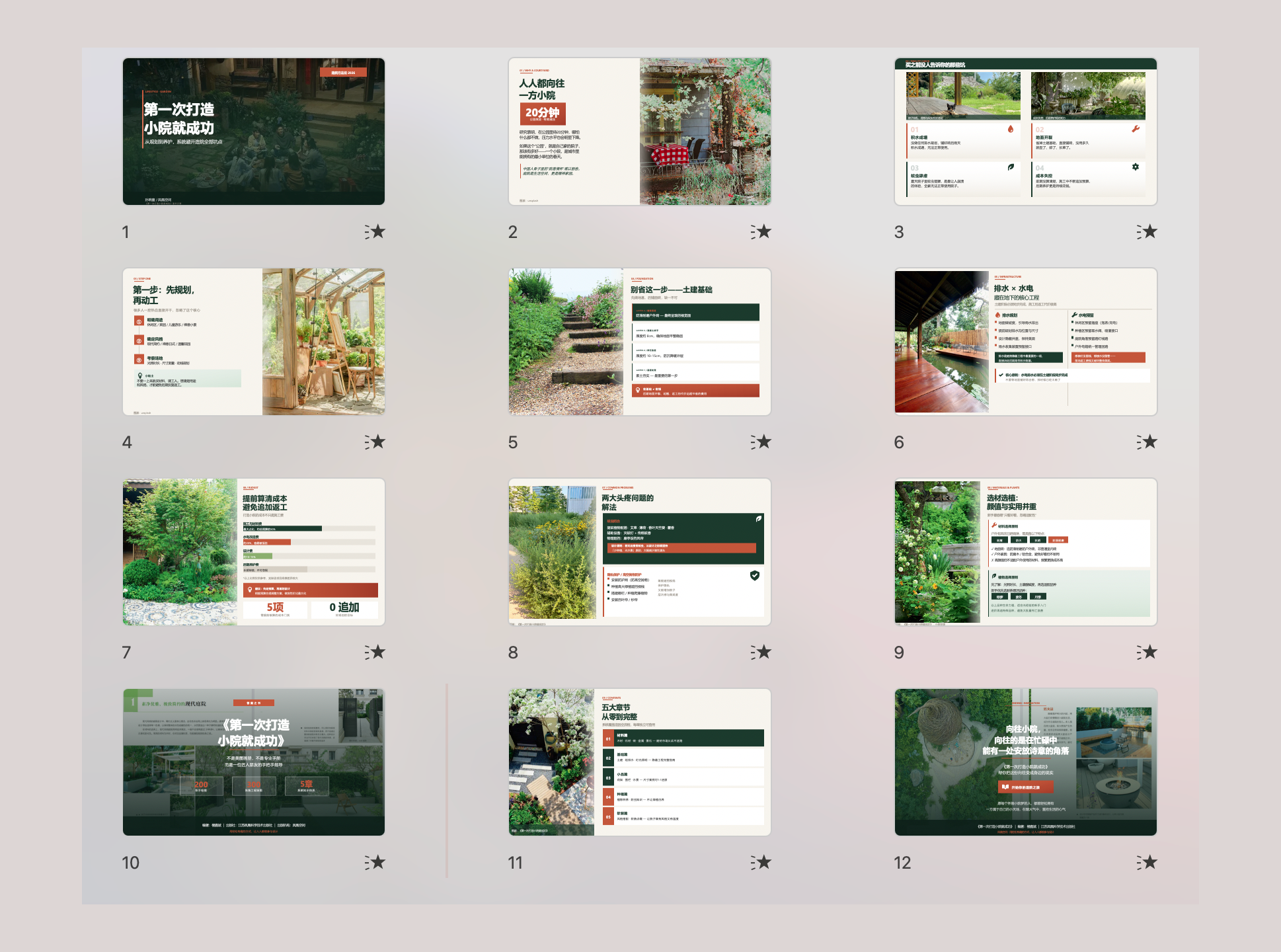
- Magazine Style × 1 (Gardening guide)
🛠️ Installation Guide
System Requirements
- Python 3.8+ (required)
- Node.js 18+ (optional — for WeChat article conversion)
- Pandoc (optional — for DOCX/EPUB conversion)
macOS
brew install python
brew install node      # optional
brew install pandoc    # optional
Ubuntu/Debian
sudo apt install python3 python3-pip
sudo apt install nodejs npm    # optional
sudo apt install pandoc        # optional
Windows
Download from official sites:
🔧 Advanced Usage
Export from Existing Project
If you have a project with svg_final/ directory:
python3 skills/ppt-master/scripts/svg_to_pptx.py <project_path> -s final
Initialize New Project
python3 skills/ppt-master/scripts/project_manager.py init my_project --format ppt169
OpenClaw Skill Integration
- Clone this repo to your OpenClaw workspace
- Skill auto-detected (
skills/PPTskill/SKILL.md) - Chat directly:
"Generate a PPT from this document"
🗺️ Roadmap
- Core PPT generation capability
- 10+ professional templates
- OpenClaw integration
- Bilingual documentation (EN/CN)
- One-click installation script
- GitHub Actions CI/CD
- Video tutorials
- More templates (pitch decks, fundraising)
- Web UI (optional)
🤝 Contributing
Contributions welcome! Please:
- Fork this repository
- Create feature branch (
git checkout -b feature/AmazingFeature) - Commit changes (
git commit -m 'Add some AmazingFeature') - Push to branch (
git push origin feature/AmazingFeature) - Submit Pull Request
Contribution areas:
- New template styles
- Workflow integration improvements
- Documentation and examples
- Bug fixes
📝 Known Limitations
- Full dependency install may fail due to
pycairo/cairorequirements- ⚠️ This does not block core PPT export functionality
- DOCX/EPUB conversion requires
pandoc(optional) - Requires Office 2016+ to open generated PPTX
🎯 Design Philosophy
Following practical engineering principles:
- Verify shortest working path first
- Remove unnecessary complexity
- Stabilize the workflow
- Automate only after proven valuable
🙏 Acknowledgments
All core PPT generation capability comes from the excellent upstream project:
- hugohe3/ppt-master — Thanks to the original author for outstanding work
This fork focuses on:
- Workflow integration optimization
- OpenClaw compatibility
- Practical documentation and examples
👨💻 Author
AI Chief Andy | AI Product Expert, Former Tencent/Baidu AI PM, OpenClaw Power User


📄 License
MIT License (same as upstream)
This repository contains workflow documentation and integration improvements. Please respect the upstream repository's license and attribution requirements.
🔗 Related Links
- Upstream Project: https://github.com/hugohe3/ppt-master
- This Fork: https://github.com/AIPMAndy/PPTskill
- OpenClaw: https://openclaw.ai/
- Live Examples: https://hugohe3.github.io/ppt-master/
If this project helps you, please give it a ⭐ Star!
Help more people discover this tool 🚀