
AIMixer/ComfyUI_MiniMaxH3_Director
AIMixer/ComfyUI_MiniMaxH3_Director has 2,711 GitHub stars and 321 forks. GitHot measured +12 stars in 24 hours. Last checked 2026-11-06 20:49 UTC. Last push 2026-10-13.
Multi-segment MiniMax H3 Director for official ComfyUI MiniMax-H3
Measured star growth
- in 24h
- +12
- in 7 days
- Collecting history
- in 15 days
- Collecting history
- in 1 month
- Collecting history
Net star changes over overlapping periods, not daily totals. Missing measurements are left blank. Stars measure attention, not software quality.
README_EN.md
OriginalComfyUI MiniMax H3 Director
Multi-segment AV timeline director for official ComfyUI MiniMax-H3.
Repository: AIMixer/ComfyUI_MiniMaxH3_Director
中文文档 → README.md
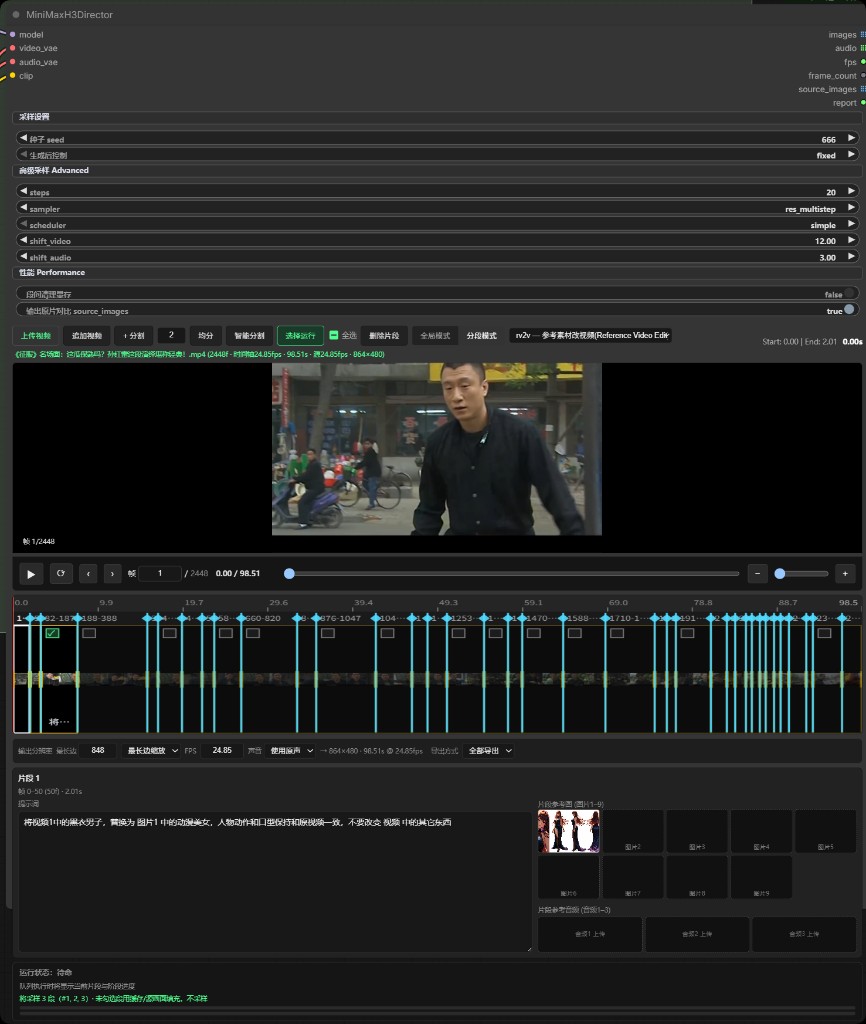
Features
MiniMaxH3Director is a single-node director for long-form, multi-segment MiniMax H3 audio–video generation — timeline planning, conditioning, sampling, AV decode, and export in one place. It wraps the official MiniMaxH3ImageToVideo / MiniMaxH3ReferenceToVideo + MiniMaxH3SigmaShift + KSampler pipeline with native stereo audio.
Core capabilities
| Feature | Description |
|---|---|
| Multi-segment timeline | Upload video in-node; split, equal-split, smart shot-split (PySceneDetect), append; selectable/deletable split points; visual timeline with thumbs |
| Task modes | t2v, i2v, fl2v (first/last frame), r2v (reference material groups), v2v (video-to-video), rv2v (reference-guided source edit) |
| First/last frame (fl2v) | Dedicated shot groups: prompt-only (text-to-video), or start and/or end (official FL2VA allows end-only). With segment continuity + From prev, an empty shot pins the previous tail (N context frames) for motion/audio handoff; drag edges for duration; run-select per group |
| Reference groups (r2v) | fl2v-style groups: top Common params share refs/audio and a common prompt (concatenated with each group prompt); each group may add images 1–9 / audios 1–3 / videos 1–3; prompt tags <Picture N> / <Video K> / <Audio J> (or @ picker); timeline preview synced with card selection |
| Source-video edit (v2v / rv2v) | Bernini-style source timeline; each segment bound as <Video 1>; rv2v adds optional refs (images 1–9, audios 1–3) |
| Run select | Sample only checked segments/groups; unselected may use cache or source passthrough when exporting all |
| External multi-group inputs | Director Group (Image to Video) / (Reference to Video) + Groups Combine; wire into i2v_groups / r2v_groups for external-priority batches with run-select |
| Native stereo audio | Generated with the picture; v2v/rv2v can generate / keep source / mute |
| Segment continuity | Off by default. For multi-segment t2v / i2v / fl2v / r2v / v2v / rv2v, pin the previous generated tail (motion + generated audio) into the next sample, then trim the prefix. Context frames: 5 / 22 / 39 / 56 — recommended default: 22. Thanks to ComfyUI-H3-Motion-Context for the implementation approach |
| Semantic Bridge | Wire MiniMax H3 Director Semantic Bridge into Director semantic_bridge (above SelfLift). Unconnected = identical. Connected = rewrite official cond tokens with the student MLP (RMS-norm → residual mix). Put weights in models/semantic_bridge/ yourself — this plugin does not ship them. Switch adapters in the node to pick original vs BUNNY; do not chain two bridges. Original leans static relations (layout / space / counting); BUNNY leans action ownership and multi-character scenes. Distilled on FL2VA; r2v / v2v / rv2v is forced-compat — use with care. See speach1sdef178/MiniMax-H3-Semantic-Bridge and JOKER141/BUNNY_H3_Conditioning_Bridge |
| SelfLift (progressive first pass) | Wire MiniMax H3 Director SelfLift into Director selflift (above Refine). Unconnected = original single-stage first pass. Connected = low-res prefix + 3D lift + high-res tail on the Director canvas. Euler only. Thanks to slmonker/selflift-Avatar for the implementation approach |
| Refine / upscale | Wire MiniMax H3 Director Refine into Director refine. Unconnected = original single-pass sampling. refine = same-resolution second sample; upscale = enlarge to a target canvas then SIGMAS sample (pixel / RTX VSR / H3 latent); latent_upscale = H3 latent enlarge only, no second sample. passes repeats refine (upscale once). Optional refine_model swaps the second-pass UNET. images is the refined clip; images_pre_refine is the first pass (before upscale) |
| Run report | report output with plan and per-segment summary |
| Director pack I/O | Toolbar Import pack / Export pack: zip of timeline JSON plus reference images/videos/audio. ASCII folders (shared_params/, asset_groups/01/, Picture1…) match the English UI and avoid path-encoding issues |
Reference-audio slots can select an existing video or a local audio/video file. A video's first audio stream is extracted immediately to FLAC directly under input/; local source videos remain temporary and are not saved as video assets. Audio follows ComfyUI's existing upload rule: identical content with the same name is reused, while different content with the same name gets a numeric suffix without overwriting; the same resolved audio path is not added twice within one material group.
Inputs / outputs
Inputs: model → video_vae → audio_vae → clip
Optional: i2v_groups (Image to Video packs) / r2v_groups (Reference to Video packs) / semantic_bridge (MiniMax H3 Director Semantic Bridge) / selflift (MiniMax H3 Director SelfLift) / refine (MiniMax H3 Director Refine)
Outputs: images → audio → fps → frame_count → source_images → report → images_pre_refine
CLIP Loader type must be
minimax(Qwen3-VL).
Use fl2va UNET fort2v/i2v/fl2v; ref2va forr2v/v2v/rv2v.
Export source to source_images populates only the separate source_images output; it does not change images. Connect source_images to a preview or video compositor. Decode failures are reported explicitly and emit a neutral placeholder instead of generated frames.
Director pack (script + media)
Toolbar Import pack / Export pack writes *.mmxpack.zip. Paths are ASCII only and match the English UI (independent of the current UI language).
| English UI | Pack path |
|---|---|
| Shared params | shared_params/ |
| Asset group 1 | asset_groups/01/ |
| Picture 1–9 | Picture1.png … Picture9.webp |
| Video 1–3 | Video1.mp4 |
| Audio 1–3 | Audio1.wav |
| start / end (fl2v) | start.jpg / end.jpg in that group folder |
| Upload video (v2v source) | source_video/ |
pack.json
shared_params/shared_params.json
shared_params/Picture1.png
asset_groups/01/group.json
asset_groups/01/Picture4.png
timeline.json
timeline.jsonis written on Director export for lossless round-trip (including other-task drafts).- A converter may write only
pack.json+shared_params/+asset_groups/and omittimeline.json. - Slot numbers match the UI: if Shared params occupy Picture 1–3, group folders continue from
Picture4— do not rename the group’s first image toPicture1. - Models (UNET / CLIP / VAE) are not included. Import replaces the current node timeline (with confirmation). Media is copied to ComfyUI
input/minimax_director_packs/.
Requirements
ComfyUI ≥ v0.30.0 with official MiniMax H3 nodes (PR #15224, PR #15228).
Optional: scenedetect, opencv-python-headless, imageio-ffmpeg — see requirements.txt.
Refine nvidia_rtx_vsr needs an NVIDIA GPU: pip install nvidia-vfx --extra-index-url https://pypi.nvidia.com (not a hard dependency).
Installation
Method 1: Manual (standard)
cd ComfyUI/custom_nodes
git clone https://github.com/AIMixer/ComfyUI_MiniMaxH3_Director.git

pip install -r ComfyUI_MiniMaxH3_Director/requirements.txt
Restart ComfyUI.
Method 2: ComfyUI Manager
- Open ComfyUI Manager
- Choose Install via Git URL
- Enter
https://github.com/AIMixer/ComfyUI_MiniMaxH3_Director.gitand install - Restart ComfyUI
Models & workflow downloads
Full pack (MiniMax H3 weights + example JSON workflows):
Comfyit · article 506 — MiniMax H3 models & workflows
Merge models/ into ComfyUI/models/, then drag a JSON workflow into ComfyUI.
Also available:
- Hugging Face: Comfy-Org/MiniMax-H3
- ComfyUI docs: MiniMax H3 workflows
This repo ships examples under example_workflows/:
| Workflow | task_type | UNET | Notes |
|---|---|---|---|
minimax_h3_director_t2v.json |
t2v | fl2va | Text to AV |
minimax_h3_director_fl2v.json |
fl2v | fl2va | First/last frame groups |
minimax_h3_director_r2v.json |
r2v | ref2va | Reference material groups |
minimax_h3_director_v2v.json |
v2v | ref2va | Source-video timeline edit |
minimax_h3_director_rv2v.json |
rv2v | ref2va | Source + reference images/audio |
minimax_h3_director_external_groups_i2v.json |
fl2v | fl2va | External Group×2 → Combine → i2v_groups |
minimax_h3_director_external_groups_r2v.json |
r2v | ref2va | External Group×N → Combine → r2v_groups |
minimax_h3_director_二采_加速.json |
r2v | ref2va | Refine second sample (SIGMAS + H3 latent); images and images_pre_refine each save a clip |
Recommended model files
| Role | Filename | Directory |
|---|---|---|
| UNET (t2v / i2v / fl2v) | minimax_h3_fl2va_pruned_int8_convrot.safetensors |
models/diffusion_models/ |
| UNET (r2v / v2v / rv2v) | minimax_h3_ref2va_pruned_int8_convrot.safetensors |
models/diffusion_models/ |
| CLIP | qwen3vl_32b_minimax_h3_nvfp4_awq.safetensors |
models/text_encoders/ |
| Video VAE | minimax_h3_video_vae_fp16.safetensors |
models/vae/ |
| Audio VAE | minimax_h3_audio_vae_fp32.safetensors |
models/vae/ |
Quick start
- Ensure ComfyUI ≥ 0.30.0 with MiniMax H3 nodes
- Load an example from article 506 or
example_workflows/ - Connect UNET / CLIP / video_vae / audio_vae, edit the timeline UI, Queue
Video tutorial: Bilibili playlist · plugin usage
Default sampling
- Canvas default 0.4MP 16:9 (864×480), 5s / 124 frames @ 24 fps (17k+5 grid)
- 25 steps,
res_multistep+simple, CFG 1.0 - Sigma shift: video 12 / audio 3
First/last frame (fl2v) — short guide
- Set task type to First/Last Frame to Video (fl2v)
- Click Add group: prompt-only (text-to-video), or upload start and/or end (end-only OK; start-only = i2v)
- With multiple groups, turn on Segment continuity and check From prev — an empty shot pins the previous tail (N context frames, default 22)
- Adjust duration on the shot card or timeline; write mid-shot motion / camera / transition in the prompt
- Queue; with multiple groups, use Run select to sample only some of them
Reference groups (r2v) — short guide
- Set task type to Reference to Video (r2v) (ref2va UNET + audio_vae)
- Click Enable common params (collapsed/off by default); upload shared refs/audio and write a common prompt (e.g. character lock /
subject_definitions); when enabled it is concatenated with each group prompt - Click Add material group; write per-shot prompts and optionally add group-only assets (same slot overrides common)
- In prompts use
<Picture N>/<Video K>/<Audio J>, or type@(with common params on, picker includes common + group assets) - Timeline previews group duration/thumbs; Run-select stays in sync with group checkboxes
Source video (v2v / rv2v) — short guide
- Choose v2v or rv2v, upload a source video and split segments (cut / equal-split / smart split)
- Write a prompt per segment; the source clip is bound as
<Video 1>automatically - For
rv2v, optionally add reference images / audio; audio mode can be generate / source / mute
Refine / upscale — short guide
- Add MiniMax H3 Director Refine and wire
refineinto Directorrefine. Leave it unconnected for the original single pass mode=refine: same-resolution second sample.mode=upscale: enlarge to a target canvas then second-sample.mode=latent_upscale: enlarge H3 video latent only (no second sample). Resolution widgets appear forupscale/latent_upscale(follow Director, aspect + megapixels, or custom W×H). Director canvas is the first-pass size; Refine target is the enlarge sizepasses: refine rounds, default 1, max 9999. Inupscalemode only the first round enlarges; later rounds stay on that canvas.latent_upscaledoes not sample- Optional
refine_model(second-pass UNET); unwired uses the Director model. Typical: Turbo LoRA on pass 1, a clean / other LoRA UNET on refine - Director
imagesis the refined clip;images_pre_refineis the first pass before upscale (for A/B).source_imagesis still the timeline source, not the first-pass generate. Withconfirm_first_pass, the first queue exposes onlyimages_pre_refineand blocks downstream saving fromimages; the next queue outputsimagesafter refining the cached first pass - Second sample uses SIGMAS: wire
BasicSchedulerorManualSigmasinto Refinesigmas - fl2v skips refine by default (protects pinned first/last frames); turn off
skip_fl2von Refine to include those shots - Upscale default is
h3_latent: pick the 3D weights in Refine (dropdown underupscale_method; also shown formode=latent_upscale). Put the file inComfyUI/models/latent_upscale_models/.lanczoscan take optionalupscale_model(RealESRGAN etc.); or usenvidia_rtx_vsr - Segment export with
passes>1also writesseg_XXXX_pN.mp4per round; export-all still only keeps first-pass and the final clip
Example: example_workflows/minimax_h3_director_二采_加速.json
External multi-group wiring
Mirror the two official conditioning nodes and feed multi-group batches into the Director:
- Add
MiniMax H3 Director Group (Image to Video)or(Reference to Video) - Wire per group:
prompt/duration_sec; I2V family usesfirst_frame/last_frame(none=t2v, first only=i2v, last only or both=fl2v); R2V uses Autogrow slots (same as official Reference to Video: images ≤9, videos ≤3, audios ≤3). Output size is set on the Director - Batch with
Director Groups Combine(Autogrow slots, same UX as official Reference to Video) → Directori2v_groups/r2v_groups; a singlegroupcan connect to the Director directly - Match
task_typeto the port (t2v/i2v/fl2v ↔i2v_groups; r2v ↔r2v_groups); do not connect both ports at once - When linked, graph wiring overrides UI cards (external priority); Run-select still applies by group index
Ecosystem · Comfyit
Comfyit provides environment, models, workflows, and tutorials:
| Resource | Link |
|---|---|
| Models & workflows pack | comfyit.cn/article/506 |
| Official MiniMax H3 docs | docs.comfy.org · MiniMax H3 |
| Plugin video tutorials | Bilibili playlist |
| Product center | comfyit.cn/products |
| Plugins | comfyit.cn/plugins |
| Models | comfyit.cn/resources/models |
| Workflows | comfyit.cn/workflows |
Contact
| Maintainer | AIMixer |
| Repository | github.com/AIMixer/ComfyUI_MiniMaxH3_Director |
| Sibling plugin | ComfyUI_Bernini_Director |
| Author QQ | 3697688140 |
| Bilibili | space.bilibili.com/1997403556 |
| Plugin tutorials | Bilibili playlist · usage |
| QQ groups | 551482703 · 425064221 · 559826331 |
| Comfyit | comfyit.cn |
Credits
- Comfy-Org / ComfyUI — official MiniMax H3 support
- MiniMax-AI — MiniMax H3 model
- Comfy-Org/MiniMax-H3 — weights & docs
- NikoDemon80/ComfyUI-H3-Motion-Context — inspiration for cross-segment motion/audio continuation
- LBH-123-AI/Comfyui_Minimax_h3_latent_Upscaler — H3 3D latent upscaler architecture and checkpoint format
- slmonker/selflift-Avatar — inspiration for SelfLift progressive first-pass sampling
- speach1sdef178/MiniMax-H3-Semantic-Bridge — Semantic Bridge student formula and adapter format
- JOKER141/BUNNY_H3_Conditioning_Bridge — same-architecture action-logic / multi-character adapter
License
Apache-2.0
Explore related projects
codecrafters-io/build-your-own-x
Master programming by recreating your favorite technologies from scratch.
560,402 starspublic-apis/public-apis
A collective list of free APIs
496,719 starsmorluto/rea
Reverse engineer anything with agents, from app behavior down to native binaries.
437,723 starsopenclaw/openclaw
The AI that really does things. Any OS. Any Platform. The lobster way. 🦞
394,058 stars