
AIAgentAndy/DeepAA
AIAgentAndy/DeepAA has 109 GitHub stars and 7 forks. GitHot measured 0 stars in 24 hours and 0 in 7 days. Last checked 2026-11-18 04:01 UTC. Last push 2026-10-23.
Measured star growth
- in 24h
- 0
- in 7 days
- 0
- in 15 days
- Update delayed
- in 1 month
- Update delayed
Net star changes over overlapping periods, not daily totals. Missing measurements are left blank. Stars measure attention, not software quality.
About
Local-first AI Agent gateway & observability for Codex, Claude Code,Dsh and more. 统一模型管理、调用追踪与 Token 成本分析。
AIREADME_en.md
OriginalDeepAA
Unify access to model providers. Trace agent calls. Understand usage and costs.
DeepAA (Deep Agent Analytics) is a free, open source AI agent gateway and observability tool that runs locally. It brings model providers, models, API keys, and agent configuration into one place, traces calls between agents and models, and connects usage, costs, and calculation details to individual requests. Configurable model failover helps reduce disruptions caused by model or service failures.
Website & product preview · Installation & setup · 中文文档 · MIT license
🔒 This tool runs entirely on your machine and never uploads anything to the cloud — your data is known only to you. Install and use it with confidence!
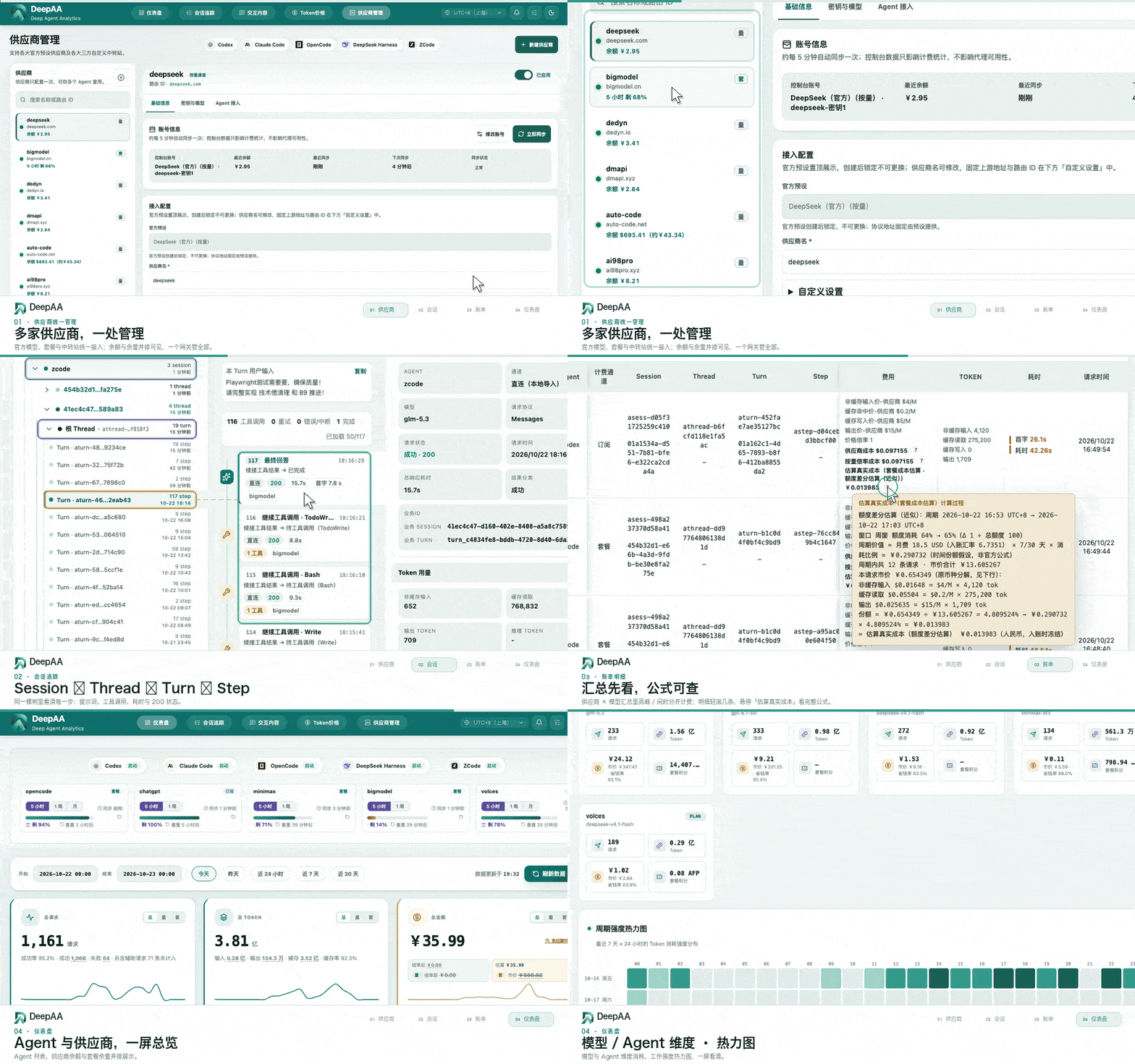
Console walkthrough: unified providers → session tracing → peak/off-peak billing with formula → dashboard overview
Core Value
When you use multiple agents, models, and providers, you need to know how to manage access, what each task called, how much it consumed, and how its cost was calculated. DeepAA brings access configuration, call records, and cost analysis into one local workspace.
| Capability | What you get |
|---|---|
| Unified provider and agent access | Manage official and relay model services, models, and API keys centrally. Enable configuration sync to use compatible models from multiple providers in the same agent with less manual setup. |
| Agent call tracing | Follow call relationships across tasks, child threads, turns, and steps, with prompts, model outputs, tool interactions, token usage, and latency shown together. |
| Context and capability evidence | Inspect the tools, MCP tools, skills, and injected rules carried in a request, along with estimated context composition, changes between steps, and compaction evidence. |
| Cost transparency for each request | Break down input, cache read/write, and output charges. Inspect rates, multipliers, promotions, and calculation details; compare usage and costs by model, provider, agent, and time. |
| Provider status and rule updates | View balances and remaining plan quotas for supported providers, and learn about new models and changes to prices, plans, promotions, and capabilities in the published catalog. |
| Model failover | Configure an ordered chain of backup models. When the required conditions are met and no response content has been returned yet, switch to an available model to reduce coding disruptions from model or service failures. |
Five coding agents are currently integrated: Codex, Claude Code, OpenCode, DeepSeek Harness, and ZCode. Connect official model services, plans, subscriptions, aggregators, and custom relay providers. Available combinations depend on protocols, model capabilities, and agent support.
For plans and subscriptions, the estimated cost of each request strictly follows the provider's credit conversion formula. If no explicit credit conversion formula is available, costs are estimated proportionally using usage over the plan's quota window. Supported relays can reconcile bills and apply adjustments. DeepAA itself is free; model services charge according to their providers' billing rules.
Observability and analytics data is kept strictly on your machine and never uploaded to any DeepAA cloud service.
Screenshots
Dashboard — one-click agent launch, a unified view of provider balances and remaining plan quotas, and timely, accurate usage and cost analytics across multiple dimensions.

Click to view the full-size image

Session tracking · Session → Thread → Turn → Step |

Token pricing · Costs for each request with step-by-step formulas |

Provider management · Targets, keys & models, agent access |
Click a thumbnail to view it full size
Installation and Startup
Currently supported on macOS and Windows.
One-line Installation (Recommended, No Repository Clone Required)
# macOS (Terminal)
curl -fsSL https://deepaa.dev/install.sh | bash
# Windows (PowerShell)
irm https://deepaa.dev/install.ps1 | iex
The install scripts prepare Node.js as needed, automatically select the faster download channel between China's npmmirror and the official source, install DeepAA through npm, then start the services and open the console at http://127.0.0.1:3210.
Install with npm
With Node.js 22.13+ already installed (23.x requires 23.4+), you can install directly; whether npm uses a China mirror or the official registry depends on your environment configuration:
npm install -g deepaa
Installation automatically starts DeepAA and opens the console (if it does not open, run deepaa).
Install from Source
To run from source or contribute to development, you need Node.js 22.13+ (23.x requires 23.4+) and pnpm:
# 1. Clone the GitHub repository
git clone https://github.com/AIAgentAndy/DeepAA.git
cd DeepAA

# 2. Install dependencies
pnpm install

# 3. Build the production version
pnpm build

# 4. Start DeepAA and open the console
pnpm start
Everyday Startup
If you installed with the one-line script or npm, search your computer for DeepAA to open the console (shortcut location: Applications on macOS or the Start menu on Windows). You can also use these commands:
deepaa          # Start services and open the console
deepaa status   # Check service status
deepaa stop     # Stop services

deepaa service install # Register system services: auto-start at login + crash recovery
For source installations, start with pnpm start. For auto-start at login and other startup options, see the official documentation.
Two Steps to Set Up and Start Observing
Have your agent client ready, along with a provider API key or the corresponding subscription login.
Step 1: Add a Provider and Connect Your Agent
Open Provider management in the console and follow the setup prompts:
- Add a provider: choose an official preset for model providers such as DeepSeek or OpenAI. For relays and other services, choose a non-official preset and enter the upstream URL.
- Configure models and credentials: select models and enter an API key. For subscriptions, simply use the official login as prompted.
- Connect your agent: select the agent you want to use and confirm the connection.
Step 2: Launch Your Agent and Start Working
Click the agent you want to use on the dashboard. In the quick launch dialog, select a project directory and the required provider, model, or launch method. You can also manually launch an agent that is already configured. For subscriptions, follow the interface prompts to use the corresponding official login or official mode.
Then start a normal conversation in your agent (select a DeepAA gateway model). DeepAA automatically records and analyzes calls within the connected scope. Open http://127.0.0.1:3210 whenever you want to inspect them:
- Dashboard: view provider balances, remaining plan quotas, and usage and cost summaries.
- Session tracking: follow tasks and steps to inspect calls, context, and tool interactions.
- Interaction content: inspect prompts, model outputs, and tool results.
- Token pricing: inspect token usage, costs, and calculation details for each request.
More Documentation
For detailed agent setup, billing rules, failover, data management, runtime configuration, and troubleshooting, see the official documentation.
Community and Feedback
Report issues or share suggestions, or scan the QR code to join the QQ group:

Scan to join the DeepAA QQ group
⭐ Star This Project
If DeepAA helps you, please consider giving it a free Star — your Stars are what keep me motivated to maintain and update this project 🙏

Author
Created and maintained by AIAgentAndy.
Contact: [email protected]