
AFSlayer/antigravity-server
AFSlayer/antigravity-server has 33 GitHub stars and 4 forks. Star changes are not measured yet. Last checked 2026-11-09 09:14 UTC. Last push 2026-11-05.
Use the Antigravity desktop app from your phone. One binary that serves Antigravity's own web UI to your devices, behind a password.
Measured star growth
- in 24h
- Update delayed
- in 7 days
- Update delayed
- in 15 days
- Update delayed
- in 1 month
- Update delayed
Net star changes over overlapping periods, not daily totals. Missing measurements are left blank. Stars measure attention, not software quality.
README.md
OriginalAntigravity Server
A second front door to your own Antigravity — one that fixes the mobile web UI,
keeps the UI off Google's relay, and runs unattended on a cheap Linux box.


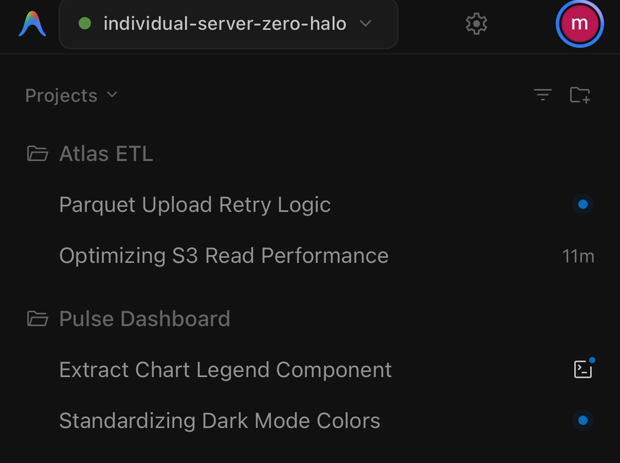
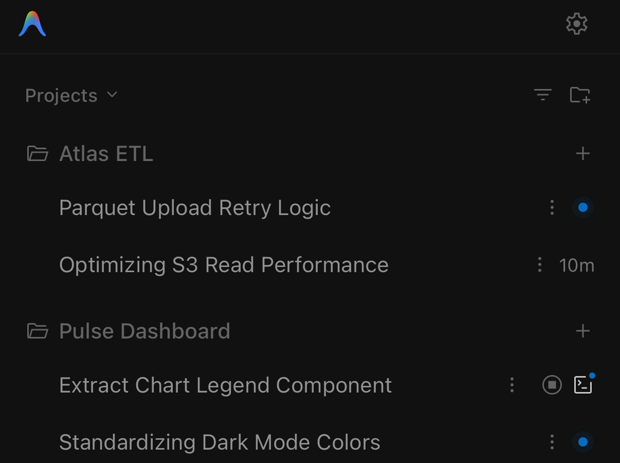
| Official remote | Same server, through agy-server |
|---|---|
 |
 |
No + on a project. No ⋮ on a conversation. |
New conversation per project, and delete / rename / pin / archive per row. |
One headless Linux box, two front doors, minutes apart.
Why Antigravity Server? (vs Official Remote)
Google now ships an official remote bridge at antigravity.google.com: sign in with the same account and you reach every machine of yours that is running Antigravity with remote access enabled. Reaching your own agent from a phone is no longer something this project has to provide — and a headless Linux server shows up in that list too.
What the official bridge hands your phone is the desktop web bundle, unchanged. That is where agy-server earns its place: it sits in front of the same Antigravity core as a second, direct front door, and rewrites that bundle on the way out so a touch screen can actually use it.
The two are not exclusive. agy-server only enables the same remoteControlEnabled setting the official bridge uses, so one machine can serve both at once — use whichever address suits you.
Official remote (antigravity.google.com) |
Antigravity Server (agy-server) |
|
|---|---|---|
| Mobile web UI | The desktop bundle as-is | 61 named runtime patches for touch |
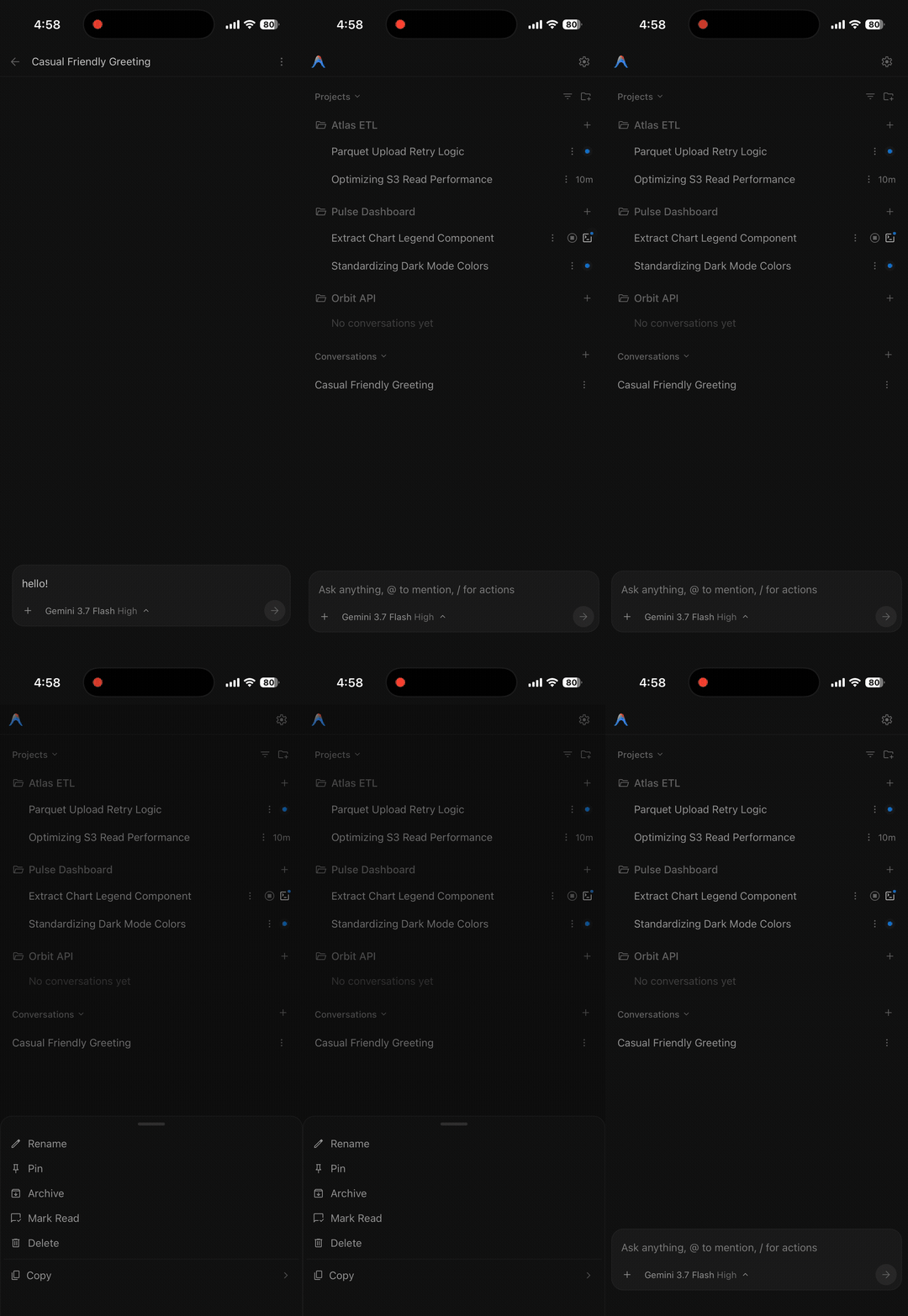
| Conversation control | No delete, pin, or archive on mobile | Delete, Rename, Pin, Archive from the kebab menu and titlebar |
| Project navigation | No project (+) button; switch via the bottom input |
Restored (+) button in project list headers |
| Message actions | Undo and Copy live behind hover states | Undo (↶) and Copy (📋) always visible on touch |
| iOS keyboard | Bottom safe-area gap remains open; viewport jumps on focus; Enter corrupts IME composition | Pinned top bar, collapsed safe area, adapted height, stabilized question modal interaction, and CJK/Korean IME composition protection on Enter (native viewport panning & dual scrolling) |
| File uploads | 1MB RPC text limit | Chunked streaming uploader for large logs, HARs, and datasets |
| Connection path | Relayed through Google's servers | Direct — your own domain, LAN, or VPN |
| Server restarts | Language server restart invalidates session; manual page refresh required | Seamless auto-reconnect — persistent CSRF token & gRPC status 14 translation restore connection without refreshing |
| Memory maintenance | Memory accumulates indefinitely (~4GB+) over long sessions | Daily idle restart — resets language server during idle windows without interrupting active work |
| Access without a Google account | Not possible — the account is the gate | Your own password (PBKDF2), sessions, and rate limiting |
Quick Start
Option 1: Linux Server / Cloud VPS (Recommended)
Run Antigravity on a headless Linux instance (Oracle Cloud Free Tier, AWS, DigitalOcean, or a home server):
curl -fsSL https://raw.githubusercontent.com/AFSlayer/antigravity-server/main/scripts/install.sh | bash
The installer:
- Prompts for your domain (e.g.
agy.example.com) and workspace root. - Downloads
language_serverdirectly from Google's official build bucket (storage.googleapis.com). No Google binaries are redistributed. - Configures Caddy for automatic HTTPS, creates a systemd service, and sets access credentials.
Google Authentication
When accessing your server for the first time:
- Direct Web Login: Open the Web UI, navigate to Settings, and complete Google authentication directly in your browser.
- Or Copy Existing Token (Optional): If you already logged in on a local desktop, you can copy your token to skip re-authenticating:
scp ~/.gemini/jetski-standalone-oauth-token user@your-server:~/.gemini/
Option 2: Desktop Companion (macOS, Windows, Linux Desktop)
To expose a local desktop Antigravity instance over your local network:
# macOS & Linux
curl -fsSL https://raw.githubusercontent.com/AFSlayer/antigravity-server/main/scripts/install-desktop.sh | bash
# Windows (PowerShell)
irm https://raw.githubusercontent.com/AFSlayer/antigravity-server/main/scripts/install-desktop.ps1 | iex
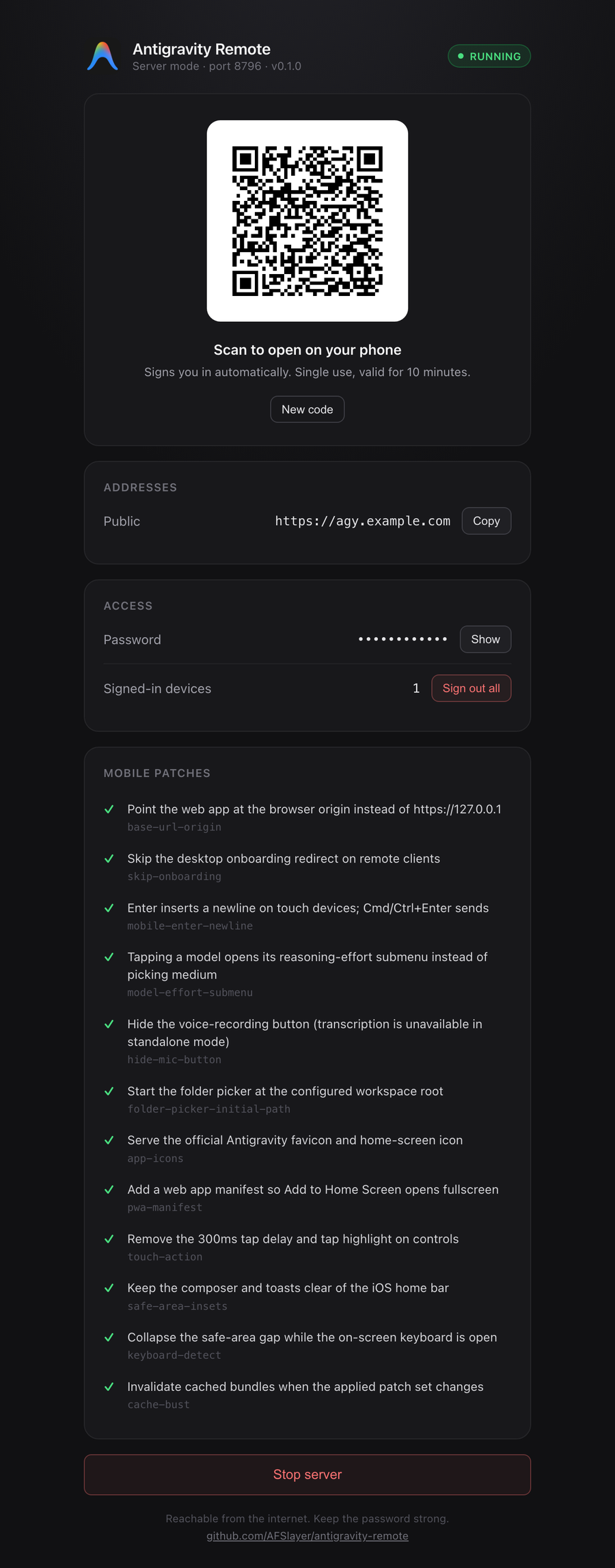
agy-server opens a local control panel with a QR code. Scan the code from a phone on the same network to connect without typing a password.
Mobile PWA & Client Setup
Antigravity Server supports the Progressive Web App (PWA) standard. Adding it to your mobile home screen launches the interface in a fullscreen, standalone view with no browser address bar or navigation buttons:
- iOS (Safari): Tap the Share button (
⎋) → Select Add to Home Screen. - Android (Chrome): Tap the Menu (
⋮) → Select Install app or Add to Home screen.
[!TIP] Running in standalone PWA mode ensures virtual keyboard transitions and 0px safe-area collapse operate smoothly without browser toolbar jumps.
Key Features
⚡ Mobile-First UX Patches
- Touch-Friendly Controls: Undo (
↶) and Copy (📋) buttons remain permanently visible on mobile message bubbles. - Full Conversation Management: Delete conversations via the titlebar menu and toggle Pin/Archive directly from the history dropdown.
- Precise Keyboard Tracking: Automatically collapses safe area insets to 0px and pins top navigation bar while adapting conversation height.
- Smooth Scroll Anchoring & Top Guard: Prevents infinite history fetch storms and anchors scroll position when scrolling up to read earlier messages in long conversations.
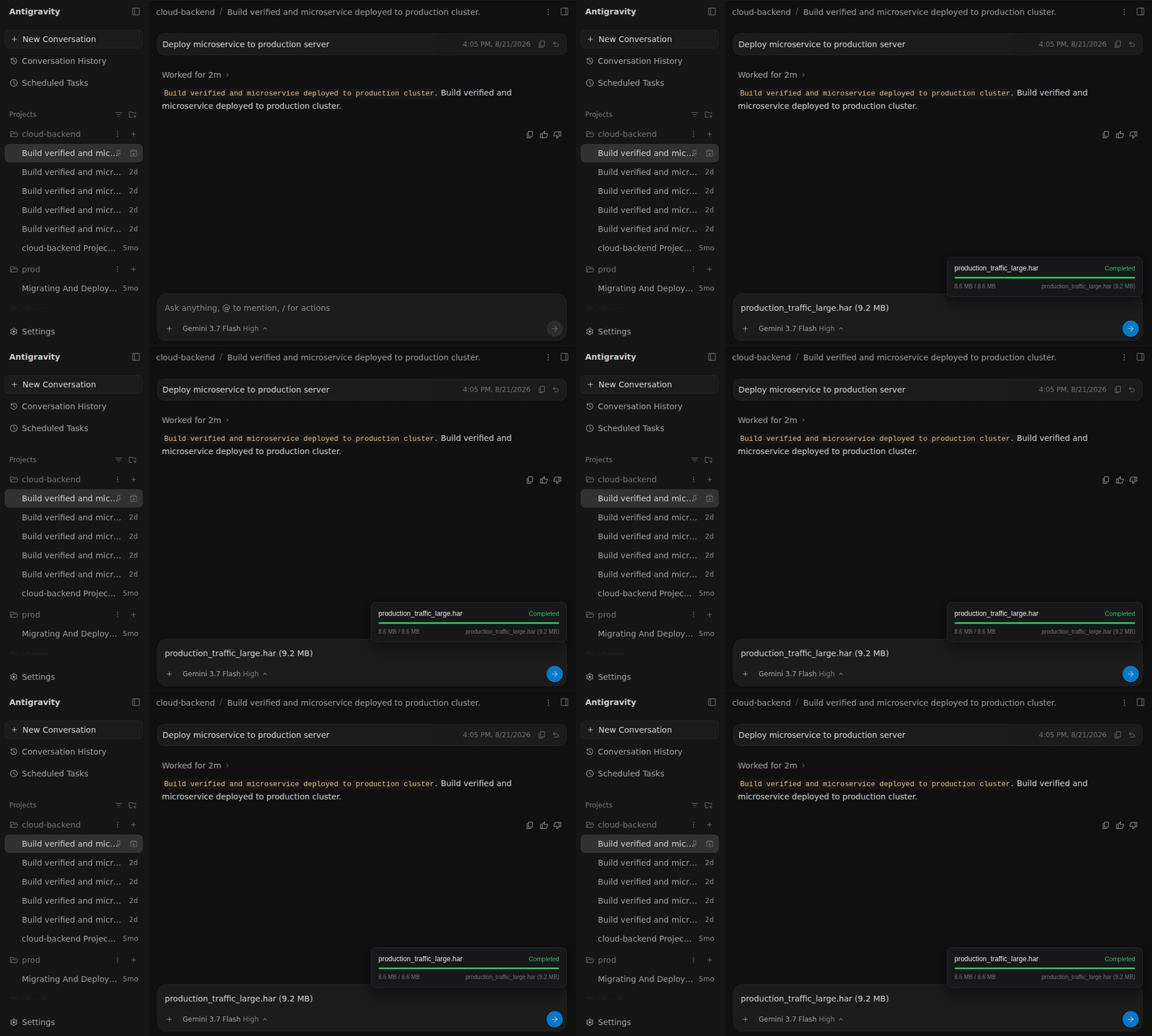
📁 Chunked Streaming File Uploads
Standard Antigravity restricts file attachments via a 1MB RPC limit. agy-server injects a chunked streaming uploader to transfer large logs, datasets, or HAR files directly into your workspace:
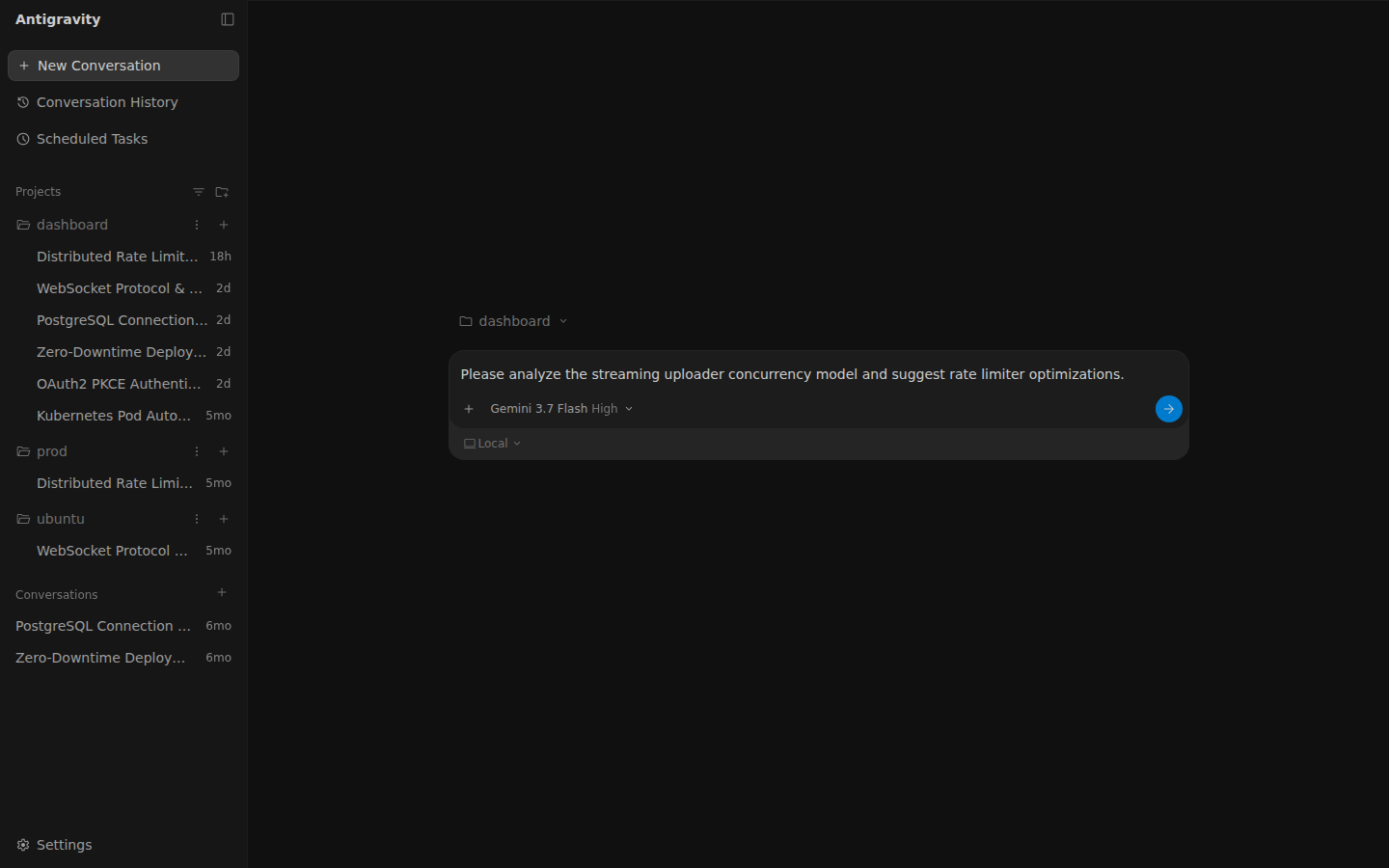
🖥️ Desktop & Tablet Web Interface
In addition to mobile devices, Antigravity Server runs smoothly in any modern desktop browser:
🔄 Zero-Downtime Automatic Updates & Daily Memory Maintenance
On headless Linux servers, agy-server includes a background auto-updater service:
- Checks Google's official release buckets daily for new
language_serverversions. - Downloads and replaces the core binary atomically with zero downtime.
- Daily Idle Restart: When up to date, periodically restarts
language_serverduring idle periods (zero active streams and 15+ minutes of inactivity) to reclaim memory accumulated from long conversations. If active user traffic is detected, maintenance is safely deferred by 10 minutes. - Manual check & upgrade: run
agy-server update.
🔁 Seamless Auto-Reconnection & Session Persistence
When the language server restarts (such as during updates or service reloads) or the connection briefly drops:
- Persistent CSRF Token: Retains the same authentication token across restarts, preventing stale-session rejections.
- gRPC-Web Protocol Translation: Translates transient connection drops to standard
grpc-status: 14(Unavailable) rather than broken HTTP 502 HTML, enabling Antigravity's native state stream to automatically reconnect within seconds without refreshing the browser tab. - Auto-Dismiss Stale Disconnect Banners: Automatically hides the "Lost connection" warning banner as soon as active communication with the server is verified alive, preventing persistent warning banners after successful reconnection.
- Stuck Loading Spinner Watchdog: Detects when mobile WebKit stalls on stale multiplexed HTTP/2 streams and automatically recovers after 30 seconds without fetch or WebSocket traffic, eliminating indefinite loading spinners without interrupting large conversation downloads.
- WebSocket RPC Transport: Routes Cascade and conversation RPCs over the
/connect-websocketconnection that the bundle already ships with, instead of fetch streaming. iOS Safari regularly stalls fetch streams mid-response, which left the conversation list empty or a conversation spinner running forever. There is no automatic fallback. To turn it off for every client, start the server with--disable-patch websocket-transport-defaultor setAGY_DISABLE_PATCHES=websocket-transport-default. For a single page load, open it with?useWebSocket=false. - Faster WebSocket Connect:
agy-serverends the/connect-websocketconnection itself and compresses what it sends to the browser, because the language server sends the initial conversation list as uncompressed JSON that is several times larger than the same data over fetch. The page also opens that connection from the document head while the bundle is still loading, and the bundle's liveness check waits 30 seconds for a ping reply instead of 2, so a slow phone link is no longer dropped mid-transfer and made to download everything again. The patched bundle is prepared in the background at startup so the first page load does not have to wait for it. To go back to a plain pass-through of the upgrade, start the server withAGY_WS_RELAY=off(also accepts0,false,no) or pass--no-ws-relay. (Early connection and liveness relaxation remain active; to disable WebSocket transport entirely, use--disable-patch websocket-transport-default.)
📝 In-App Rules & Skills Editor
Manage your agent instructions (~/.gemini/GEMINI.md, ~/.gemini/config/skills/) and project rules directly within the web UI:
- Open Settings → Customizations.
- Click the native Edit button next to rules or skills to expand an inline code editor.
- Updates are saved atomically to the host filesystem with instant effect.
Production & Reverse Proxy Setup
Antigravity uses Server-Sent Events (SSE), WebSocket connections, and chunked streaming. If running behind a custom reverse proxy, disable proxy buffering and pass WebSocket upgrades through. The web UI routes its primary conversation RPCs over /connect-websocket, so WebSocket upgrades must be passed through. agy-server rejects WebSocket handshakes whose Origin does not match the forwarded Host or X-Forwarded-Host, so keep that header intact. If upgrades cannot be enabled, start the server with --disable-patch websocket-transport-default:
Caddy
agy.example.com {
    encode zstd gzip

    reverse_proxy 127.0.0.1:8765 {
        flush_interval -1
    }
}
Nginx
server {
    listen 443 ssl http2;
    server_name agy.example.com;

    # Allow large chunked streaming uploads
    client_max_body_size 0;

    location / {
        proxy_pass http://127.0.0.1:8765;
        proxy_http_version 1.1;

        # WebSocket support
        proxy_set_header Upgrade $http_upgrade;
        proxy_set_header Connection "upgrade";

        # Disable buffering for real-time agent token streaming
        proxy_buffering off;
        proxy_cache off;
        proxy_read_timeout 86400s;

        # Forward real client IP
        proxy_set_header Host $host;
        proxy_set_header X-Real-IP $remote_addr;
        proxy_set_header X-Forwarded-For $proxy_add_x_forwarded_for;
        proxy_set_header X-Forwarded-Proto $scheme;
    }
}
[!IMPORTANT] When running behind a reverse proxy, pass
--trusted-proxies 127.0.0.1/32(or setAGY_TRUSTED_PROXIES=127.0.0.1/32) so brute-force rate limiters inspect the genuine client IP rather than the proxy.
How It Works
Antigravity includes a standalone binary named language_server. When run with --standalone, it serves the Antigravity Web UI on 127.0.0.1.
agy-server acts as a reverse proxy to:
- Handle authentication (PBKDF2 hashing, cookie sessions, rate-limiting).
- Apply on-the-fly JS/CSS patches for touch devices.
- Serve the patched bundle with an ETag so browsers revalidate it instead of downloading it again.
- Provide a chunked streaming endpoint for large file uploads.
  Phone / Tablet / Laptop Browser
                │
                ▼ HTTPS (Port 443 / 8765)
  ┌──────────────────────────────────────────────┐
  │ agy-server (Reverse Proxy & Auth)            │
  │  - PBKDF2 Session & Rate Limiting            │
  │  - Chunked Streaming Uploader (/uploads)     │
  │  - On-the-fly Web Bundle Patcher             │
  └──────────────────────┬───────────────────────┘
                         │ localhost
                         ▼
  ┌──────────────────────────────────────────────┐
  │ language_server --standalone                 │
  │  - Official Antigravity Core & Agent Engine   │
  │  - Terminal, File Tree, Artifacts, Composer   │
  └──────────────────────┬───────────────────────┘
                         │ gRPC
                         ▼
                Google CloudCode API
Mobile UX Patches
The web bundle Antigravity serves — through the official remote bridge or through agy-server — is the desktop one. agy-server rewrites it in flight. The registry in internal/patches/registry.go holds 61 patches, with touch UX, uploads, navigation, sign-in, connection health and cache busting. A sample:
| Category | Desktop Bundle Behavior | agy-server Patch |
|---|---|---|
| Navigation | Project (+) button omitted on mobile screens |
Restores the (+) New Conversation button next to each project row |
| Settings & Customizations | Customizations tab removed from Settings modal in web bundle; inaccessible on mobile without sidebar | Preserves the Customizations tab inside the Settings modal on mobile and desktop |
| Conversation Actions | No delete, pin, or archive on touch | Adds Delete, Pin, and Archive to the ⋮ kebab menu and titlebar |
| Message Actions | Undo and Copy buttons hidden behind hover states | Displays Undo (↶) and Copy (📋) buttons on touch devices |
| Virtual Keyboard & Scroll | iOS Safari viewport bounces and leaves blank gaps on scroll; upward scroll in long chats triggers cascading fetch storms | Dynamic visualViewport offset tracking, 0px safe-area collapse, pinned conversation layout, CSS scroll anchoring, and top-scroll guard against cascading fetch storms |
| File Uploads | 1MB RPC payload limit fails on logs or datasets | Streams files asynchronously to disk via chunked streaming endpoint |
| Touch Interaction | 300ms tap delay and double-tap zoom | Sets touch-action: manipulation for immediate touch response |
| Connection Health | "Lost connection" banner remains visible even after successful auto-reconnect; iOS Safari stalls fetch streams mid-response, leaving lists empty or spinners running | Uses the bundled WebSocket RPC transport by default, dismisses stale disconnect banners upon verified server heartbeat, and recovers from stuck loading spinners (>30s without network traffic) via client watchdog |
| Input Behavior | Mobile Enter key sends message or corrupts CJK/Korean IME composition; line navigation jumps to text start when slash commands exist | Preserves native newline, prevents IME corruption, and restores visual line start navigation on Cmd+Left (macOS) / Home (all OS) with slash commands while preserving Ctrl+Left word navigation; Cmd/Ctrl+Enter submits |
| Model Selection | Tapping a model closes the menu immediately | Opens the reasoning effort submenu on tap |
Run agy-server doctor to inspect the status of all patches against your installed bundle.
CLI Commands
agy-server                      Start in desktop companion mode (local network)
agy-server serve                Run as a headless server daemon
agy-server update               Check and update language_server to latest upstream
agy-server doctor               Verify patch integrity and system status
agy-server passwd [password]    Set or reset web access password
agy-server sessions [revoke]    List active sessions or revoke all devices
agy-server config [flags]       Manage configuration in config.json
All CLI flags can be set via environment variables prefixed with AGY_ (e.g. AGY_PORT=8765, AGY_PUBLIC_URL=https://agy.example.com).
Security
- Password Protection: Passwords are hashed with PBKDF2-SHA256 (200,000 iterations).
- Session Tokens: 256-bit random tokens; only SHA-256 hashes are stored on disk.
- Persistent CSRF Normalization: Stored with restricted owner permissions (
0600) and injected transparently through the proxy to prevent stale-session rejections. - Brute-Force Protection: 5 failed login attempts trigger an IP lockout (5 to 30 minutes).
- Upload Isolation: File uploads are restricted to the configured project directory; path traversal attempts (
../) are rejected. - Trusted Proxies: Set
--trusted-proxieswhen running behind Nginx, Caddy, or Cloudflare to prevent header spoofing.
FAQ
Google already has an official remote. Do I still need this?
Only if the official mobile web UI gets in your way, or you would rather not relay through Google's servers and would rather gate access with your own password. Both can run on the same machine; nothing here disables the official bridge.
Does this require the Antigravity desktop GUI on Linux?
No. agy-server runs the core language_server binary headlessly.
Will updates from Google break the patches?
Patches use adaptive regular expressions that match structural AST patterns rather than exact variable names. Run agy-server update to pull official upstream releases safely.
Does my code pass through third-party servers?
No. Traffic flows directly between your client browser and your server instance. The only external connection is language_server communicating with Google's API.
License
Apache-2.0. Not affiliated with or endorsed by Google. See DISCLAIMER.md.
Explore related projects
freeCodeCamp/freeCodeCamp
freeCodeCamp.org's open-source codebase and curriculum. Learn math, programming, and computer science for free.
458,947 starsdonnemartin/system-design-primer
Learn how to design large-scale systems. Prep for the system design interview. Includes Anki flashcards.
377,582 starsreact/react
The library for web and native user interfaces.
252,496 starsvuejs/vue
This is the repo for Vue 2. For Vue 3, go to https://github.com/vuejs/core
212,623 stars