
AAitorG/napari-DINOSim
AAitorG/napari-DINOSim has 27 GitHub stars and 4 forks. Star changes are not measured yet. Last checked 2026-11-11 18:07 UTC. Last push 2026-10-31.
This repository provides DINOSim, a method that leverages the DINOv2 foundation model for zero-shot object detection and segmentation in bioimage analysis. DINOSim uses pretrained DINOv2 embeddings to compare patch similarities, allowing it to detect and segment unseen objects in complex datasets with minimal annotations.
Measured star growth
- in 24h
- Update delayed
- in 7 days
- Update delayed
- in 15 days
- Update delayed
- in 1 month
- Update delayed
Net star changes over overlapping periods, not daily totals. Missing measurements are left blank. Stars measure attention, not software quality.
README.md
OriginalDINOSim




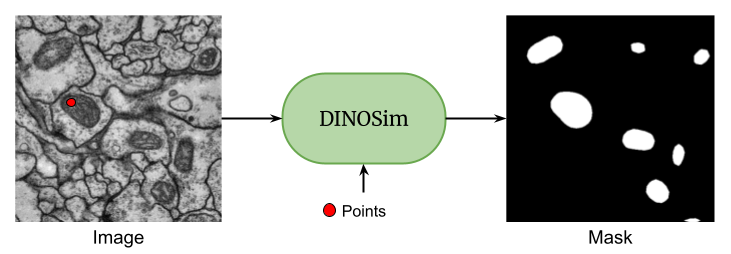
A napari plugin for zero-shot image segmentation using DINOv2 vision transformers.
Overview
napari-DINOSim enables zero-shot image segmentation by selecting reference points on an image. The plugin leverages DINOv2's powerful feature extraction capabilities to compute similarity maps and generate segmentation masks.
For detailed information about the widget's functionality, UI elements, and usage instructions, please refer to the Plugin Documentation. A simple example notebook and an advanced notebook are also available for programmatic use, showing how to load/save embeddings and references.
Installation
For a fresh environment, install napari-DINOSim with napari:
pip install "napari-dinosim[all]"
When napari is already installed, including through the napari plugin manager, install only the plugin:
pip install napari-dinosim
To install from source with conda:
# Clone the repository
git clone https://github.com/AAitorG/napari-DINOSim.git
cd napari-DINOSim

# Create and activate the conda environment
conda env create -f environment.yml
conda activate napari-dinosim
Note on GPU/CUDA Compatibility:
The runtime will automatically fall back to CPU or Apple MPS if CUDA is unavailable. However, environment installation (e.g., via conda or pip) may still fail or produce runtime errors on older systems if the installed PyTorch wheel targets an incompatible CUDA version. If you experience GPU-related installation errors, please reinstall PyTorch with a matching CUDA build or opt for the CPU-only version from the official PyTorch guide.
Usage
To launch napari, run the following command in your terminal:
napari
Within the napari interface, go to Plugins > DINOSim Segmentation > DINOSim Widget in the menu bar. You can then:
- Drag and drop your image into the napari viewer
- Select points on the objects you want to segment
- The plugin will automatically generate segmentation masks based on your selections
For more detailed instructions and examples, please refer to our Plugin Documentation.
License and contributing
The code is distributed under the MIT license. Contributions are welcome. Please open an issue if you run into a problem.
Citation
Please note that DINOSim is based on a publication. If you use DINOSim in your research, please be so kind to cite our work:
@article{Gonzalez-Marfil2026dinosim,
    author = {González-Marfil, Aitor and Gómez-de-Mariscal, Estibaliz and Arganda-Carreras, Ignacio},
    title = {DINOSim: Training-Free Semantic Segmentation on Microscopy Images},
    journal = {Microscopy Research and Technique},
    year = {2026},
    doi = {https://doi.org/10.1002/jemt.70194},
}
Explore related projects
tensorflow/tensorflow
An Open Source Machine Learning Framework for Everyone
201,505 starshuggingface/transformers
🤗 Transformers: the model-definition framework for state-of-the-art machine learning models in text, vision, audio, and multimodal models, for both inference and training.
168,815 starsAUTOMATIC1111/stable-diffusion-webui
Stable Diffusion web UI
165,300 starsComfy-Org/ComfyUI
The most powerful and modular diffusion model GUI, api and backend with a graph/nodes interface. The fastest local inference engine in the world.
146,472 stars