
23aaaa/jobfill
23aaaa/jobfill has 42 GitHub stars and 6 forks. GitHot measured 0 stars in 24 hours. Last checked 2026-11-15 01:16 UTC. Last push 2026-09-28.
Measured star growth
- in 24h
- 0
- in 7 days
- Collecting history
- in 15 days
- Collecting history
- in 1 month
- Collecting history
Net star changes over overlapping periods, not daily totals. Missing measurements are left blank. Stars measure attention, not software quality.
About
Local job application profile manager and Chrome form filler. 小师弟求职:本地整理校招、秋招和实习网申资料,侧栏逐项填写,支持独立 HTML 与 Excel 导入导出。
ProductivityREADME.en.md
OriginalXiaoshidi Job (JobFill)
Download · 中文 · Questions · Report a bug
A local profile manager and Chrome side panel for filling job application forms. Keep your education, work experience and project descriptions together. Select an input on a recruitment website, then click a value in the side panel to fill that field.
The current version is 1.1.0-rc.1, an installation candidate. The application interface is in Chinese; this guide is in English. No account or Node.js installation is needed to use the downloadable files.
What you can do
- Edit categories, records, fields and groups in the profile manager.
- Search your saved information and copy complete descriptions.
- Fill one selected webpage field at a time, with an undo option for the most recent fill.
- Edit a local HTML file or use the Excel template, then import your information into the extension.
- Export JSON, Excel or a password-encrypted
.applyvaultbackup.
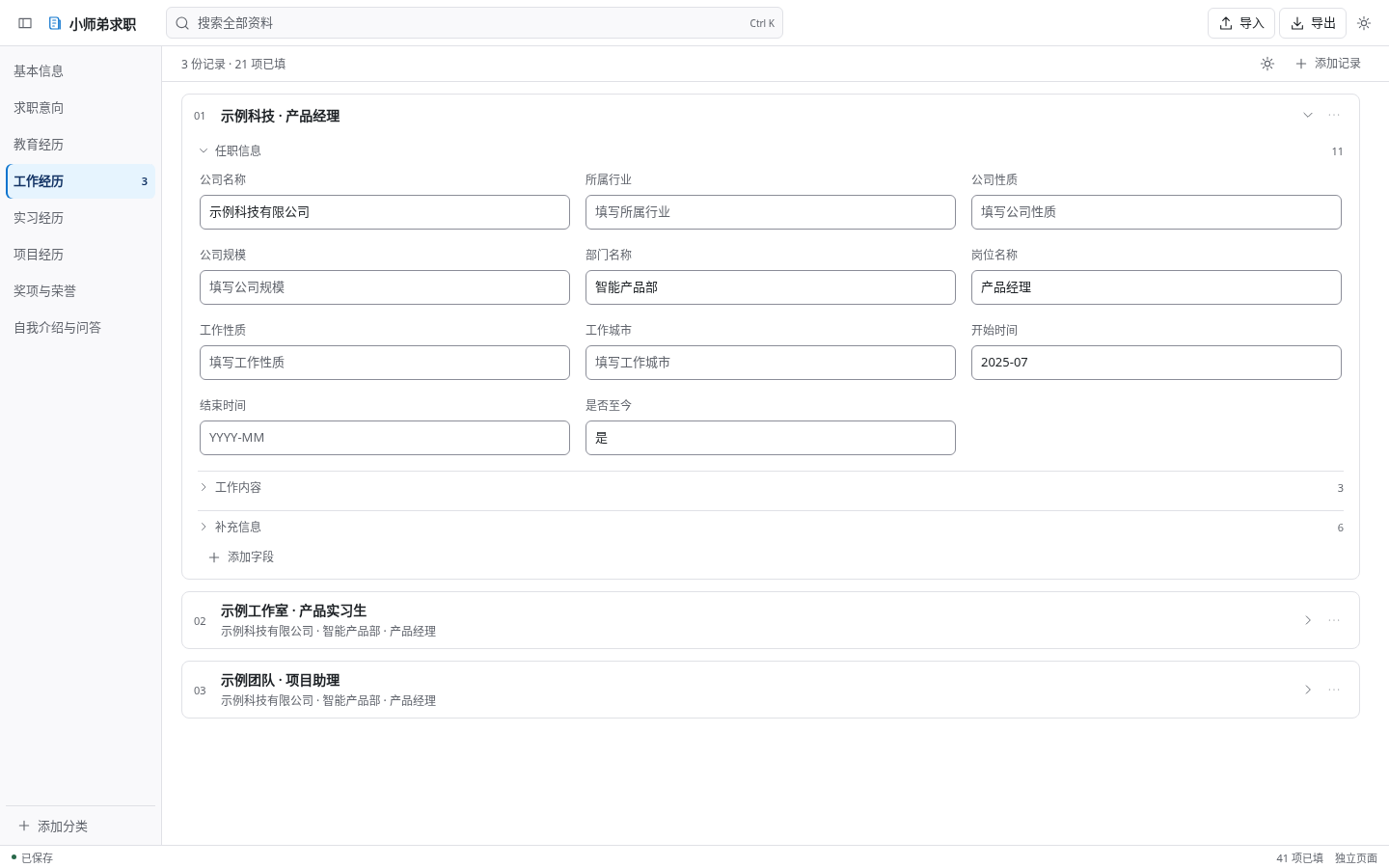
The screenshot uses fictional example information.
Install the extension
- Download the extension ZIP. Notes and checksums are on the release page.
- Extract it into a folder you will keep on your computer.
- Open
chrome://extensions/in Chrome 116 or newer and turn on Developer mode. - Choose Load unpacked, then select the extracted folder containing
manifest.json. - Open a recruitment page and click the extension icon. Use 编辑资料 to open the profile manager.
If you download the entire repository instead, load the dist/extension folder.
You can also download the HTML profile manager and Excel template. Save the HTML file locally and open it in your browser. The Excel template contains 20 categories and 230 fields. Import and export exchange data between these files and the extension; they do not sync automatically.
Fill a field
Click an input on the website, check the target website shown in the side panel, then click the corresponding saved value. Review the result before continuing. Copy and paste is available when direct filling does not work.
The extension does not fill an entire form at once, upload attachments or submit applications. Custom dropdowns, date pickers and other complex controls may need manual input. Other browsers and individual recruitment sites need separate verification.
Data and privacy
The product has no account system and makes no network requests. Profile data stays in the current browser until you export it or choose to fill a website field. Copying writes to the system clipboard.
Local profile storage is unencrypted. Masked fields hide text on screen; they do not encrypt stored data. JSON and Excel exports are plain files. Password encryption is available for .applyvault backups.
Back up your information before replacing an imported profile or changing devices. Please keep real resumes, identification numbers and private backups out of public issues.
Common questions
Does the HTML manager fill websites?
It manages your information. The Chrome extension handles webpage filling. Transfer information through export and import.
Can I import any resume file?
Use this product's Excel format, JSON export or .applyvault backup. Arbitrary PDF or Word resume parsing is not included.
Is it available in the Chrome Web Store?
This release is installed using Developer mode. There is no approved store listing linked here.
How do I report an issue?
Use the bug report form. Include the version, steps and a screenshot with personal information removed. For help using the tool, open a discussion.
Development
The extension uses native JavaScript modules, HTML/CSS and Chrome Manifest V3. Node.js 22 or newer is required for development. There are no npm runtime dependencies.
npm run check
npm test
npm run build
The supplied automated suite has 127 unit tests, 58 browser regression checks and 32 interface regression checks. Browser tests use explicit substitutes for Chrome APIs, storage and the clipboard. They do not replace native browser and real-site acceptance testing. See the testing report and contribution guide.
The release gate can return HOLD while manual and operational evidence is missing. This is an installation candidate, not a claim of completed store approval.
License
The supplied LICENSE does not grant a public open-source license. Publishing the repository does not change those terms. See third-party notices for included attributions.