
0xdnd/ctf-tracker
0xdnd/ctf-tracker has 47 GitHub stars and 4 forks. GitHot measured +2 stars in 24 hours. Last checked 2026-11-15 17:38 UTC. Last push 2026-11-12.
Measured star growth
- in 24h
- +2
- in 7 days
- Update delayed
- in 15 days
- Update delayed
- in 1 month
- Update delayed
Net star changes over overlapping periods, not daily totals. Missing measurements are left blank. Stars measure attention, not software quality.
About
Free offline CTF tracker for HackTheBox & TryHackMe — OSCP/CPTS/CRTO exam simulator, writeups, cheatsheets.
SecurityREADME.md
Original
⚡ ZeroBox — Free OSCP & CTF Tracker for HackTheBox and TryHackMe
Track every HTB & TryHackMe box, from recon to root, in one free, offline, keyboard-driven dashboard.
Use it free at ctftracker.com
No signup. No backend. No tracking in the app. Just open it and start hacking.










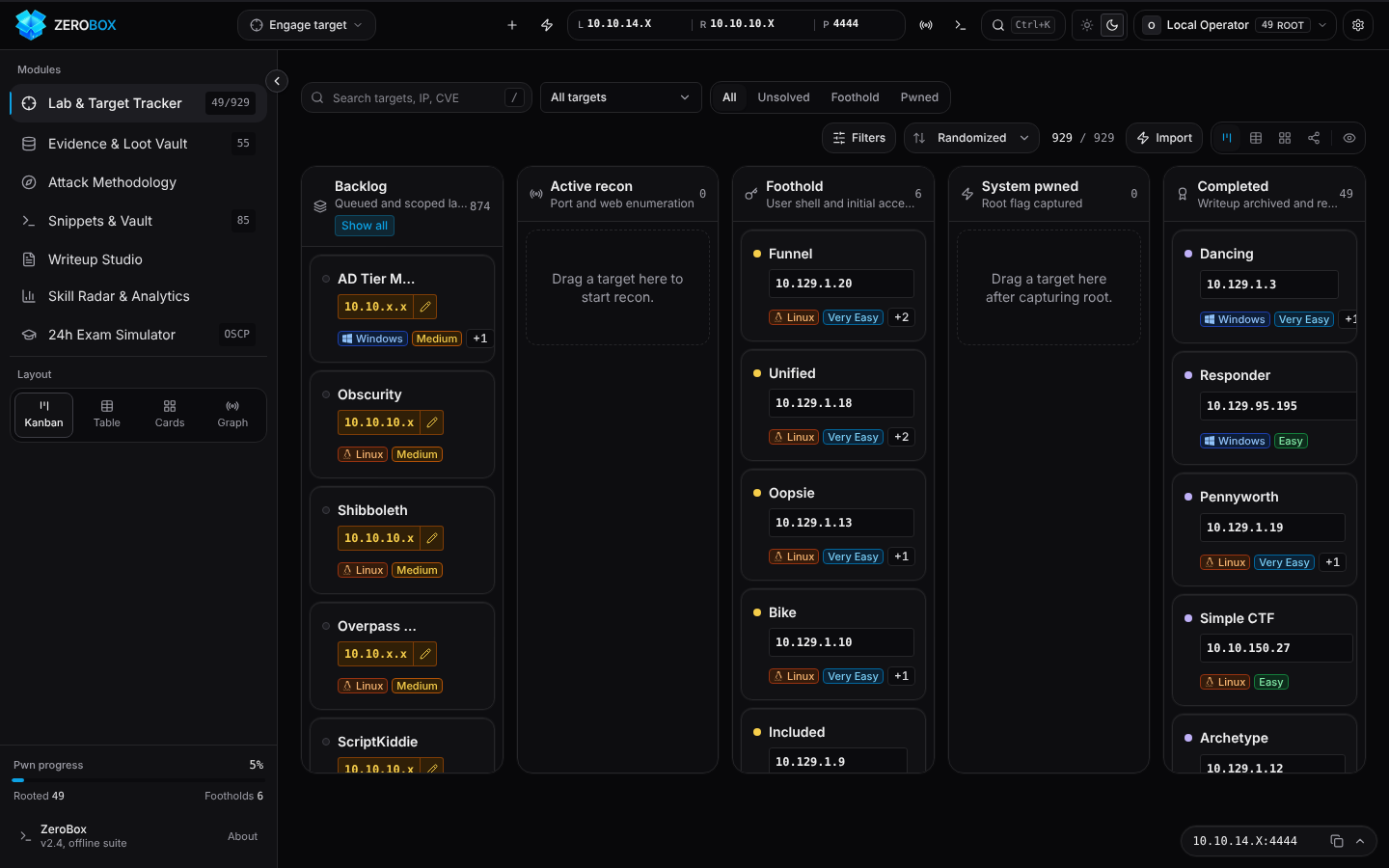
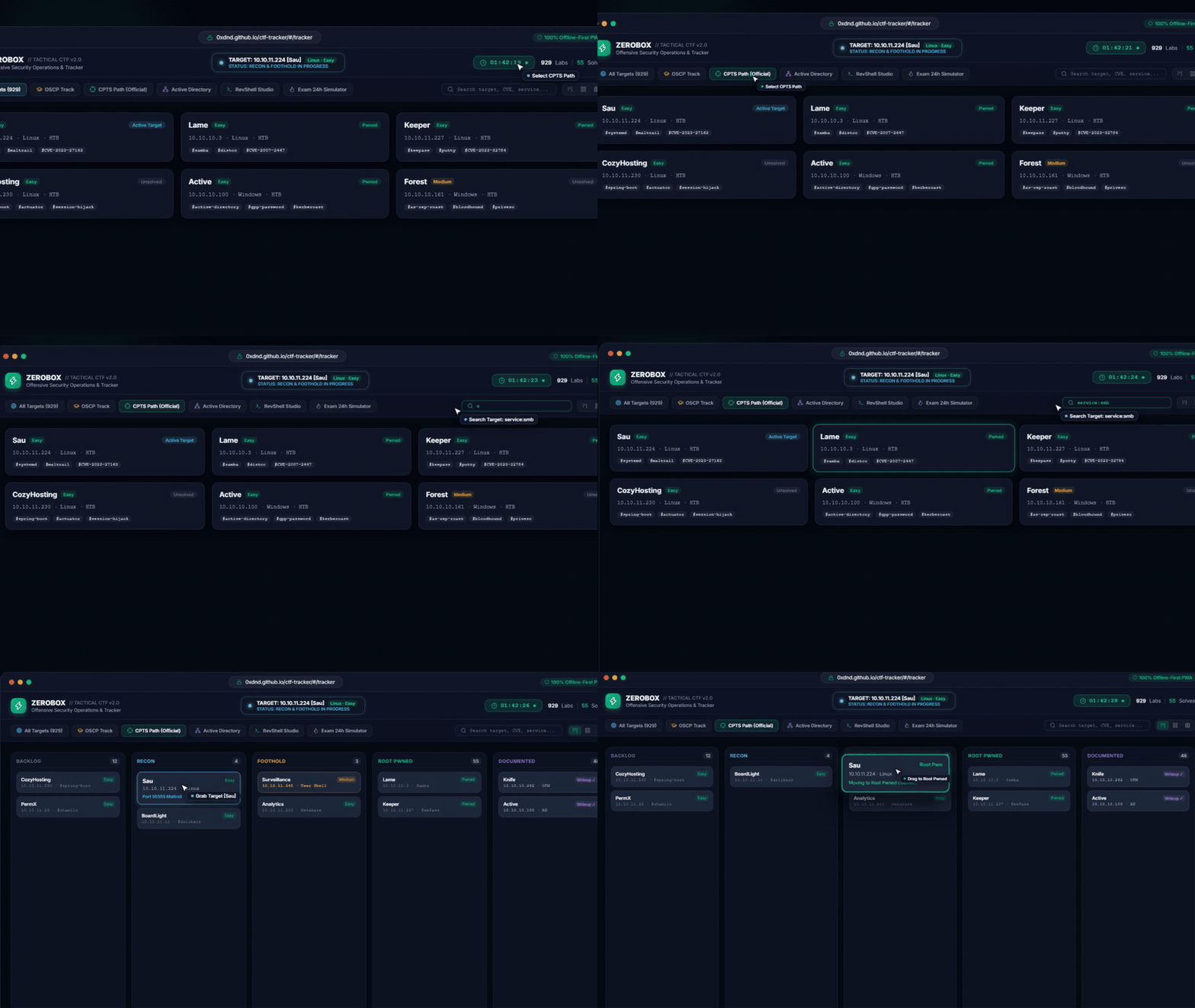
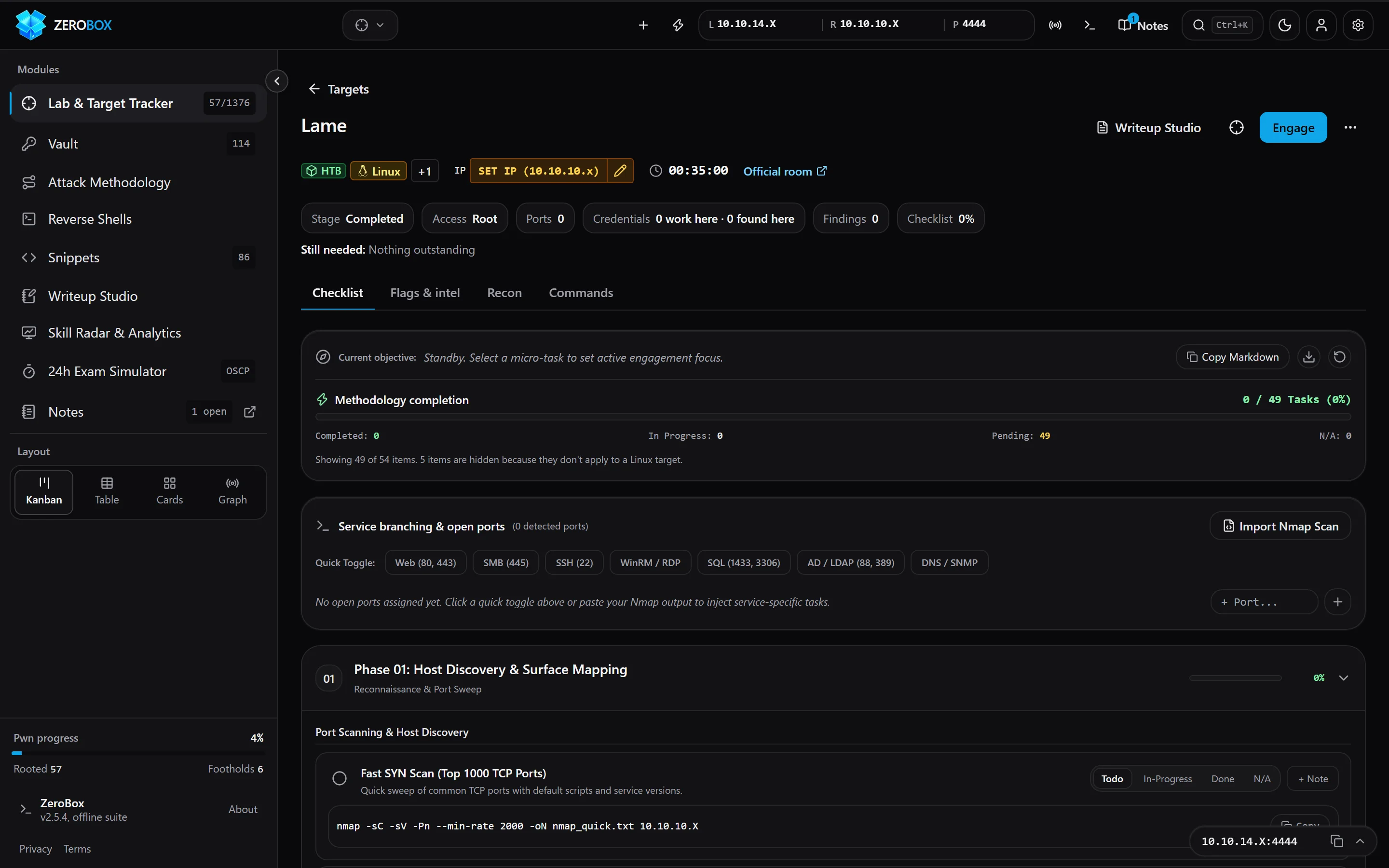
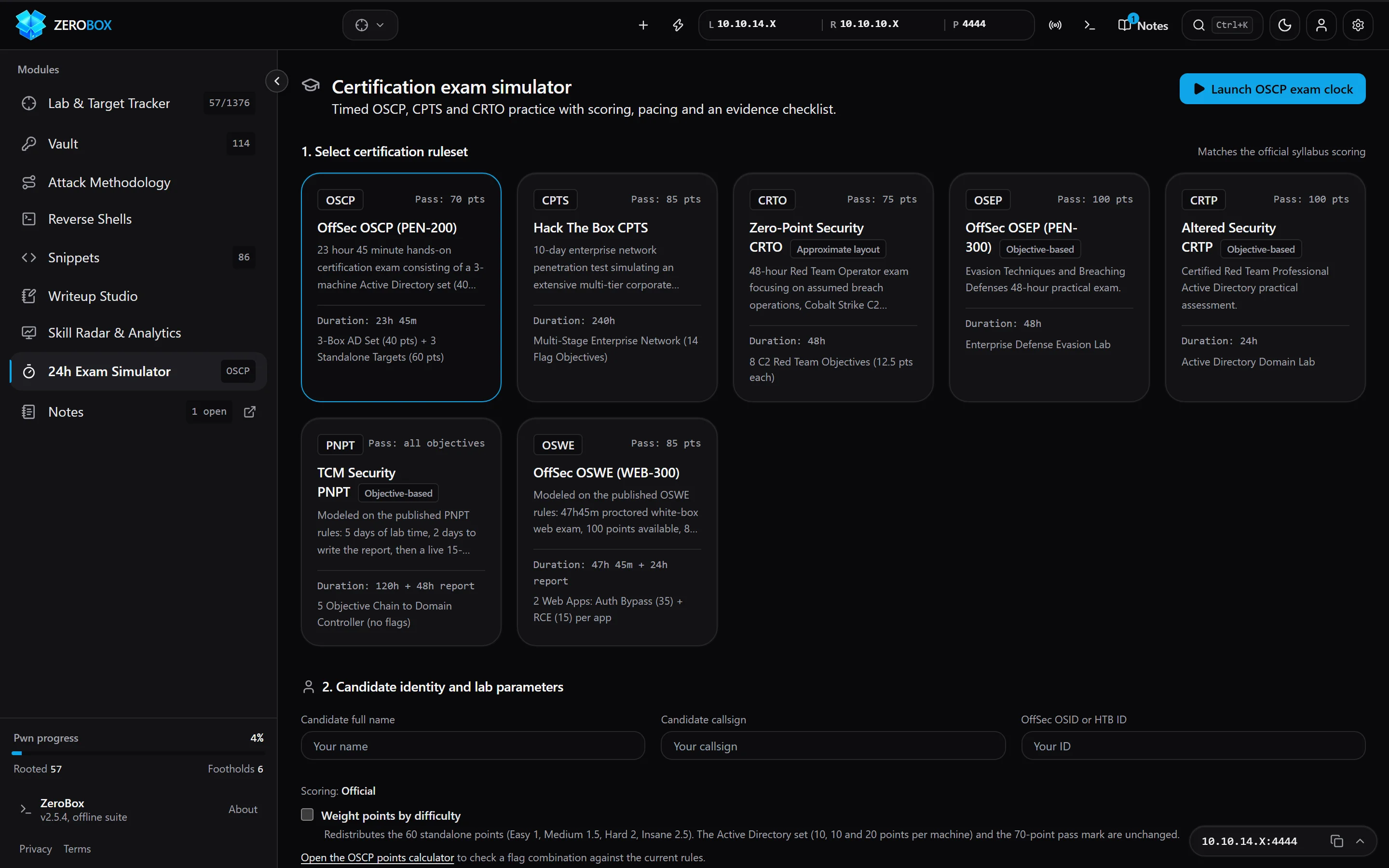
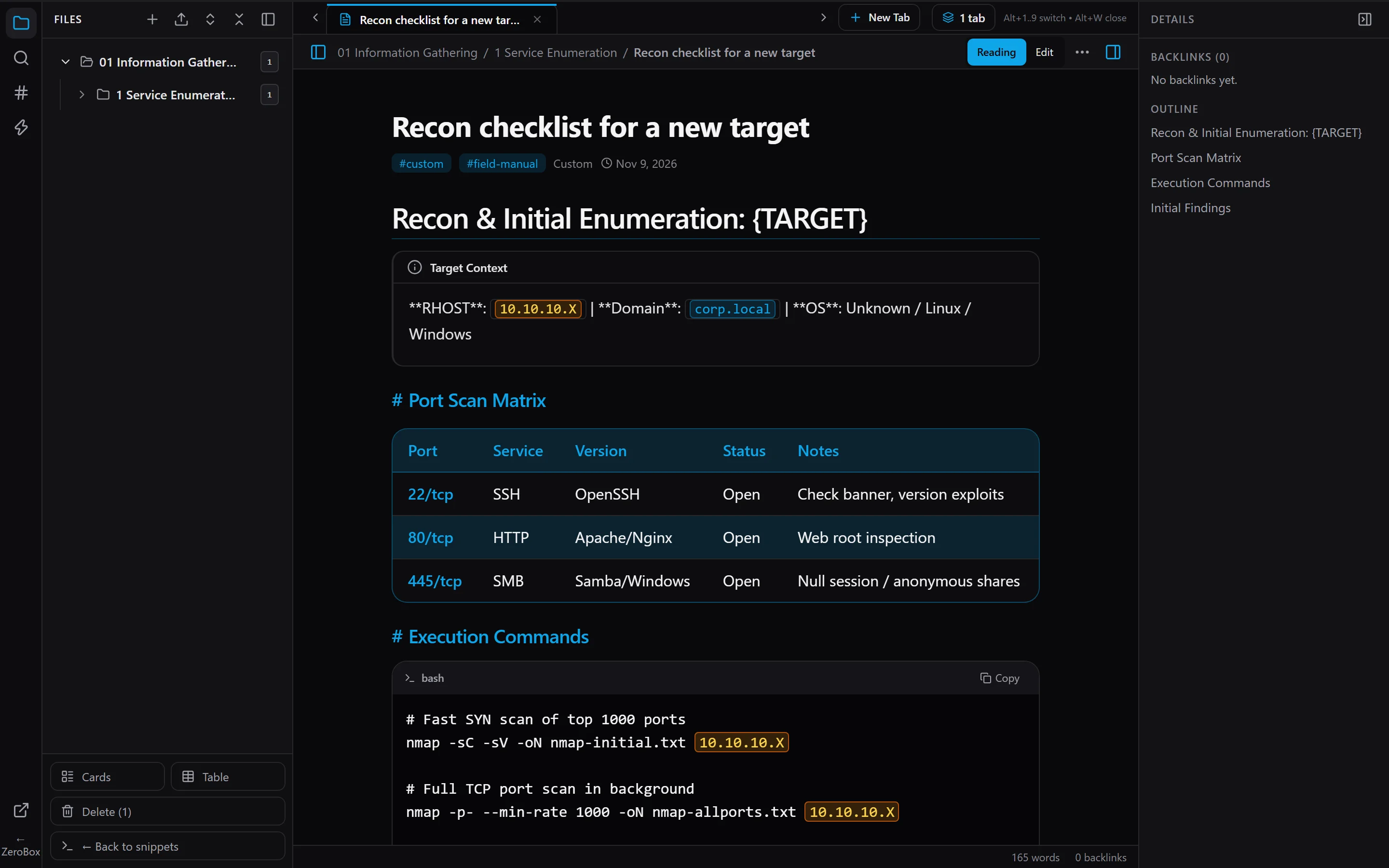
Screenshots
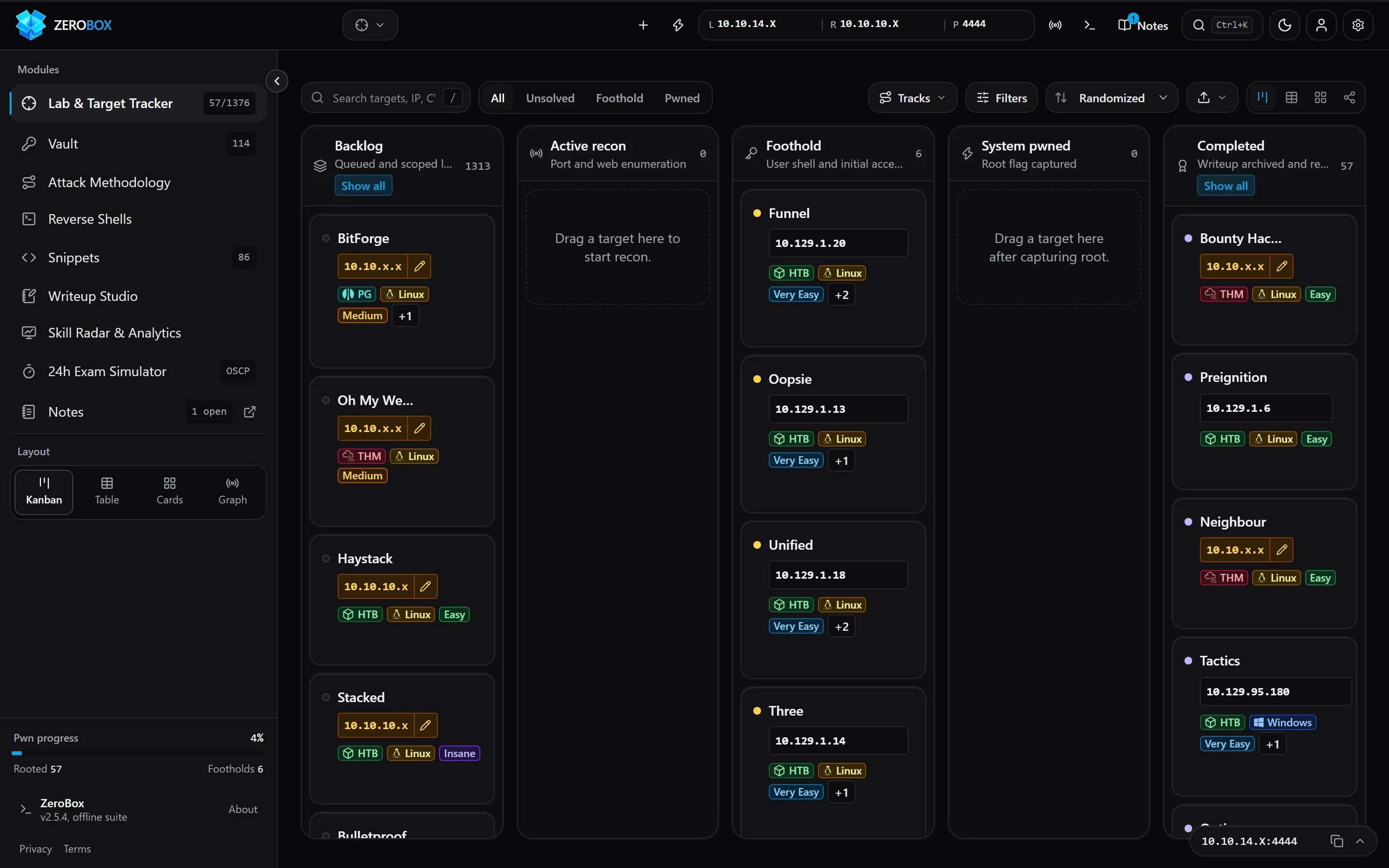
Captured from the built-in demo data.
| Tracker board | Machine detail |
|---|---|
 |
 |
| Exam simulator | Notes |
 |
 |
ZeroBox is a free, source-available CTF tracker for Hack The Box and TryHackMe. Use it to track your capture the flag (CTF) progress, plan which HTB machines and THM rooms to do next, keep your pentest notes and loot in one place, and prepare for OSCP, CPTS and CRTO. It runs in your browser at ctftracker.com or as a desktop app.
🤔 Why ZeroBox?
Grinding for OSCP, CPTS or CRTO? Your progress is probably scattered across browser tabs, a Notion page, a text file of creds and a cheatsheet you keep re-typing IPs into. ZeroBox puts it all in one place:
| Instead of… | ZeroBox gives you… |
|---|---|
| 📋 A messy spreadsheet of boxes | 1376 HTB, THM, PG & VulnHub machines pre-loaded, on a Kanban board from Backlog to Pwned |
🔁 Editing 10.10.x.x in every command |
A dynamic cheatsheet — set LHOST/LPORT/TARGET_IP once, every command updates |
| 🐚 Googling "python reverse shell" again | 129 reverse shells with matching listeners, one click to copy |
| 🔑 Creds lost in random notes | A loot vault for every hash, key, flag and password you find |
| 😰 Wondering if you're exam-ready | A 24h exam simulator with OSCP/CPTS/CRTO-style scoring |
🔒 100% private: everything lives in your browser (LocalStorage + IndexedDB). Nothing is ever sent anywhere.
⭐ If ZeroBox saves you time, please star the repo — it's the best way to help more hackers find it!
🚀 Core Modules
1. 🛡️ Lab & Machine Tracker
- 1376-machine catalog: Active & retired HTB machines and Starting Point labs, THM CTF rooms, OffSec Proving Grounds and VulnHub boxes, plus custom targets, Pro Labs and exams.
- Unified Tactical HUD: Streamlined
UnifiedHeaderwith instant Day/Night theme toggles, slide-outFilterDrawerwith MITRE ATT&CK tagging, andSnippetsDrawerfor lightning-fast command lookups. - 5-stage attack lifecycle:
Target Backlog→Active Recon→Foothold Obtained→System Pwned→Completed & Logged. - Five views & pathways: Kanban board, dense sortable table, card grid, attack graph view with edge pivot inspector, and a practice-track chip row with progress and a next-machine shortcut for structured cert journeys (OSCP, CPTS, CRTO).
- Target dossier: Per-machine detail page with multi-host Nmap/scan import, methodology checklist, flags, and user/root timers.
- Fast search:
/orCtrl+K/Cmd+K, plus syntax DSL search (syntaxSearchUtils) and a global command palette.
2. 🗝️ Evidence & Loot Vault
- Credentials, hashes, flags, keys and tokens collected across every target in one place.
- Automatic hash type identification (
hashIdentifier) across 20+ hash formats. - Loot timeline, quick add, batch operations, and an export drawer for reports.
3. 🧭 Methodology & Field Manual
- Attack methodology: Phase-by-phase tree with decision branches and playbooks.
- Dynamic cheatsheet: Set
LHOST,LPORT,TARGET_IPonce and they are injected into every command. - Reverse shell builder & modal: 129 Linux and Windows payloads (
RevShellModal) with matching listeners and one-click copy. - Offensive Forge Utilities: Multi-host scan parsing, payload encoding, and transfer server presets (
offensiveForgeUtils,multiHostScanParser). - Notes workspace: Obsidian-style note viewer with multi-tab docked notes and an IndexedDB-backed private vault.
4. 📝 Writeup Studio & Reports
- Dual-pane Markdown editor with live preview.
- Pentest report templates pre-filled with target data, exportable via
reportCompilerUtilsas.mdor formatted HTML for Obsidian or GitBook.
5. 📊 Analytics & ⏱️ Exam Simulator
- Skill radar & readiness analytics: Real-time telemetry (
readinessAnalytics) across Web, AD, Linux/Windows PrivEsc, Pivoting, and a 90-day activity heatmap. - 24h exam simulator: OSCP, CPTS and CRTO-style rulesets, scoring, breaks, evidence proofs, and a live burn-down chart.
🧱 Tech Stack
- UI: React 18 + TypeScript, built with Vite
- Routing: react-router 7
- Styling: Tailwind CSS
- State: Zustand
- Desktop: Tauri
- Testing: Vitest
🤝 Contributing
Bug reports, ideas and pull requests are welcome. Read CONTRIBUTING.md first, then open an issue using the bug report or feature request templates.
🎨 Design & Principles
- Refined tactical UI: calm dark (zinc / graphite / OLED) and light themes, switchable presets, Inter for text and monospace for IPs, hashes and commands.
- Accessible: WCAG 2.1 AA contrast, visible focus states, keyboard navigation, and
prefers-reduced-motionsupport. - Offline-first & private: zero backend and no outbound network requests. All data stays in your browser (LocalStorage + IndexedDB).
- Data portability: one-click JSON backup and restore.
- Audio cues: synthesized alerts with no external audio files.
🛠️ Local Development & Build
Prerequisites
- Node.js 18+ (tested on Node.js 24)
- npm 9+
# Clone the repository
git clone https://github.com/0xdnd/ctf-tracker.git
cd ctf-tracker

# Install dependencies
npm install

# Start local development server
npm run dev

# Build production bundle
npm run build

# Preview production build locally
npm run preview
Windows shortcut: after
npm install, double-clickSTART-TRACKER.batto start the dev server and open the tracker in your browser. On macOS/Linux, use the npm commands above.
🖥️ Desktop App (Tauri)
ZeroBox also ships as a native desktop app. With the Tauri prerequisites installed:
npm run tauri:dev     # run the desktop app in development
npm run tauri:build   # build an installer
✅ Testing
npx tsc --noEmit   # type check
npm test           # 212 test suites / 3,200+ unit & component tests (Vitest)
npm run test:e2e   # browser E2E crawl (Python + Playwright)
❓ FAQ
What is a CTF tracker? A CTF tracker is a tool for keeping track of the capture the flag challenges you have started and finished. ZeroBox tracks HTB machines and TryHackMe rooms through each stage, from recon to root, and stores your flags, credentials and notes with them.
Is ZeroBox free? Yes. It's free for personal and educational use, needs no account, and has no paywall. Open ctftracker.com and start.
Does it work offline? Where is my data stored? Everything is stored locally in your browser (LocalStorage + IndexedDB). There is no backend and nothing is uploaded. You can export a JSON backup at any time.
Which platforms does it cover? 560 retired Hack The Box machines, 20 active Hack The Box machines (name, OS, difficulty and link only), plus 451 TryHackMe CTF rooms. You can also add custom targets from other platforms, such as PG Practice, VulnHub or your own lab, and track your own Pro Labs or exams as personal targets.
Can I use it to prepare for OSCP or CPTS? Yes. It includes a 24-hour exam simulator with OSCP, CPTS and CRTO-style scoring, a methodology checklist, and a cheatsheet that fills in your IPs and ports for you.
👨💻 Creator & System Architect
ZeroBox is designed, engineered, and maintained by Daniel Dayan (@0xdnd) — Cybersecurity Researcher, Penetration Tester, and Offensive Security Architect.
| Channel | Identifier | Link |
|---|---|---|
| 🌐 Official Portfolio | Daniel Dayan Security & Research |
0xdnd.github.io |
| 💼 LinkedIn Profile | daniel-dayan-a66322352 |
Connect on LinkedIn |
| 💻 GitHub Repositories | @0xdnd |
Follow on GitHub |
| 📝 CTF Write-ups & Docs | THM & HTB Research Vault |
Read GitBook Writeups |
| ☕ Buy Me a Coffee | 0xdnd |
Support on Buy Me a Coffee |
📜 Terms of Service (ToS) & Acceptable Use Policy (AUP) Compliance
ZeroBox is engineered to strictly uphold the Terms of Service, Acceptable Use Policies, and Community Guidelines of Hack The Box (HTB) and TryHackMe (THM):
1. 🛡️ Hack The Box Acceptable Use Policy (§8.2 & §8.3)
- Zero Active Content Disclosure: In strict accordance with HTB AUP §8.2 ("Sharing solutions, write-ups, flags, or hints for active content is strictly prohibited"), active machines appear only as metadata-only entries: name, OS, difficulty, release date (recorded in
src/data/activeMachines.json) and a link to the official machine page. Every hint, solution, flag, tag and note is stripped from them, including anything typed in by the user. The active list is maintained by hand and may lag behind Hack The Box. - Retired Content: The 560 retired HTB machines stay in the catalog; 141 of them (mostly retired since 2024) are listed by name, OS, difficulty and link only. HTB AUP §8.3 explicitly permits community walkthroughs, educational write-ups, and streaming for content that has been retired.
- Pro Labs & Exams Not Bundled: No Pro Lab, Fortress or certification exam names or content ship with ZeroBox. Users can only add them as personal targets that they name and fill in themselves.
- Anti-Scraping / No-Crawling: ZeroBox contains zero scrapers, bots, or automated crawlers targeting HTB servers (HTB UA §6.1).
2. 🎯 TryHackMe Terms of Use (§3 & §5)
- Practice Challenge Rooms Only: 451 public community challenge rooms are indexed for individual tracking (multiplayer/KoTH competition rooms excluded).
- Zero Raw Flag Dumping: Solved milestones in Daniel Dayan's verified roster utilize synthetic educational tokens (e.g.,
THM{flag_captured_daniel_dayan}) rather than raw live challenge flags. - Zero Data Harvesting: No automated data extraction or scraping tools are used against THM infrastructure.
3. 🔒 Zero-Leakage Private Notes & Vault Architecture
- Proprietary Course Materials Excluded: Course material, official academy modules (such as CPTS / HTB Academy), and private exam notes are never committed into the git repository or bundled into public build artifacts.
- 100% In-Browser IndexedDB Sandbox: All imported field notes and obsidian vaults operate in-memory and inside the user's private client-side IndexedDB database (
zerobox_vault_db).
4. ⚖️ Independent Project & Trademark Disclaimer
ZeroBox is an independent source-available tracking and educational dashboard created by Daniel Dayan. ZeroBox is not affiliated with, endorsed by, sponsored by, or associated with Hack The Box Ltd or TryHackMe Ltd. "Hack The Box", "HTB", "TryHackMe", and "THM" are trademarks or registered trademarks of their respective owners. All target metadata, room links, and writeup hyperlinks are referenced solely for non-commercial educational tracking and study under fair use.
⚖️ License & Intellectual Property Protection
ZeroBox is released under the ZeroBox Source-Available Non-Commercial & Educational License (ZNSL 1.0).
Copyright © 2026 Daniel Dayan (@0xdnd). All Rights Reserved.
Summary of Terms:
| Permission / Restriction | Status | Details |
|---|---|---|
| Personal & Educational Use | ✅ ALLOWED | You may inspect, clone, build, and use ZeroBox locally for individual study, practice labs, and CTF preparation. |
| Commercial Exploitation | ❌ FORBIDDEN | You may NOT sell, rent, monetize, sub-license, or charge fees for this platform or any portion thereof. |
| Public Re-Publishing / SaaS | ❌ FORBIDDEN | You may NOT host a public web instance, re-publish, or distribute modified copies under your name without written consent. |
| Course Bundling / Paid Training | ❌ FORBIDDEN | You may NOT include ZeroBox in any paid course, bootcamp, or commercial subscription service. |
| Attribution Requirement | ⚠️ MANDATORY | All permitted educational mentions or references must prominently cite Daniel Dayan (0xdnd.github.io). |
For the full legal text, see the official LICENSE file.