
00200200/usagetrim
00200200/usagetrim has 43 GitHub stars and 7 forks. GitHot measured 0 in 7 days. Last checked 2026-11-09 14:02 UTC. Last push 2026-11-07.
Local CLI and MCP server for compacting test and build output, with retrieval from a redacted local cache.
Measured star growth
- in 24h
- Update delayed
- in 7 days
- 0
- in 15 days
- Update delayed
- in 1 month
- Update delayed
Net star changes over overlapping periods, not daily totals. Missing measurements are left blank. Stars measure attention, not software quality.
README.md
OriginalUsageTrim
A local CLI and MCP server for compacting verbose test and build output. Filters use format-specific rules to retain diagnostic context; cached output is recoverable after recognized secrets are redacted, while the entry remains stored. Integrations are available for Claude Code, Codex, Cursor, and Claude Desktop; the macOS companion is optional.


Website · Install · Demo · Features · Connect · Pet · Guide
Install
Requires Python 3.11+ and uv (pipx works too).
uv tool install git+https://github.com/00200200/usagetrim
usagetrim demo
Try without installing: uvx --from git+https://github.com/00200200/usagetrim usagetrim demo.
Add it inside your app
| App | Install |
|---|---|
| Claude Code | /plugin marketplace add 00200200/usagetrim, then /plugin install usagetrim@usagetrim — MCP tools, Bash and MCP output hooks, Haiku agents |
| Claude Desktop | Customize → Plugins → add the marketplace 00200200/usagetrim, or double-click usagetrim-<version>.mcpb from Releases (Settings → Extensions) |
| Codex app & CLI | codex plugin marketplace add 00200200/usagetrim, then codex plugin add usagetrim@usagetrim (or pick it under Plugins in the app) |
| Cursor, Windsurf | usagetrim install --cursor or usagetrim install --windsurf |
Plugins run the pinned release wheel through uvx, so they need uv on PATH. The .mcpb extension installs its own copy through Claude Desktop.
verbose tool text → keep the failure → recover the rest by reference
See it cut
usagetrim demo runs authored fixtures with no model calls. It checks failure retention and exact recovery for those fixtures, which contain no recognized secrets. These checks do not guarantee preservation of every diagnostic in arbitrary output.
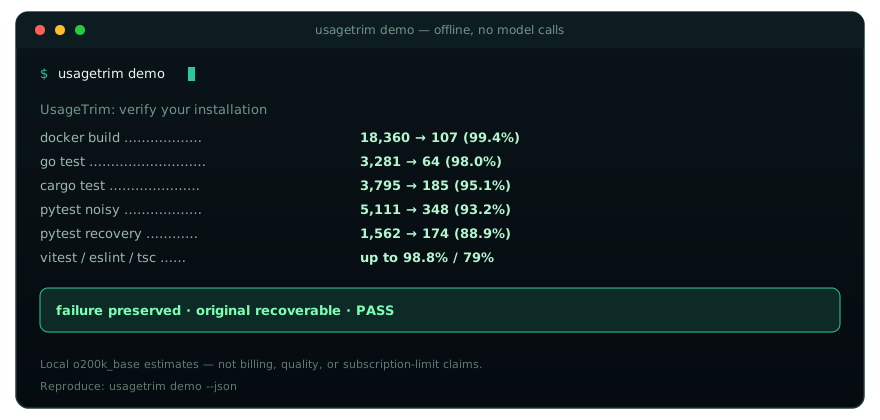
| Fixture | Tokens |
|---|---|
docker build BuildKit |
18,360 → 107 (99.4%) |
go test + goroutine dump |
3,281 → 64 (98.0%) |
terraform plan refresh/read |
6,409 → 276 (95.7%) |
cargo test + backtrace |
3,795 → 197 (94.8%) |
| pytest noisy (xdist + I/O) | 5,111 → 349 (93.2%) |
kubectl describe pod |
8,127 → 595 (92.7%) |
| pytest recovery demo | 1,562 → 174 (88.9%) |
vitest / eslint / tsc |
up to 98.8% / 79% |
Local o200k_base estimate — not billing, quality, or subscription-limit claims. Full matrix: usagetrim demo --json.
usagetrim run -- pytest -v
usagetrim run -- docker build -t app .
usagetrim run -- docker compose logs
usagetrim run -- cargo test
usagetrim run -- go test ./...
usagetrim run -- kubectl describe pod api-7d8f9c-xk2m9
usagetrim run -- terraform plan
usagetrim run -- npx eslint . --format codeframe
What you get
- Compact supported MCP text formats. The Claude Code hook rewrites results from other MCP servers: uniform JSON rows become TSV with the keys once,
{"result": "…"}wrappers lose their escaping, and indentation goes. The rewrites target supported JSON shapes and preserve recognized<untrusted-data-…>delimiters and surrounding warnings; they do not provide a prompt-injection defense. Measured below. - Focused helper agents. The plugin adds
scout(read-only search) andrunner(tests and builds, failures only) agents on Haiku.usagetrim install --cheap-exploreconfigures Claude Code's built-in Explore to use Haiku./output-style usagetrim:leantrims reply preambles and recaps. - Compose logs.
docker compose/docker-compose/podman compose/podman-composeupandlogsfold repeated successful healthchecks, HTTP health polls and Redis heartbeats per service. Unknown lines, errors and exit events remain intact. Before every exit, the last ten lines of every observed service are preserved: even an exact name match can refer to another service's container. This deliberately favors crash context over maximum compression when project or custom container names are ambiguous. ANSI-decorated or other unrecognized formats are left unchanged; no Docker/Podman daemon is needed by the filter. - Cut noise, keep the failure. Specialized filters for pytest, Docker, cargo, go, vitest, eslint, tsc, mypy, pyright, kubectl, terraform/tofu plan|apply|destroy, GitHub Actions / GitLab CI log folding (
gh run view --log-failed,glab ci trace),uv sync/uv add, git diff, ruff… - Session dedup + spill. Same
runoutput or identicalcat/ MCPusagetrim_readview within ~15 minutes → short cache ref. Payloads over ~20 KiB → file + preview (USAGETRIM_SPILL_BYTES). - Recover by reference.
usagetrim retrieve tc_…returns cached text after recognized secrets are redacted. Cache entries can be evicted when the size budget is exceeded, pruned, or cleared; references are not permanent backups. Redaction uses patterns and may miss sensitive content. - Measure it.
usagetrim gain/ MCPusagetrim_gain— per-tool-family savings and passthrough candidates (local estimates, not account quotas). - Desktop-ready. MCP for Claude Code / Codex / Cursor / Claude Desktop; Prepare-for-chat clipboard flow; optional macOS pet.
usagetrim gain                 # summary + by tool family + passthrough tips
usagetrim gain --history       # same tables + recent Raw→Compact / Saved rows
usagetrim gain --passthrough   # near-zero cuts only (specializer candidates)
usagetrim prepare --file draft.txt
Local Llama 3 text token counting
You can explicitly supply an already-obtained April 2024 Llama 3
tokenizer.model file. UsageTrim never downloads it or installs a backend:
export USAGETRIM_LLAMA3_TOKENIZER_PATH=/absolute/path/to/tokenizer.model
usagetrim tokens "hello world" --model llama
usagetrim prepare --file draft.txt --model llama --budget 1000
In PowerShell, set $env:USAGETRIM_LLAMA3_TOKENIZER_PATH to the local file path.
The optional path is consulted only for the llama family. It does not change
legacy calls with model=None or the Claude/OpenAI counting paths.
With tiktoken available and a valid file, the method is
llama3-2024-04-local-sha256-<file digest> and is_estimate=False: this is a
real count of plain text under that specific local vocabulary and the April
2024 Llama 3 segmentation rules. It does not certify that the file came from
Meta. Use the tokenizer supplied for your exact model; the file digest identifies
the artifact, not a general guarantee for every Llama version or derivative.
SentencePiece files and other vocabulary formats are not supported by this adapter.
The adapter accepts regular files named tokenizer.model, at most 16 MiB, in
base64-token/integer-rank format with 128,000 unique contiguous ranks and complete
byte fallback. URL and UNC paths are refused. No file is executed. Missing,
unreadable, oversized or structurally incompatible files, or unavailable tiktoken,
use the existing deterministic utf8-bytes-div4-ceil estimate instead. Configuration
errors are reflected by the fallback method and estimate label. Structural
validation cannot detect every vocabulary intended for a different model.
One encoding snapshot is pinned throughout an optimization/preparation operation;
changing the file or environment affects only subsequent operations.
No BOS/EOS, chat templates, role markers or API message framing are added. Text resembling a special token is counted as ordinary text. These counts are therefore not counts for an entire API request. Budget enforcement uses the selected local method; the UTF-8 fallback is not an upper bound on provider tokens.
The adapter uses tiktoken's Encoding API and the published segmentation rules;
it does not bundle Meta vocabulary, model weights or the Meta tokenizer class.
Obtain and use Meta artifacts under the
Meta Llama 3 Community License.
The synthetic CI vocabulary tests loading, byte fallback and merges, not agreement
with an official model. An optional manual comparison can use an independently
installed Meta tokenizer
and the same local file: compare counts with bos=False, eos=False, and special
tokens treated as ordinary text, across code, JSON, whitespace and Unicode.
No official vocabulary is required by the regular test suite.
Measured on real sessions
Maintainer-reported results from 14 days of Claude Code transcripts, replayed offline through the same functions the hook runs. Token counts are local o200k_base estimates, not billing; the private transcripts are not included as a public benchmark dataset.
| Tool results | Count | Tokens before → after | Cut |
|---|---|---|---|
| All third-party MCP results | 11,058 | 7.17M → 5.85M | 18.3% |
Supabase execute_sql |
6,571 | 4.97M → 4.03M | 18.9% |
| Google Search Console analytics | 223 | 702k → 434k | 38.2% |
Vercel list_deployments |
43 | 250k → 210k | 16.1% |
All 3,144 SQL results rewritten as TSV decoded back to the original rows (reproduce on your own transcripts: uv run python scripts/replay_mcp_transcripts.py). Browser and page-text tools return prose and were left alone. Bash output in the same sessions was mostly ad-hoc scripts, where the filters saved under 1%. Test and build logs are where the Bash filters pay off, so results depend on what your tools print.
How it fits
UsageTrim sits on the tool path (CLI wrapper, MCP, Prepare-for-chat). It does not intercept or rewrite the chat stream. Its filters aim to retain failure details while reducing repetitive output; inspect the cached text when the compact view is insufficient.
| Approach | What UsageTrim does instead |
|---|---|
| Blind head/tail truncation | Specialized cutters retain recognized failure details; redacted cached text is available via usagetrim retrieve while retained |
| Rewrite the whole chat stream | MCP + prepare only — Desktop cannot rewrite model turns |
| Opaque “saved tokens” badges | usagetrim gain shows local Raw→Compact by tool family (not billing quotas) |
Same CCR idea as peers (compress → cache → retrieve). Differentiation is specialized cutters, session dedup, spill-to-file, and Desktop/MCP install paths — not a claim that we beat RTK/snip/headroom on every workload.
Connect your agent
Desktop & Coding profiles: 11 and 9 tools respectively, compared with 16 in the full profile, with shorter schema descriptions. Schema token counts depend on the release, serialization, and tokenizer; smaller schemas do not guarantee lower per-turn usage.
# One-command installer for Codex & Claude Desktop
usagetrim install --codex            # configures ~/.codex/config.toml
usagetrim install --claude-desktop   # configures Claude Desktop MCP
usagetrim install --mcpb             # Extension manifest for one-click packaging
usagetrim install --all              # configures all at once
For Claude Code CLI:
claude mcp add --scope user usagetrim -- usagetrim mcp --profile coding
# or, without installing first:
claude mcp add --scope user usagetrim -- uvx --from git+https://github.com/00200200/usagetrim usagetrim mcp
Manual MCP configuration for Claude Desktop, Cursor, Codex, Windsurf:
{
  "mcpServers": {
    "usagetrim": {
      "command": "/absolute/path/to/usagetrim",
      "args": ["mcp", "--profile", "desktop"]
    }
  }
}
Path: command -v usagetrim. Use --profile full for every tool, --profile coding for core terminal tools, or --profile desktop for chat apps. Client setup →
Legacy HTTP+SSE transport
Install the optional MCP dependencies and start the SSE server:
pip install 'usagetrim[mcp]'
usagetrim mcp --transport sse --profile coding --host 127.0.0.1 --port 8080
Configure a native MCP SSE client with http://127.0.0.1:8080/sse. The stream
advertises /messages?session_id=... for client POST requests. This is legacy
MCP HTTP+SSE (protocol version 2024-11-05), not Streamable HTTP. Browser
clients are not supported; requests containing Origin are rejected.
Both transports support --profile minimal (4 tools), coding (9, the CLI
default), desktop (11), and full (all tools). You can also set
USAGETRIM_MCP_PROFILE. usagetrim mcp continues to use stdio by default;
--transport stdio selects it explicitly.
To require authentication, supply --auth-token or set the environment variable:
export USAGETRIM_MCP_AUTH_TOKEN='replace-with-a-long-random-secret'
usagetrim mcp --transport sse --profile coding
An explicit --auth-token overrides the environment variable. The client must
send Authorization: Bearer <token> on both GET /sse and POST /messages.
Listening outside localhost (for example, --host 0.0.0.0) requires a token.
For remote access, use HTTPS through a reverse proxy or a secure tunnel; the
server itself serves plain HTTP, and Bearer authentication does not encrypt it.
Without a token, both the Host and the actual ASGI peer must be loopback. Remote reverse-proxy deployments must configure Bearer authentication; do not trust forwarded client headers as authentication.
SSE buffers default to a 4 MiB JSON response limit and a global 32 MiB response
budget, including SSE framing. SSEApplication accepts keyword-only
max_response_bytes and max_pending_response_bytes overrides. The budget is
reserved before serialization (including room for the temporary buffer copy)
and held through queueing and sending. The global limit must fit two maximum
framed responses to allow that copy. Exceeding either limit closes the affected session without sending truncated JSON; clients
must reconnect. These limits bound transport buffering, not the memory used by
synchronous MCP handlers or temporary JSON encoder allocations. Serialization
runs outside the event loop. A disconnected or cancelled request cannot forcibly
stop an already running Python handler; execution remains serialized until it
actually returns.
The stats tool's legacy “Session Savings” label means process-wide counters, shared by all SSE clients, not per-HTTP-session or per-user accounting. Clients share the server's tools, operating-system permissions, and cache.
# Prepare messy logs or stack traces with prompt-cache prefix stabilization:
usagetrim prepare --desktop -f error.log

# Initialize or optimize lean, cache-aligned instructions (CLAUDE.md / AGENTS.md):
usagetrim rules --init --client claude        # writes lean CLAUDE.md (~120 tokens)
usagetrim rules --init --client codex         # writes lean AGENTS.md (~120 tokens)
usagetrim rules --optimize --write -f CLAUDE.md # strips filler, aligns prompt caching
Terminal dashboard (TUI)
Install the optional dashboard and launch it locally:
pip install 'usagetrim[tui]'
usagetrim tui
Use Tab and arrow keys to navigate, q to quit, Ctrl+F to focus filters,
Enter/Apply to confirm them, and Ctrl+R to refresh. Telemetry refreshes every
5 seconds. Operation/client/project filters use exact values; time ranges are
24 hours, 7 days, or all time. Global gain totals stay global; history and the
savings chart respect filters. The all-time chart shows only the last 30 days.
USD savings are hypothetical GPT-4o and Claude 3.5 Sonnet input-cost estimates
based on OpenAI token counts and static reference rates, not actual billing
or subscription savings.
The history table shows recorded execution outcomes such as Pass (exit 0),
Fail (exit 7), Signaled and Timed out. Pass means a process exited with
code 0, not that UsageTrim validated every test or diagnostic. Missing execution
metadata is shown as Not recorded. Details separately report execution,
recovery (full, line range or search results), delivery, and snapshot presence.
Prepared is not confirmation that a client received the response. Opening the
viewer is not counted as recovery and does not increment CCR hit counts.
Press Enter on a selected history row to open its unified before/after diff;
press Esc to return with filters and selection preserved. The viewer uses
stored, sanitized and redacted snapshots, never a rerun of the original command
or compressor. Identical snapshots are identified explicitly. Unavailable,
evicted, damaged or oversized snapshots produce a message instead of a partial
comparison. Each snapshot's complete decompressed content is checked against
its full stored SHA-256 before renewed redaction and display; a short ref_id
alone is not integrity verification. Missing or inconsistent hash metadata
prevents comparison. This is a consistency check against local metadata, not
a signature against someone modifying both the content and its hash.
Snapshot storage is disabled by default. Opt in explicitly before running supported operations:
export USAGETRIM_EVENT_REPLAY=1
The environment variable alone does not force capture: the operation must also
explicitly allow caching. --no-cache, pause and applicable storage bypasses
take precedence. CLI/MCP paths without a real before/after pair do not create
one. Native hooks keep replay disabled because stream boundaries and client
cache permission are not sufficiently established; their telemetry remains
prepared. Only trustworthy supplied execution metadata is used.
Snapshots live exclusively in CCR cache.db; telemetry contains references and
limited metadata, not command strings or log payloads. Capture is limited to
4 MiB per snapshot, with no silent truncation. Diff generation has stricter
limits: 128 KiB decoded and 192 KiB stored per input, 1,000 lines per input,
4,096 bytes per sanitized line including its terminator, and 256 KiB of complete
diff output. Snapshots are redacted before capture and again before presentation,
but pattern-based redaction can miss sensitive information. Capture is not a
permanent backup: CCR eviction, pruning or clearing may remove either snapshot.
Historical events lacking snapshots cannot be reconstructed retroactively.
History and charts retain gain eligibility: engine usagetrim, excluding
delivery="prepared". Consequently native prepared events, rtk and bypassed
operations do not appear in this history. At most 50 matching events are shown.
Press F2 for Cache and Esc/F2 to return. Search by a literal ref ID fragment,
use Previous/Next or Ctrl+Left/Ctrl+Right for pages of up to 50 entries, and
select a row for metadata. Browsing does not retrieve log content or increment
cache hits. Copy ref ID uses a native clipboard helper when available.
Preview, Find lines, and Export read content only on request and re-redact secrets. Preview is limited to 100 lines and 16 KiB, with a 256 KiB stored-payload limit. Content search returns up to 20 matching numbered lines, each displayed in at most 300 characters; matching still uses the complete redacted line. Search/export refuse payloads exceeding 4 MiB after decompression (stored limit: 4 MiB + 64 KiB). Export writes the complete redacted log to the supplied path, never overwrites an existing file, and uses private file permissions. Zstd needs optional support; unknown-size zstd frames are refused for complete search/export. Missing, damaged, or oversized records produce an error instead of a partial export.
Desktop companion
Linux / Windows MVP: install pip install 'usagetrim[companion]', then run
usagetrim companion in a graphical desktop session. The optional PySide6 window
shows today's actual monitor aggregates (operations, raw/compact token estimates,
and signed net reduction), refreshes every five seconds and can pause/resume
optimization using the same local settings as CLI/MCP. An empty history is shown
as unavailable measurements, not invented savings. After a refresh failure, pause
controls remain disabled until a successful read restores the current state.
Closing the window immediately stops UI updates and cancels queued monitor work
without waiting on the GUI thread. A monitor call already running is allowed to finish;
Python may wait for it before the process exits. This MVP cannot guarantee an
immediate process exit if local filesystem or database operations stall. It does
not forcibly terminate threads or apply their results to a closed window.
On Windows, install and launch from PowerShell (the module form does not require
the Python Scripts directory on PATH):
py -3.12 -m pip install "usagetrim[companion]"
py -3.12 -m usagetrim.cli companion
Drag the standard title bar to move the window. The opaque, normally decorated
window works through Qt's native Windows, X11 or Wayland support; a working Qt
platform plugin and system GUI libraries are required. The optional always-on-top
hint is saved in companion.json, but compositors may ignore it (especially on
Wayland); the normal window remains usable.
Use Desktop Pet to show the bundled Mint robot (the same artwork as macOS),
and Statistics panel to return. Drag Mint or the standard title bar. Pet mode
uses a frameless transparent window only when Windows composition or an X11
compositor can be confirmed. Otherwise it keeps normal window decorations and an
opaque background, including on Wayland. On Wayland global coordinates are not
saved or restored; placement and dragging remain under compositor control.
Mode and supported Pet coordinates are stored in the existing companion.json;
restored positions are clamped to an available screen. Preference writes use an
independent, serialized worker and are coalesced during dragging. Normal closing
captures the final mode and position even before the drag timer fires, and drains
the final atomic settings write without waiting for a monitor read in the GUI.
Normal Python process shutdown waits for that settings worker. This does not
guarantee persistence after a process/system crash or a filesystem write failure.
The Mint tray icon provides Show/Hide Desktop Pet, Show Statistics, Pause/Resume,
Always on Top and Quit. Hide Controls leaves just Mint; restore controls with
Show Pet Controls in the tray menu or Mint's right-click menu. Hiding the Pet
keeps monitoring active. Quit removes the icon, stops GUI timers and exits the Qt
event loop; running monitor work finishes safely as described above.
The tray menu also has a read-only summary: Active/Paused/Unavailable status, today's returned UsageTrim operation count and signed net token reduction. These are existing local OpenAI token estimates, not AI-provider billing or account balances. Negative net reduction remains negative and indicates expansion, not savings. Empty history is shown as no measurements; initial loading and monitor errors show unavailable values. The summary follows the same five-second monitor updates even while Mint is hidden; opening the menu adds no data reads or network requests.
Tray support depends on the desktop shell (including GNOME/Wayland). No GNOME extension is required: without a detected tray, all controls remain available and hiding the whole Pet is disabled. If tray support disappears, controls and a previously hidden Pet are restored on the next availability check (every five seconds). Mint's right-click menu provides another route to statistics and Quit. Control visibility and hidden-window state are session-only; startup always keeps controls accessible.
Mint gently floats by 2–3 pixels inside its widget, with a cached bitmap and at most ten idle redraws per second. The window itself does not move. A small status indicator and tooltip distinguish idle, paused, new measurements and unavailable monitor data. Activity means an increase in today's returned UsageTrim operation count between existing snapshots, not a running command or invented savings. Existing history at startup, a day rollover or a cleared history does not trigger activity. Missing history is idle; read errors are unavailable. Activity feedback is brief, and a paused pet is muted and returns gently to its neutral position.
Turn off Mint animations in the panel or tray/right-click menu to keep Mint
still; the preference is saved in companion.json. Static state indicators remain
available. Motion stops when the Pet is hidden, minimized or replaced by the panel,
and resumes when shown. Quit stops all pet timers and animations. There is no
blinking or eye-layer manipulation of the original PNG, and no notifications or
account-limit network polling. Animation adds no monitor or provider requests.
CI runs the companion tests on Ubuntu and Windows (Python 3.12 on Windows) using
Qt's offscreen plugin and mocked system tray support. The Windows job installs
locked dependencies, loads the real Windows Qt bindings, queries native DWM and
checks the interpreter's final exit status, including failures after tests pass.
This verifies headless behavior, not the appearance of an interactive desktop.
The Qt 6.12.0 binding release is excluded because of the observed Python 3.11
shutdown crash; the lockfile currently selects Essentials/Shiboken 6.11.3.
Manual checks remain necessary on Windows, X11 with/without a compositor, and actual Wayland sessions: transparency, native dragging, focus/always-on-top, multi-monitor and mixed-DPI placement, tray visibility and disappearance, and Quit from a hidden Pet. On Wayland, tests model rejected global positioning; they do not establish support for every compositor's move protocol. Tray tests cannot confirm whether a particular GNOME/KDE setup or Windows notification area exposes the icon. Missing tray support keeps controls accessible as described above.
This command leaves the existing macOS application unchanged; on macOS use the application below.
Mint robot on your Mac — draggable pet or menu-bar mode. Local measurements, task memory, optional account-limit readings. English UI. No extra AI calls.
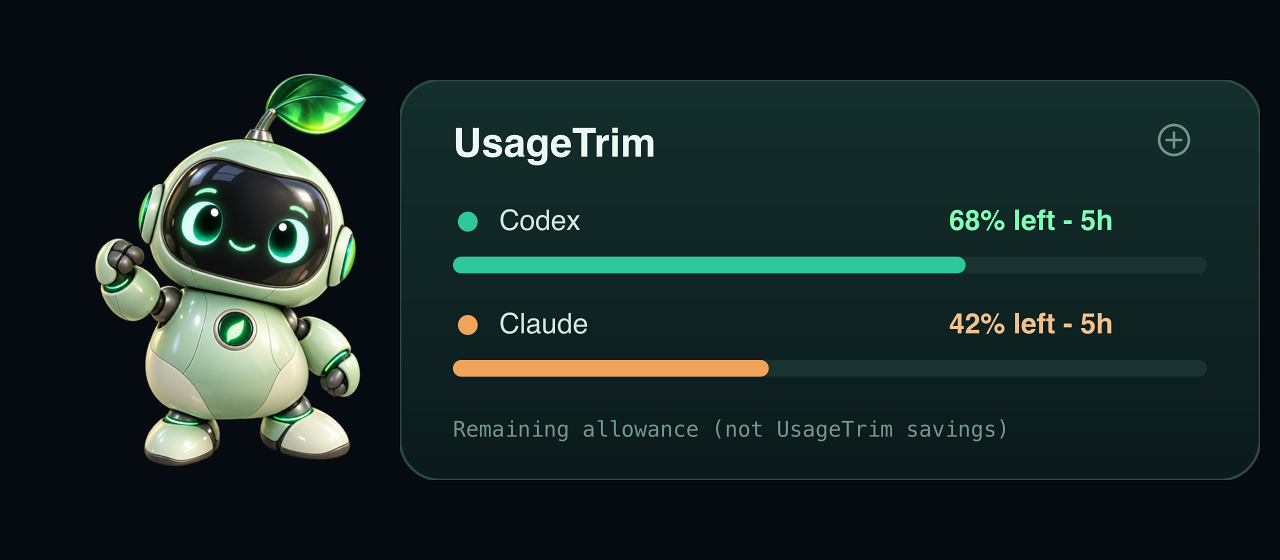
Example balances are remaining allowance — not savings caused by UsageTrim.
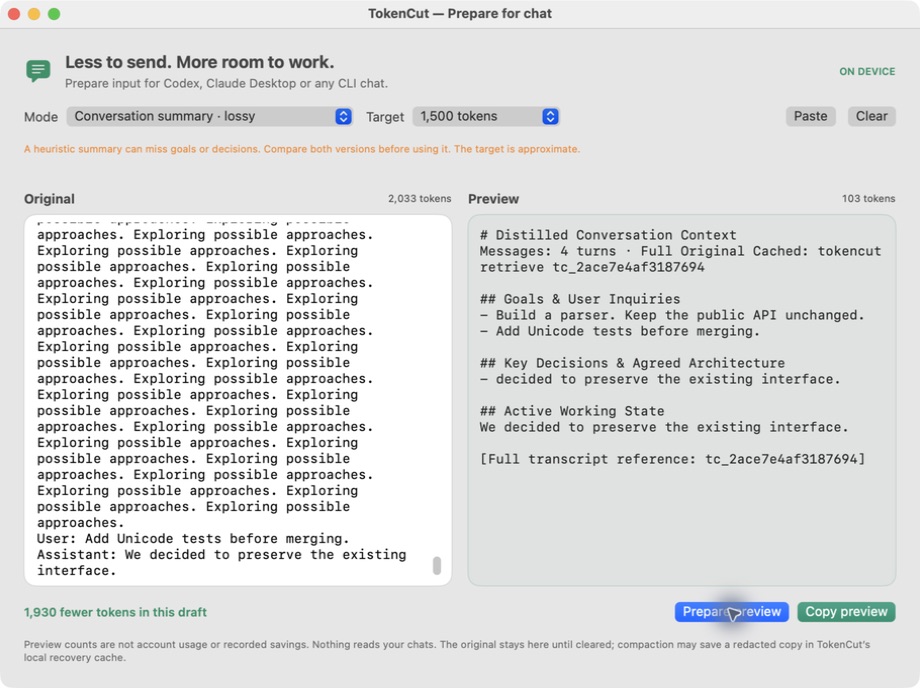
Prepare for chat — paste a log, preview the cut, copy into Codex / Claude Desktop. Log prep →
macOS 13+ · ad-hoc signed, not notarized. CLI and MCP work without the pet. Build →
Roadmap
Possible follow-up work, separate from the features available today:
- Ranked repo map (Aider-style PageRank over the symbol graph) fitted to a token budget.
- LSP-backed references and rename (Serena-style), falling back to the ast-grep index.
- Lossless log templating (Drain-style) for dev-server, Docker and CI logs.
- A paired A/B harness on provider-reported tokens and task pass rate, because output-size savings alone can hide extra turns.
Contributing
Lost context or an incorrect filter result? Open an issue with a small redacted input, the command, and the expected output. See CONTRIBUTING.md for development setup and checks.
Guide · Measurements · MIT
Explore related projects
codecrafters-io/build-your-own-x
Master programming by recreating your favorite technologies from scratch.
561,398 starspublic-apis/public-apis
A collective list of free APIs
497,679 starsmorluto/rea
Reverse engineer anything with agents, from app behavior down to native binaries.
447,495 starsopenclaw/openclaw
The AI that really does things. Any OS. Any Platform. The lobster way. 🦞
394,261 stars