
zylon-ai/private-gpt
zylon-ai/private-gpt has 57,634 GitHub stars and 7,624 forks. GitHot measured +3 stars in 24 hours, +9 in 7 days, and +21 in 15 days. Last checked 2026-11-08 17:39 UTC. Last push 2026-10-29.
로컬 모델 기반 프라이빗 AI 애플리케이션을 위한 완전한 API 레이어입니다. RAG, 스킬, 도구, MCP, text-to-sql 등을 지원하며, OpenAI 호환 추론 서버와 함께 동작합니다.
측정된 스타 증가
- in 24h
- +3
- in 7 days
- +9
- in 15 days
- +21
- in 1 month
- 업데이트 지연
서로 겹치는 기간의 순증가량이며 일별 합계가 아닙니다. 측정값이 없으면 비워 둡니다. 스타는 관심도를 나타내며 품질을 보장하지 않습니다.
README.md
Original




Running a model locally is only the first step. To build useful AI applications you need a set of higher-level building blocks. PrivateGPT provides that layer as an open-source API following the Claude API model — so you can build private AI products without rebuilding the same backend primitives from scratch, and without depending on cloud APIs.
Production-tested: PrivateGPT powers Zylon, the on-premise AI platform providing Private AI to enterprises across the globe.
Your app / agent / workflow / UI
              |
        PrivateGPT API
              |
OpenAI-compatible inference server (Ollama, llama.cpp, vLLM, …)
PrivateGPT does not run models itself. It connects to any OpenAI-compatible inference server via
OPENAI_API_BASE. If it implements/v1/chat/completionsand/v1/models, it works.
PrivateGPT ships a built-in workbench UI for testing and demos, available at /ui. The API is the actual product.
What PrivateGPT gives you
- Standard messages API (streaming, async, token counting)
- File and artifact ingestion
- Retrieval with citations and agentic RAG
- Built-in tools mirroring the Claude API (web search, web fetch, code execution)
- Custom tools and MCP connectors
- Structured access to databases and CSVs
- Embeddings and orchestration
Quickstart
For Docker, full installation options, and model configuration see the full Quickstart guide.
Prerequisites: You need a running OpenAI-compatible LLM server. Ollama is the easiest starting point.
1. Install PrivateGPT
# macOS
brew tap zylon-ai/tap
brew install private-gpt
# Linux
curl -LsSf https://astral.sh/uv/install.sh | sh

uv tool install --python 3.11 \
  --find-links https://wheels.privategpt.dev/packages/ \
  "private-gpt[core]"
# Windows
powershell -ExecutionPolicy ByPass -c "irm https://astral.sh/uv/install.ps1 | iex"

uv tool install --python 3.11 `
  --find-links https://wheels.privategpt.dev/packages/ `
  "private-gpt[core]"
2. Start your LLM server
# Example with Ollama
ollama pull qwen3.5:35b         # LLM (~24 GB)
ollama pull mxbai-embed-large   # Embeddings (~670 MB)
ollama serve
3. Run PrivateGPT
# macOS / Linux
OPENAI_API_BASE=http://localhost:<llm-port>/v1 \
  OPENAI_EMBEDDING_API_BASE=http://localhost:<embedding-port>/v1 \
  private-gpt serve
# Windows (PowerShell)
$env:OPENAI_API_BASE = "http://localhost:<llm-port>/v1"
$env:OPENAI_EMBEDDING_API_BASE = "http://localhost:<embedding-port>/v1"
private-gpt serve
4. Open the UI
Go to http://localhost:8080/ui. The API is at http://localhost:8080 and follows the Anthropic API spec.
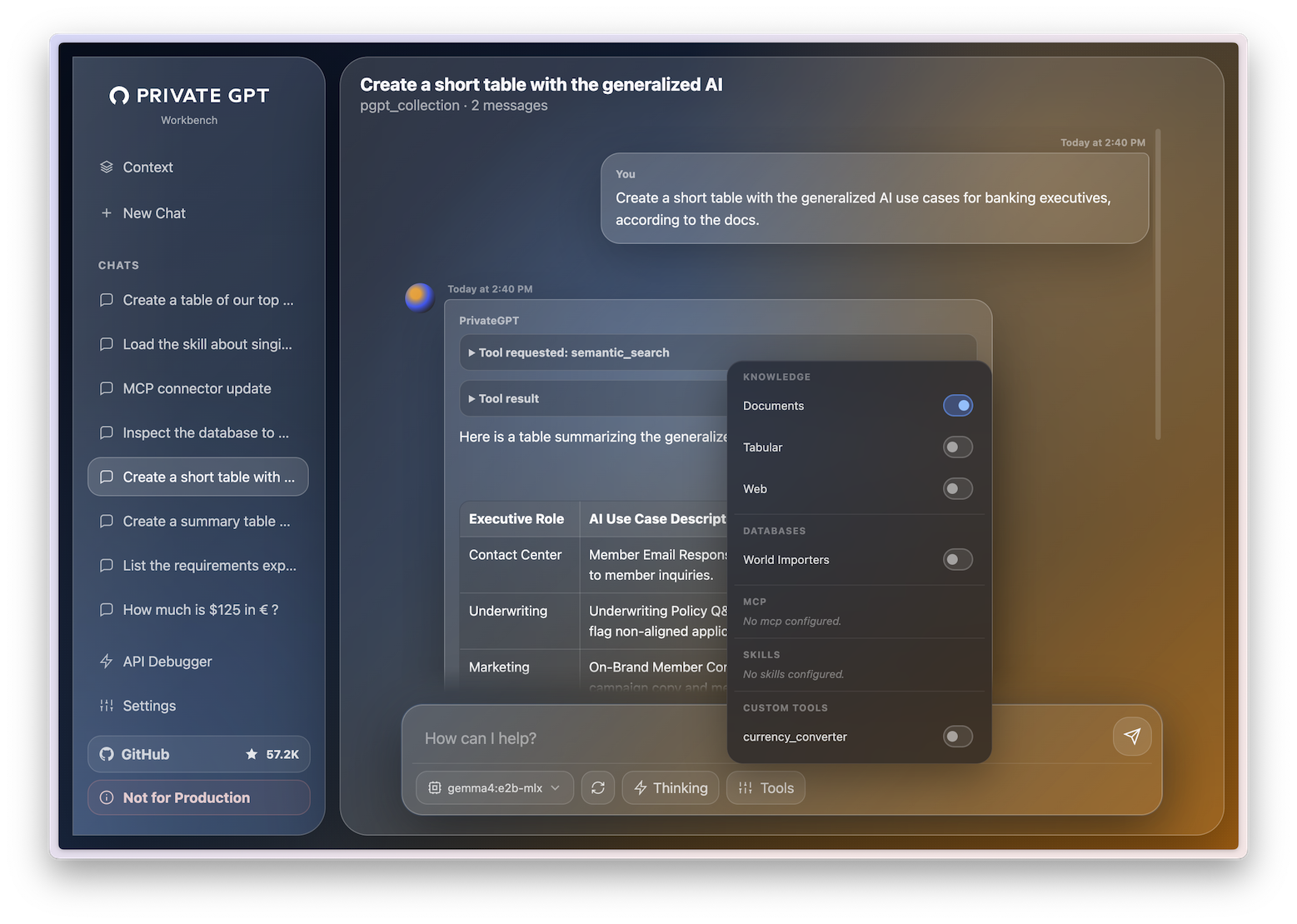
The UI is useful for:
- Sending messages.
- Selecting models from /v1/models.
- Uploading documents.
- Testing retrieval with citations.
- Enabling tools per chat.
- Configuring databases, MCP connectors, skills, and custom tools.
- Inspecting requests and responses through the API Debugger.
This UI is a demonstrator, not the core product. Developers are expected to build their own applications on top of the API. That said, the UI is intentionally polished enough for demos, videos, internal pilots, and quick local usage.
Integrations
 Claude Desktop / Cowork |
 Microsoft Excel Claude add-in |
 Microsoft Word Claude add-in |
 n8n |
 OpenCode |
 PrivateGPT Workbench |
PrivateGPT works natively as the local backend for the tools developers and end users already use.
| Integration Guide | What it enables |
|---|---|
| Claude Code | Use your local models as the backend for agentic coding in the terminal |
| Claude Desktop / Cowork | Connect the Claude desktop app and Cowork to your private models |
| Claude for Microsoft 365 | Run private AI inside Word, Excel, Outlook, and PowerPoint |
| OpenCode | Local AI coding assistant in the terminal |
Any tool that works with a local OpenAI-compatible provider will also work with PrivateGPT. The list below is non-exhaustive.
| Tool | Link |
|---|---|
| n8n | n8n.io |
| OpenClaw | openclaw.ai |
| Hermes Agent | hermes-agent.dev |
| VS Code | code.visualstudio.com |
| Cline | cline.bot |
Claude API compatibility
PrivateGPT follows the Claude API as the reference for modern AI application APIs. The goal is full coverage where it makes sense for a local, open-source layer.
| Area | Capability | Claude API | PrivateGPT |
|---|---|---|---|
| Models | Model selection | ✅ | ✅ |
| Messages | Messages API | ✅ | ✅ |
| Messages | Streaming | ✅ | ✅ |
| Messages | Batch / async processing | ✅ | ✅ async |
| Messages | Token counting | ✅ | ✅ |
| Knowledge | Files / artifacts | ✅ | ✅ |
| Knowledge | PDF and document ingestion | ✅ | ✅ |
| Knowledge | Retrieval with citations | ✅ | ✅ |
| Knowledge | Embeddings | ✅ | ✅ |
| Tools | Tool use | ✅ | ✅ |
| Tools | Tools in streaming | ✅ | ✅ |
| Tools | Built-in web search | ✅ | ✅ |
| Tools | Web extraction / fetch | ✅ | ✅ |
| Tools | Custom tools | ✅ | ✅ |
| Data | Database querying | Via tools | ✅ built-in |
| Data | CSV / tabular analysis | Via tools / code | ✅ built-in |
| Agents | MCP in the API | ✅ | ✅ |
| Agents | Remote MCP servers | ✅ | ✅ |
| Agents | Skills | ✅ | ⚙️ basic |
| Output | Structured outputs | ✅ | ✅ inference-dependent |
| Models | Vision | ✅ | ✅ model-dependent |
| Optimization | Prompt caching | ✅ | ❌ |
| Reasoning | Extended thinking | ✅ | ✅ |
| Platform | Token-based auth | ✅ | ✅ |
| Platform | OAuth / organizations | ✅ | ❌ |
✅ Supported · ⚙️ Partial / in progress · ❌ Not supported
Contributions are especially welcome in ⚙️ areas.
Why PrivateGPT? A brief history
PrivateGPT started as a proof of concept in 2023: a script that let you chat with your documents, fully offline, with no data leaving your machine. It went viral on GitHub, crossed 50K stars, and became one of the most-watched AI repos of that year.
That early version made one thing clear: there was serious demand for private, local AI that worked without cloud dependencies.
PrivateGPT 1.0 is the evolution of that idea — rebuilt from the ground up as a proper API layer for private AI applications.
How PrivateGPT compares
vs Ollama, LM Studio, LocalAI, vLLM, llama.cpp
These projects make it possible to run and serve models locally. They answer: how do I run a model?
PrivateGPT answers the next question: how do I build a useful AI application on top of that model?
Ollama / LM Studio / LocalAI / vLLM / llama.cpp  =  local inference layer
PrivateGPT                                        =  local AI application API layer
Use them together. Run your model with whichever inference server you prefer, then point PrivateGPT at it.
vs Onyx, Open WebUI
Both are valuable, but they are app-first experiences focused on chat and enterprise search. PrivateGPT is API-first. It provides the standardized local backend underneath those products — not the final product itself.
Onyx / Open WebUI  =  self-hosted AI applications
PrivateGPT         =  API layer for building self-hosted AI applications
PrivateGPT vs Zylon
PrivateGPT is maintained by the team at Zylon.
PrivateGPT is the open-source application API layer: messages, ingestion, tools, retrieval, citations, database access, tabular analysis, MCP, skills, and custom tools.
Zylon is the end-to-end AI Infrastructure orchestrating the hardware and software layers into a complete production platform for regulated organizations. On top of PrivateGPT, Zylon adds:
- Integrated inference server based on NVIDIA Triton + vLLM to run open-weight models.
- Concurrency, batch processing and load balancing capabilities to operate at scale.
- Kubernetes self-contained deployment with 20+ production services packaged and supported.
- CLI for installation, updates, model selection, and platform configuration.
- API gateway for governance and developer platform.
- Workspace application for non-technical end users.
- LDAP/Active Directory integration and RBAC user management.
- Telemetry, observability and operational monitoring.
- SIEM audit logs for compliance.
- SharePoint, Confluence, FTP, and Samba connectors.
- Disconnected (air-gapped) operation without external cloud dependencies.
- Integrated n8n Community Edition for workflow automation.
Use PrivateGPT if you want the open-source local AI application layer and developer API.
Use Zylon if you need the full enterprise AI infrastructure around it: deployment, governance, operations, user management, integrations, auditability, and support.
Learn more at zylon.ai · Book a demo
Community and contributing
- Discord — questions, show-and-tell, and release discussions
- Documentation — full reference, guides, and API docs
- Issues — bug reports and feature requests
- Community Forks — interesting forks and derivatives by the community
Pull requests are welcome. If your PR doesn't fit the upstream roadmap, you can add your fork to the Community Forks page instead.
관련 프로젝트 살펴보기
affaan-m/ECC
에이전트 실행·제어 프레임워크를 위한 성능 최적화 시스템. Claude Code, Codex, Opencode, Cursor 등을 위한 스킬, 본능, 메모리, 보안, 연구 우선 개발을 제공합니다.
299,811 스타NousResearch/hermes-agent
당신과 함께 성장하는 에이전트
261,840 스타multica-ai/andrej-karpathy-skills
Andrej Karpathy가 관찰한 LLM 코딩의 함정을 바탕으로 Claude Code의 동작을 개선하는 단일 CLAUDE.md 파일입니다.
231,047 스타firecrawl/firecrawl
웹과 그 너머의 데이터로 AI 에이전트를 강화합니다. 초지능을 위한 라이브러리를 구축하고 있습니다. 🔥
199,847 스타