
ysalitrynskyi/stedding-browser
ysalitrynskyi/stedding-browser has 194 GitHub stars and 8 forks. GitHot measured +4 stars in 24 hours and +50 in 7 days. Last checked 2026-11-12 12:30 UTC. Last push 2026-11-03.
Chromium 기반의 오픈소스 Arc 스타일 브라우저입니다. 사이드바에 세로형 탭, Spaces, 폴더, 고정 탭을 제공하며, 명령 모음과 Arc에서 한 번의 클릭으로 가져오는 기능도 지원합니다. macOS와 Windows를 지원하며 Linux 버전은 곧 출시될 예정입니다. 텔레메트리를 수집하지 않습니다.
What you can do
- Folders in the pinned tabs. Drag one over the line, to any place among the pins; a bar shows where it will land. - Spaces with the mouse. Scroll sideways over the sidebar, with a tilt wheel or Shift and the wheel: one Space for each notch. On Windows, Ctrl and the wheel does it too.
- Little windows, then a tab. A link from another app opens small, its row in the page's colour; Open in Stedding (⌘O, Ctrl+O) moves it into a tab. - ⌘W (Ctrl+W) on a pinned tab, as in Arc: it goes back to its pinned page, asleep, in its place.
측정된 스타 증가
- in 24h
- +4
- in 7 days
- +50
- in 15 days
- 기록 수집 중
- in 1 month
- 기록 수집 중
서로 겹치는 기간의 순증가량이며 일별 합계가 아닙니다. 측정값이 없으면 비워 둡니다. 스타는 관심도를 나타내며 품질을 보장하지 않습니다.
README.md
Original
Stedding Browser
Arc's way of browsing, open source, on Chromium. Tabs in a sidebar, Spaces, pinned tabs and folders, and one command bar for everything. macOS (Apple silicon) and Windows. No account, no telemetry, BSD-3-Clause.




stedding.dev · Download · Shortcuts · FAQ · Privacy · Build
Download for macOS ·
Apple silicon, macOS 13 or later, signed with the project's Developer ID and notarized by Apple
Download for Windows ·
Windows 10 and 11, x64, installs for you alone
Homebrew: brew install --cask ysalitrynskyi/stedding/stedding · Install guide
Highlights
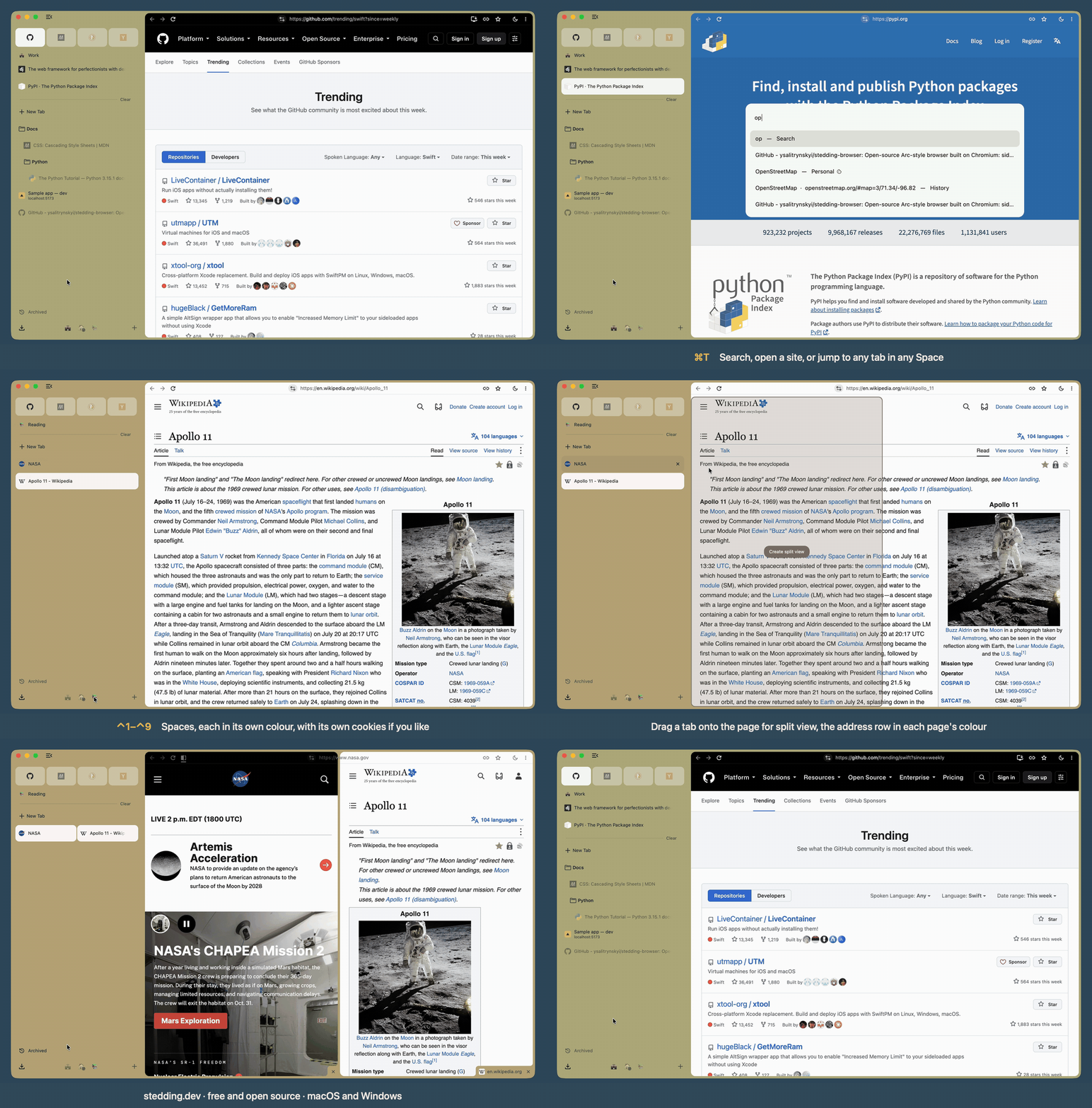
 Folders in the pinned tabs. Drag one over the line, to any place among the pins; a bar shows where it will land. |
 Spaces with the mouse. Scroll sideways over the sidebar, with a tilt wheel or Shift and the wheel: one Space for each notch. On Windows, Ctrl and the wheel does it too. |
 Little windows, then a tab. A link from another app opens small, its row in the page's colour; Open in Stedding (⌘O, Ctrl+O) moves it into a tab. |
 ⌘W (Ctrl+W) on a pinned tab, as in Arc: it goes back to its pinned page, asleep, in its place. |
Each release's notes are on the Releases page.
What Arc never had
- Open source, with no account. Stedding is BSD-licensed and asks you to sign up for nothing: download it and use it. Arc requires an account, and its code is closed.
- Spaces with their own sign-ins, in one profile. Give a Space an Independent session and it keeps its own cookies and site data, so the same site can be signed in as work in one Space and as you in another. Extensions, settings, history and saved passwords stay shared. Arc keeps sign-ins apart only by giving a Space a whole separate profile. Spec
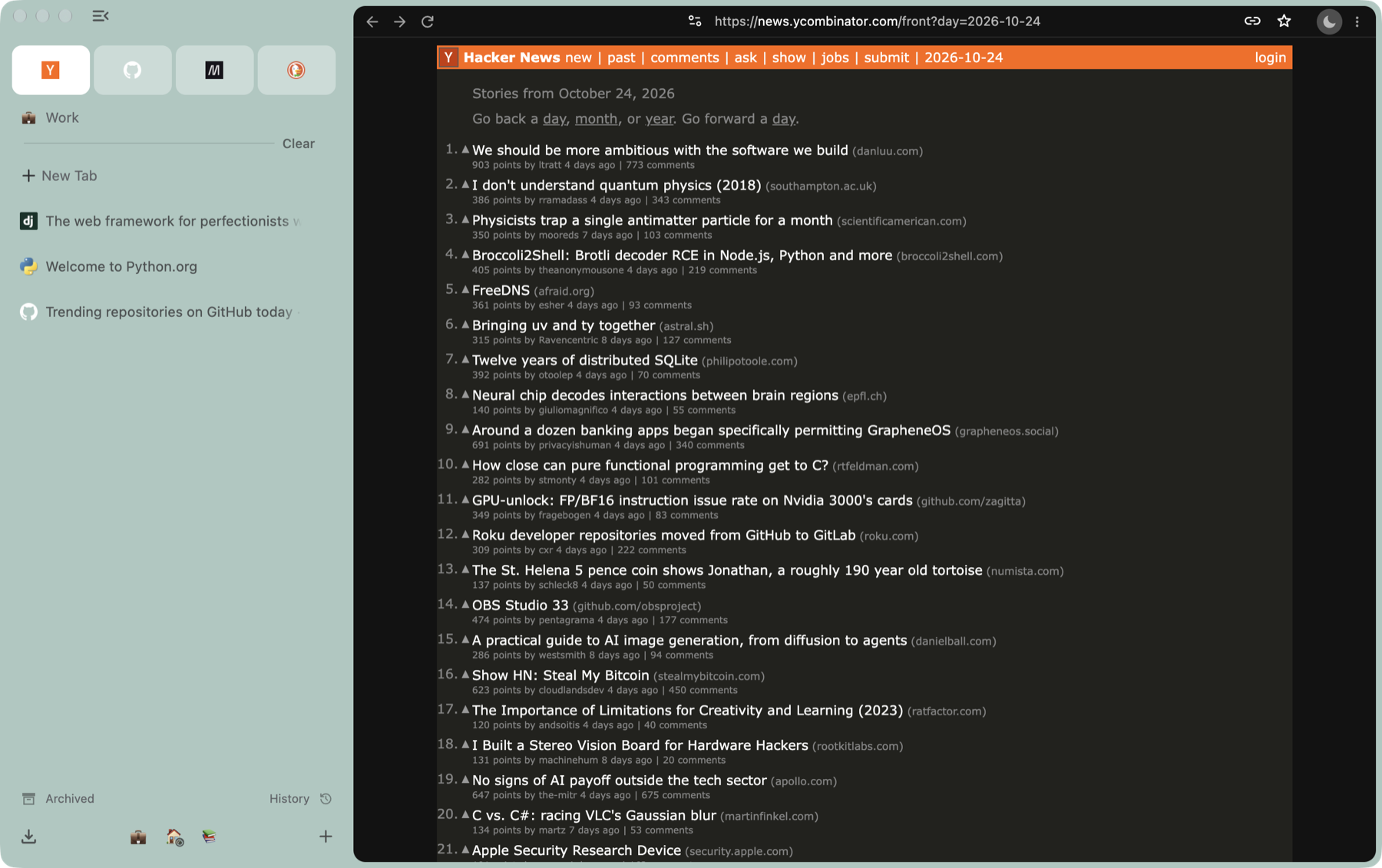
- Dark pages. One switch draws every website dark from its first frame: the moon by the address row, or ⌥⇧⌘D (Ctrl+Alt+Shift+D). Keep some sites light, or darken only the ones you list. Spec
- Apps from any page. Add to Dock… on the Mac, Install page as app… on Windows: the page gets a window and an icon of its own and keeps the session of the Space it was made in, so it stays signed in as that Space is. Arc does not install web apps. Spec
- Site cleanup in one step. Clear Site Cookies and Reload (⌥⇧⌘R, Ctrl+Alt+Shift+R) signs you out of the site in front of you and nothing else; Close Duplicate Tabs is one command away. Spec
- Your sidebar on every computer. Pick any folder your computers share (iCloud, Dropbox, Syncthing and more). Each Stedding keeps its Spaces, pins, pinned folders and essentials there, and makes no network request of its own. Spec
- Links without trackers, and blocking if you want it.
utm_and similar parameters come off the links you open; ad and tracker blocking is built in, off until you turn it on. Spec, Spec
Everything you know from Arc
- The sidebar: vertical tabs, essentials as cards, pinned tabs that remember their page, nested folders (in the pinned tabs too), and ⌘S (Ctrl+S) to fold it to a rail of icons or hide it. ⌘W (Ctrl+W) on a pinned tab sends it back to its page, asleep, in its place. While it is awake the close button is a minus that does the same, on screen or not. Once it is asleep the button is an x that asks before it removes the pin.
- Spaces with their own colour and icon: switch with the chips, ⌃1–⌃9 (Alt+1–Alt+9), a two-finger swipe, or the mouse's sideways scroll over the sidebar. A Space can keep its own cookies, so one site can be signed into twice.
- ⌘T (Ctrl+T): a URL, a search, or an open or archived tab in any Space. ⇧⌘P (Ctrl+Shift+P) lists the commands, each with its key.
- Split view: drag a tab onto the page, and it opens beside it.
- Peek: a link from a pinned tab that leaves its site opens on a card over the page, or in a small window if you prefer; keep it as a tab or beside the pin. On a click, or only on a held press, as you choose.
- History and Downloads in the sidebar, the sidebar on the left or the right, and shortcuts you can change.
- Little windows for links from other apps, with Open in Stedding to keep the page as a tab; sites routed to their Space, sleeping tabs, and an archive for idle tabs, off until you choose.
- Local development tabs wear a yellow and black dashed outline while on screen. At Comfortable density every local tab with a title shows its host and port.
- Copy the link clean of trackers (⇧⌘C, Ctrl+Shift+C) or as Markdown, screenshots by key, mute and picture in picture by key.
- Arc in one click: Spaces, essentials, pins, folders, tabs, history and passwords, on the Mac and on Windows.
- Arc's keyboard on both platforms, and updates in the sidebar. The feed and the download are checked against a signature. Stedding looks when you open it if the last look was over an hour ago, and every six hours while it runs. A switch turns that off.
Each feature has a specification naming the test behind every behaviour: docs/features/.
What Arc has that Stedding does not
- Boosts and Easels: deferred (ADR 0012).
- The mini player in the sidebar: planned; picture in picture by key until then (
S-95). - The Library panel and Live Folders: later (
S-61). - Shared Spaces and share links: there is no account or server, by design. Your own computers keep the sidebar in step through a folder you choose; to give a Space to someone, send it as a file.
- AI (Arc Max): never, by choice (ADR 0020).
- Phones (Arc Search): desktop only.
Download
From stedding.dev or the Releases page. The newest release is 0.4.0 beta 6, for macOS and Windows, on Chromium 157.0.8103.31.
| Platform | File | |
|---|---|---|
| macOS 13 or later, Apple silicon | Stedding-<version>-arm64.dmg |
Signed with the project's Developer ID and notarized by Apple. Drag it to Applications and open it |
| Windows 10 / 11, x64 | Stedding-<version>-win-x64.exe |
Installs for you alone, with no administrator prompt. Not signed yet: SmartScreen → More info → Run anyway, once |
On a Mac, Homebrew installs it too:
brew install --cask ysalitrynskyi/stedding/stedding
After that it updates itself (the Mac from 0.2.0 beta 16, Windows from 0.2.0 beta 19; an older Windows copy needs one install by hand). Checksums are in each release's notes; docs/INSTALL.md covers verifying, updating and uninstalling. Intel Macs are not supported. Linux is not shipped.

Keyboard shortcuts
The ones you will use most. These are the keys it ships with. Settings → Stedding → Shortcuts can change them, and Number keys for the rows and the Spaces can put Spaces on ⌘1–⌘9 (Ctrl+1–Ctrl+9) or on ⌃⌘1–⌃⌘9 (Alt+Shift+1–Alt+Shift+9). The full list is docs/SHORTCUTS.md.
| Action | macOS | Windows |
|---|---|---|
| Command bar: search, a URL, any tab | ⌘T | Ctrl+T |
| Every command, with its key | ⇧⌘P | Ctrl+Shift+P |
| Fold or show the sidebar | ⌘S | Ctrl+S |
| Pin the tab in its Space | ⌘D | Ctrl+D |
| Space 1–9 / next / previous | ⌃1–⌃9 / ⌥⌘→ / ⌥⌘← | Alt+1–Alt+9 / Ctrl+Alt+→ / Ctrl+Alt+← |
| Most recent tab in this Space | ⌃⇥ | Ctrl+Tab |
| Clear the Space's loose tabs | ⇧⌘K | Ctrl+Shift+K |
| Split the tab with a new one | ⌃⌘N | Alt+Shift+N |
| Dark pages on or off | ⌥⇧⌘D | Ctrl+Alt+Shift+D |
| Copy the link, clean | ⇧⌘C | Ctrl+Shift+C |
Moving from Arc
With Arc installed, the first start offers Move everything from Arc: Spaces with their colours and icons, essentials, pinned tabs, nested folders, open tabs, history and passwords. It reads Arc's files on your disk and sends nothing anywhere. On a Mac the passwords need one keychain prompt; on Windows none. Running it again does not duplicate anything.
The same welcome step brings bookmarks, history and passwords from Chrome, Edge, Brave, Vivaldi and Dia (on a Mac, each browser's passwords need one keychain prompt; on Windows, passwords that Chrome seals with its own key cannot be read and are counted), and from the file Safari exports. Settings → Stedding → Sync and import → Import from another browser opens that step again any time. Passwords in that file are plain text, so they stay unticked until you ask for them. Chromium's own importer also lists the browsers it finds, including Firefox, and on the Mac Safari's bookmarks.
Privacy
- No telemetry, no experiments, no account. No usage metrics, crash reports or identifiers. The new tab page makes no requests.
- Protective defaults: third-party cookies blocked, HTTPS-First, Global Privacy Control, quiet prompts for notifications and location, search suggestions off, DuckDuckGo until you choose an engine.
- No Google sign-in, and no AI sections in Settings.
- Safe Browsing is not active yet. Its lists need a Google API key the builds do not
carry (
S-75). The local warnings for dangerous file types still work.
The connections the browser makes are listed in docs/PRIVACY.md. Anything else is a bug.
It is Chromium
Chromium stable, with a documented series of patches, so sites, extensions and DevTools behave as they do in Chrome.
| Part | In Stedding | |
|---|---|---|
| Engine | Chromium 157, stable channel | ✓ |
| Chrome extensions | From the Chrome Web Store, as in Chrome | ✓ |
| H.264 and AAC | The video and audio codecs plain Chromium leaves out | ✓ |
| DevTools | Chromium's own | ✓ |
| Google services | No sign-in, sync, telemetry or experiments. Chromium's component updates and network time stay (PRIVACY.md) | ✓ |
| Ad and tracker blocking | Built in, from EasyList and EasyPrivacy; off until you turn it on | ✓ |
| Sync | Your sidebar, through a folder your own sync app keeps; no account | Your folder |
| Import | Arc (Mac and Windows), Chrome, Edge, Brave, Vivaldi, Dia, Safari's export file, Firefox. Opera is not offered | Most |
| Updates | Checked against a signature, in the background, with a switch to turn them off | ✓ |
| Safe Browsing | Waits on a Google API key (S-75) |
Not yet |
| Netflix, Disney+, Prime Video, Spotify | Need Widevine, which needs a licence from Google first (S-270) |
Not yet |
| Windows code signing | SmartScreen asks once (S-56) |
Not yet |
| Intel Macs | Apple silicon only | Not supported |
| Linux | After Windows (ROADMAP, M9) | Not yet |
To hear when a release is out, use Watch → Custom → Releases at the top of this page.
Status
A beta. On a Mac with a second desktop, Mission Control takes ⌃1–⌃9 before Stedding does.
The Spaces menu still has them, and Settings → Stedding → Shortcuts can move the Space keys
to ⌘1–⌘9 or ⌃⌘1–⌃⌘9. While Arc runs it takes ⌥⌘N from every app; split with ⌃⌘N (S-79;
the FAQ has the way round). Open work is in BACKLOG.md, the
milestones in docs/ROADMAP.md, and every release's notes on the
Releases page.
Building from source
Stedding is a documented patch series on Chromium stable. tooling/sync-chromium will not
start below 150 GB free. The first build takes a few hours.
On a Mac (Apple silicon):
tooling/bootstrap-depot-tools     # once per machine
tooling/sync-chromium             # once per pin change; tens of GB
tooling/apply-patches             # the Stedding patch series
tooling/apply-branding            # the name and the icon
tooling/build-chromium release --budget 0
tooling/package-dmg release       # unsigned, unless you sign it
On Windows the checkout uses the same tooling/sync-chromium, tooling/apply-patches and
tooling/apply-branding (Git for Windows for those shell scripts). Then:
tooling\win\build.ps1 -BudgetMinutes 0
tooling\win\package-installer.ps1
build.ps1 stops after 15 minutes if you leave the budget unset. Prerequisites:
docs/ARCHITECTURE.md.
Contributing
The most useful thing now is a report from real use: install the latest beta, use it for a
day, and open an issue for each thing that is worse than what you use today. See
CONTRIBUTING.md. Security issues go through private reporting
(SECURITY.md). A pull request made with an AI tool's help says so, and each of
its commits carries an Assisted-by: trailer
(CONTRIBUTING.md, "AI tools"). New contributors start at
AGENTS.md. The index of every document is docs/README.md.
License
BSD-3-Clause. Chromium is © The Chromium Authors, BSD-3-Clause.
Stedding is offered as is, without warranty. Its authors and contributors are not liable for what comes of using it. The licence has the exact words.
관련 프로젝트 살펴보기
n8n-io/n8n
네이티브 AI 기능을 갖춘 Fair-code 워크플로 자동화 플랫폼입니다. 시각적 구성과 사용자 지정 코드를 결합할 수 있으며, 직접 호스팅하거나 클라우드에서 사용할 수 있고 400개 이상의 연동을 제공합니다.
210,306 스타langgenius/dify
하나의 협업 워크스페이스에서 에이전트 워크플로와 RAG 파이프라인을 구축하고, 풍부한 AI 모델과 도구를 지원합니다. 클라우드, VPC 또는 자체 호스팅으로 배포할 수 있어 팀은 스택을 다시 구축하지 않고 프로토타입에서 프로덕션으로 이동할 수 있습니다.
161,046 스타microsoft/PowerToys
Microsoft PowerToys는 Windows의 생산성과 사용자 지정 기능을 향상하는 유틸리티 모음입니다
140,888 스타stablyai/orca
Orca는 에이전트 집단(예: Grok Bot, Claude Code)과 함께 작업하는 곳입니다. 본인의 구독으로 어떤 코딩 에이전트든 실행할 수 있습니다. 데스크톱, 모바일, 원격 런타임에서 사용할 수 있습니다.
123,242 스타