
yogsec/endpoints-extractor
yogsec/endpoints-extractor has 34 GitHub stars and 10 forks. GitHot measured 0 stars in 24 hours. Last checked 2026-11-14 05:46 UTC. Last push 2026-06-23.
What you can do
- Scan a single URL or a list of URLs.
- Extract URLs from HTML, JavaScript, and JSON content.
- Save the results to a file for further analysis.
- Simple and user-friendly interface.
측정된 스타 증가
- in 24h
- 0
- in 7 days
- 기록 수집 중
- in 15 days
- 기록 수집 중
- in 1 month
- 기록 수집 중
서로 겹치는 기간의 순증가량이며 일별 합계가 아닙니다. 측정값이 없으면 비워 둡니다. 스타는 관심도를 나타내며 품질을 보장하지 않습니다.
소개
A powerful Bash script for extracting URLs and API endpoints from HTML, JavaScript, and JSON content of web pages. Designed for security researchers, bug bounty hunters, and developers to streamline endpoint discovery. Simple to use, supports single or multiple URLs, and offers file-saving capabilities.
보안README.md
OriginalEndpoints Extractor Tool
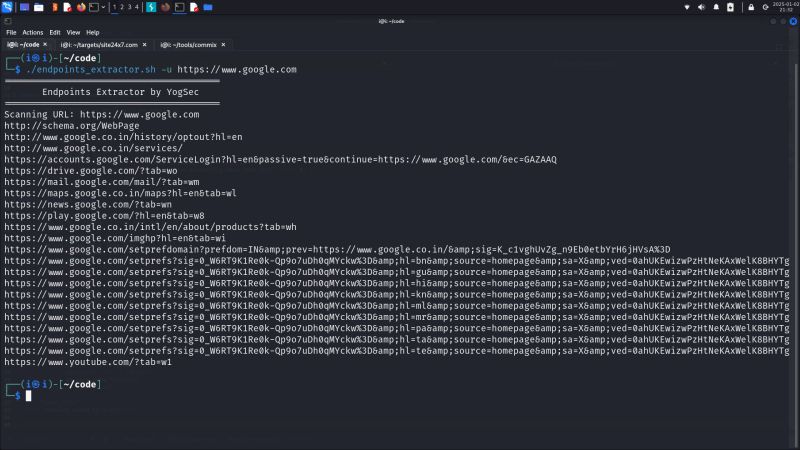
The Endpoints Extractor by YogSec is a Bash script designed to extract URLs and API endpoints from the HTML, JavaScript, and JSON content of web pages.
Features
- Scan a single URL or a list of URLs.
- Extract URLs from HTML, JavaScript, and JSON content.
- Save the results to a file for further analysis.
- Simple and user-friendly interface.
Prerequisites
- Bash: Ensure you are running the script in a Bash shell environment.
- cURL: The script uses
curlto fetch web page content. - grep: Used to extract URLs from the content.
- sort: Ensures the URLs are unique.
Usage
Display Help
./find_urls_endpoints.sh -h
Scan a Single URL
./find_urls_endpoints.sh -u <URL>
Example:
./find_urls_endpoints.sh -u https://example.com
Scan a List of URLs
./find_urls_endpoints.sh -l <FILE>
Example:
./find_urls_endpoints.sh -l urls.txt
Save Results to a File
./find_urls_endpoints.sh -u <URL> -s <OUTPUT_FILE>
Example:
./find_urls_endpoints.sh -u https://example.com -s results.txt
Combined Example
Scan a list of URLs and save results to a file:
./find_urls_endpoints.sh -l urls.txt -s endpoints.txt
Options
-u <URL>: Specify a single URL to scan.-l <FILE>: Specify a file containing a list of URLs.-s <FILE>: Save the output to the specified file.-h: Display the help message.
Example Output
For the URL https://example.com, the script may output:
https://example.com/api/v1/users
https://example.com/assets/js/script.js
https://cdn.example.com/library.js
Troubleshooting
- Error: Either -u or -l must be specified: Ensure you provide a URL with
-uor a file with-l. - Error: File does not exist: Verify the file path is correct.
- Empty Output: Ensure the target URL or file contains valid HTML, JS, or JSON content with endpoints.
관련 프로젝트 살펴보기
trimstray/the-book-of-secret-knowledge
영감을 주는 목록, 매뉴얼, 치트시트, 블로그, 팁, 원라이너, CLI/웹 도구 등을 모은 컬렉션.
258,353 스타Hack-with-Github/Awesome-Hacking
해커, 펜테스터, 보안 연구자를 위한 다양한 Awesome 목록 모음.
125,477 스타swisskyrepo/PayloadsAllTheThings
웹 애플리케이션 보안과 모의 침투 테스트/CTF에 유용한 페이로드 및 우회 방법 목록.
82,667 스타caddyserver/caddy
빠르고 확장 가능한 멀티플랫폼 HTTP/1-2-3 웹 서버이며, 자동 HTTPS를 지원합니다
79,026 스타