
xaecbd/KCenter
xaecbd/KCenter has 1,160 GitHub stars and 193 forks. GitHot measured 0 in 7 days. Last checked 2026-11-10 22:59 UTC. Last push 2025-06-26.
KCenter(KafkaCenter) is a unified platform for kafka cluster management and maintenance, producer / consumer monitoring, and use of ecological components(ksql/kafka connect).it's kafkacenter(kafka center).
What you can do
- monitor producers and consumers with graphs and the ability to easily configure email alerts for thresholds
- let your users request topics and monitor them themselves in a simple web UI
- access the Kafka ecosystem (Kafka, KSQL, Kafka Connect, Kafka Manager) in one combined UI
- Home -> Overview of all configured Kafka clusters as well as high-level monitoring information.
측정된 스타 증가
- in 24h
- 업데이트 지연
- in 7 days
- 0
- in 15 days
- 업데이트 지연
- in 1 month
- 업데이트 지연
서로 겹치는 기간의 순증가량이며 일별 합계가 아닙니다. 측정값이 없으면 비워 둡니다. 스타는 관심도를 나타내며 품질을 보장하지 않습니다.
README.md
OriginalLanguage: :us: - :cn:
KCenter


KCenter (previously known as KafkaCenter) is a unified one-stop platform for Apache Kafka cluster management and maintenance, producer/consumer monitoring, and use of ecological components.
:loudspeaker::loudspeaker::loudspeaker: Now we have deployed this product on Azure/AWS :loudspeaker::loudspeaker::loudspeaker:
:fire::fire::fire: Commercial products have better functions and technical support.
if you have any needs, including aws support, personalized development:technologist:. You can create an issue and we will reply as soon as possible.
Table of Contents
- Why Should I Use KCenter?
- Main Features
- Application Config
- Getting Started
- Building KCenter and/or Contributing Code
- Documentation
- Changelog
- Questions? Problems? Suggestions?
Why Should I Use KCenter?
You have a Kafka cluster and want to
- monitor producers and consumers with graphs and the ability to easily configure email alerts for thresholds
- let your users request topics and monitor them themselves in a simple web UI
- access the Kafka ecosystem (Kafka, KSQL, Kafka Connect, Kafka Manager) in one combined UI
All you need is a MySQL DB in the background where KCenter can store its configuration. If you want to use the monitoring functionalities, you additionally need an Elasticsearch installation. Then, just download our Docker image (see HowTo below) and off you go!
* Note: KCenter does not yet support authenticating to a secured Kafka cluster (SASL or OAuth), we're working on it though.
Main Features
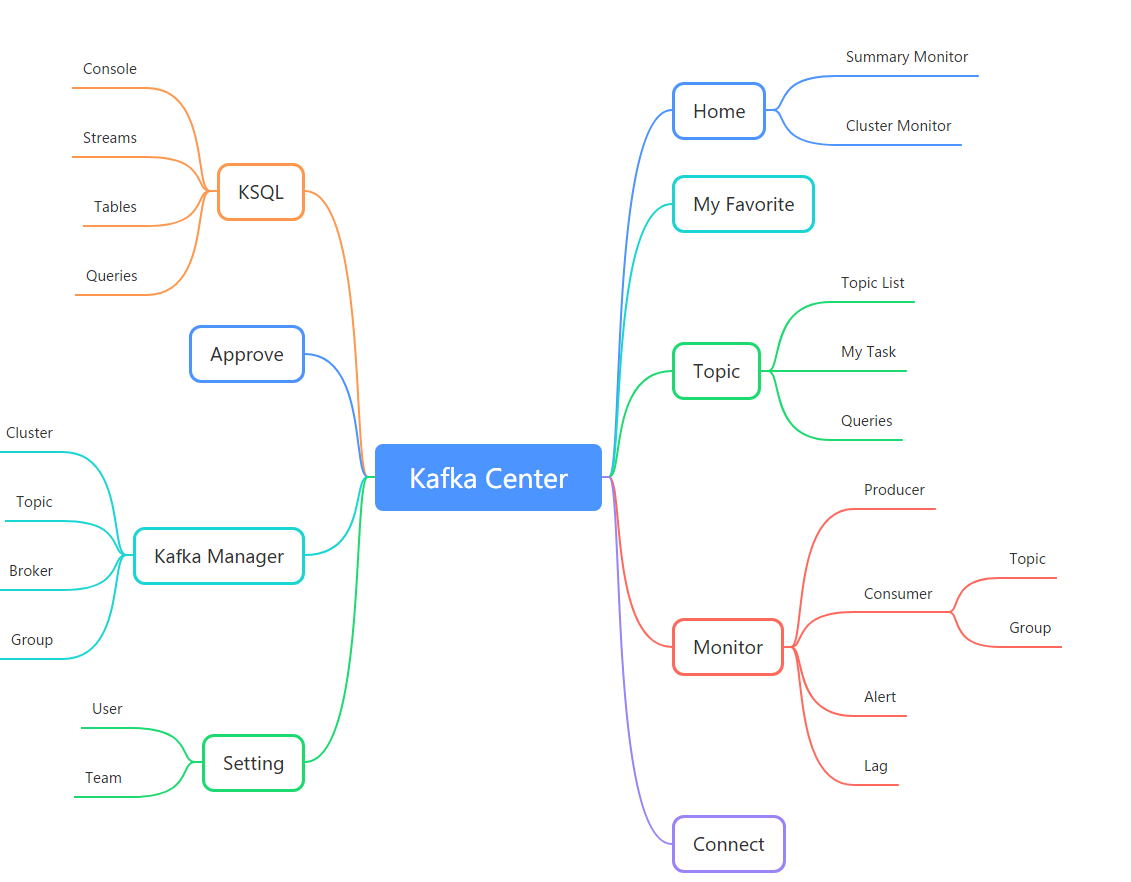
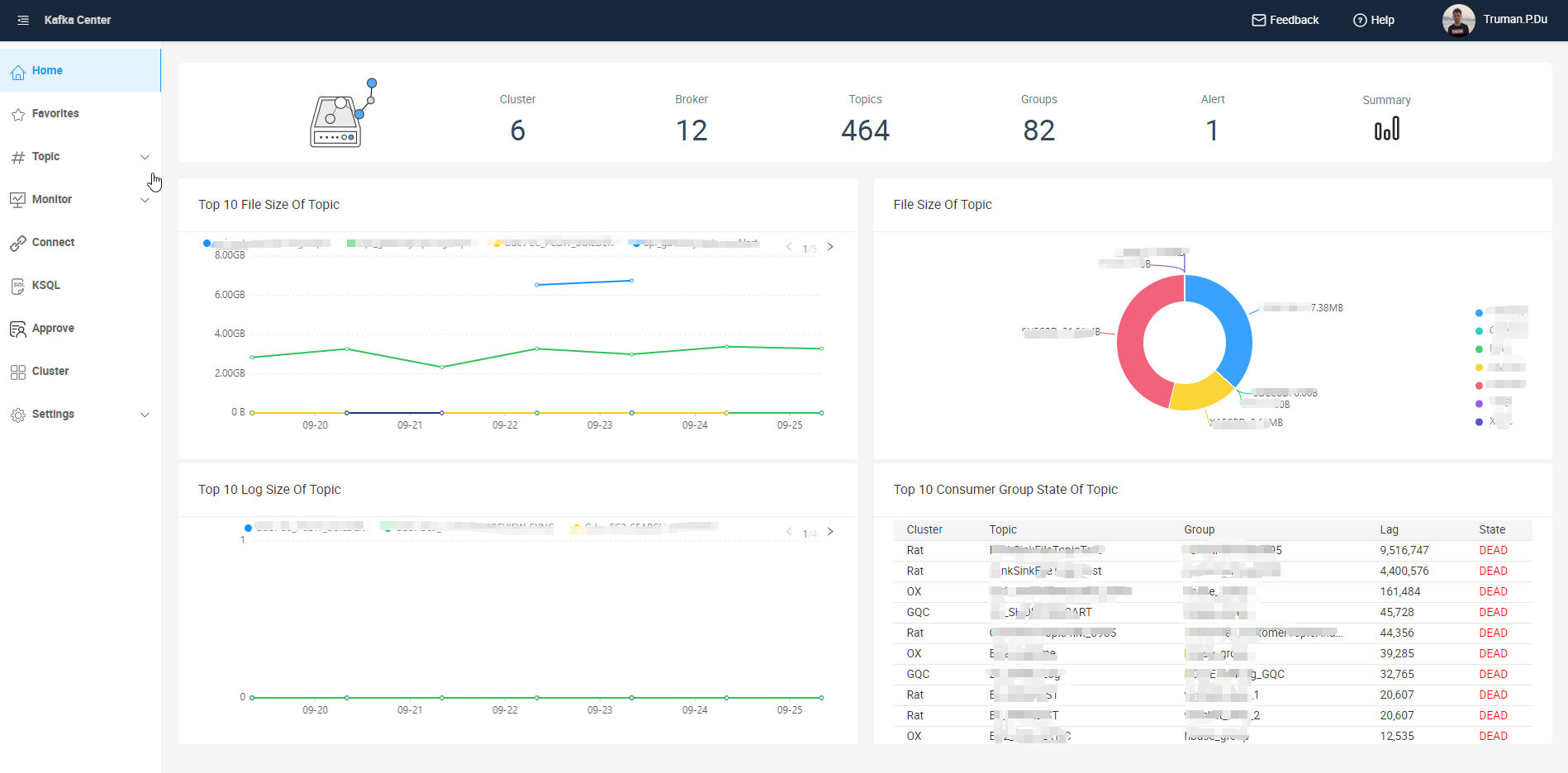
- Home -> Overview of all configured Kafka clusters as well as high-level monitoring information.
- Favorites -> Direct access to the monitoring statistics of your favorite topics.
- Topic -> View your own topics or apply for new topics. You can also both consume messages and mock new records via web UI into your topics here!
- Monitor -> Statistics about production and consumption of your topics. There is an additional possibility to configure alerts (which optionally trigger emails) for arbitrary consumption delay thresholds here!
- Kafka Connect -> Create and maintain your own Kafka Connect jobs (needs an external Kafka Connect service to connect to).
- KSQL -> Create and maintain your own KSQL jobs (needs an external KQL service to connect to).
- Approve -> Users can view their topic creation requests here, administrators can manage and approve the requests.
- Settings -> Maintain users and teams (accessible by administrators only). You can also use an external OAuth solution for the user management.
- Kafka Manager -> Maintain Kafka cluster information (embedded UI from the popular open-source tool Kafka Manager).
Application Config
The main application configuration is done in a central application.properties file. Have look at our detailed example here.
Getting Started
Important: The application needs a MySQL database to store all configurations. Before you begin, make sure that you have it either installed on the same host or that there's an instance available somewhere else. The exact location can then be configured via the spring.datasource.url inside the application.properties. (There is no MySQL service included in the Docker image.)
| Resource | Dependencies | Use |
|---|---|---|
| MySQL | must | Stores all configuration information (users, teams, clusters, etc.) |
| Elasticsearch (7.0+) | optional | Stores monitoring information (cluster metrics, consumption lag visualization, etc.) |
| Email server | optional | Email notifications (topic requests & approvals, configured consumer alerts) |
1. Init
Create database and table
Execute the provided table_script.sql on your MySQL instance to create the database and all necessary tables.
Edit config
Download the provided application.properties example and adapt the config to your needs.
2. Run
Option A (recommended): Docker
The following command assumes that you have your adapted application.properties inside the same folder:
docker run -d \
  -p 8080:8080 \
  --name KCenter \
  -v ${PWD}/application.properties:/opt/app/kafka-center/config/application.properties \
  xaecbd/kafka-center:2.3.0
Option B: Local
Important: Make sure you have installed a JRE 8 or higher and download the most recent release package.
$ git clone https://github.com/xaecbd/KCenter.git
$ cd KCenter
$ mvn clean package -Dmaven.test.skip=true
$ cd KCenter\KCenter-Core\target
$ java -jar KCenter-Core-2.3.0-SNAPSHOT.jar
3. Access UI
The application UI is published on port 8080. Visit http://localhost:8080 (or insert the IP/URL of the host you deployed on) and log in with the default administrator:user/pw = admin/admin
Building KCenter and/or Contributing Code
We're happy if you want to play around and build KCenter locally, or even get involved in shaping and developing KCenter further. The Contributing Guidelines will help to get you started.
Documentation
For more information, see the README in KCenter/docs.
For information about user guide the documentation, see the UserGuide in KCenter/docs/UserGuide
For information about module the documentation, see the Module in KCenter/docs/Module.
For information about kafka connect ui, see docs in KafkaConnectUi.
Note that we open-sourced our tool very recently and did not translate all the documents to English yet. (We are happy about contributions in this area as well if you're motivated!)
Changelog
See the separate Changelog.
Questions? Problems? Suggestions?
If you found a bug, want to request a feature or have a question, please create an issue. Try to make sure someone else hasn't already created an issue for the same topic beforehand.
Sponsorship
CDN acceleration and security protection for this project are sponsored by Tencent EdgeOne.
Best Asian CDN, Edge, and Secure Solutions - Tencent EdgeOne

관련 프로젝트 살펴보기
Asabeneh/30-Days-Of-Python
30 Days of Python 프로그래밍 챌린지는 Python 프로그래밍 언어를 30일 동안 배우기 위한 단계별 가이드입니다. 이 챌린지는 100일 이상 걸릴 수 있습니다. 자신의 속도에 맞춰 진행하세요. 다음 동영상도 도움이 될 수 있습니다: https://www.youtube.com/channel/UC7PNRuno1rzYPb1xLa4yktw
78,560 스타grafana/grafana
개방적이고 조합 가능한 옵저버빌리티 및 데이터 시각화 플랫폼입니다. Prometheus, Loki, Elasticsearch, InfluxDB, Postgres 등 여러 소스의 메트릭, 로그, 트레이스를 시각화합니다.
77,830 스타redis/redis
실시간 데이터 기반 애플리케이션을 구축하는 개발자에게 Redis는 가장 선호되고, 가장 빠르며, 기능이 가장 풍부한 캐시, 데이터 구조 서버이자 문서 및 벡터 쿼리 엔진입니다.
77,395 스타apache/superset
Apache Superset는 데이터 시각화 및 데이터 탐색 플랫폼입니다.
75,473 스타