
wrogistefan/desktop-2fa
wrogistefan/desktop-2fa has 30 GitHub stars and 1 forks. Star changes are not measured yet. Last checked 2026-11-14 12:01 UTC. Last push 2026-11-11.
What you can do
- 🔐 Vault Security - AES-256-GCM encryption with Argon2id key derivation
- ⏱️ TOTP Generation - RFC 6238 compliant code generation
- 💻 Full CLI - Complete command-line interface for managing tokens
- 📋 Clipboard Support - Automatic copying of TOTP codes to clipboard
측정된 스타 증가
- in 24h
- 기록 수집 중
- in 7 days
- 기록 수집 중
- in 15 days
- 기록 수집 중
- in 1 month
- 기록 수집 중
서로 겹치는 기간의 순증가량이며 일별 합계가 아닙니다. 측정값이 없으면 비워 둡니다. 스타는 관심도를 나타내며 품질을 보장하지 않습니다.
소개
A secure offline desktop application for generating and managing TOTP 2FA codes. Features encrypted vault storage, modern cryptography (Argon2 + AES‑GCM), modular architecture, and a local‑first approach with no cloud dependencies. Designed for reliability, extensibility, and future cross‑platform UI.
보안README.md
Original🛡️ Desktop-2FA
A secure, offline two-factor authentication (2FA) manager for desktop environments. Built with Python, featuring strong encryption and no cloud dependencies.
🌐 Landing Page: desktop-2fa.org


✨ Features
| Feature | Description |
|---|---|
| 🔐 Vault Security | AES-256-GCM encryption with Argon2id key derivation |
| ⏱️ TOTP Generation | RFC 6238 compliant code generation |
| 💻 Full CLI | Complete command-line interface for managing tokens |
| 📋 Clipboard Support | Automatic copying of TOTP codes to clipboard |
| 🔓 Session Control | CLI authenticates each command; UI reauthenticates writes and locks after five minutes without input |
| 🛡️ Password Policy | Configurable password strength enforcement with zxcvbn |
| 🧪 Well Tested | Regression tests include RFC 6238 vectors and historical vault fixtures |
| 📖 Security Model | Detailed threat analysis and cryptographic design documentation |
| 🖥️ Textual UI | Account and vault forms, live TOTP countdowns and clipboard actions (0.11.0) |
📸 Screenshots
English dark-terminal CLI captures from Desktop-2FA 0.10.0, followed by the 0.11.0 Textual UI. All accounts and credentials are synthetic. Terminal images render actual command output; interactive prompts use a test runner and Textual runs headlessly. See the capture notes and report.
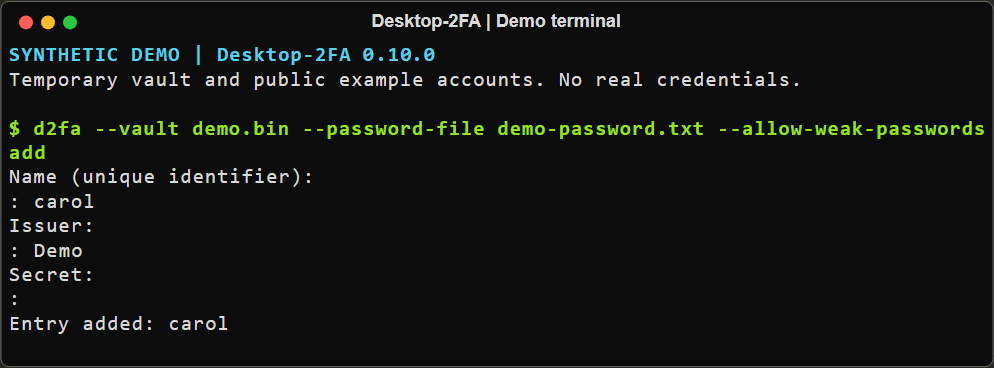 Adding an entry without displaying its secret.
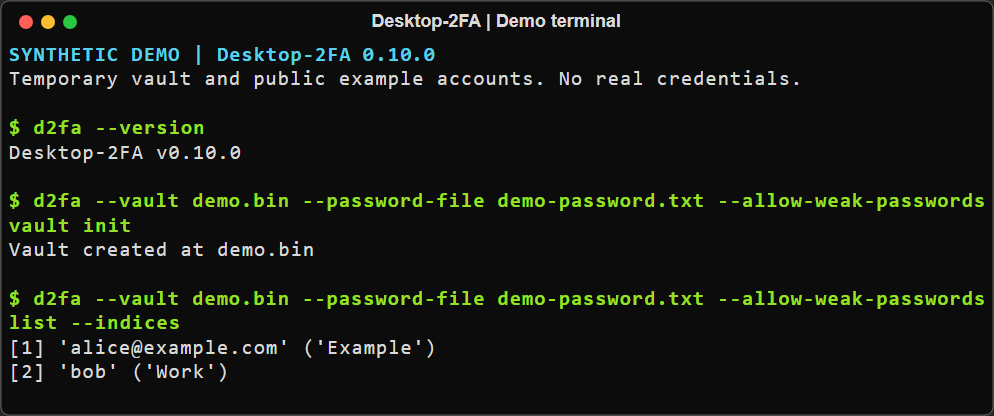 Initializing a vault and listing synthetic accounts.
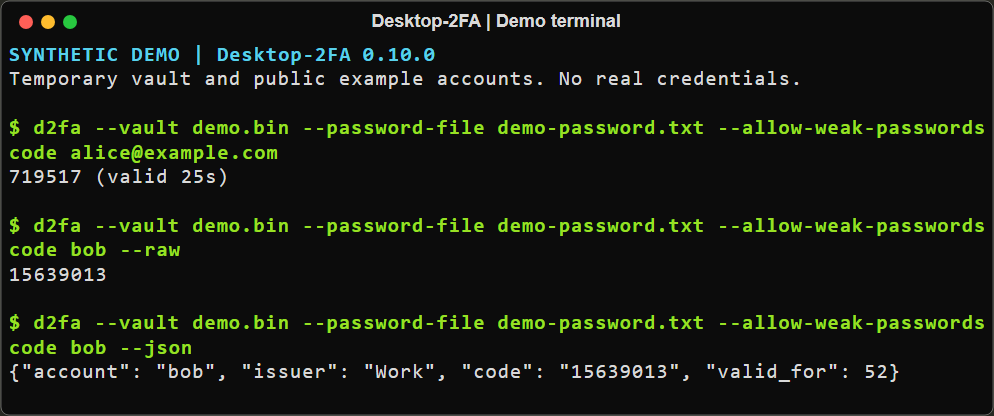 Human-readable, raw and JSON code output.
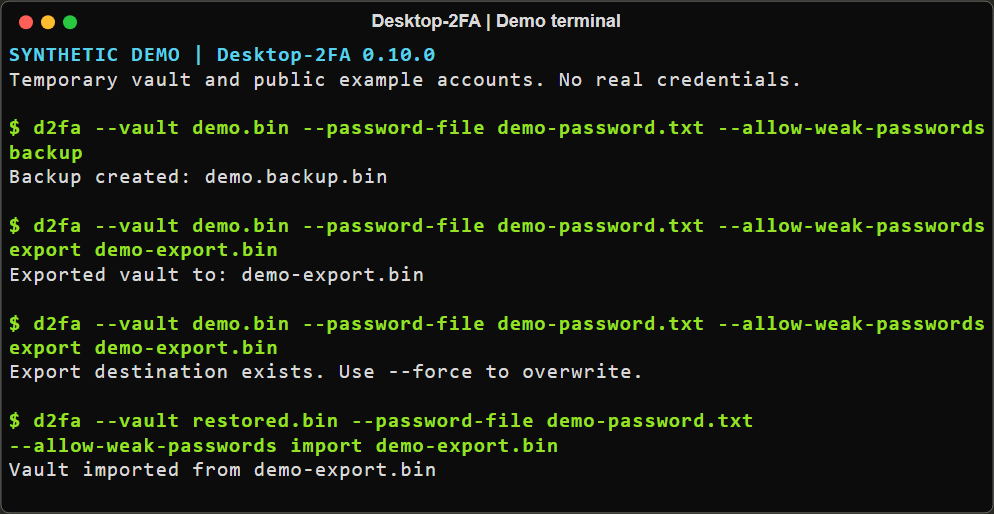 Encrypted export, overwrite refusal and recovery into a separate vault.
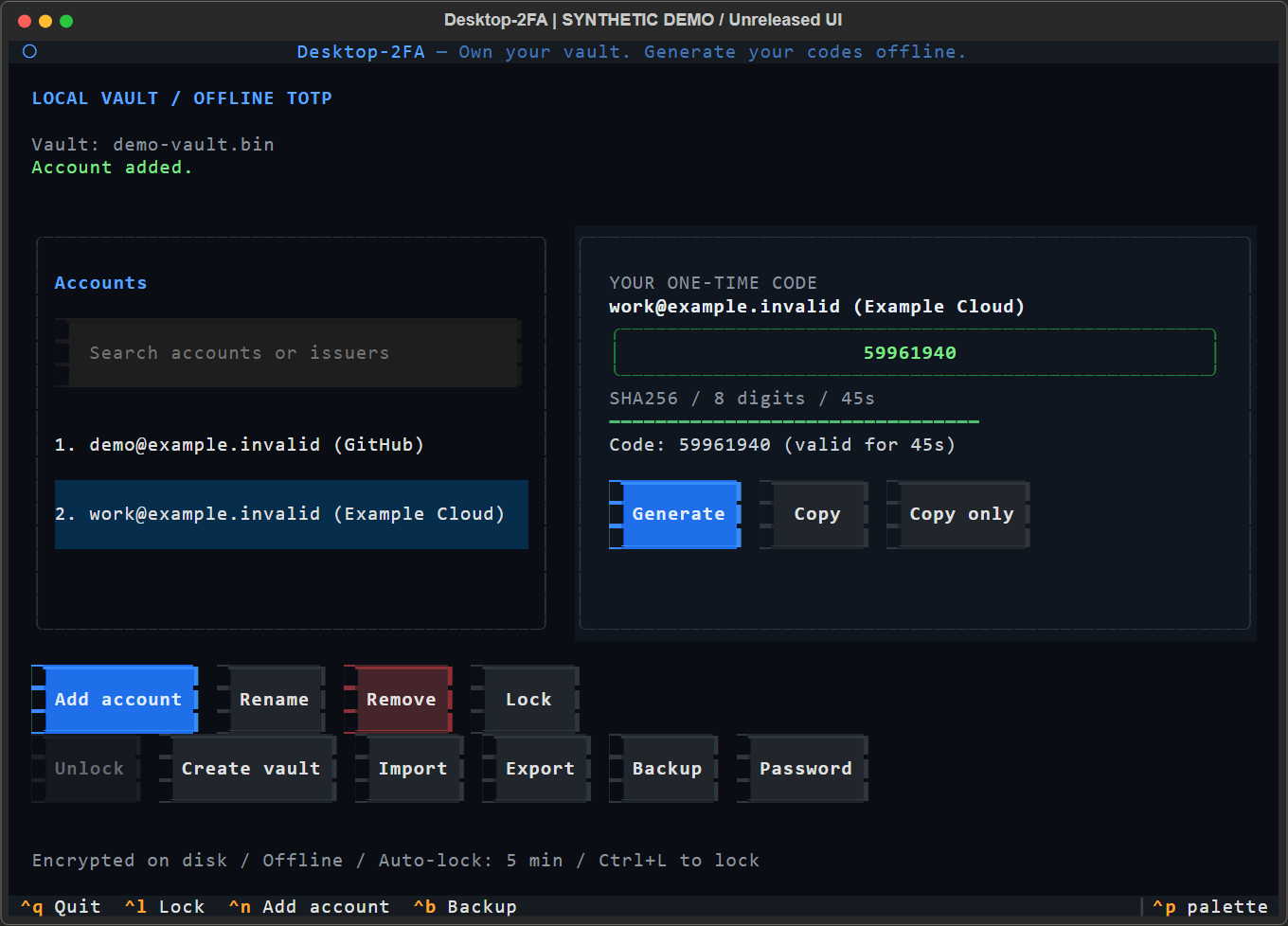 Textual UI: live codes and full account/vault operations. Capture method and limits.
🚀 Quick Start
Installation
pip install desktop-2fa
Verify installation:
python -c "import desktop_2fa; print(desktop_2fa.__version__)"
# Output: 0.11.0
Basic Usage
# Initialize a new vault
d2fa vault init

# Add a new TOTP token
d2fa add GitHub GitHub JBSWY3DPEHPK3PXP

# Or add a provisioning URI (quote it so the shell preserves '&')
d2fa add "otpauth://totp/Example:alice?secret=JBSWY3DPEHPK3PXP&issuer=Example&algorithm=SHA256&digits=8&period=60"

# List all entries
d2fa list

# Generate a code
d2fa code GitHub
The vault is stored by default at ~/.desktop-2fa/vault. Select a different
file for any command with the global --vault option, or set
DESKTOP_2FA_VAULT to choose one by default. An explicit --vault takes
precedence over the environment variable; without either, the default remains
~/.desktop-2fa/vault.
# Use a separate vault for this command
d2fa --vault ./development-vault list

# Show the currently selected vault path
d2fa --vault ./development-vault vault path

# Launch the Textual terminal UI with that vault
d2fa --vault ./development-vault ui
URI-based add preserves algorithm, digits and period; omitted parameters default to SHA1, 6 digits and 30 seconds. Labels are percent-decoded, and an issuer query parameter must agree with any issuer prefix. Unsupported or contradictory provisioning data exits with status 6 before vault access. Interactive add also accepts a URI at the issuer prompt and skips the separate secret prompt. The URI label supplies the account name.
Interactive add hides input at the dedicated Secret prompt; name and issuer
remain visible. Secrets/URIs passed as arguments can appear in shell history or
process inspection, and a URI pasted into the visible issuer prompt can be
echoed. Prefer a plain issuer name plus the hidden secret prompt to avoid those
exposures. See interactive add.
The 0.11.0 Textual UI supports account management, vault
creation/unlocking, encrypted import/export/backup and password changes. Codes
refresh automatically with a countdown and validity bar. Start with d2fa ui;
without supplied credentials it opens a locked screen. Writes ask for a password
again; Ctrl+L or five minutes of inactivity locks the session. See the UI guide.
Version 0.10.0 contained the earlier prototype; upgrade to 0.11.0 for these
account and vault workflows.
Non-Interactive Usage
# Provide password via command line
d2fa --password mypassphrase add GitHub GitHub JBSWY3DPEHPK3PXP

# Provide password via file
d2fa --password-file /path/to/passphrase.txt add GitHub GitHub JBSWY3DPEHPK3PXP
📁 Vault Lifecycle
The vault is an encrypted storage file located by default at
~/.desktop-2fa/vault; use --vault or DESKTOP_2FA_VAULT to select another
path. Vault files must be regular files no larger than 10 MiB.
Before Upgrading
The current loader supports vault format version 1. Future releases are not guaranteed to support every older format. Before upgrading, create an encrypted backup and store it securely.
Desktop-2FA 0.9.0 changes the public Python API: Vault.save() and
Vault.load() require an explicit, non-empty password. Vaults created by
earlier Python API versions with no password must be opened and re-saved with a
non-empty password using the previous release before upgrading. CLI and
Textual UI flows already require a non-empty password.
d2fa backup
Vault Creation
New TOTP secrets use shared Base32 rules: ASCII case and spaces are accepted,
correct trailing padding is optional, and empty decoded keys are refused before
vault access. New records use canonical uppercase padded text with identical
decoded bytes. Existing secret text is preserved on load/save. Legacy empty or
historically admitted Unicode-folded secrets remain listable but cannot generate
codes; code reports invalid_secret with status 6. See the
explicit repair procedure.
In the CLI, only vault init, list and add create missing vaults. Other content commands
report a missing-vault error. For creation:
- The CLI prompts for a new password (interactive mode) or requires
--password/--password-file(non-interactive mode) listcreates an empty encrypted vault;addcreates one with the validated entry- Successful creation prints:
Vault created at <path>
The 0.11.0 Textual UI can explicitly create a vault through Create vault, with password confirmation and an overwrite checkbox for existing destinations.
Vault Loading
When a command requires a vault and it exists:
- The CLI prompts for the existing password (interactive mode) or requires credentials (non-interactive mode)
- The vault is decrypted and loaded
- Authentication failure exits with status 2; other failures use the shared exit-status contract and never report success.
Duplicate Entry Handling
The code and remove commands resolve names case-sensitively. An exact
account_name match takes precedence over another entry's issuer. Without an
exact account match, a unique issuer match is accepted for compatibility.
Multiple exact account matches or multiple fallback issuer matches are rejected
with an Ambiguous entry error (exit status 6); the vault is left unchanged.
code --json reports entry_ambiguous. Python Vault.get_entry() and
Vault.remove_entry(), and the public code/removal helpers, use the same rule;
ambiguous lookups raise desktop_2fa.vault.AmbiguousEntry, a ValueError subclass.
The rename command uses the same exact-account-name/unique-issuer rule and
rejects an occupied destination account name before mutation. Ambiguity without
an explicit selector, invalid selectors and occupied destinations exit with
status 6. Both account name and issuer are updated; renaming a uniquely named
entry to itself is allowed and still updates its issuer.
For legacy duplicates, run d2fa list --indices, then
d2fa rename OLD NEW --index N using a displayed one-based entry number.
The selected entry must match OLD at the account-name/issuer tier that ordinary
lookup would use. Indices describe the current list order, not permanent IDs;
list again after adding/removing entries and avoid concurrent vault edits.
See duplicate recovery.
📖 CLI Commands
Core Commands
| Command | Description |
|---|---|
d2fa add <name> <issuer> <secret> |
Add a new TOTP entry |
d2fa list |
List all stored TOTP entries |
d2fa rename <old> <new> |
Rename an entry |
d2fa remove <name> |
Remove an entry |
d2fa code <name> [--copy|--copy-only] |
Generate TOTP code with clipboard copy options |
Vault Management
| Command | Description |
|---|---|
d2fa vault init [--force] |
Initialize a new vault (d2fa init-vault is an alias) |
d2fa vault unlock |
Open vault with weak password warning (if configured) |
d2fa vault change-password |
Change the vault password |
d2fa vault path |
Show the currently selected vault path |
d2fa backup |
Create an encrypted backup of the vault |
d2fa export <path> [--force] |
Export encrypted D2FA v1; existing files require --force |
d2fa import <path> [--force] |
Import vault from file |
d2fa ui |
Launch the Textual terminal UI |
External-format Python helpers are described in the adapter contract; they are not CLI import modes.
Global Options
| Option | Description |
|---|---|
--version |
Show the installed version |
--password <pwd> |
Provide vault password directly |
--password-file <path> |
Read one UTF-8 password line without BOM; preserve spaces |
--vault <path> |
Select the vault file; place before the command |
--allow-weak-passwords |
Allow weak passwords |
--help |
Show command help |
Password files remove only one optional final LF or CRLF. Spaces, tabs and
Unicode remain significant. Older files read with .strip() may require an
explicit update to contain the actual previously used password; no alternate
password is tried automatically. See password-file compatibility.
The --vault option takes precedence over DESKTOP_2FA_VAULT. When neither
is provided, Desktop-2FA uses ~/.desktop-2fa/vault. The code command also
supports --json, --raw, --quiet, --copy, and --copy-only; --force
is available on vault initialization and import commands.
code --json writes one JSON success/error object to stdout, including early
option and password errors. code --raw prints only the code on success.
Diagnostics and password prompts use stderr; code --quiet suppresses both
streams but retains the exit status. See the output contract.
🔒 Security
The vault uses:
- AES-256-GCM for authenticated encryption
- Argon2id for key derivation (time_cost=4, memory_cost=128MiB, parallelism=2)
- zxcvbn for password strength evaluation
- Versioned header to identify the vault format
Each CLI command that accesses vault contents authenticates separately; path
and version queries do not access vault contents. CLI vault unlock checks the
password without authorizing later commands. Textual keeps a decrypted Vault
in its application object during the unlocked session, until manual locking,
five minutes of inactivity, or exit. Writes, backup and export authenticate
again. Releasing the session does not guarantee erasure of copies in Python or
system memory. See the security model.
Password Strength Evaluation
Desktop-2FA uses zxcvbn to evaluate password strength when creating or changing vault passwords:
- Score 0-2 (Weak): Easily guessable passwords (e.g., "password123")
- Score 3-4 (Strong): Resistant to common attacks (recommended)
Examples:
- ❌ Weak:
password,123456,qwerty,admin2024 - ✅ Strong:
Battery-Horse-Staple-Correct,Mountain@River*2024,MySecureVault#42
Configuration (~/.config/d2fa/config.toml):
[security]
# Require strong passwords (score >= 3)
reject_weak_passwords = false  # warn but allow | true: reject weak passwords
When reject_weak_passwords = false:
- Weak passwords trigger a diagnostic warning
- User is prompted to confirm continuation
- Password acceptance is non-blocking
When reject_weak_passwords = true:
- Weak passwords are rejected immediately
- Command exits with error
- User must choose a stronger password
Backward Compatibility:
If you have min_password_entropy set in your config (legacy option), it is recognized and treated as equivalent to requiring zxcvbn score >= 3.
Security Hardening
Version 0.8.2 added bounded vault loading and atomic saves; version 0.8.3 added the early Textual UI prototype; version 0.9.0 requires explicit, non-empty passwords in the public Python vault API:
- Empty passwords are immediately rejected with a clear error message
- Permission errors are distinguished from missing vault files
- Vault loading accepts only regular files and reads at most 10 MiB
- Vault saves use unique temporary files and atomic replacement
- Only payload schema 1 is supported; unknown versions and fields are refused before a vault can be rewritten and lose metadata.
- Concurrent mutations reject stale revisions under a short OS publication lock;
status 6 asks you to reload and retry. Empty
.NAME.locksidecars remain beside vaults. File symlinks and multiply linked files are read-only. - The CLI boundary maps failures to documented statuses and messages without exception details
- User-friendly error messages for filesystem permission issues
- CLI and cryptographic components are separate modules; this is not a process-isolation guarantee
- zxcvbn-based password strength evaluation
📚 Documentation
Start at the documentation index. Historical audits and completion reports are archived and are not current verification evidence.
| Document | Description |
|---|---|
| User Manual | Complete usage guide |
| Security Model | Detailed threat analysis and cryptographic design |
| CLI UX Specification | UX contract and behavior |
| Cryptography | Security implementation details |
🧪 Testing
See development commands for the project environment, quality checks and optional coverage measurement. Test counts and coverage change; use CI results for the exact commit rather than historical totals.
🏗️ Project Structure
src/desktop_2fa/
├── app/           # Retained dormant module paths
├── cli/           # Command-line interface
├── crypto/        # Encryption utilities
├── totp/          # TOTP generation
├── ui_textual/    # Textual terminal UI
├── vault/         # Vault management
└── utils/         # Utilities
📄 License
Apache License 2.0. See LICENSE file.
👤 Author
Łukasz Perek
🏆 Sponsorship
desktop‑2fa is supported through the Kilo OSS Sponsorship Program.
📧 Contact
For questions or support, contact us at [email protected]
💖 Support the Project
Desktop‑2FA is an independent open‑source tool built with a focus on autonomy, transparency, and offline security. If you find it useful and want to support ongoing development, you can do so through the platforms below:
- Ko‑fi: https://ko-fi.com/lukaszperek
- Buy Me a Coffee: https://buymeacoffee.com/lukaszperek
- AirTM: https://airtm.me/lukper