
withfig/autocomplete
withfig/autocomplete has 25,201 GitHub stars and 5,401 forks. GitHot measured -1 stars in 24 hours and -3 in 7 days. Last checked 2026-11-15 00:28 UTC. Last push 2025-05-05.
측정된 스타 증가
- in 24h
- -1
- in 7 days
- -3
- in 15 days
- 기록 수집 중
- in 1 month
- 기록 수집 중
서로 겹치는 기간의 순증가량이며 일별 합계가 아닙니다. 측정값이 없으면 비워 둡니다. 스타는 관심도를 나타내며 품질을 보장하지 않습니다.
소개
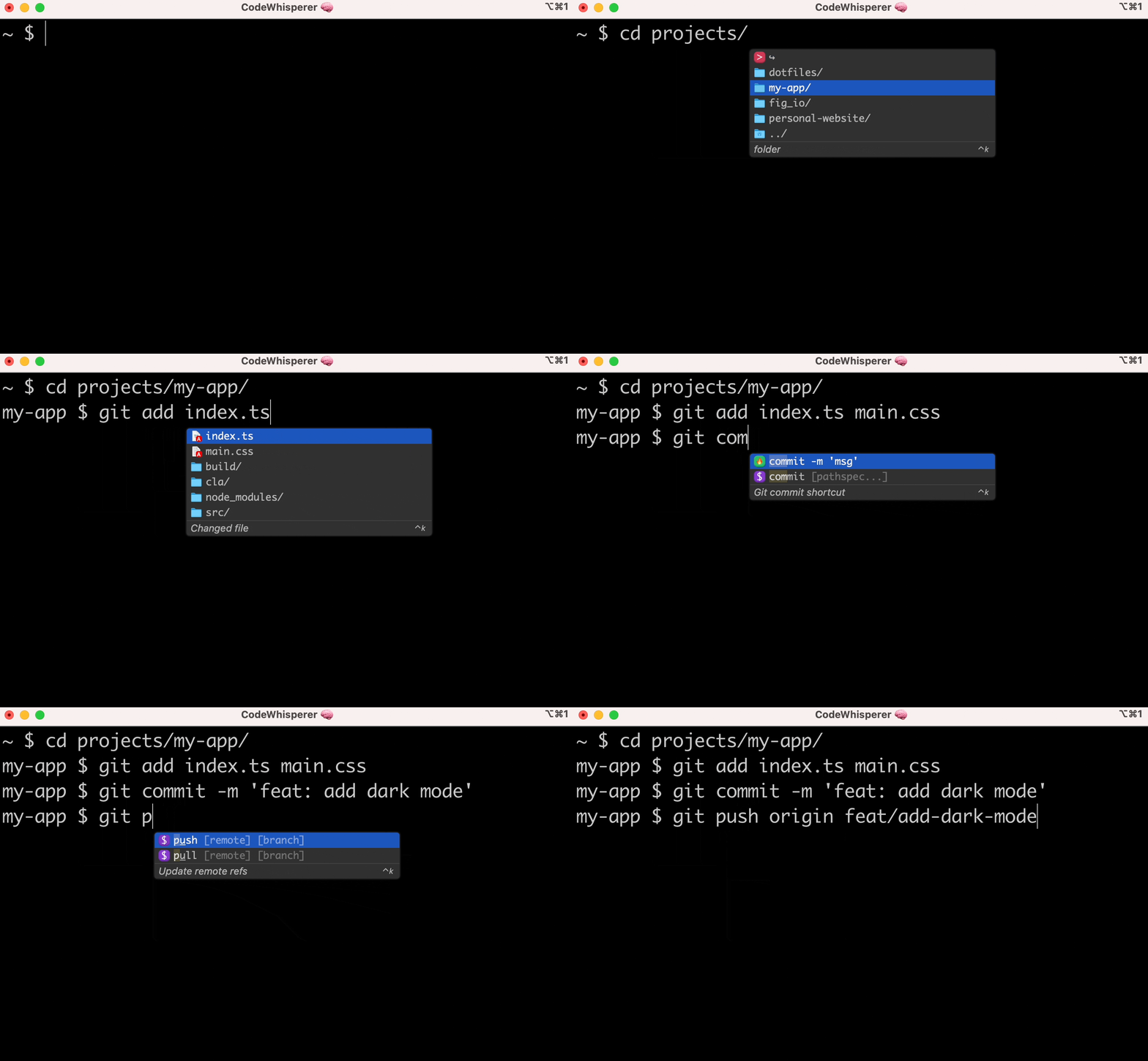
기존 터미널과 셸을 위한 IDE 스타일 자동 완성
개발 도구README.md
Original


Amazon Q Developer CLI
adds IDE-style completions for hundreds of popular CLIs like git, npm,
docker, and aws. Start typing, and Amazon Q populates contextually relevant
subcommands, options and arguments.
Amazon Q Developer CLI, formerly known as Fig, is open source. See aws/amazon-q-developer-cli to learn more.
⚡️ Installation
- macOS:
- DMG: Download from AWS: aws.amazon.com
- Homebrew:
brew install amazon-q
- Linux/Windows:
- Remote machines
NOTE: Once it's downloaded, launch the app to set up Amazon Q for command line!
👋 What are "completion specs"?
A completion spec is a declarative schema that specifies the subcommands,
options and args for a CLI tool. Amazon Q uses these schemas to generate
suggestions.
😎 Contribute your first spec in < 3 minutes
Use the steps below or follow our getting started guide: fig.io/docs
Prerequisites:
- Download Amazon Q for command line
- Node and Pnpm
Steps
Make sure you have
pnpminstalled, as that's the package manager used in this repo.Click here to fork this repo.
Clone your forked repo and create an example spec
# Replace `YOUR_GITHUB_USERNAME` with your own GitHub username
git clone https://github.com/YOUR_GITHUB_USERNAME/autocomplete.git autocomplete
cd autocomplete

# Add withfig/autocomplete as a remote
git remote add upstream https://github.com/withfig/autocomplete.git

# Install packages
pnpm install

# Create an example spec (call it "abc")
pnpm create-spec abc

# Turn on "dev mode"
pnpm dev
Now go to your terminal and type
abc[space]. Your example spec will appear. 😊
Other things to know
- Edit your spec in TypeScript in the
src/folder - On save, specs are compiled to the
build/folder - In dev mode, specs are read from the
buildfolder, and generators run every keystroke.
📦 Other available package.json commands
# Typecheck all specs in the src/ folder
pnpm test

# Compile typescripts specs from src/ folder to build/ folder
pnpm build

# Lint and fix issues
pnpm lint:fix
🔥 Contributions
We would love contributions for:
- New completion specs
- Errors with existing completion specs (e.g. missing subcommands, options, or arguments)
- Generators for argument suggestions
- Better descriptions, icons etc
- Themes!
If you aren't able to contribute, please feel free to open an issue.
🙋♀️ FAQ
What terminals does Amazon Q work with?
Amazon Q for command line works with the native macOS Terminal app, iTerm, Tabby, Hyper, Kitty, WezTerm, and Alacritty. It also works in the integrated terminals of VSCode, JetBrains IDEs, Android Studio, and Nova.
Want to see another terminal included? Check our issue tracker and add your support for it!
How does Amazon Q for command line work?
Amazon Q for command line uses the Accessibility API on Mac to position the window, and integrates with your shell to read what you've typed.
Does Amazon Q for command line work on Windows or Linux?
Not yet, Amazon Q for command line is only available on macOS for now. Windows and Linux support is in progress!
How can I download Amazon Q?
Run brew install amazon-q or, downloading the app at
aws.amazon.com.
Then, launch the Amazon Q app!
How do I submit a PR?
Check out our How to Contribute guide. Many of Amazon Q's 400+ contributors made their first open source contribution to Amazon Q!
Amazon Q for command line doesn't work for me!
Run q doctor to automatically debug issues with your installation. Otherwise
make an issue in our GitHub discussions community:
aws/q-command-line-discussions