
willwill85/TAKT-UI-CC
willwill85/TAKT-UI-CC has 70 GitHub stars and 22 forks. Star changes are not measured yet. Last checked 2026-11-13 22:21 UTC. Last push 2026-11-06.
측정된 스타 증가
- in 24h
- 기록 수집 중
- in 7 days
- 기록 수집 중
- in 15 days
- 기록 수집 중
- in 1 month
- 기록 수집 중
서로 겹치는 기간의 순증가량이며 일별 합계가 아닙니다. 측정값이 없으면 비워 둡니다. 스타는 관심도를 나타내며 품질을 보장하지 않습니다.
소개
Multi-machine workbench for Claude Code over SSH: conversation sidebar, persistent tmux terminals, Syncthing file mirror, and a reverse-tunnelled local MCP server (macOS).
개발 도구README.md
OriginalTAKT-UI-CC
A multi-machine workbench for Claude Code over SSH. One window for all your Linux servers: projects & conversations in a sidebar, persistent terminals, local file preview, two-way file sync — and a local MCP server your remote Claude can call back into.
简体中文 · Setup guide · Architecture · Configuration · MCP tools · Security
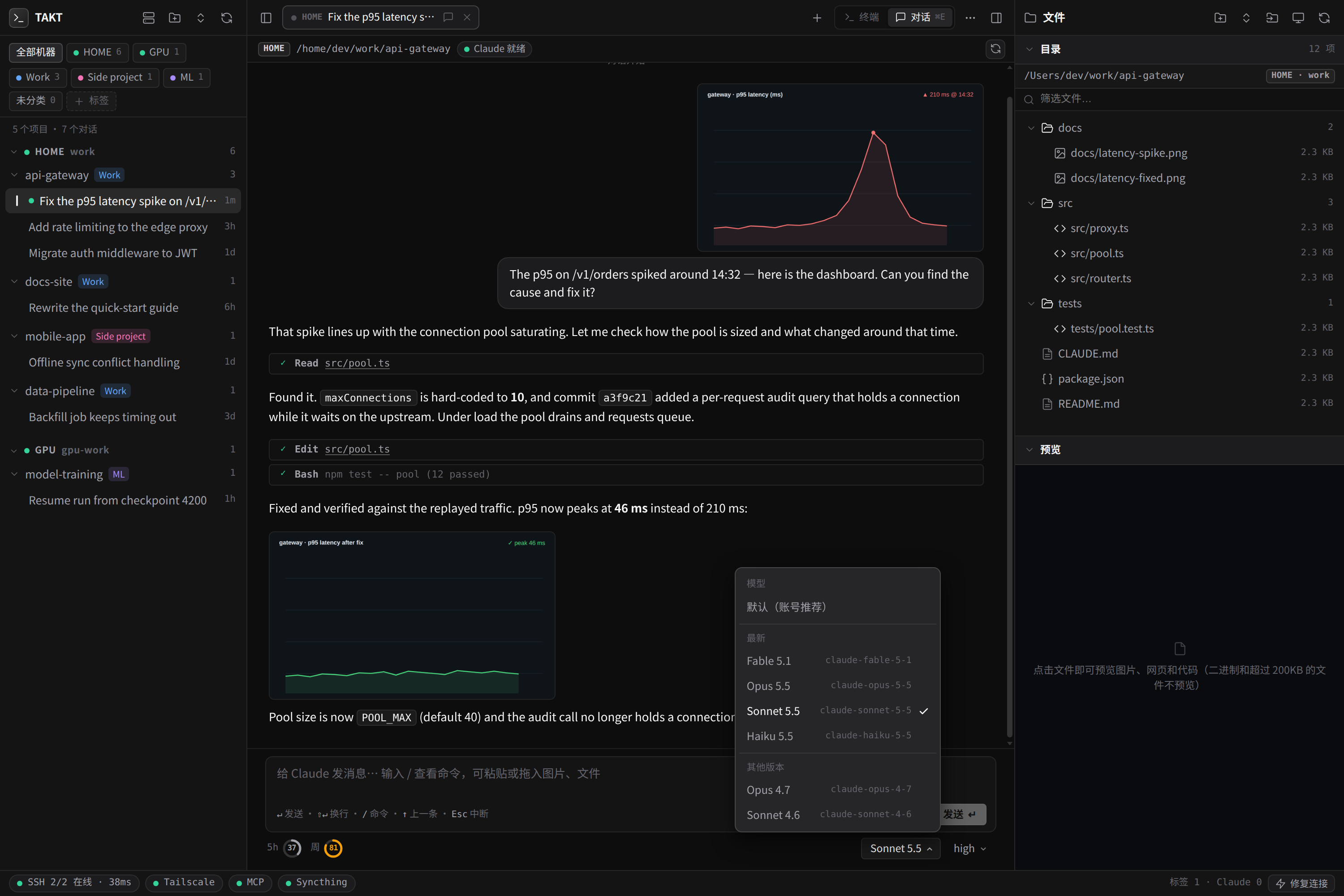
Chat view: inline image previews, 5h / weekly usage rings and a Codex-style model & effort picker under the composer.
The UI language is currently Chinese (简体中文). All code, configuration and docs are in English/Chinese; contributions that add an i18n layer are very welcome.
Why
Claude Code runs best on a server (good network, always on, close to your data). But then you juggle SSH windows, lose track of which conversation lives on which machine, and your local tools (Blender, FreeCAD, Xcode, USB boards…) are out of reach. TAKT-UI-CC fixes that:
| Many machines, one UI | Connect any number of Linux hosts. Every project and conversation is tagged with the machine it lives on (HOME, GPU, …). |
| Conversation sidebar | Projects → conversations, discovered passively from each server's ~/.claude/projects/*.jsonl. Rename, delete, tag, filter by machine or tag. Backed by a local SQLite database, so the list never flickers or loses entries when a server is offline. |
| Immortal terminals | Every tab is ssh + a remote tmux session. Close the app, lose Wi-Fi, reboot your laptop — reopen and you are back in the same session. Auto-reconnect on network drops. |
| Local file preview | The right-hand file tree and preview read the local mirror of the server's work folder (kept in sync by Syncthing), so opening images/HTML/code is instant and works even if the server is slow. Drag files in/out of the terminal. The tree updates live as files change (server-sent events backed by fs.watch, with a polling fallback). |
| Per-machine work folders | Machine 1 ↔ ~/.takt-ai/work, machine 2 ↔ ~/.takt-ai/work2, … each with its own Syncthing folder. |
| Reverse MCP tunnel | A local MCP server (23 tools: Blender, FreeCAD, EasyEDA/JLC EDA, Chrome, Xcode + iPhone deploy, USB/serial, MCU flashing, screen capture, host shell…) is reverse-tunnelled (ssh -R) to every node, so Claude running remotely can drive your machine. Protected by a token, loopback-only. |
| Appearance settings | The ⚙ button (top-left) opens a settings panel: 4 themes + follow-system (Graphite / Midnight / Light / Paper), accent colour, UI / chat / terminal font sizes, UI and monospace font families, terminal line-height and cursor, corner radius, chat width, reduced motion. Applies instantly (terminals included) and is remembered. |
| Project tags | Antigravity-style colour tags to group projects (Work / Side project / ML …) and filter the sidebar. |
| Status bar | Live SSH latency, Tailscale, MCP tunnel and Syncthing state across all nodes, with one-click tunnel self-heal. |
How it fits together
flowchart LR
  subgraph Mac["Your Mac (client)"]
    UI["Desktop app / browser\n(WKWebView + xterm.js)"]
    WB["Workbench server :3080\nnode-pty · SQLite · REST + WS"]
    MCP["Local MCP server :18765\nBlender · FreeCAD · Xcode · USB …"]
    ST1["Syncthing"]
    LW["~/.takt-ai/work, work2 …"]
    UI <--> WB
    WB --- LW
    ST1 --- LW
  end
  subgraph L1["Linux node 1"]
    TM1["tmux session per tab\n→ claude"]
    RW1["~/work"]
    ST2["Syncthing"]
    ST2 --- RW1
  end
  subgraph L2["Linux node 2"]
    TM2["tmux …"]
  end
  WB -- "ssh -tt (terminal)" --> TM1
  WB -- "ssh (scan ~/.claude)" --> L1
  MCP -. "ssh -R 18765 (reverse tunnel)" .-> TM1
  ST1 <-- "two-way sync" --> ST2
  WB --> L2
More detail: docs/ARCHITECTURE.md.
Requirements
On your Mac (client):
- macOS 13+ (the desktop app and most MCP tools are macOS-only; the web UI itself also runs on Linux in a browser)
- Node.js ≥ 22.13 (uses the built-in
node:sqlite) —brew install node sshwith key-based login to your servers (entries in~/.ssh/config)- Xcode command line tools (only to build the native app / compile
node-ptywhen no prebuild exists):xcode-select --install - Optional: Syncthing (
brew install syncthing) for the local file mirror
On each Linux server:
tmux,python3,curl, and Claude Code installed for the SSH user- Optional:
syncthing— a helper script installs tmux/python3/syncthing for you:scripts/remote-bootstrap.sh
Quick start
git clone https://github.com/willwill85/TAKT-UI-CC.git
cd TAKT-UI-CC

bash scripts/install.sh          # checks prerequisites + npm install
bash scripts/start.sh            # starts the workbench (:3080) and the local MCP server (:18765)
open http://127.0.0.1:3080       # or build the native app below
- Make sure
ssh my-serverlogs in without a password prompt (see SETUP). - In the UI click the 节点 (Nodes) button (server icon, top-left) → pick your SSH host from the list (read from
~/.ssh/config) → Save. TAKT creates the local folder, registers it with Syncthing, opens the MCP reverse tunnel and configures Claude Code on the server — automatically. - Create a project with the folder-plus icon (top-left), hover a project and click + to open a terminal on that server, then press 注入终端 to run
claude(resumed conversations useclaude -r <id>). TAKT never startsclaudebehind your back — it only opens a shell in tmux and offers the command.
Native macOS app (optional)
bash scripts/build-app.sh                       # → build/TAKT-UI-CC.app
cp -R build/TAKT-UI-CC.app /Applications/
The app is a WKWebView + native SwiftTerm terminal. It is ad-hoc signed, so on first launch use right-click → Open. It starts the background services itself.
Everyday commands
| Command | What it does |
|---|---|
npm run start:all / bash scripts/start.sh |
Start workbench + MCP server (idempotent, survives closing the terminal) |
npm run stop |
Stop both and close the MCP tunnels (remote tmux sessions keep running) |
npm run doctor |
Diagnose local setup and every node (ssh, tmux, claude, MCP tunnel…) |
bash scripts/remote-bootstrap.sh |
Install tmux/python3/syncthing on a Linux server (ssh host 'bash -s' < scripts/remote-bootstrap.sh) |
Configuration (short)
Everything is driven by environment variables; defaults work out of the box. Put overrides in ~/.takt-ai/env (KEY=value per line).
| Variable | Default | Meaning |
|---|---|---|
TAKT_HOME |
~/.takt-ai |
Data dir: nodes.json, SQLite DB, logs, per-node work folders, MCP token |
TAKT_PORT |
3080 |
Web UI / API port (bound to 127.0.0.1) |
TAKT_MCP_PORT |
18765 |
Local MCP server port (bound to 127.0.0.1) |
TAKT_AUTO_ALLOW_HOST_EXEC |
(unset) | Set to 1 to pre-approve the mac_host_exec tool on remotes (otherwise Claude asks every time) |
Full list: docs/CONFIGURATION.md.
Security model (read this)
The MCP server can run commands on your Mac, so it is locked down by default:
- Binds to 127.0.0.1 only; remote nodes reach it exclusively through the SSH reverse tunnel.
/mcprequiresAuthorization: Bearer <token>(random token in~/.takt-ai/mcp-token, mode 0600, written into each node's~/.claude.json).- No CORS headers,
Host/Originvalidation on every request — websites in your browser cannot talk to it (DNS-rebinding / CSRF safe). mac_host_execis set to ask in the remote's Claude permissions unless you opt in.- The workbench itself also only listens on loopback and rejects foreign
Host/Origin.
Anyone who can log in to a connected Linux node as the SSH user can reach the tunnel and (with the token, which is readable from that user's ~/.claude.json) call MCP tools. Only connect machines you trust. Details: docs/SECURITY.md.
Repository layout
TAKT-UI-CC/
├── config.js                 shared paths/ports/token (env-driven)
├── server/
│   ├── server.js             workbench: REST API, WebSocket terminals, SQLite state, node provisioning
│   ├── native-ssh-session.sh ssh + remote tmux launcher with auto-reconnect
│   └── public/               single-page UI (index.html) + vendored xterm.js
├── mcp-server/server.js      local MCP server + multi-node tunnel/Syncthing watchdog
├── desktop/                  Swift package: native macOS shell (WKWebView + SwiftTerm)
├── scripts/                  install · start · stop · doctor · build-app · remote-bootstrap
├── docs/                     architecture, setup, configuration, MCP tools, security (+ 简体中文)
└── examples/nodes.example.json
Troubleshooting
npm run doctor finds most problems. Common ones: docs/SETUP.md#troubleshooting.
Credits & licence
MIT — see LICENSE. Bundles xterm.js (MIT); uses node-pty, ws and SwiftTerm (MIT). Third-party notices: THIRD_PARTY_NOTICES.md.