

TMS9918 emulator. Core engine written in C99. Zero dependencies.
The goal is to emulate all documented modes listed in the TMS9918A/TMS9928A/TMS9929A datasheet
- Graphics I (including sprites)
- Graphics II (including sprites)
- Multicolor mode (including sprites)
- Text
- 5th sprite
- Sprite collisions
- VSYNC interrupt
- Individual scanline rendering
This library is also being used in the PICO9918 project. A drop-in replacement for a physical TMS9918A powered by a Raspberry Pi Pico.

The PICO9918 running in an original TI-99/4A:
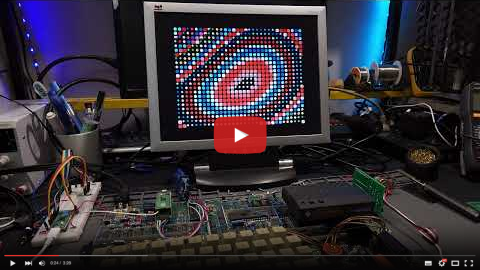
See github.com/visrealm/pico9918


vrEmuTms9918 uses the CMake build system
git clone https://github.com/visrealm/vrEmuTms9918.git
cd vrEmuTms9918
mkdir build
cd build
cmake ..
cmake --build .
Windows: Optionally, open the generated solution file
ctest
Windows: Optionally, build the ALL_TESTS project in the generated solution file
// set up the VDP write-only registers vrEmuTms9918WriteRegisterValue(tms9918, TMS_REG_0, TMS_R0_MODE_GRAPHICS_I); vrEmuTms9918WriteRegisterValue(tms9918, TMS_REG_1, TMS_R1_MODE_GRAPHICS_I | TMS_R1_RAM_16K); vrEmuTms9918SetNameTableAddr(tms9918, TMS_VRAM_NAME_ADDRESS); vrEmuTms9918SetColorTableAddr(tms9918, TMS_VRAM_COLOR_ADDRESS); vrEmuTms9918SetPatternTableAddr(tms9918, TMS_VRAM_PATT_ADDRESS); vrEmuTms9918SetSpriteAttrTableAddr(tms9918, TMS_VRAM_SPRITE_ATTR_ADDRESS); vrEmuTms9918SetSpritePattTableAddr(tms9918, TMS_VRAM_SPRITE_PATT_ADDRESS); vrEmuTms9918SetFgBgColor(tms9918, TMS_BLACK, TMS_CYAN);
// send it some data (a pattern) vrEmuTms9918SetAddressWrite(tms9918, TMS_VRAM_PATT_ADDRESS);
// update pattern #0 char smile[] = {0b00111100, 0b01000010, 0b10000001, 0b10100101, 0b10000001, 0b10011001, 0b01000010, 0b00111100}; vrEmuTms9918WriteBytes(tms9918, smile, sizeof(smile));
// update fg/bg color for first 8 characters vrEmuTms9918SetAddressWrite(tms9918, TMS_VRAM_COLOR_ADDRESS) vrEmuTms9918WriteData(tms9918, vrEmuTms9918FgBgColor(TMS_BLACK, TMS_LT_YELLOW));
// output smile pattern to screen vrEmuTms9918SetAddressWrite(tms9918, TMS_VRAM_NAME_ADDRESS);
// a few smiles vrEmuTms9918WriteData(tms9918, 0x00); vrEmuTms9918WriteData(tms9918, 0x00); vrEmuTms9918WriteData(tms9918, 0x00);
// render the display char scanline[TMS9918A_PIXELS_X]; // scanline buffer
// an example output (a framebuffer for an SDL texture) uint32_t frameBuffer[TMS9918A_PIXELS_X * TMS9918A_PIXELS_Y];
// generate all scanlines and render to framebuffer uint32_t *pixPtr = frameBuffer; for (int y = 0; y < TMS9918A_PIXELS_Y; ++y) { // get the scanline pixels vrEmuTms9918ScanLine(tms9918, y, scanline);
for (int x = 0; x < TMS9918A_PIXELS_X; ++x)
{
  // values returned from vrEmuTms9918ScanLine() are palette indexes
  // use the vrEmuTms9918Palette array to convert to an RGBA value
  *pixPtr++ = vrEmuTms9918Palette[scanline[x]];
}
}
// output the buffer...
...
// clean up
vrEmuTms9918Destroy(tms9918); tms9918 = NULL;
return 0; }">
#include "vrEmuTms9918.h" #include "vrEmuTms9918Util.h"#define TMS_VRAM_NAME_ADDRESS 0x3800 #define TMS_VRAM_COLOR_ADDRESS 0x0000 #define TMS_VRAM_PATT_ADDRESS 0x2000 #define TMS_VRAM_SPRITE_ATTR_ADDRESS 0x3B00 #define TMS_VRAM_SPRITE_PATT_ADDRESS 0x1800
// program entry point int main() { // create a new tms9918 VrEmuTms9918 *tms9918 = vrEmuTms9918New();
// Here, we're using the helper functions provided by vrEmuTms9918Util.h // // In a full system emulator, the only functions required (connected to the system bus) would be: // // * vrEmuTms9918WriteAddr() // * vrEmuTms9918WriteData() // * vrEmuTms9918ReadStatus() // * vrEmuTms9918ReadData() // // The helper functions below wrap the above functions and are not required. // vrEmuTms9918Util.h/c can be omitted if you're not using them. // // For a full example, see https://github.com/visrealm/hbc-56/blob/master/emulator/src/devices/tms9918_device.c
// set up the VDP write-only registers vrEmuTms9918WriteRegisterValue(tms9918, TMS_REG_0, TMS_R0_MODE_GRAPHICS_I); vrEmuTms9918WriteRegisterValue(tms9918, TMS_REG_1, TMS_R1_MODE_GRAPHICS_I | TMS_R1_RAM_16K); vrEmuTms9918SetNameTableAddr(tms9918, TMS_VRAM_NAME_ADDRESS); vrEmuTms9918SetColorTableAddr(tms9918, TMS_VRAM_COLOR_ADDRESS); vrEmuTms9918SetPatternTableAddr(tms9918, TMS_VRAM_PATT_ADDRESS); vrEmuTms9918SetSpriteAttrTableAddr(tms9918, TMS_VRAM_SPRITE_ATTR_ADDRESS); vrEmuTms9918SetSpritePattTableAddr(tms9918, TMS_VRAM_SPRITE_PATT_ADDRESS); vrEmuTms9918SetFgBgColor(tms9918, TMS_BLACK, TMS_CYAN);
// send it some data (a pattern) vrEmuTms9918SetAddressWrite(tms9918, TMS_VRAM_PATT_ADDRESS);
// update pattern #0 char smile[] = {0b00111100, 0b01000010, 0b10000001, 0b10100101, 0b10000001, 0b10011001, 0b01000010, 0b00111100}; vrEmuTms9918WriteBytes(tms9918, smile, sizeof(smile));
// update fg/bg color for first 8 characters vrEmuTms9918SetAddressWrite(tms9918, TMS_VRAM_COLOR_ADDRESS) vrEmuTms9918WriteData(tms9918, vrEmuTms9918FgBgColor(TMS_BLACK, TMS_LT_YELLOW));
// output smile pattern to screen vrEmuTms9918SetAddressWrite(tms9918, TMS_VRAM_NAME_ADDRESS);
// a few smiles vrEmuTms9918WriteData(tms9918, 0x00); vrEmuTms9918WriteData(tms9918, 0x00); vrEmuTms9918WriteData(tms9918, 0x00);
// render the display char scanline[TMS9918A_PIXELS_X]; // scanline buffer
// an example output (a framebuffer for an SDL texture) uint32_t frameBuffer[TMS9918A_PIXELS_X * TMS9918A_PIXELS_Y];
// generate all scanlines and render to framebuffer uint32_t *pixPtr = frameBuffer; for (int y = 0; y < TMS9918A_PIXELS_Y; ++y) { // get the scanline pixels vrEmuTms9918ScanLine(tms9918, y, scanline);
<span class="pl-k">for</span> (<span class="pl-smi">int</span> <span class="pl-s1">x</span> <span class="pl-c1">=</span> <span class="pl-c1">0</span>; <span class="pl-s1">x</span> <span class="pl-c1"><</span> <span class="pl-c1">TMS9918A_PIXELS_X</span>; <span class="pl-c1">++</span><span class="pl-s1">x</span>) { <span class="pl-c">// values returned from vrEmuTms9918ScanLine() are palette indexes</span> <span class="pl-c">// use the vrEmuTms9918Palette array to convert to an RGBA value </span> <span class="pl-c1">*</span><span class="pl-s1">pixPtr</span><span class="pl-c1">++</span> <span class="pl-c1">=</span> <span class="pl-s1">vrEmuTms9918Palette</span>[<span class="pl-s1">scanline</span>[<span class="pl-s1">x</span>]]; }}
// output the buffer...
...
// clean up
vrEmuTms9918Destroy(tms9918); tms9918 = NULL;
return 0; }
This library is used in the HBC-56 emulator.
The HBC-56 uses this library to support:
- Rendering to an SDL texture.
- TMS9918 VSYNC Interrupts.
- Time-based rendering. Supports beam-time.
Full source: hbc-56/emulator/src/devices/tms9918_device.c
This code is licensed under the MIT license