
twilio/video-quickstart-js
twilio/video-quickstart-js has 397 GitHub stars and 347 forks. GitHot measured 0 stars in 24 hours and -2 in 7 days. Last checked 2026-11-24 23:05 UTC. Last push 2026-10-27.
측정된 스타 증가
- in 24h
- 0
- in 7 days
- -2
- in 15 days
- 기록 수집 중
- in 1 month
- 기록 수집 중
서로 겹치는 기간의 순증가량이며 일별 합계가 아닙니다. 측정값이 없으면 비워 둡니다. 스타는 관심도를 나타내며 품질을 보장하지 않습니다.
소개
A quickstart and code samples for Twilio Video JavaScript SDK. https://www.twilio.com/docs/video
창작 및 미디어README.md
OriginalTwilio Video Quickstart for JavaScript

For Twilio Video 1.x Quickstart, go here.
Overview
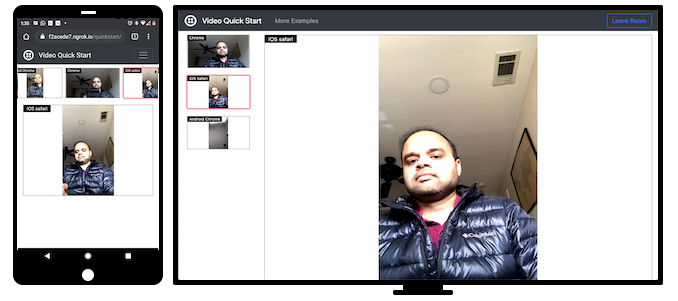
This application should give you a ready-made starting point for writing your own video apps with Twilio Video.
Community Contributions and Support
This repository is publicly available and maintained by Twilio under a limited external contribution model.
Due to limited maintenance capacity, external pull requests are not currently accepted.
GitHub Issues may be used to report reproducible bugs or provide feature feedback about these samples. Issues are reviewed on a best-effort basis, with no SLA or guaranteed response.
GitHub Issues are not an official Twilio support channel. For production issues, general usage questions, or account-specific assistance, please contact Twilio Support. If you have a Twilio account manager, you may also escalate through them.
Do not share Personally Identifiable Information (PII) or sensitive account information, including access tokens, API keys, and credentials, in issues, logs, or screenshots.
Report security vulnerabilities privately through Twilio's Vulnerability Disclosure Program, rather than public GitHub Issues.
See CONTRIBUTING.md for reporting guidance.
Setup Requirements
Before we begin, we need to collect all the config values we need to run the application:
- Account SID: Your primary Twilio account identifier - find this in the console here.
- API Key SID: Used to authenticate - generate one here.
- API Key Secret: Used to authenticate - just like the above, you'll get one here.
A Note on API Keys
When you generate an API key pair at the URLs above, your API Key Secret will only
be shown once - make sure to save this in a secure location,
or possibly your ~/.bash_profile.
Setting Up The Application
Create a configuration file for your application:
cp .env.template .env
Edit .env with the configuration parameters we gathered from above.
Next, we need to install our dependencies from npm:
npm install
Running The Application
Now we should be all set! Run the application:
npm start
Your application should now be running at http://localhost:3000. You will be prompted to test and choose your microphone and camera. On desktop browsers, your choices will be saved. On mobile browsers, you will be asked to test and choose your microphone and camera every time you load the application in order to make sure they are not reserved by another application.
After choosing your input devices, you will be prompted to enter your Room name and user name, following which you will join the Room. Now, all you have to do is open another tab and join the same Room in order to see and hear yourself on both tabs!
joinroom.js demonstrates how to use the SDK APIs to build a multi-party video sesssion. You can start building your own application by incorporating this code into your own application, and build your user interface around it.
Running On Multiple Devices
You can use ngrok to try your application on different devices by creating a secure tunnel to your application server:
ngrok http 3000
You will get a URL of the form https://a1b2c3d4.ngrok.io which can be loaded on a browser from a device
different than the one where your application server is running.
Examples
The project contains some use-case examples for the Twilio Video JS SDK. After running the application by following the instructions above, go to http://localhost:3000/examples to try them out.
관련 프로젝트 살펴보기
불러오는 중…