
stride3d/stride
stride3d/stride has 7,944 GitHub stars and 1,182 forks. GitHot measured +6 in 7 days. Last checked 2026-11-10 04:38 UTC. Last push 2026-11-07.
Stride (formerly Xenko), a free and open-source cross-platform C# game engine.
측정된 스타 증가
- in 24h
- 업데이트 지연
- in 7 days
- +6
- in 15 days
- 업데이트 지연
- in 1 month
- 업데이트 지연
서로 겹치는 기간의 순증가량이며 일별 합계가 아닙니다. 측정값이 없으면 비워 둡니다. 스타는 관심도를 나타내며 품질을 보장하지 않습니다.
README.md
Original



Welcome to the Stride Game Engine
Stride is an open-source C# game engine designed for realistic rendering and VR. Highly modular, it aims to give game makers more flexibility in their development. Stride comes with an editor, Game Studio, which allows you to create and manage the content of your games or applications visually and intuitively. To learn more about Stride, visit stride3d.net.
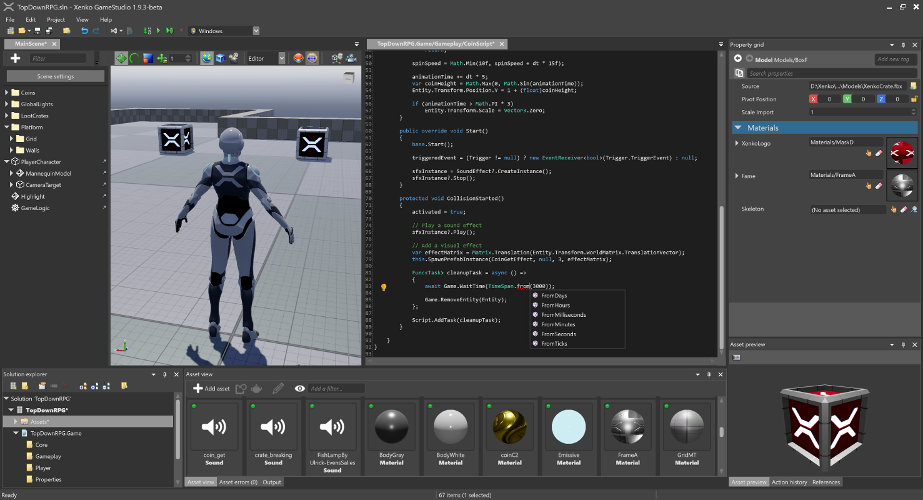
This README is intended for users who want to build the Stride engine from source or contribute to its development. If your goal is to create games using Stride, we recommend visiting the Get started with Stride guide. There, you'll find detailed instructions on downloading, installing, and getting started with game development in Stride.
🚀 Try Stride from the command line
Create and manage Stride projects from the command line — no editor required.
The Stride CLI tool installs and manages Stride engine versions, creates projects from templates, and opens Game Studio:
dotnet tool install -g Stride.Cli

stride sdk install                   # install the latest Stride engine
stride new fps -n MyShooter          # template: game, fps, platformer2d, topdownrpg, vrsandbox, ...
cd MyShooter && dotnet run --project MyShooter.Windows

stride studio                        # open Game Studio, the visual editor
stride new with no template lists what's available, stride sdk manages installed engine versions (list, install, uninstall, update), and stride upgrade moves a project to a newer engine. See sources/launcher/README.md.
Prefer standard .NET templating? The same templates are available through dotnet new:
dotnet new install Stride.Templates.Games
dotnet new stride-game -n MyGame
cd MyGame && dotnet run --project MyGame.Windows
See sources/templates/README.md for the full template catalog (genre starters, 18 feature demos, tutorials) and the local-development workflow.
🤝 Contributing
Want to get involved? See our Contributing section for how to ask questions, report bugs, submit pull requests (including good first issues), and how you can earn money by contributing via funded tasks/bug bounties.
🗺️ Roadmap
Our Roadmap communicates upcoming changes to the Stride engine.
🛠️ Building from Source
Prerequisites
- Latest Git — the Windows installer includes Git LFS by default; make sure it stays enabled. For convenience, you can also use a UI client like GitExtensions.
- Visual Studio 2026 (Community edition is free), with these two workloads:
- .NET desktop development (bundles the .NET 10 SDK)
- Desktop development with C++
See docs/build/README.md for detailed prerequisites (specific MSVC toolset versions, optional iOS/Android/ARM64/VSIX components, command-line builds without VS, and troubleshooting).
Build Stride
git clone https://github.com/stride3d/stride.git- Open
Stride.slnxin Visual Studio 2026. - Build the
Stride.GameStudioproject (default startup, in the60-Editorfolder) or run it directly from the toolbar.
Repository layout
| Folder | What it holds |
|---|---|
Stride.slnx |
The main solution: open this one |
sources/ |
What ships, by area (core, engine, editor, assets, shaders, presentation, launcher, tools...). Unit tests sit next to their code. The Stride.*.slnf filters are the slices CI builds |
tests/ |
Test-only projects and data: editor and end-user suites, GPU gold images, device scripts. See tests/README.md |
samples/ |
Sample games and templates, built like user projects (samples/StrideSamples.slnx) |
deps/ |
Third-party code: committed binaries, and the recipes that build them or the Stride.Dependencies.* packages |
build/ |
How CI and releases build, sign and pack (package.proj), and your local settings (Stride.Local.props) |
docs/ |
Contributor docs: build, debugging, editor, launcher, asset system |
bin/ |
Build output and local packages (ignored by git) |
There is no Directory.Build.props at the root on purpose: sources/ and tests/ have their own, and samples must build like a user's project.
Contribution Guidelines
Please check our Contributing Guidelines.
🔬 Build Status
| Build | Status |
|---|---|
| Windows |  |
| Linux Vulkan/OpenGL |  |
| iOS |  |
| Tests (Simple) |  |
| Tests (Game/WARP) | |
📖 Stride Documentation Landscape
The Stride documentation is organized across different locations. Here's how it's structured:
- Stride Game Engine - The main repository for Stride.
- Contributing to Stride - A guide for developers interested in contributing to or developing the Stride engine.
- Stride Website - The official site showcasing Stride, featuring:
- Stride Docs - The official documentation, including:
- Manual
- Tutorials
- Release Notes
- Ways to contribute
- API Reference
- Community Resources - Demos, articles, shaders, physics examples, and more.
- Contributing to the Docs - Guide for contributing to the Stride documentation.
- Stride Community Toolkit - A set of C# helpers and extensions to enhance your experience with the Stride game engine.
- Contributing to Toolkit - Contribute to or explore the toolkit's source code.
🌐 .NET Foundation
This project is supported by the .NET Foundation.
🛡️ License
Stride is covered by the MIT License unless stated otherwise (i.e. for some files that are copied from other projects). You can find the list of third-party projects here. Contributors need to sign the following Contribution License Agreement.
✨ Contributors
Thanks to all these wonderful people who have contributed to Stride!


This project follows the all-contributors specification. Contributions of any kind welcome!