
stephencelis/SQLite.swift
stephencelis/SQLite.swift has 10,187 GitHub stars and 1,612 forks. GitHot measured -1 stars in 24 hours and 0 in 7 days. Last checked 2026-11-12 18:17 UTC. Last push 2026-10-25.
What you can do
- A pure-Swift interface
- A type-safe, optional-aware SQL expression builder
- A flexible, chainable, lazy-executing query layer
- Automatically-typed data access
측정된 스타 증가
- in 24h
- -1
- in 7 days
- 0
- in 15 days
- 업데이트 지연
- in 1 month
- 업데이트 지연
서로 겹치는 기간의 순증가량이며 일별 합계가 아닙니다. 측정값이 없으면 비워 둡니다. 스타는 관심도를 나타내며 품질을 보장하지 않습니다.
소개
A type-safe, Swift-language layer over SQLite3.
데이터README.md
OriginalSQLite.swift


A type-safe, Swift-language layer over SQLite3.
SQLite.swift provides compile-time confidence in SQL statement syntax and intent.
Features
- A pure-Swift interface
- A type-safe, optional-aware SQL expression builder
- A flexible, chainable, lazy-executing query layer
- Automatically-typed data access
- A lightweight, uncomplicated query and parameter binding interface
- Developer-friendly error handling and debugging
- Full-text search support
- Well-documented
- Extensively tested
- SQLCipher support via Swift Package Manager
- Schema query/migration
- First-class WAL mode and journaling configuration via
Connection(_, journalMode: .wal)and theenableWAL()/walCheckpoint(...)APIs - Works on Linux (with some limitations)
- Active support at StackOverflow, and Gitter Chat Room (experimental)
Usage
import SQLite

// Wrap everything in a do...catch to handle errors
do {
    let db = try Connection("path/to/db.sqlite3")

    let users = Table("users")
    let id = SQLite.Expression<Int64>("id")
    let name = SQLite.Expression<String?>("name")
    let email = SQLite.Expression<String>("email")

    try db.run(users.create { t in
        t.column(id, primaryKey: true)
        t.column(name)
        t.column(email, unique: true)
    })
    // CREATE TABLE "users" (
    //     "id" INTEGER PRIMARY KEY NOT NULL,
    //     "name" TEXT,
    //     "email" TEXT NOT NULL UNIQUE
    // )

    let insert = users.insert(name <- "Alice", email <- "[email protected]")
    let rowid = try db.run(insert)
    // INSERT INTO "users" ("name", "email") VALUES ('Alice', '[email protected]')

    for user in try db.prepare(users) {
        print("id: \(user[id]), name: \(user[name]), email: \(user[email])")
        // id: 1, name: Optional("Alice"), email: [email protected]
    }
    // SELECT * FROM "users"

    let alice = users.filter(id == rowid)

    try db.run(alice.update(email <- email.replace("mac.com", with: "me.com")))
    // UPDATE "users" SET "email" = replace("email", 'mac.com', 'me.com')
    // WHERE ("id" = 1)

    try db.run(alice.delete())
    // DELETE FROM "users" WHERE ("id" = 1)

    try db.scalar(users.count) // 0
    // SELECT count(*) FROM "users"
} catch {
    print (error)
}
[!WARNING] Iterating the sequence that
prepare(_:)returns force-tries each step. If SQLite reports an error partway through the results (for exampleSQLITE_BUSYwhile another connection holds a lock, or an I/O error), your app crashes instead of throwing. To handle these errors, read rows withprepareRowIterator(_:)instead. See Failable iteration.
Note that Expression should be written as SQLite.Expression to avoid
conflicts with the SwiftUI.Expression if you are using SwiftUI too.
SQLite.swift also works as a lightweight, Swift-friendly wrapper over the C API.
// Wrap everything in a do...catch to handle errors
do {
    // ...

    let stmt = try db.prepare("INSERT INTO users (email) VALUES (?)")
    for email in ["[email protected]", "[email protected]"] {
        try stmt.run(email)
    }

    db.totalChanges    // 3
    db.changes         // 1
    db.lastInsertRowid // 3

    for row in try db.prepare("SELECT id, email FROM users") {
        print("id: \(row[0]), email: \(row[1])")
        // id: Optional(2), email: Optional("[email protected]")
        // id: Optional(3), email: Optional("[email protected]")
    }

    try db.scalar("SELECT count(*) FROM users") // 2
} catch {
    print (error)
}
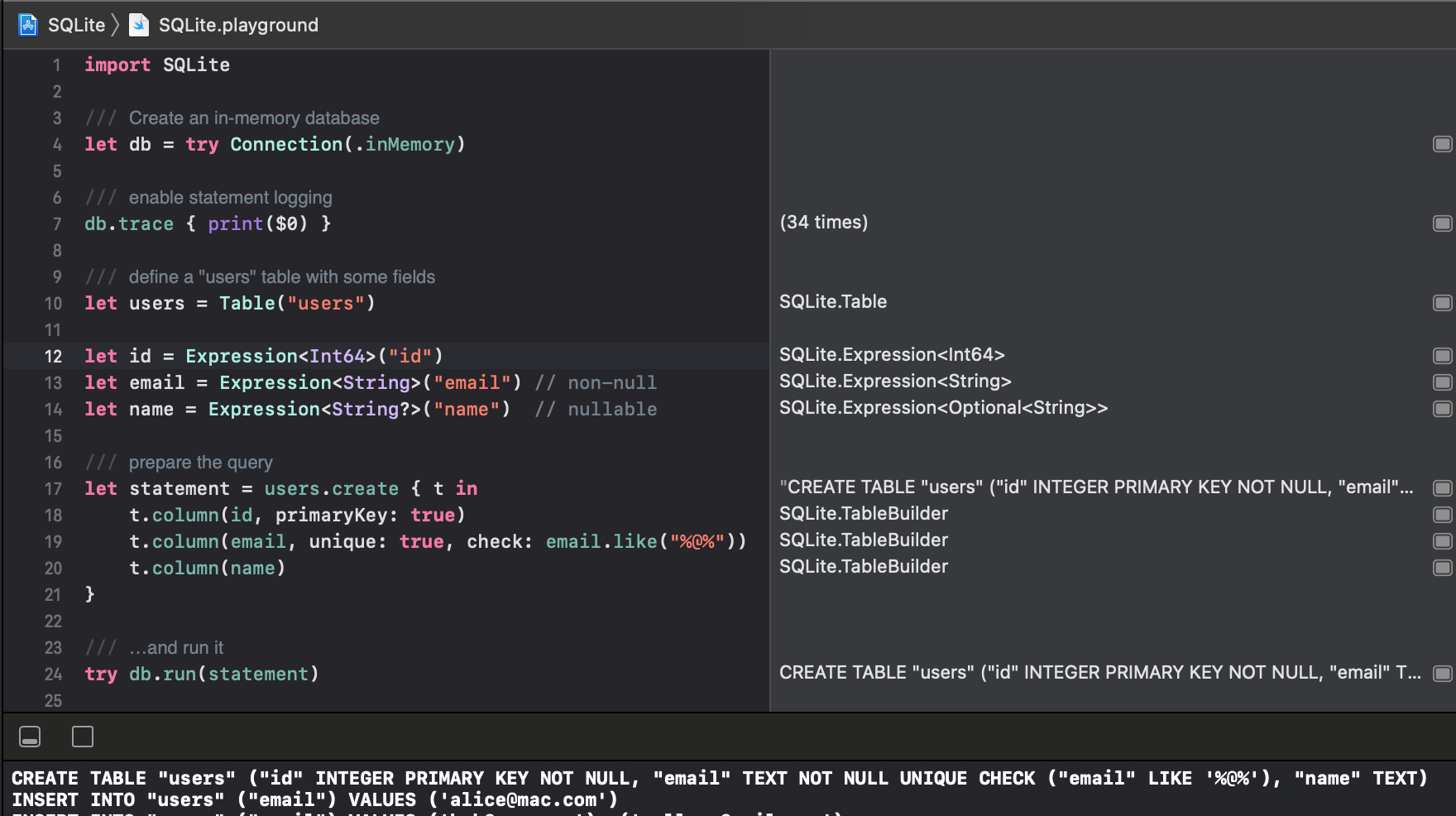
Read the documentation or explore more, interactively, from the Xcode project’s playground.
Installation
Swift Package Manager
The Swift Package Manager is a tool for managing the distribution of Swift code.
- Add the following to your
Package.swiftfile:
dependencies: [
    .package(url: "https://github.com/stephencelis/SQLite.swift.git", from: "0.17.0")
]
- Build your project:
$ swift build
See the Tests/SPM folder for a small demo project which uses SPM.
Manual
To install SQLite.swift as an Xcode sub-project:
Drag the SQLite.xcodeproj file into your own project. (Submodule, clone, or download the project first.)
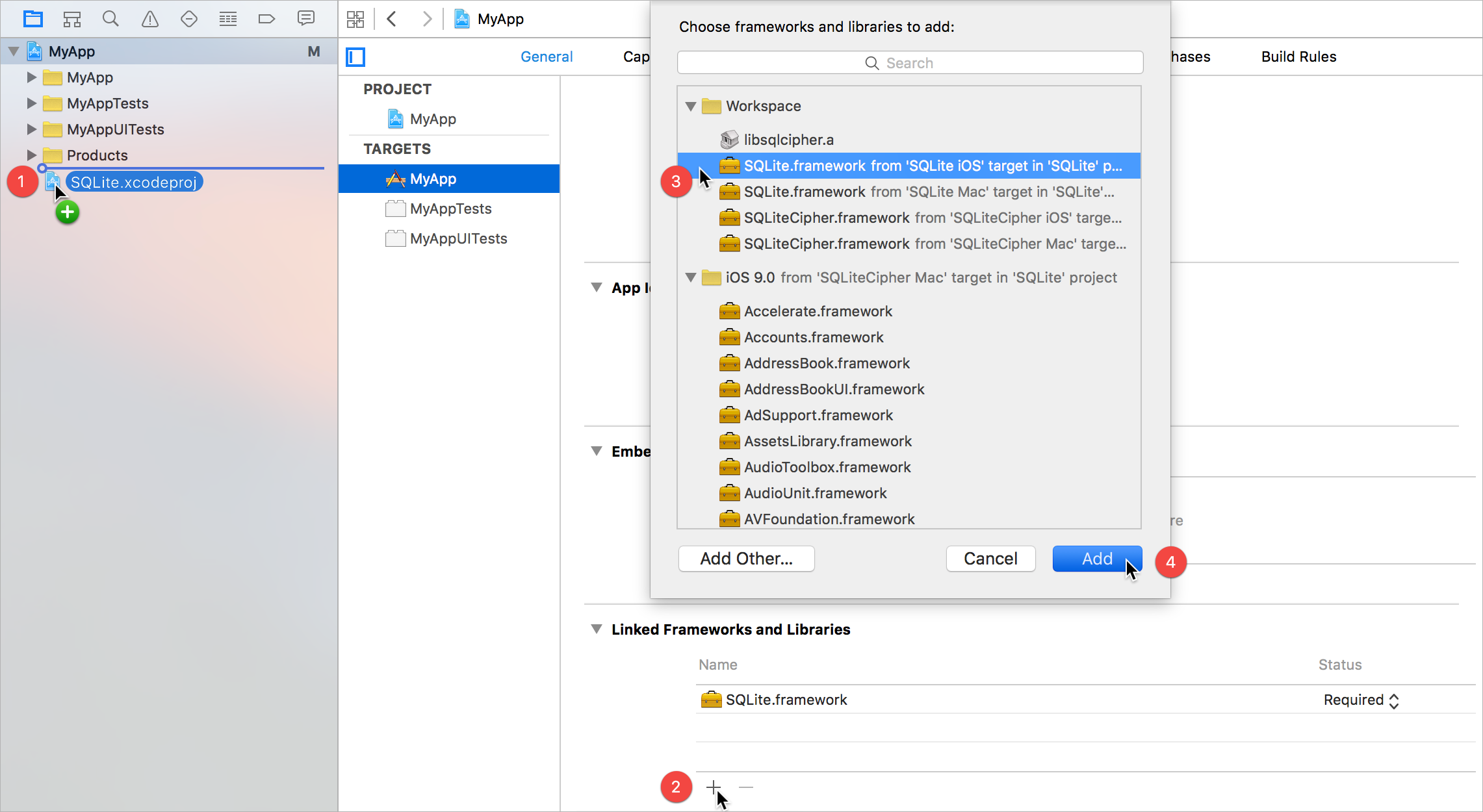
In your target’s General tab, click the + button under Linked Frameworks and Libraries.
Select the appropriate SQLite.framework for your platform.
Add.
Some additional steps are required to install the application on an actual device:
In the General tab, click the + button under Embedded Binaries.
Select the appropriate SQLite.framework for your platform.
Add.
Communication
Read the contributing guidelines. The TL;DR (but please; R):
- Need help or have a general question? Ask on Stack
Overflow (tag
sqlite.swift). - Found a bug or have a feature request? Open an issue.
- Want to contribute? Submit a pull request.
Original author
License
SQLite.swift is available under the MIT license. See the LICENSE file for more information.
Related
These projects enhance or use SQLite.swift:
- SQLiteMigrationManager.swift (inspired by FMDBMigrationManager)
Alternatives
Looking for something else? Try another Swift wrapper (or FMDB):
관련 프로젝트 살펴보기
Asabeneh/30-Days-Of-Python
30 Days of Python 프로그래밍 챌린지는 Python 프로그래밍 언어를 30일 동안 배우기 위한 단계별 가이드입니다. 이 챌린지는 100일 이상 걸릴 수 있습니다. 자신의 속도에 맞춰 진행하세요. 다음 동영상도 도움이 될 수 있습니다: https://www.youtube.com/channel/UC7PNRuno1rzYPb1xLa4yktw
78,673 스타grafana/grafana
개방적이고 조합 가능한 옵저버빌리티 및 데이터 시각화 플랫폼입니다. Prometheus, Loki, Elasticsearch, InfluxDB, Postgres 등 여러 소스의 메트릭, 로그, 트레이스를 시각화합니다.
77,876 스타redis/redis
실시간 데이터 기반 애플리케이션을 구축하는 개발자에게 Redis는 가장 선호되고, 가장 빠르며, 기능이 가장 풍부한 캐시, 데이터 구조 서버이자 문서 및 벡터 쿼리 엔진입니다.
77,485 스타apache/superset
Apache Superset는 데이터 시각화 및 데이터 탐색 플랫폼입니다.
75,509 스타