
segecey/SwiftIconFont
segecey/SwiftIconFont has 1,168 GitHub stars and 114 forks. GitHot measured 0 stars in 24 hours and 0 in 7 days. Last checked 2026-11-12 05:38 UTC. Last push 2022-08-05.
Icons fonts for iOS (Font Awesome 5, Iconic, Ionicon, Octicon, Themify, MapIcon, MaterialIcon, Foundation 3, Elegant Icon, Captain Icon)
측정된 스타 증가
- in 24h
- 0
- in 7 days
- 0
- in 15 days
- 업데이트 지연
- in 1 month
- 업데이트 지연
서로 겹치는 기간의 순증가량이며 일별 합계가 아닙니다. 측정값이 없으면 비워 둡니다. 스타는 관심도를 나타내며 품질을 보장하지 않습니다.
README.md
Original


Installation
SPM
Not yet supported. Please use Cocoapods or Carthage
Carthage
github "segecey/SwiftIconFont"
Cocoapods
CocoaPods is a dependency manager for Cocoa projects.
You can install it with the following command:
gem install cocoapods
To integrate SwiftIconFont into your Xcode project using CocoaPods, specify it in your Podfile:
use_frameworks!

pod 'SwiftIconFont'
Example
To run the example project, clone the repo, and run pod install from the Example directory first.
Prefixes
| Font | Prefix | Cheat Sheet |
|---|---|---|
| Font Awesome 5 | fa5: | List |
| Font Awesome 5 Brand | fa5b: | List |
| Font Awesome 5 Solid | fa5s: | List |
| Ion Icons | io: | List |
| Octicons | oc: | List |
| Open Iconic | ic: | List |
| Material Icon | ma: | List |
| Themify | ti: | List |
| Map Icons | mi: | List |
| Segoe MDL2 | sm: | List |
| Foundation 3 | fo: | List |
| Elegant Icon | el: | List |
| Captain | cp: | Please check example project. |
Fonts
public enum Fonts: String {
    case fontAwesome5 = "FontAwesome5Free-Regular"
    case fontAwesome5Brand = "FontAwesome5Brands-Regular"
    case fontAwesome5Solid = "FontAwesome5Free-Solid"
    case iconic = "open-iconic"
    case ionicon = "Ionicons"
    case octicon = "octicons"
    case themify = "themify"
    case mapIcon = "map-icons"
    case materialIcon = "MaterialIcons-Regular"
    case segoeMDL2 = "Segoe mdl2 assets"
    case foundation = "fontcustom"
    case elegantIcon = "ElegantIcons"
    case captain = "captainicon"
}
Storyboard
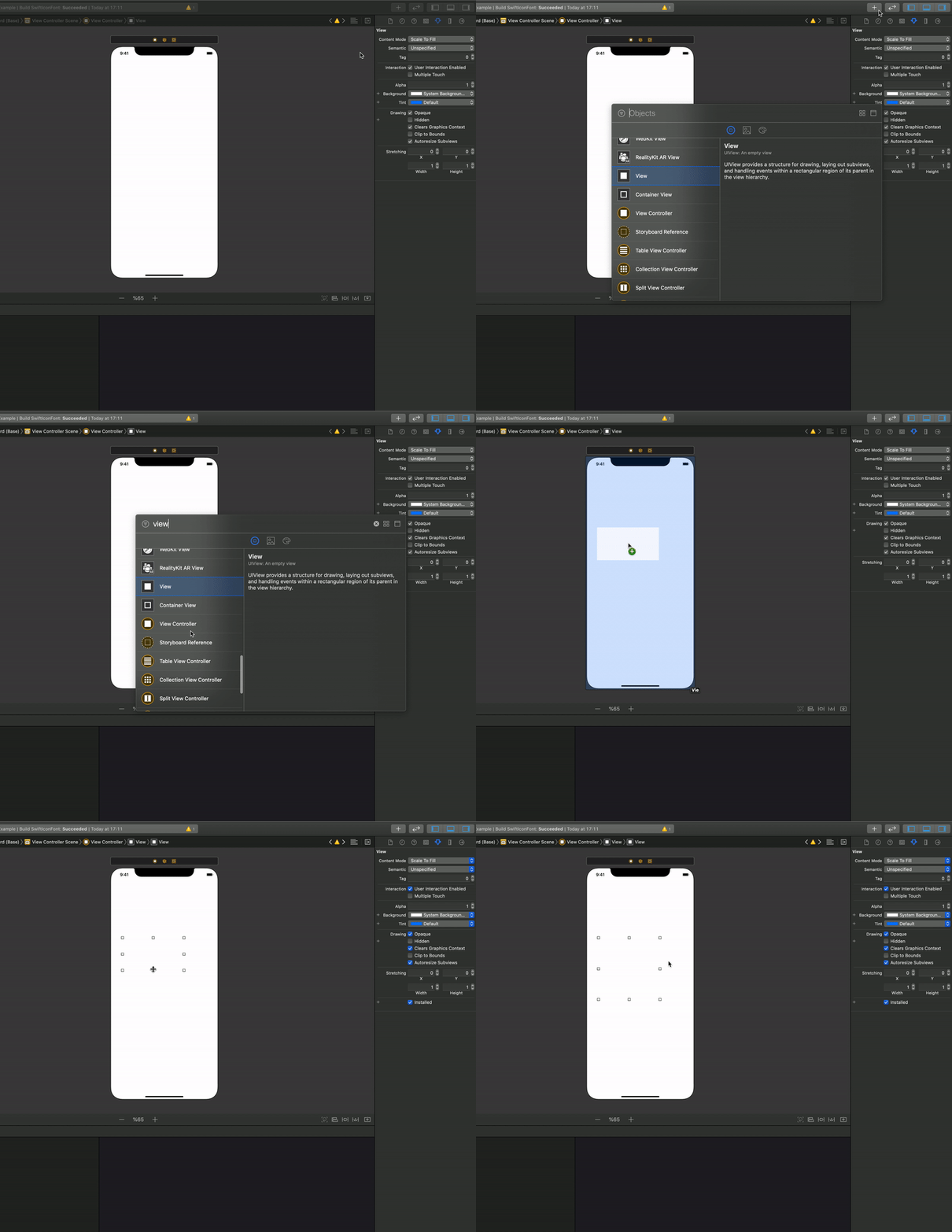
Runtime Structure
< Prefix >:< Icon >
Usage
In your UILabel, UIButton or UITextField, set a text containing a placeholder anywhere you want the icon to be. Somethink like this
oc:logo-github
Then you can choose between 3 ways you can use SwiftIconFont.
1. Without Custom Class
Simply import SwiftIconFont and call processIcons on any UILabel, UIButton or UITextField that has a placeholder.
label.parseIcon()
2. Custom Class
The lazy way, just set your UILabel, UITextField, UIButton, UITextView, UIBarButtonItem class as SwiftIconLabel, SwiftIconTextField, SwiftIconButton, SwiftIconTextView, SwiftBarButtonItem, and thats it, your icons will be processed at runtime.
3. Programmatically
import SwiftIconFont

label.font = UIFont.icon(from: .fontAwesome5, ofSize: 50.0)
label.text = String.fontAwesome5Icon(code: "twitter")
UIBarButtonItem (Without Custom Class)
import SwiftIconFont

twitterBarButton.icon(from: .fontAwesome5, code: "twitter", ofSize: 20)
UITabBarItem (Without Custom Class)
import SwiftIconFont

twitterTabBarButton.icon(from: .fontAwesome5, code: "twitter", imageSize: CGSizeMake(20, 20), ofSize: 20)
UIImage
import SwiftIconFont

let githubLogo = UIImage(from: .octicon, code: "logo-github", textColor: .black, backgroundColor: .clear, size: CGSize(width: 150, height: 50))
UIImageView
import SwiftIconFont

let githubLogoImageView: UIImageView = UIImageView(frame: CGRect(x: 120, y: self.view.frame.size.height - 130, width: 150, height: 50))
githubLogoImageView.setIcon(from: .octicon, code: "logo-github", textColor: .black, backgroundColor: .clear, size: nil)
macOS
- NSTextField, NSImage, NSView
- Please check ExampleMac project
Author
Sedat ÇİFTÇİ - [email protected]
Contributors
License
SwiftIconFont is available under the MIT license. See the LICENSE file for more info.
Contributing
- Fork it (http://github.com/segecey/SwiftIconFont/fork)
- Create your feature branch (
git checkout -b my-new-feature) - Commit your changes (
git commit -am 'Add some feature') - Push to the branch (
git push origin my-new-feature) - Create new Pull Request
관련 프로젝트 살펴보기
sindresorhus/awesome
😎 온갖 흥미로운 주제에 관한 Awesome 목록 [참고: 기존 풀 리퀘스트를 따라잡을 여유가 생길 때까지 풀 리퀘스트가 일시적으로 비활성화되어 있습니다]
535,931 스타EbookFoundation/free-programming-books
:books: 무료로 이용할 수 있는 프로그래밍 도서
401,493 스타nilbuild/developer-roadmap
개발자의 커리어 성장을 돕는 인터랙티브 로드맵, 가이드 및 기타 교육 콘텐츠.
371,909 스타vinta/awesome-python
“Python으로 X를 하고 싶은데, 어떤 도구를 써야 할까?”에 답하는 결정판 목록.
334,320 스타