
seekerhuang/HarMA
seekerhuang/HarMA has 64 GitHub stars and 3 forks. GitHot measured 0 in 7 days. Last checked 2026-11-10 03:37 UTC. Last push 2026-10-26.
[ICLRW 2024] Efficient Remote Sensing with Harmonized Transfer Learning and Modality Alignment
측정된 스타 증가
- in 24h
- 업데이트 지연
- in 7 days
- 0
- in 15 days
- 업데이트 지연
- in 1 month
- 업데이트 지연
서로 겹치는 기간의 순증가량이며 일별 합계가 아닙니다. 측정값이 없으면 비워 둡니다. 스타는 관심도를 나타내며 품질을 보장하지 않습니다.
README.md
OriginalHarMA


This repo is the official implementation of "Efficient Remote Sensing with Harmonized Transfer Learning and Modality Alignment"(ICLRW 2024).
Introduction 🌍
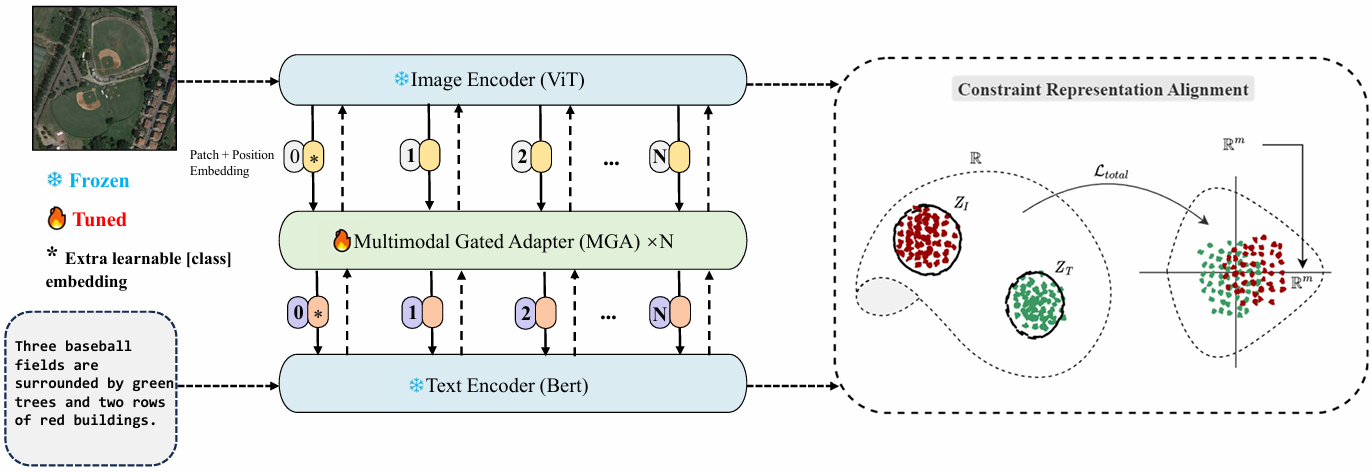
This paper proposes a framework for efficient remote sensing using Harmonized Transfer Learning and Modality Alignment (HarMA), addressing key challenges in the field of remote sensing image-text retrieval. HarMA leverages a unified perspective on multimodal transfer learning to enhance task performance, modality alignment, and single-modality uniform alignment. The core innovation lies in the hierarchical multimodal adapter inspired by the human brain's information processing, which integrates shared mini-adapters to improve fine-grained semantic alignment. By employing parameter-efficient fine-tuning, HarMA significantly reduces training overhead while achieving state-of-the-art performance on popular multimodal retrieval tasks without relying on external data or other tricks. This approach outperforms fully fine-tuned models with minimal parameter adjustments, making it a versatile and resource-efficient solution for remote sensing applications. Experiments validate the effectiveness of HarMA, showcasing its potential to enhance vision and language representations in remote sensing tasks.
Implementation 💻
Environments 🌐
Set up the environment by running:
pip install -r requirements.txt
Datasets 📚
All experiments are based on the RSITMD and RSICD datasets.
Download the images from Baidu Disk or Google Drive and modify the configs/yaml file accordingly:
image_root: './images/datasets_name/'
The annotation files for the datasets are located in the data/finetune directory.
Training 📈
Download the GeoRSCLIP pre-trained model from this link and place it in the models/pretrain/ directory.
If you encounter environmental issues, you can modify the get_dist_launch function in run.py. For example, for a 2-GPU setup:
elif args.dist == 'f2':
        return "CUDA_VISIBLE_DEVICES=0,1 WORLD_SIZE=2 /root/miniconda3/bin/python -W ignore -m torch.distributed.launch --master_port 9999 --nproc_per_node=2 " \
               "--nnodes=1 "
Start training with:
python run.py --task 'itr_rsitmd_vit' --dist "f2" --config 'configs/Retrieval_rsitmd_vit.yaml' --output_dir './checkpoints/HARMA/full_rsitmd_vit'

python run.py --task 'itr_rsicd_vit' --dist "f2" --config 'configs/Retrieval_rsicd_vit.yaml' --output_dir './checkpoints/HARMA/full_rsicd_vit'

python run.py --task 'itr_rsitmd_geo' --dist "f2" --config 'configs/Retrieval_rsitmd_geo.yaml' --output_dir './checkpoints/HARMA/full_rsitmd_geo'

python run.py --task 'itr_rsicd_geo' --dist "f2" --config 'configs/Retrieval_rsicd_geo.yaml' --output_dir './checkpoints/HARMA/full_rsicd_geo'
Testing 🧪
To evaluate the model, change if_evaluation to True in the configs/yaml, then run:
python run.py --task 'itr_rsitmd_vit' --dist "f2" --config 'configs/Retrieval_rsitmd_vit.yaml' --output_dir './checkpoints/HARMA/test' --checkpoint './checkpoints/HARMA/full_rsitmd_vit/checkpoint_best.pth' --evaluate

python run.py --task 'itr_rsicd_vit' --dist "f2" --config 'configs/Retrieval_rsicd_vit.yaml' --output_dir './checkpoints/HARMA/test' --checkpoint './checkpoints/HARMA/full_rsicd_vit/checkpoint_best.pth' --evaluate

python run.py --task 'itr_rsitmd_geo' --dist "f2" --config 'configs/Retrieval_rsitmd_geo.yaml' --output_dir './checkpoints/HARMA/test' --checkpoint './checkpoints/HARMA/full_rsitmd_geo/checkpoint_best.pth' --evaluate

python run.py --task 'itr_rsicd_geo' --dist "f2" --config 'configs/Retrieval_rsicd_geo.yaml' --output_dir './checkpoints/HARMA/test' --checkpoint './checkpoints/HARMA/full_rsicd_geo/checkpoint_best.pth' --evaluate
Note: We provide a Jupyter notebook for direct execution. Please refer to the begin.ipynb file. If you want to test or use the pre-trained models directly, you can download the checkpoints from Checkpoints-v1.0.0.
Citation 📜
If you find this paper or repository useful for your work, please give it a star ⭐ and cite it as follows:
@article{huang2024efficient,
  title={Efficient Remote Sensing with Harmonized Transfer Learning and Modality Alignment},
  author={Huang, Tengjun},
  journal={arXiv preprint arXiv:2404.18253},
  year={2024}
}
Acknowledgement 🙏
This code builds upon the excellent work of PIR by Pan et al.
관련 프로젝트 살펴보기
sindresorhus/awesome
😎 온갖 흥미로운 주제에 관한 Awesome 목록 [참고: 기존 풀 리퀘스트를 따라잡을 여유가 생길 때까지 풀 리퀘스트가 일시적으로 비활성화되어 있습니다]
535,221 스타EbookFoundation/free-programming-books
:books: 무료로 이용할 수 있는 프로그래밍 도서
401,413 스타nilbuild/developer-roadmap
개발자의 커리어 성장을 돕는 인터랙티브 로드맵, 가이드 및 기타 교육 콘텐츠.
371,821 스타vinta/awesome-python
“Python으로 X를 하고 싶은데, 어떤 도구를 써야 할까?”에 답하는 결정판 목록.
334,054 스타