
santoru/shcheck
소개
웹사이트의 보안 헤더를 확인하는 기본 도구입니다.
보안측정된 스타 증가
- in 24h
- 0
- in 7 days
- 0
- in 15 days
- 기록 수집 중
- in 1 month
- 기록 수집 중
서로 겹치는 기간의 순증가량이며 일별 합계가 아닙니다. 측정값이 없으면 비워 둡니다. 스타는 관심도를 나타내며 품질을 보장하지 않습니다.
README.md
Originalshcheck - Security Header Check



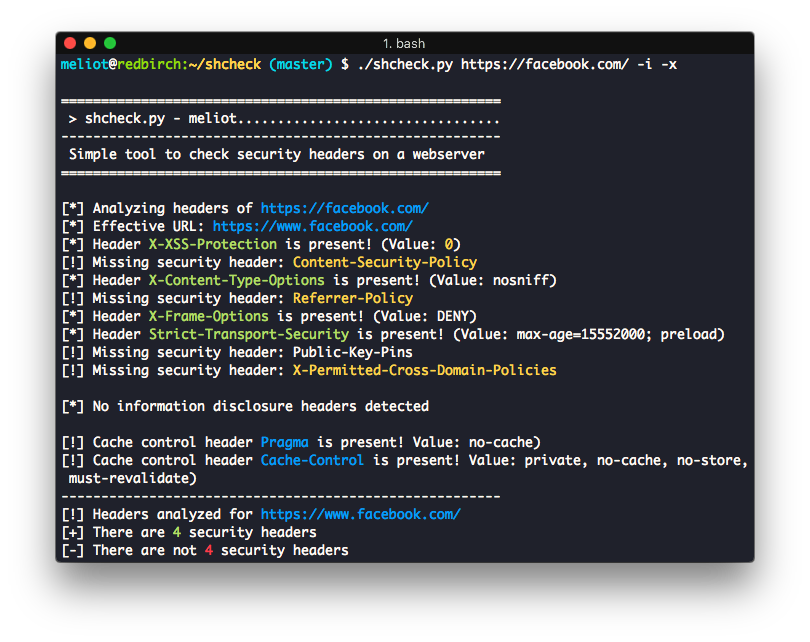
Check security headers on a target website
I did this tool to help me to check which security headers are enabled on certain websites.
The tool is very simple and it's the result of few minutes of coding.
It just check headers and print a report about which are enabled and which not
I think there is a lot to improve, and I will be grateful if somebody wants to help
How to run:
Pypi
pip3 install shcheck
shcheck.py https://insecurity.blog
Docker
First build your docker container using something like this:
docker build -t shcheck .
Then simply run your docker container using something like this where you specify which website you want to check headers on:
docker run -it --rm shcheck https://insecurity.blog
From source
git clone https://github.com/santoru/shcheck && cd shcheck
./shcheck.py https://insecurity.blog
Standalone script
If you want to run shcheck as a standalone script, just grab the shcheck.py script from the shcheck module/folder and copy it around.
Usage
Usage: ./shcheck.py [options] <target>

Options:
  -h, --help            show this help message and exit
  -p PORT, --port=PORT  Set a custom port to connect to
  -c COOKIE_STRING, --cookie=COOKIE_STRING
                        Set cookies for the request
  -a HEADER_STRING, --add-header=HEADER_STRING
                        Add headers for the request e.g. 'Header: value'
  -d, --disable-ssl-check
                        Disable SSL/TLS certificate validation
  -g, --use-get-method  Use GET method instead HEAD method
  -j, --json-output     Print the output in JSON format
  -i, --information     Display information headers
  -x, --caching         Display caching headers
  -k, --deprecated      Display deprecated headers
  --no-follow           Do not follow HTTP redirects
  --proxy=PROXY_URL     Set a proxy (Ex: http://127.0.0.1:8080)
  --hfile=PATH_TO_FILE  Load a list of hosts from a flat file
  --colours=COLOURS     Set up a colour profile [dark/light/none]
  --colors=COLOURS      Alias for colours for US English
관련 프로젝트 살펴보기
불러오는 중…