
samyfodil/musql
samyfodil/musql has 130 GitHub stars and 16 forks. Star changes are not measured yet. Last checked 2026-11-14 02:42 UTC. Last push 2026-11-13.
측정된 스타 증가
- in 24h
- 기록 수집 중
- in 7 days
- 기록 수집 중
- in 15 days
- 기록 수집 중
- in 1 month
- 기록 수집 중
서로 겹치는 기간의 순증가량이며 일별 합계가 아닙니다. 측정값이 없으면 비워 둡니다. 스타는 관심도를 나타내며 품질을 보장하지 않습니다.
소개
SQLite-compatible database with a JIT; 300× C SQLite, 1000× Turso.
데이터README.md
Original

musql
Pronounced "muscle." (In French)
SQLite-compatible SQL, accelerated by columnar storage and a JIT compiler.
musql pairs a new storage format optimized for columnar execution with just-in-time (JIT) compilation. The format stores columns contiguously; the JIT turns supported query paths into native machine code at runtime. Filters and aggregates work directly over those columns, reducing row decoding and interpreter overhead. In a 100,000-row read benchmark, a filtered count ran about 300× faster than C SQLite and nearly 1,000× faster than Turso. See performance for the full comparison and measurement scope.
Use it as an embedded database through database/sql, import existing SQLite
data, or replicate a database across nodes that need to work independently.
- A format built for fast queries. The
.musqsegment format gives compiled code direct access to column values, with an append-only delta for writes. - JIT-compiled execution. Supported query paths run as native machine code, with vectorized filter kernels on supported CPUs.
- Familiar SQL. Joins, window functions, triggers, JSON, full-text search, and R-tree indexes are part of the engine.
- Vector search. libSQL's vector functions, column types and
libsql_vector_idx/vector_top_k, plus SQLite'svec1extension. - SQLite import and export. Move databases between SQLite and musql's
.musqformat withmusql-convert. - Replication over your own network. Choose CRDT replication for independent writers, or leader mode with optional consensus integration.
Get started · Performance · SQLite compatibility · Vectors · Replication · How it works · DOOM · Development
Get started
In a Go program
go get github.com/samyfodil/musql/driver
A complete program, in a new module (go mod init example, then the
go get above and go run .):
package main

import (
    "database/sql"
    "fmt"
    "log"

    _ "github.com/samyfodil/musql/driver"
)

func main() {
    db, err := sql.Open("sqlite", "app.musq") // created if missing
    if err != nil {
        log.Fatal(err)
    }
    defer db.Close()

    if _, err := db.Exec(`CREATE TABLE IF NOT EXISTS people (id INTEGER PRIMARY KEY, name TEXT)`); err != nil {
        log.Fatal(err)
    }
    if _, err := db.Exec(`INSERT INTO people (name) VALUES (?)`, "John"); err != nil {
        log.Fatal(err)
    }

    rows, err := db.Query(`SELECT id, name FROM people`)
    if err != nil {
        log.Fatal(err)
    }
    defer rows.Close()
    for rows.Next() {
        var id int
        var name string
        if err := rows.Scan(&id, &name); err != nil {
            log.Fatal(err)
        }
        fmt.Println(id, name)
    }
    if err := rows.Err(); err != nil {
        log.Fatal(err)
    }
}
Pure Go, no CGo; needs Go 1.27 or newer. The driver registers as sqlite
(and musql), so code written for another SQLite driver usually only
changes its import. Use one SQL statement per Exec or Query call.
From the command line
musql open runs SQL on a local database file, created if missing: a
statement given as an argument, a script on standard input, or an interactive
shell.
$ ./musql open app.musq
Opened app.musq. End statements with ;  .help for commands.
musql> CREATE TABLE people (id INTEGER PRIMARY KEY, name TEXT);
musql> INSERT INTO people (name) VALUES ('John'), ('Ann');
musql> .timer on
musql> SELECT id, name FROM people;
id  name
1   John
2   Ann
Run Time: real 0.001
musql is in the release archive
with musqld and musql-convert. .help lists the shell's commands.
Given a server's URL instead of a file, musql open runs the same shell on a
musqld server, with the server's token from
--auth-token or $MUSQLD_AUTH_TOKEN. http://, https://, ws://,
wss:// and libsql:// URLs all work:
$ ./musql open http://localhost:8080 --auth-token secret
Connected to http://localhost:8080.
musql> SELECT count(*) FROM notes;
For musql cloud, point the CLI at the server once, sign in in the browser, and open a database by name:
$ ./musql config set url https://cloud.example.com
$ ./musql auth login
$ ./musql db create app
$ ./musql db shell app
Connected to acme/app.
musql>
musql --help lists the rest (organizations, groups, tokens, import and
export). cloud/DESIGN.md describes the server and how to run
it.
As a server, no Go needed
Run musqld with Docker; the database lives in the musql volume:
docker run -p 8080:8080 -e MUSQLD_AUTH_TOKEN=secret -v musql:/data ghcr.io/samyfodil/musql
The image is built from the repository's Dockerfile, a 5 MB
scratch image; to build it yourself, run docker build -t musql . in the
repository root and use musql in place of the image name above.
Or download musqld for your platform from the
latest release and run
musqld -db app.musq (the file is created if missing).
It speaks Turso's protocol, so any libSQL client connects unchanged. In
TypeScript (npm install @libsql/client):
import { createClient } from "@libsql/client";

const db = createClient({ url: "http://localhost:8080", authToken: "secret" });

await db.execute("CREATE TABLE IF NOT EXISTS notes (id INTEGER PRIMARY KEY, body TEXT)");
await db.execute({ sql: "INSERT INTO notes (body) VALUES (?)", args: ["hello"] });
const { rows } = await db.execute("SELECT id, body FROM notes");
console.log(rows); // [ { id: 1, body: 'hello' } ]
More in Serve it to Turso and libSQL clients.
From an existing SQLite database
The release archive also has musql-convert:
./musql-convert import app.db app.musq   # SQLite -> musql
./musql-convert export app.musq app.db   # musql -> SQLite
Performance
musql beats C SQLite on every workload in its benchmark. That is 26 read shapes and 4 single-row writes, and every read runs as JIT-compiled native code. The benchmark fails if one stops beating C or if the JIT declines one.
Selected reads over 1,000,000 rows, one thread each, measured on an amd64 server (Xeon D-2123IT):
| Query | musql | C SQLite | vs C SQLite | vs DuckDB, 1 thread |
|---|---|---|---|---|
min/max whole table |
25 µs | 86.2 ms | 3,400× faster | 175× faster |
| Whole-table count | 9 µs | 5.53 ms | 610× faster | 50× faster |
Correlated EXISTS |
11.2 ms | 2.15 s | 190× faster | 5.7× faster |
UNION ALL compound |
875 µs | 130 ms | 150× faster | 6.2× faster |
GROUP BY ... HAVING |
2.61 ms | 349 ms | 134× faster | 2.1× faster |
| Filtered count | 457 µs | 59.3 ms | 130× faster | 7.1× faster |
| Sum over a filter | 500 µs | 63.8 ms | 128× faster | 7.5× faster |
ORDER BY v DESC LIMIT 20 |
676 µs | 83.2 ms | 123× faster | 8.1× faster |
| Grouped aggregate | 3.98 ms | 393 ms | 99× faster | 2.0× faster |
LIMIT 20 OFFSET 1000 |
6.55 ms | 92.3 ms | 14× faster | 1.1× faster |
| Rowid lookup | 2 µs | 11.2 µs | 5.6× faster | 190× faster |
| Indexed equi-join | 12 µs | 16.6 µs | 1.4× faster | 63× faster |
How the numbers are taken:
- C SQLite and Turso are each called natively through their C APIs, with no Go in their path, and read every column; musql through its direct engine API.
- Each workload is checked against C SQLite on up to 40 bind values, then timed for about 200 ms.
Scans and aggregates run as JIT-compiled code over musql's columnar format. Point lookups and joins run as JIT-compiled VDBE programs.
Through database/sql, a point lookup costs about 4 µs, under half of native
C SQLite's 11 µs. Against Turso, called natively, musql is faster on all 26
shapes at 100,000 rows; see docs/benchmarks.md.
DuckDB is an analytical engine and not SQLite-compatible. On one thread it beats
musql on 6 of the 26 shapes: TEXT sorting, IS NULL, a grouped count over few groups, grouped
min/max, and two subquery shapes. With its default thread count it beats
musql on more. engine.WithWorkers(n) lets musql split scans across goroutines
too.
Without the JIT, musql loses to C SQLite by a large multiple on scans.
Vector search is faster too: vector_top_k beats libSQL's index while
returning the exact top 10, and every vec1 index beats C SQLite's. See
Vector search.
Queries users reported as slow (issues #69 to #74) now beat C SQLite too. They
cover generate_series, a sudoku solved by a recursive CTE, GROUP BY an
expression, and sum(DISTINCT ...). On an Apple M4, the sudoku takes 12 ms
against C SQLite's 36 ms, and GROUP BY a+1 over 10M rows 20 ms against 1.67 s.
docs/benchmarks.md has:
- all 26 shapes;
- per-machine timings, including the 100k-row runs and the Apple M4;
- the multithreaded comparison with DuckDB;
- the vector benchmarks;
- the queries from issues #69 to #74;
- the cost of calling C from Go.
Writes, through database/sql against C SQLite through mattn/go-sqlite3
(TestBenchVsC, best of 5 rounds,
amd64 Xeon D). Lower is better; under 1.0× means musql is faster:
| Write workload | musql time ÷ C SQLite time |
|---|---|
Batch INSERT, per row |
0.82–0.97× |
Bulk UPDATE ... WHERE k = ?, per statement |
0.95–0.98× |
Bulk DELETE, per statement |
0.30–0.33× |
A bulk UPDATE runs its loop as native code, writes rows in place, and
records each changed row as a patch of its changed columns in the delta.
The current engine uses segment storage with a writable delta. Its
comparison harness measures both
musql's direct engine and database/sql paths, alongside C SQLite and Turso.
For a current comparison on your machine, run from the repository root
(requires CGo):
(cd compat-harness && go test -run '^TestBenchColumnarVsC$' -count=1 -v -timeout 4h .)
The full suite includes expensive workloads and can take hours. For read and
write comparisons through database/sql, use
TestBenchVsC:
(cd compat-harness && go test -run '^TestBenchVsC$' -count=1 -v -timeout 30m .)
SQLite compatibility
musql implements SQLite's SQL dialect through its own parser, planner, and execution engine. SQL compatibility and file compatibility are separate: the engine opens musql segment files. Existing SQLite files need conversion before you open them with the driver.
Import and export databases
Install the converter:
go install github.com/samyfodil/musql/cmd/musql-convert@latest
Then convert in either direction:
# Bring an existing SQLite database into musql.
musql-convert import app.db app.musq

# Export a musql database for SQLite tools or another application.
musql-convert export app.musq exported.db
Open the imported database with sql.Open("sqlite", "app.musq").
The converter package also exposes Import and Export
for use from Go.
What is tested
The differential harness runs SQL against both musql and C SQLite and compares
results. The whole SQL corpus mined from SQLite's own test suite (73,855
statements) runs with zero wrong results and zero panics. Its only declines
are 16 PRAGMA max_page_count statements. The rest either match C SQLite's output
exactly or are rejected by both engines. That is a measured result for the corpus,
not a claim that every SQLite behavior is identical. The
segment-format compatibility notes list
what the format declines and why.
Storage-specific behavior differs. For example, page counts describe musql's
storage, and PRAGMA max_page_count is declined. Use musql's
PRAGMA max_size = <bytes> to cap storage per connection. The compatibility
report explains the remaining declines and how import/export is tested.
Moving from another Go driver
Change the driver import, convert your database, and point the DSN at the
converted file. If you use mattn/go-sqlite3 and scan date, datetime, or
timestamp columns into time.Time, enable its declared-type conversion:
db, err := sql.Open("sqlite", "app.musq?_time_decltype=1&_loc=auto")
By default, musql returns stored values without that conversion. _loc=auto
uses time.Local; a named time zone can be supplied instead. The
driver compatibility notes
describe the conversion rules.
Vector search
musql speaks libSQL's vector SQL: vector(), vector32() and the other
constructors, vector_extract(), vector_distance_cos() and
vector_distance_l2(), the F32_BLOB(n) family of column types, and
libSQL's index and search:
CREATE TABLE docs(id INTEGER PRIMARY KEY, emb F32_BLOB(384));
CREATE INDEX docs_emb ON docs(libsql_vector_idx(emb));
SELECT id FROM vector_top_k('docs_emb', vector(?), 10);
Vectors use libSQL's byte layout, and distances match libSQL's to the bit. An index with no options searches exactly: it ranks every row, with JIT kernels where it can, by its true distance, so recall is always 10/10. From 100,000 rows, or when any of libSQL's graph options is given, it walks an approximate graph built in the background, and searches exactly until that graph is ready.
SQLite's own vector extension, vec1, is also
built in (CREATE VIRTUAL TABLE t USING vec1(...)). Its tables are ordinary
tables, so a database holding one converts to and from C SQLite like any
other.
Against libSQL through its Go driver, 384-dimension float32 vectors, top 10, one thread unless noted, on a 4-core amd64 server (benchmarks):
| Workload | musql | libSQL |
|---|---|---|
vector_top_k, 100k clustered vectors |
4.1 ms, exact | 27.5 ms, recall 10/10 |
vector_top_k, 100k random vectors |
15.2 ms, exact | 33.3 ms, recall 6/10 |
| Brute-force KNN, 100k rows, cosine | 209 ms (60 ms on 4 cores) | 264 ms |
| Brute-force KNN, 100k rows, L2 | 215 ms (61 ms on 4 cores) | 216 ms |
| Insert 2,000 vectors as text | 125–134 ms | 173–185 ms |
libSQL's index answers from a DiskANN graph and can miss neighbours; musql's default index returns the exact top 10 and is still faster here.
vec1 against C SQLite with vec1 built for speed (AVX2/FMA), 100,000
clustered vectors of 384 dimensions, one thread, mean of 200 queries, on an
amd64 Xeon D (benchmark):
| Index | musql query | C SQLite query | recall@10 (musql / C) | musql train + build | C train + build |
|---|---|---|---|---|---|
| flat | 25.0 ms | 72.5 ms | 1.000 / 1.000 | 0.8 s | 0.9 s |
| ivf | 8.5 ms | 19.3 ms | 1.000 / 1.000 | 2.8 s | 3.8 s |
| ivfpq | 1.30 ms | 1.86 ms | 0.999 / 0.999 | 12.1 s | 16.5 s |
| ivfopq | 0.99 ms | 1.30 ms | 0.990 / 0.993 | 60.1 s | 71.5 s |
| ivfbq | 0.98 ms | 1.33 ms | 0.994 / 0.996 | 2.7 s | 3.5 s |
Inserting the 100,000 rows takes about the same time in both (0.59–0.63 s for musql, 0.52–0.64 s for C).
Serve it to Turso and libSQL clients
musqld serves a musql database over Hrana, the protocol libSQL and Turso
clients speak, so an app built on Turso can point at musql without code changes:
go run -C hrana ./cmd/musqld -db app.musq -listen :8080 -auth-token "$TOKEN"
import { createClient } from "@libsql/client";
const db = createClient({ url: "http://localhost:8080", authToken: process.env.TOKEN });
await db.execute("SELECT 1");
http://, ws:// and libsql:// URLs all work. musqld implements Hrana 1–3
over HTTP and WebSocket, in JSON and Protobuf: pipelines, batches with
conditions, cursors, stored SQL, describe and interactive transactions. CI runs
Turso's own clients against it, @libsql/client for Node and libsql-client-go
(examples/turso).
To serve many databases, give musqld a directory. Like Turso, the first label of
the host name picks the database, so http://app.example.com:8080 serves
./dbs/app.musq:
go run -C hrana ./cmd/musqld -dir ./dbs -create -listen :8080
Replicate a database
The replication package returns a regular *sql.DB and captures
row and schema changes as transactions commit. You supply the network through
replication.WithTransport; the base package has no networking dependency.
Choose the mode that fits your application:
| Mode | Behavior |
|---|---|
| CRDT | Every node can write, including while disconnected. Conflicts resolve per column using a hybrid logical clock, and nodes converge after reconnecting. |
| Leader | Only the node selected by your isWriter callback can commit. Changes reach followers asynchronously. |
| Leader with quorum | Commits go through your consensus log and return after quorum commitment and local application. |
CRDT merges can violate constraints that each local write satisfied, such as
foreign keys or a multi-column CHECK. Replicated databases also refuse
virtual tables, and in CRDT mode triggers and WITHOUT ROWID. Read the
replication guide for setup, conflict behavior, and
supported schemas, or start with the libp2p example.
How it works
Columnar segments put a column's values together in memory, so a filter can scan the values it needs without decoding every field of every row. The JIT compiles supported execution paths to native code, with vectorized filter kernels on supported CPUs. The planner also uses index seeks and specialized aggregate and top-N paths to avoid unnecessary work.
The driver connects database/sql to the parser, planner, and execution engine.
Committed changes go into an append-only delta; compaction folds them into the
segments. SQLite file handling lives in the converter. Replication captures
changes within the same transaction as the data it tracks.
| Package | Purpose |
|---|---|
| engine | SQL parsing, planning, execution, storage, triggers, full-text search, R-tree indexes, and JSON. |
| driver | The database/sql interface, connection handling, and transaction change capture. |
| convert/sqlite | Import and export between SQLite files and musql storage. |
| replication | Change logs, conflict resolution, synchronization, and leader/quorum integration. |
| examples/doom | DOOM compiled to VDBE bytecode, with windowed and headless runners. |
| examples/libp2p | A replication transport and end-to-end tests in a separate module. |
| compat-harness | Differential tests against C SQLite in a separate module that requires CGo. |
docs/architecture.md follows one query through the code, from the driver to the JIT, and names the file that owns each step.
Yes, it runs DOOM
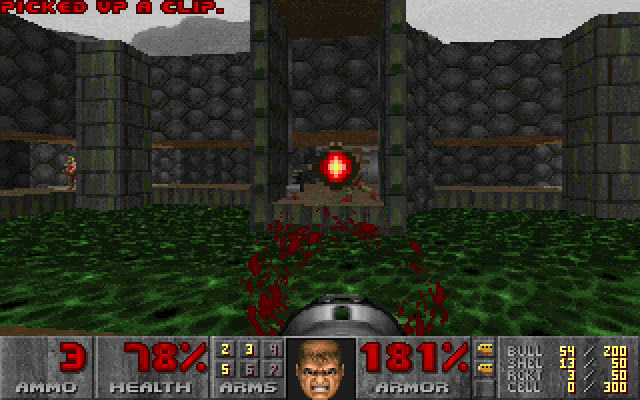
The same virtual machine that executes SQL can run DOOM. The
DOOM example takes unmodified doomgeneric through
C → LLVM IR → musql VDBE bytecode, then executes it with engine.ProgramStmt.
Each frame comes back as a result row; keyboard events go in as bound parameters.
Measured about 38 fps without JIT and 96 fps with JIT on an Intel i9. See the measurement details.
The program has 159,609 instructions and 40,561 registers. The idea comes from Turso's DOOM example.
The quickest way to play downloads the latest release for your machine and starts it (Doom's IR and the shareware WAD, about 20 MB, follow on first run).
macOS and Linux:
curl -fsSL https://raw.githubusercontent.com/samyfodil/musql/main/examples/doom/run.sh | sh
Windows (PowerShell):
irm https://raw.githubusercontent.com/samyfodil/musql/main/examples/doom/run.ps1 | iex
Or from source, in the repository root:
cd examples/doom
go run ./cmd/doom
Arrows move, Ctrl fires, and Space opens doors. Use ./cmd/doomhl instead of
./cmd/doom for a headless run that reports fps and saves the last frame as a
PNG. See the example README for controls and compiler tests.
Development
From a checkout of this repository:
make test               # Test the main module and the libp2p example.
make vet                # Vet both modules.
make harness            # Compare with C SQLite (requires CGo).
make build_all_targets  # Cross-compile the supported GOOS/GOARCH matrix.
The full SQL corpus can be replayed with scripts/sweep. See the
compatibility notes for what the format
declines and which storage numbers are excluded from SQL comparisons.
About the name
musql is muscle SQL: small, and stronger than it looks, like Mash Burnedead from Mashle. That is also why the logo is a cream puff, his favorite food, with data sliced inside.
관련 프로젝트 살펴보기
Asabeneh/30-Days-Of-Python
30 Days of Python 프로그래밍 챌린지는 Python 프로그래밍 언어를 30일 동안 배우기 위한 단계별 가이드입니다. 이 챌린지는 100일 이상 걸릴 수 있습니다. 자신의 속도에 맞춰 진행하세요. 다음 동영상도 도움이 될 수 있습니다: https://www.youtube.com/channel/UC7PNRuno1rzYPb1xLa4yktw
78,711 스타grafana/grafana
개방적이고 조합 가능한 옵저버빌리티 및 데이터 시각화 플랫폼입니다. Prometheus, Loki, Elasticsearch, InfluxDB, Postgres 등 여러 소스의 메트릭, 로그, 트레이스를 시각화합니다.
77,894 스타redis/redis
실시간 데이터 기반 애플리케이션을 구축하는 개발자에게 Redis는 가장 선호되고, 가장 빠르며, 기능이 가장 풍부한 캐시, 데이터 구조 서버이자 문서 및 벡터 쿼리 엔진입니다.
77,490 스타apache/superset
Apache Superset는 데이터 시각화 및 데이터 탐색 플랫폼입니다.
75,522 스타