
roest01/docker-speedtest-analyser
roest01/docker-speedtest-analyser has 110 GitHub stars and 48 forks. GitHot measured 0 stars in 24 hours and 0 in 7 days. Last checked 2026-11-10 23:08 UTC. Last push 2022-07-07.
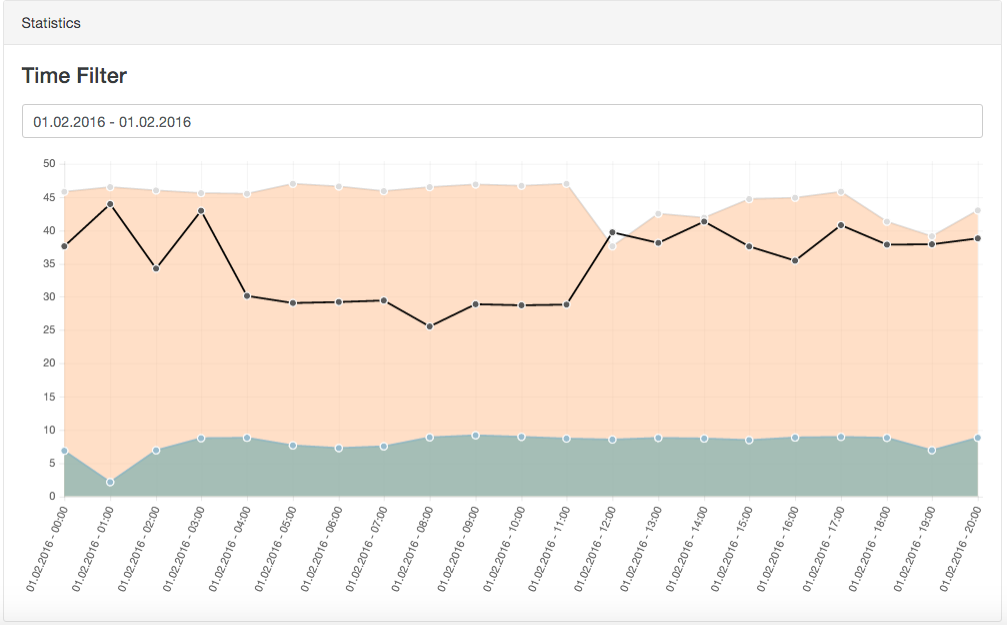
Automated docker speedtest analyser tool with included web interface to monitor your internet speed connection over time. Setup at home on your NAS (Synology, QNAP tested) and the container runs hourly speedtests. The speedtest results are displayed in an webinterface as line graph(s) over the day.
측정된 스타 증가
- in 24h
- 0
- in 7 days
- 0
- in 15 days
- 업데이트 지연
- in 1 month
- 업데이트 지연
서로 겹치는 기간의 순증가량이며 일별 합계가 아닙니다. 측정값이 없으면 비워 둡니다. 스타는 관심도를 나타내며 품질을 보장하지 않습니다.
README.md
OriginalDocker Speedtest Analyser
Automated docker speedtest analyser tool with included web interface to monitor your internet speed connection over time. Setup at home on your NAS (Synology, QNAP tested) and the container runs hourly speedtests. The speedtest results are displayed in an webinterface as line graph(s) over the day.
This tool was created in reference to this reddit post.
It used speedtest-cli to make speedtests and log them into a CSV file.
After that you can visit the web interface to view a hourly - time filterable reports about
your internet connectivity speed.
Screenshot
Docker Hub Image
You can get the publicly available docker image at the following location: roest/docker-speedtest-analyser.
Facts
- The speedtest runs hourly per default
- nginx is prepared but not configured for SSL yet
- data is saved in a .csv under
/var/www/html/data/result.csv - First speedtest will be executed in container build
Installation
The SpeedTest analyser should to run out of the box with docker.
Important: To keep the history of speedtest within a rebuild of
the container please moint a volume in /var/www/html/data/
Setup:
- Moint host volume onto
/var/www/html/data/ - Map preferred host port on port 80
- Build container from image
- Enjoy continious speed statistics after a while
Environment variables
| Variable | Type | Usage | Example Value | Default |
|---|---|---|---|---|
| CRONJOB_ITERATION | INT | Time between speedtests in minutes. Value 15 means the cronjob runs every 15 minutes. Keep undefined to run hourly. | 15 | 60 |
| SPEEDTEST_PARAMS | STRING | append extra parameter for cli command.speedtest-cli --simple $SPEEDTEST_PARAMS Check parameter documentation |
--mini https://speedtest.test.fr | none |
Config
You can configure the visualization frontend via appConfig.js
copy the /js/appConfig.example.js into /data/appConfig.js (where your volume should be mounted).
Change let appConfig = { to appConfig = { in /data/appConfig.js
Libs used
- Bootstrap 4 - alpha
- Chart.js
- daterangepicker.js
- moment.js
- papaparse
- speedtest-cli
Licence
I kindly ask not to re-distribute this repo on hub.docker.com if it's not indispensable.
Disclaimer / Off topic
I've written this small tool for private use on my Synology NAS.
The original twitter function is removed in this version.
If you want to contribute and report / fix bugs or bring the feature stuff written for your own setup, don't be shy.
have fun and test your speeeeed :)
관련 프로젝트 살펴보기
Asabeneh/30-Days-Of-Python
30 Days of Python 프로그래밍 챌린지는 Python 프로그래밍 언어를 30일 동안 배우기 위한 단계별 가이드입니다. 이 챌린지는 100일 이상 걸릴 수 있습니다. 자신의 속도에 맞춰 진행하세요. 다음 동영상도 도움이 될 수 있습니다: https://www.youtube.com/channel/UC7PNRuno1rzYPb1xLa4yktw
78,560 스타grafana/grafana
개방적이고 조합 가능한 옵저버빌리티 및 데이터 시각화 플랫폼입니다. Prometheus, Loki, Elasticsearch, InfluxDB, Postgres 등 여러 소스의 메트릭, 로그, 트레이스를 시각화합니다.
77,830 스타redis/redis
실시간 데이터 기반 애플리케이션을 구축하는 개발자에게 Redis는 가장 선호되고, 가장 빠르며, 기능이 가장 풍부한 캐시, 데이터 구조 서버이자 문서 및 벡터 쿼리 엔진입니다.
77,395 스타apache/superset
Apache Superset는 데이터 시각화 및 데이터 탐색 플랫폼입니다.
75,473 스타