
relytcloud/pg_duckpipe
relytcloud/pg_duckpipe has 76 GitHub stars and 7 forks. GitHot measured 0 stars in 24 hours, 0 in 7 days, and 0 in 15 days. Last checked 2026-11-19 02:35 UTC. Last push 2026-05-20.
What you can do
- One-command setup: duckpipe.add_table() creates the columnar target and starts syncing automatically
- Real-time CDC: streams WAL changes continuously with ~5 s default flush latency (tunable)
- Sync groups: group multiple tables to share a single publication and replication slot
측정된 스타 증가
- in 24h
- 0
- in 7 days
- 0
- in 15 days
- 0
- in 1 month
- 업데이트 지연
서로 겹치는 기간의 순증가량이며 일별 합계가 아닙니다. 측정값이 없으면 비워 둡니다. 스타는 관심도를 나타내며 품질을 보장하지 않습니다.
소개
Real-time streaming ingestion (CDC) for HTAP in PostgreSQL
데이터README.md
Originalpg_duckpipe
PostgreSQL extension for real-time CDC to pg_ducklake


Overview
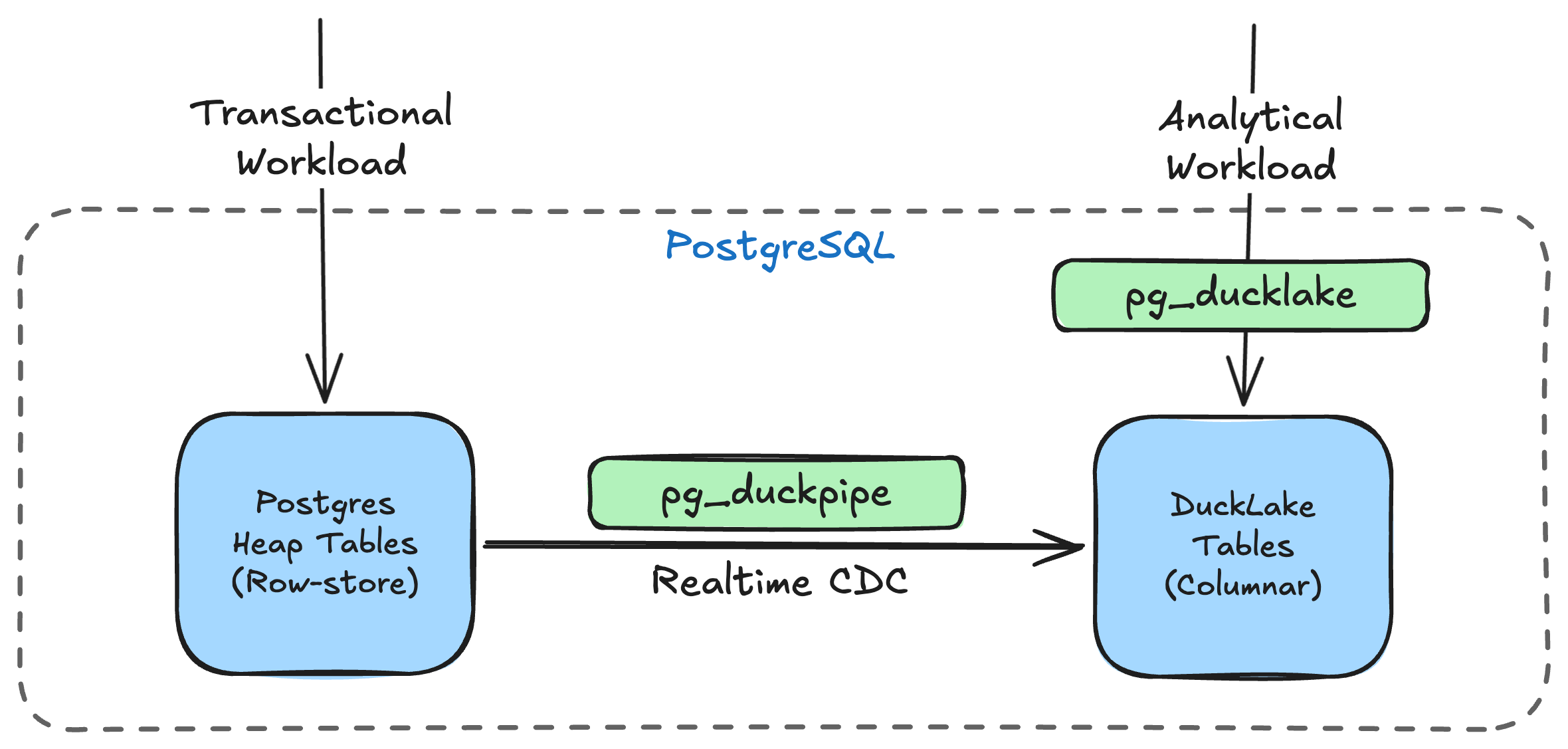
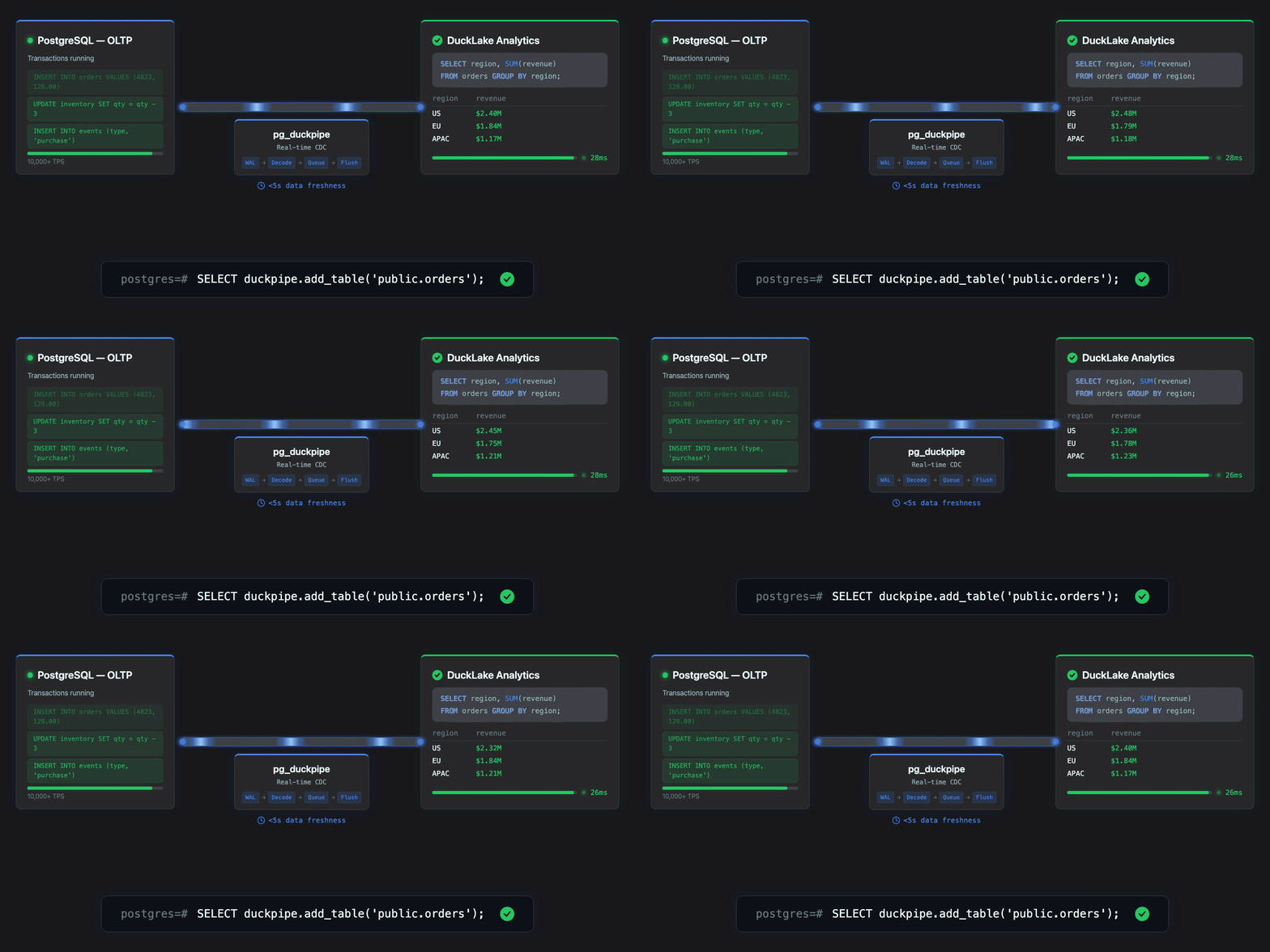
pg_duckpipe brings real-time change data capture (CDC) to PostgreSQL, enabling HTAP by continuously syncing your row tables to DuckLake columnar tables. Run transactional and analytical workloads in a single database.
|
Key Features
- One-command setup:
duckpipe.add_table()creates the columnar target and starts syncing automatically - Real-time CDC: streams WAL changes continuously with ~5 s default flush latency (tunable)
- Sync groups: group multiple tables to share a single publication and replication slot
Quick Start
curl -sSfL https://raw.githubusercontent.com/relytcloud/pg_duckpipe/main/install.sh | bash
This pulls the Docker image, starts PostgreSQL with all extensions loaded, and drops you into psql. Then try:
-- Create a source table (must have a primary key)
CREATE TABLE orders (id BIGSERIAL PRIMARY KEY, customer_id BIGINT, total INT);

-- Insert some existing data
INSERT INTO orders(customer_id, total) VALUES (101, 4250), (102, 9900);

-- Start syncing to DuckLake (snapshots existing rows, then streams new changes)
SELECT duckpipe.add_table('public.orders');

-- New writes are captured in real time
INSERT INTO orders(customer_id, total) VALUES (103, 1575);

-- Query the columnar copy (wait a few seconds for CDC to flush)
SELECT * FROM orders_ducklake;

-- Monitor sync state
SELECT source_table, state, rows_synced FROM duckpipe.status();
Requirements
The Docker image ships everything preconfigured. The notes below apply when installing from source.
- PostgreSQL 17 or 18 (tested in CI)
- pg_ducklake (which bundles pg_duckdb and libduckdb) must be installed
wal_level = logicalwith sufficientmax_replication_slotsandmax_wal_senders- Both extensions must be preloaded:
shared_preload_libraries = 'pg_duckdb, pg_duckpipe' - Source tables must have a PRIMARY KEY (required by logical replication to identify rows)
Benchmark
Sysbench on Apple M1 Pro, 100k rows/table, 30s OLTP phase:
| Scenario | Snapshot | OLTP TPS | Avg Lag | Consistency |
|---|---|---|---|---|
1 table, oltp_insert |
136,240 rows/s | 10,102 | 3.3 MB | PASS |
4 tables, oltp_insert |
163,599 rows/s | 9,413 | 64.6 MB | PASS |
1 table, oltp_read_write |
132,450 rows/s | 627 | 170.8 MB | PASS |
4 tables, oltp_read_write |
150,830 rows/s | 450 | 369.3 MB | PASS |
Full breakdown (flush latency, phase timing, snapshot per-table, WAL cycles): benchmark/suite/results/report.md
./benchmark/suite/bench_suite.sh              # Run all 4 scenarios (30s each)
./benchmark/suite/bench_suite.sh --duration 10  # Quick smoke test
Architecture
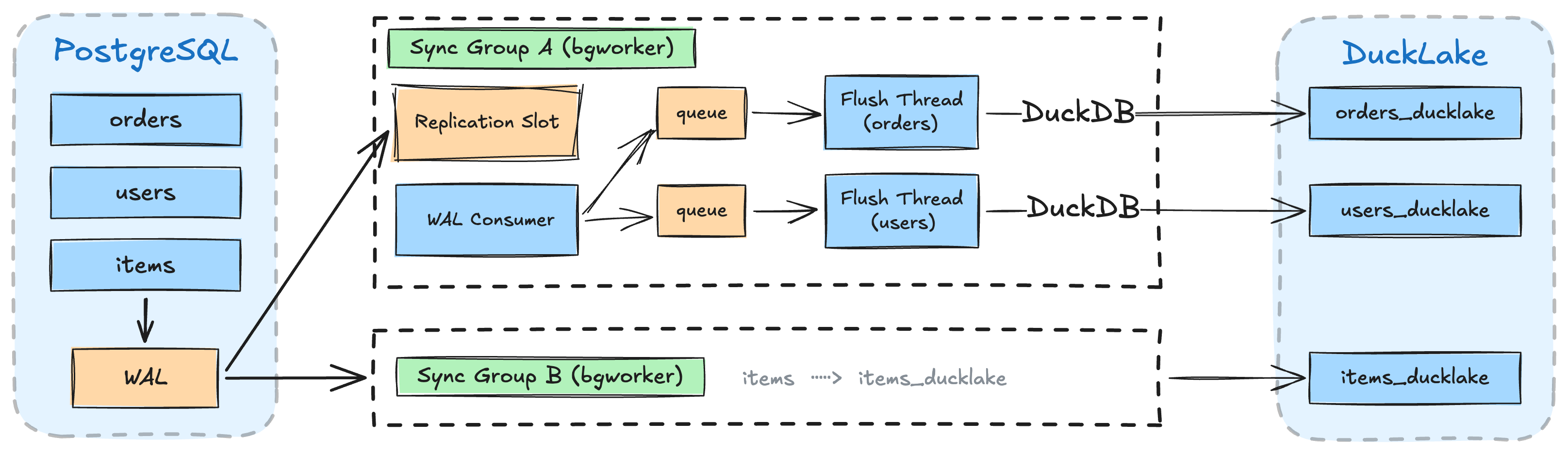
pg_duckpipe streams WAL changes through a decoupled producer-consumer pipeline:
- Sync groups: each group runs as an isolated bgworker process with its own replication slot — a slow table in one group cannot affect another
- Per-table flush threads: each table gets a dedicated OS thread that drains its change queue and writes to DuckLake via DuckDB, enabling parallel flushes across tables
- Backpressure: when queued changes exceed a threshold, the WAL consumer pauses until flush threads catch up, bounding memory usage
Build & Test
With Claude Code
If you use Claude Code:
/build— Clone, build, and install PostgreSQL 18, pg_ducklake, and pg_duckpipe from source into a localdeps/directory./setup— Start a configured PostgreSQL instance (port 5588) with all extensions loaded and ready to use.
Manual
Requires PostgreSQL 17+ and pg_ducklake to be installed first. Set PG_CONFIG to point to your installation:
PG_CONFIG=/path/to/pg_config make install   # Build and install the extension
PG_CONFIG=/path/to/pg_config make installcheck   # Run all regression tests
make check-regression TEST=api              # Run a single test
Documentation
| Doc | Description |
|---|---|
| doc/QUICKSTART.md | Hands-on walkthrough: add, remove, re-add, resync, multi-table, monitoring |
| doc/USAGE.md | SQL usage, monitoring, configuration (GUCs), and tuning |
| doc/DATA_TYPES.md | Supported PG→DuckDB type mappings and limitations |
| doc/FAN_IN.md | Fan-in streaming: multiple sources to one target, use cases, operations |
| doc/ACCESS_CONTROL.md | Permissions: who can manage, monitor, and query target tables |
| doc/DAEMON.md | Standalone daemon with REST API: setup, endpoints, curl examples |
| doc/DESIGN_V2.md | Historical v2 design notes |
| benchmark/README.md | Benchmark harness |