
quantopian/pyfolio
quantopian/pyfolio has 6,437 GitHub stars and 1,897 forks. Star changes are not measured yet. Last checked 2026-11-08 17:06 UTC. Last push 2023-12-23.
Portfolio and risk analytics in Python
측정된 스타 증가
- in 24h
- 업데이트 지연
- in 7 days
- 업데이트 지연
- in 15 days
- 업데이트 지연
- in 1 month
- 업데이트 지연
서로 겹치는 기간의 순증가량이며 일별 합계가 아닙니다. 측정값이 없으면 비워 둡니다. 스타는 관심도를 나타내며 품질을 보장하지 않습니다.
README.md
Original
pyfolio


pyfolio is a Python library for performance and risk analysis of financial portfolios developed by Quantopian Inc. It works well with the Zipline open source backtesting library. Quantopian also offers a fully managed service for professionals that includes Zipline, Alphalens, Pyfolio, FactSet data, and more.
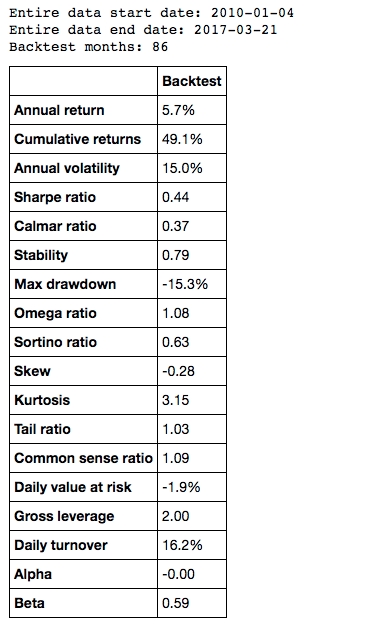
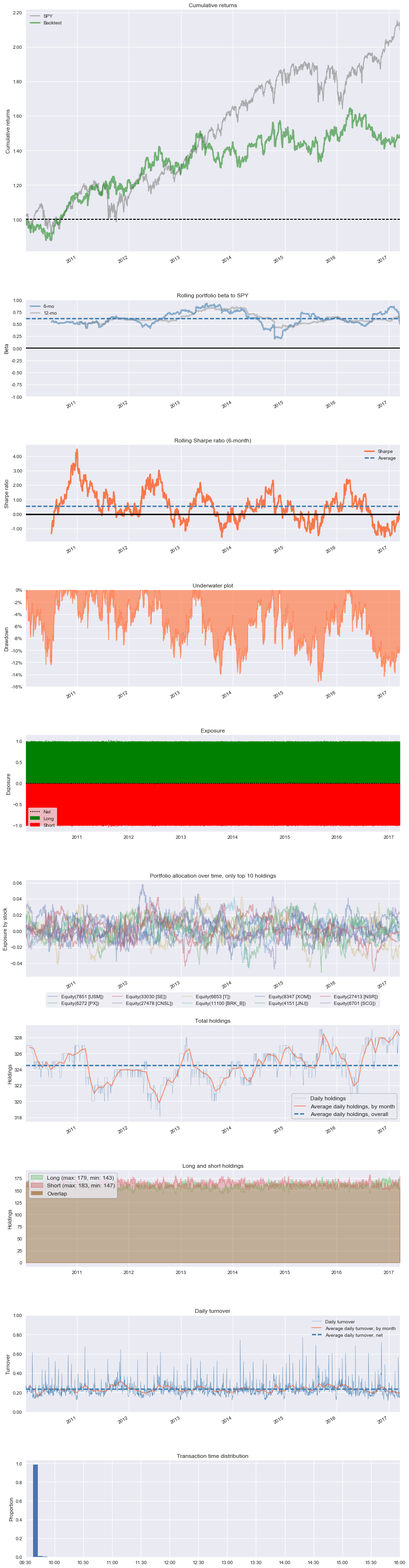
At the core of pyfolio is a so-called tear sheet that consists of various individual plots that provide a comprehensive image of the performance of a trading algorithm. Here's an example of a simple tear sheet analyzing a strategy:
Also see slides of a talk about pyfolio.
Installation
To install pyfolio, run:
pip install pyfolio
Development
For development, you may want to use a virtual environment to avoid dependency conflicts between pyfolio and other Python projects you have. To get set up with a virtual env, run:
mkvirtualenv pyfolio
Next, clone this git repository and run python setup.py develop
and edit the library files directly.
Matplotlib on OSX
If you are on OSX and using a non-framework build of Python, you may need to set your backend:
echo "backend: TkAgg" > ~/.matplotlib/matplotlibrc
Usage
A good way to get started is to run the pyfolio examples in a Jupyter notebook. To do this, you first want to start a Jupyter notebook server:
jupyter notebook
From the notebook list page, navigate to the pyfolio examples directory and open a notebook. Execute the code in a notebook cell by clicking on it and hitting Shift+Enter.
Questions?
If you find a bug, feel free to open an issue in this repository.
You can also join our mailing list or our Gitter channel.
Support
Please open an issue for support.
Contributing
If you'd like to contribute, a great place to look is the issues marked with help-wanted.
For a list of core developers and outside collaborators, see the GitHub contributors list.
관련 프로젝트 살펴보기
Asabeneh/30-Days-Of-Python
30 Days of Python 프로그래밍 챌린지는 Python 프로그래밍 언어를 30일 동안 배우기 위한 단계별 가이드입니다. 이 챌린지는 100일 이상 걸릴 수 있습니다. 자신의 속도에 맞춰 진행하세요. 다음 동영상도 도움이 될 수 있습니다: https://www.youtube.com/channel/UC7PNRuno1rzYPb1xLa4yktw
78,423 스타grafana/grafana
개방적이고 조합 가능한 옵저버빌리티 및 데이터 시각화 플랫폼입니다. Prometheus, Loki, Elasticsearch, InfluxDB, Postgres 등 여러 소스의 메트릭, 로그, 트레이스를 시각화합니다.
77,763 스타redis/redis
실시간 데이터 기반 애플리케이션을 구축하는 개발자에게 Redis는 가장 선호되고, 가장 빠르며, 기능이 가장 풍부한 캐시, 데이터 구조 서버이자 문서 및 벡터 쿼리 엔진입니다.
77,309 스타apache/superset
Apache Superset는 데이터 시각화 및 데이터 탐색 플랫폼입니다.
75,453 스타