
pixijs-userland/graphics-smooth
pixijs-userland/graphics-smooth has 177 GitHub stars and 20 forks. Star changes are not measured yet. Last checked 2026-11-13 02:06 UTC. Last push 2024-12-20.
Drop-in replacement for Graphics but with anti-aliasing
측정된 스타 증가
- in 24h
- 기록 수집 중
- in 7 days
- 기록 수집 중
- in 15 days
- 기록 수집 중
- in 1 month
- 기록 수집 중
서로 겹치는 기간의 순증가량이며 일별 합계가 아닙니다. 측정값이 없으면 비워 둡니다. 스타는 관심도를 나타내며 품질을 보장하지 않습니다.
README.md
OriginalPixiJS Smooth Graphics
PixiJS v7 plugin for making smooth shapes using HHAA shader.


:link: Links
Features
This is very early version of the plugin.
Here's how it looks, compared to pixi graphics (antialias=false)
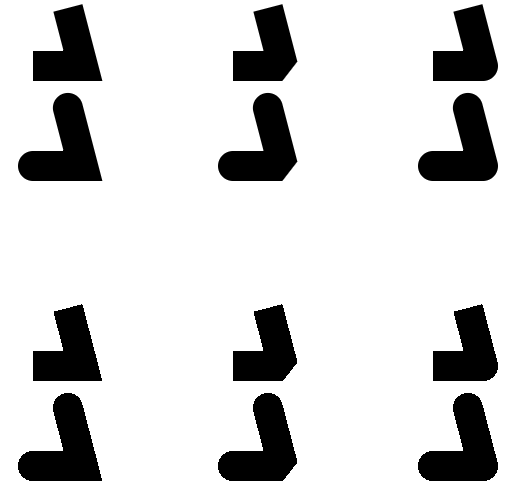
You can find examples in examples folder, you have to start the local webserver in repo folder to view them.
How to draw lines
This is drop-in replacement of PIXI.Graphics, API is compatible.
import { SmoothGraphics as Graphics } from '@pixi/graphics-smooth';

const graphics = new Graphics();

graphics.moveTo(100, 100);
graphics.lineTo(200, 200);
LineScaleMode
For lines, native mode is renamed to scaleMode, you can ignore scale of element or even set default value for it!
import { SmoothGraphics, LINE_SCALE_MODE, settings } from '@pixi/graphics-smooth';

graphics.lineStyle({ width: 2.0, scaleMode: LINE_SCALE_MODE.NONE }); // now its always 2 independent from scale

//alternatively
settings.LINE_SCALE_MODE = LINE_SCALE_MODE.NONE;

const graphics2 = new SmoothGraphics();
graphics.lineStyle(2.0, 0xffffff, 1.0); //the usual, but scaleMode works by default

settings.LINE_SCALE_MODE = LINE_SCALE_MODE.NORMAL;
graphics.lineStyle(2.0, 0xffffff, 1.0); //its normal again
Note: NONE was the only option for graphics-smooth <= 0.0.6. Please update your code if you used early versions!
How to draw fills
Fills have a bit of a problem - smoothing works good only on concave objects. It works only on circles and polygons. It is not implemented for rects and rounded rects yet.
graphics.beginFill(0xffffff, 1.0, true); //third param for beginFill
HHAA doesn't work with texture fill yet.
drawStar and other graphics-extras
That's what you have to do if you need functions from graphics-extras package:
import { SmoothGraphics } from '@pixi/graphics-smooth';
import { Graphics } from '@pixi/graphics';
import '@pixi/graphics-extras';

Object.assign(SmoothGraphics.prototype, {
    drawTorus: Graphics.prototype.drawTorus,
    drawChamferRect: Graphics.prototype.drawChamferRect,
    drawFilletRect: Graphics.prototype.drawFilletRect,
    drawRegularPolygon: Graphics.prototype.drawRegularPolygon,
    drawRoundedPolygon: Graphics.prototype.drawRoundedPolygon,
    drawStar: Graphics.prototype.drawStar,
});
For UMD:
PIXI.smooth.SmoothGraphics.prototype.drawStar = PIXI.Graphics.prototype.drawStar;
Pixel Perfect
You might notice that for diagonal lines, coverage differs from canvas2d a lot, especially if you do line animations. Solution is easy:
import { settings } from '@pixi/graphics-smooth';
settings.PIXEL_LINE = 1;
It has to be done before first GraphicsSmooth is created.
This setting is disabled by default because it adds extra computations in coverage calculation. It is not researched yet how it will affect performance.
What are we working on
- better AA on fills
- support for line textures
- rope mode for line textures
Performance
Currently graphics geometry uses 11 floats per vertex, when original graphics used only 8. Number of vertices also differ, it might use up to 2x of original.
Uniforms are used to store styles depends on (lineWidth * scaleMode, lineAlignment, texture, matrix).
If style buffer is too big (for now its max 24), one more drawcall will spawn.
What are we working on
- support instancing
- support Uniform Buffer Objects
- support batching of multiple graphics elements
Build & Test
npm install
npm start