
phantomptr/ps5upload
phantomptr/ps5upload has 1,209 GitHub stars and 81 forks. GitHot measured +21 stars in 24 hours and +101 in 7 days. Last checked 2026-11-13 07:28 UTC. Last push 2026-11-03.
측정된 스타 증가
- in 24h
- +21
- in 7 days
- +101
- in 15 days
- 기록 수집 중
- in 1 month
- 기록 수집 중
서로 겹치는 기간의 순증가량이며 일별 합계가 아닙니다. 측정값이 없으면 비워 둡니다. 스타는 관심도를 나타내며 품질을 보장하지 않습니다.
소개
Send games, apps and homebrew to a jailbroken PS5, and manage the console from your computer, phone or browser.
개발 도구README.md
Originalps5upload

PS5Upload gets your games, apps and homebrew onto a jailbroken PS5 quickly and reliably: uploads resume after a dropped connection, installs pick the route that works, and you can browse files, manage the console and run cheats from your computer, phone or browser.





What it does
- Fast, resumable uploads of games, folders, disk images and
.zip/.7z/.rararchives (unpacked on the way with nothing extracted to your disk, or sent as they are: a game archive unpacks, anything else is sent as the file, and you can choose either). Everything runs over AVA1, one encrypted connection on port 9120. Every file is verified, and an upload continues after a dropped connection, a helper restart or rest mode. A job that will not fit is refused up front, counting what is already on the console. Queue, live speed and ETA; pause an upload and resume it later where it stopped, or Send now to let another item go first. - Upload & Install. One drop zone takes packages, game folders and dumps, disk images,
archives and any other file, and works out what each is. PS4
.pkgand PS5 fake packages (base, update, DLC) install from your computer (Stream & install or Upload & install), a NAS/SMB share, a USB drive or a link. If the PS5 refuses one route, the app offers another. PS5 fake packages install but do not start on firmware later than 11.60; PS4 fake packages are fine. - Games. One grid with every game once: your copies in your folders (including folders on a NAS, scanned in place) grouped with their updates and DLC, what each PS5 has installed, and the games on its drives. Play (or close) an installed game right from its card. Each game's page holds everything you can do with it: install, play, mount, add to the home screen, move, back up, convert, dump. Organize, de-duplicate and clean up the drives. Replaces PS Game Library.
- Convert games (Workshop). Build an installable package from a decrypted game folder or an
image, or write a game folder as a game image (
.exfat,.ffpkg,.ffpfs, or the smaller.ffpfsc) that ShadowMount+ mounts. A queue makes games one after another and hands each to Upload & Install to install or upload. - Browse and manage. Files, games, disk images (mount, edit in place), screenshots and video clips; register, launch, stop and uninstall games; copy, move (Move to…), delete, set permissions.
- Save Data. Automatic backups to a folder (or a server), Back up now and Restore…; Copy to… another user on the same PS5, or a file for a friend or another PS5 that loads under their own account; open a save for save editors. PS1 (PSSwanStation), PS2 (Crux2, PS5SX2) and Switch (ProsperoEden) emulator saves are backed up and restored too.
- Play. Play the PS5 from your computer, phone or browser, no PS Remote Play app
needed:
- Start wakes a console in rest mode and signs your user in; the stream keeps playing while you use other screens, and a dropped connection rejoins by itself.
- Play with a controller connected to this device, the keyboard (keys you can remap) or an on-screen controller on phones and tablets; the controller vibrates with the game.
- Or give the PS5 your computer's keyboard and mouse as its own (any firmware), and use a phone as its touchpad and keyboard.
- If the user has a PS5 passcode, the app asks for it (never saved).
- Picture in picture: a small always-on-top window while you do something else (desktop app, Chrome and Edge; picture only in Safari).
- 1080p or 720p at 60 or 30 fps, full screen, volume, stats on the picture, and low-delay sound.
- A step-by-step setup (Play › Set up) that checks each requirement on the console and fixes what it can (sign-in, account ID, Remote Play switches, pairing, or pairing with the PIN the PS5 shows). If you prefer Sony's PS Remote Play app or chiaki-ng, Accounts has a PIN for those.
- Play Together: friends join your game as Player 2, 3 and 4, each with their own controller on the PS5, from any browser or the app. Share a QR code, a link or a short code, allow each friend, and they pick Quick Play on the TV. They play with a controller, the keyboard or the on-screen controls on a phone, and hear the game (with Mute). A short drop keeps their place; when you stop Play, they're told at once. Friends away from home join over Tailscale, WireGuard or another VPN, and a link opens in the PS5Upload app when they have it.
- Go live to YouTube, Twitch, Kick, Facebook or any RTMP/SRT server, several at once, straight from Play (desktop apps and the web UI), or add the stream to OBS for your own scenes and overlays.
- A script or AI agent on the engine's computer can watch and play a running session (AUTOMATION.md), and drive everything else too (API and AI agents).
- Cheats, fan curve, hardware view, payload sender with a catalogue and playlists, and backport tools.
- Bug reports in one place. Bug Report (always in the sidebar) gathers the app's, the
engine's and the PS5 helper's logs for the time you pick into one
.zip, with addresses, serials and keys removed, ready to post on GitHub or Discord. Detailed logs (Logs tab) record the hard Remote Play and Play Together cases for 24 hours. - Power. Rest mode, reboot, shut down, and wake over the network (optionally straight into your signed-in user).
- PS5Upload Minion. A page the helper serves to the PS5's own browser (a tile on the home screen, port 9180), made for the controller: installed games and the games on your network shares and drives, save backups, files (SMB shares, archive extraction, package install, payload loading), cheats, fan, processes, clean-up and settings, with no PC nearby.
- Several devices, one PS5. Computers, phones and Docker connect at once with no pairing code, see what the others are doing (Devices), share your consoles and settings, and stay out of each other's way. Settings are backed up daily, to the engine and to each console. Mesh Drive keeps a folder the same on all of them, at home on the console, with an optional join password and every device's state visible from any of them.
- Runs everywhere: macOS, Windows, Linux, Android, iPhone (sideloaded), or any browser through the self-hosted Docker web UI (compose file, see Self-hosted engine and web UI). 21 languages.
What it doesn't do
- System package patches (NPXS Store or Settings updates). Use the PS5's own Settings → Debug Settings → Game → Package Installer.
- Re-sign retail packages. The packages Workshop builds are fake packages, and they need fake-package support (kstuff) running on the console.
A quick look
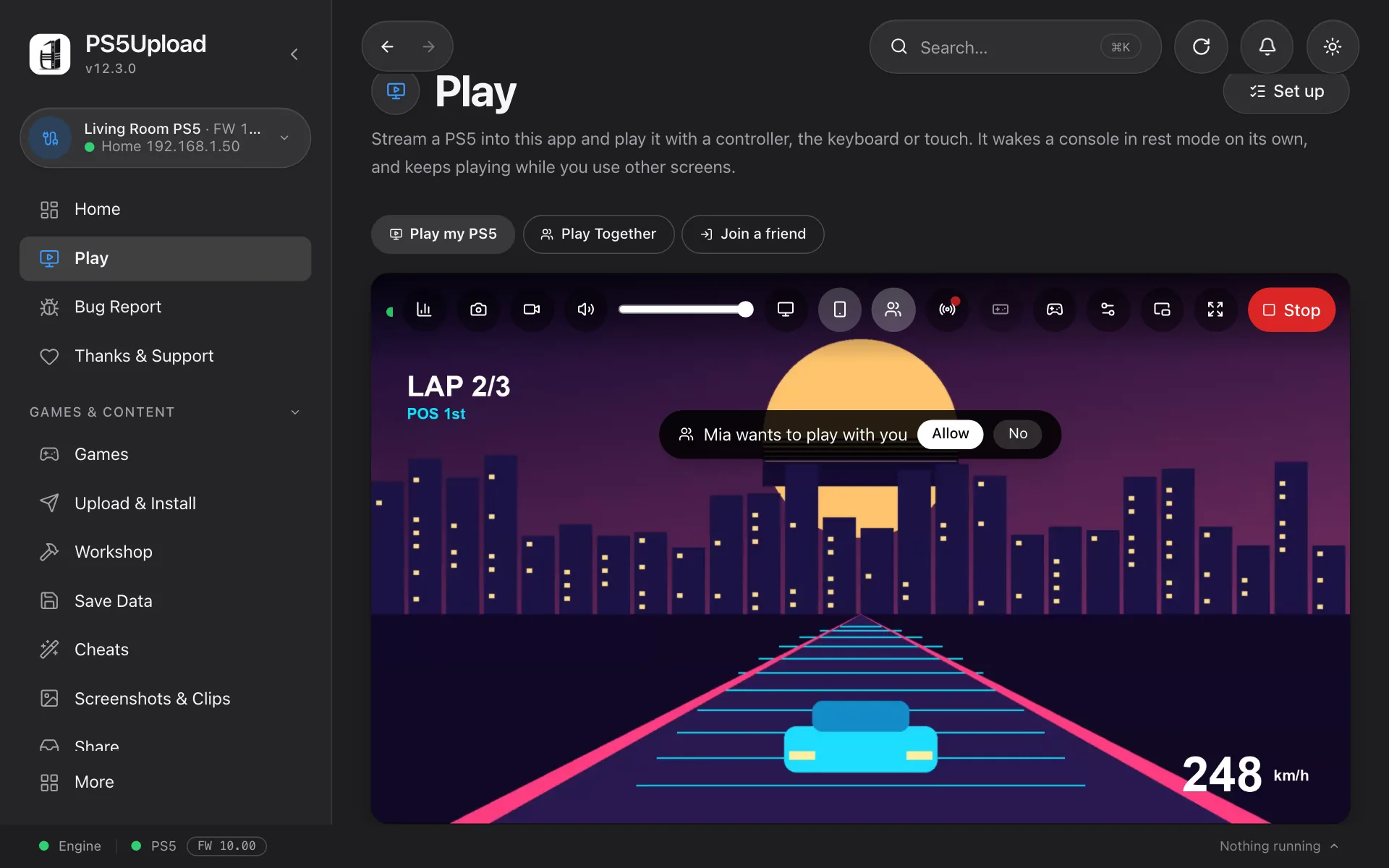

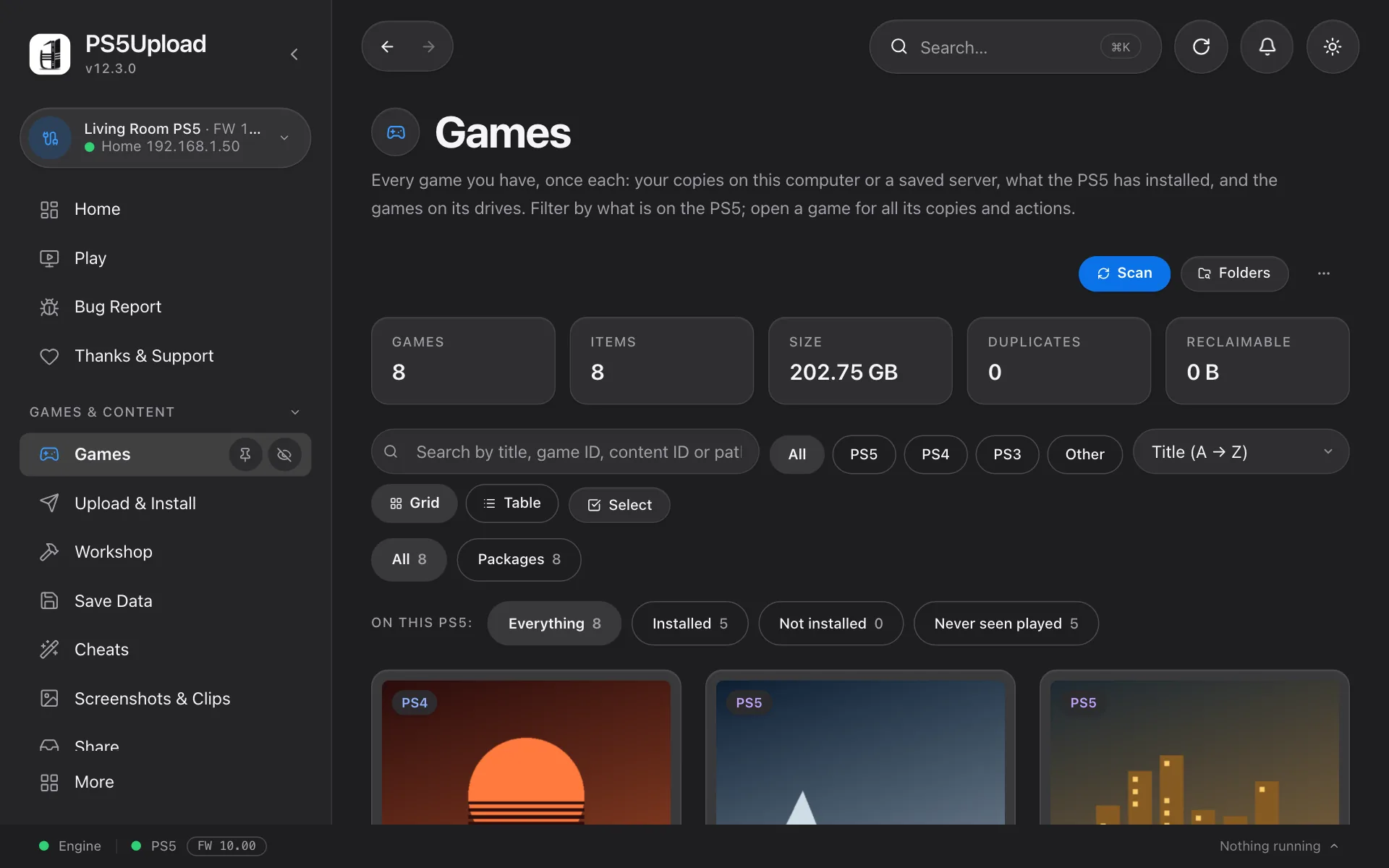
Install
Pre-built downloads land on the Releases page:
| Platform | File | How to install |
|---|---|---|
| macOS (Apple Silicon / Intel) | PS5Upload-<ver>-mac-{arm64,x64}.dmg |
Open the .dmg, drag PS5Upload into Applications. See First-launch warnings below — Gatekeeper blocks downloaded apps the first time. |
| Windows (x64 / ARM64) | PS5Upload-<ver>-win-{x64,arm64}-setup.exe or PS5Upload-<ver>-win-{x64,arm64}.zip |
Run the -setup.exe installer (it updates itself later), or unzip the .zip and double-click PS5Upload.exe — portable, no installer. See First-launch warnings — SmartScreen warns on first run. |
| Linux — Debian / Ubuntu (x64 / ARM64) | PS5Upload-<ver>-linux-{x64,arm64}.deb |
sudo apt install ./PS5Upload-<ver>-linux-<arch>.deb — installs a normal app with a menu entry; pulls in the WebKitGTK deps automatically. |
| Linux — Fedora / RHEL / Bazzite (x64 / ARM64) | PS5Upload-<ver>-linux-{x64,arm64}.rpm |
sudo dnf install ./PS5Upload-<ver>-linux-<arch>.rpm (Bazzite/Silverblue: rpm-ostree install; to update, rpm-ostree uninstall ps5-upload --install ./<new>.rpm and reboot, which Settings → Updates shows ready to copy) — menu entry + auto deps. |
| Linux — any distro (x64 / ARM64) | PS5Upload-<ver>-linux-{x64,arm64}.zip |
Universal fallback (no install). Unzip, then chmod +x PS5Upload.sh PS5Upload.AppImage and run ./PS5Upload.sh (the wrapper — handles the FUSE-less and WebKit white-screen cases for you). Running ./PS5Upload.AppImage directly also works if your system has libfuse2 and a happy WebKitGTK. |
| Linux — AppImage (x64 / ARM64) | PS5Upload-<ver>-linux-{x64,arm64}.AppImage |
The bare AppImage, for AppImage managers (Gear Lever, AppImageLauncher). chmod +x and run it. On Wayland with an NVIDIA card it restarts itself once with the system libwayland-client, which is what the .zip's PS5Upload.sh does. |
| Linux — NixOS (x64 / ARM64) | no release artifact | Packaged in NUR as ps5upload — see NixOS below. |
| Android | PS5Upload-<ver>-android.apk (older 32-bit phones: -android-armv7.apk) |
Enable "install unknown apps" for your browser/file manager, then open the .apk. Same interface, mobile-friendly; connects to and manages your PS5 over Wi-Fi. On Android 17, allow local network access ("nearby devices") when asked. |
| iPhone | PS5Upload-<ver>-ios-unsigned.ipa |
Sideload with AltStore or Sideloadly and an Apple ID (a free one works; it is re-signed every 7 days). AltStore, SideStore and Feather can also add the source https://ps5upload.phantomptr.com/altstore.json and update the app from there (a raw GitHub link doesn't work; see the FAQ). Turn on Developer Mode and trust your Apple ID on the iPhone; see the FAQ. Copy games into the app's folder with the Files app. |
NixOS
No NixOS artifact is published on the Releases page, but ps5upload is
packaged in GriefNorth's NUR as
ps5upload (x64 and ARM64) — it wraps the same .AppImage and needs no
FUSE. With flakes:
{
  inputs = {
    nixpkgs.url = "github:NixOS/nixpkgs/nixos-unstable";
    nur.url = "github:GriefNorth/nur-packages";
  };

  outputs = { nixpkgs, nur, ... }: {
    nixosConfigurations.myhost = nixpkgs.lib.nixosSystem {
      system = "x86_64-linux";
      modules = [
        ({ pkgs, ... }: {
          environment.systemPackages = [
            nur.packages.${pkgs.system}.ps5upload
          ];
        })
      ];
    };
  };
}
Then nixos-rebuild switch --flake .#myhost and launch ps5upload from
your app menu. Without flakes, call the package straight out of the repo —
and note that ps5upload bundles UnRAR for .rar support, so nixpkgs needs
config.allowUnfree = true:
{ pkgs, ... }:
{
  nixpkgs.config.allowUnfree = true;

  environment.systemPackages = [
    (pkgs.callPackage
      ((builtins.fetchTarball
        "https://github.com/GriefNorth/nur-packages/archive/refs/heads/main.tar.gz")
        + "/pkgs/ps5upload")
      { })
  ];
}
Or try it without installing anything:
nix run github:GriefNorth/nur-packages#ps5upload
The Nix expression pins one release version, so bump it there when a new
ps5upload comes out. Prefer to run the AppImage yourself? Prefer the
./PS5Upload.sh wrapper from the zip above — on NixOS the bare
.AppImage usually renders an empty window, because its bundled
libwayland-client shadows the host one and WebKitGTK then fails to create
an EGL display. The Nix package works around that for you.
First-launch warnings (and why they're there)
ps5upload is not code-signed with paid OS certificates — same as every other PS5 scene tool. The OS's verification layers (Gatekeeper on macOS, SmartScreen on Windows) treat unsigned downloads as suspicious until you allow them once. The one-time bypass:
macOS — "App is damaged" or "cannot be opened":
xattr -dr com.apple.quarantine /Applications/PS5Upload.app
That removes the quarantine attribute macOS slaps on every file downloaded from a browser. Alternatively, right-click PS5Upload in Applications → Open → click Open in the prompt. Either method only needs to be done once per install.
Windows — "Windows protected your PC" SmartScreen prompt:
- Click More info → Run anyway.
- Only shown until SmartScreen builds reputation for the binary; subsequent launches are silent.
- If your IT policy blocks "Run anyway", unzip + right-click
PS5Upload.exe→ Properties → check Unblock → OK.
Linux — no equivalent warning. Just chmod +x and launch.
System requirements
- macOS 11 (Big Sur) or newer. No dependencies — ad-hoc signed, see First-launch warnings above for the one-line quarantine bypass.
- Windows 10 (build 19041+) or Windows 11. Ships with the Microsoft Edge WebView2 runtime by default; LTSC / stripped installs may need WebView2 installed once.
- Linux — the
.deband.rpmpackages pull in their dependencies automatically (WebKitGTK 4.1, gtk3, libsoup3, etc.) via the package manager, so they're the easiest route on Debian/Ubuntu and Fedora/RHEL/Bazzite. The universal.AppImagebundles WebKitGTK and GTK, and takes glibc, X11 or Wayland client libraries and FUSE from the host; install commands for a stripped-down system on Debian/Ubuntu/Fedora/RHEL/Arch are in the FAQ. Minimum distro version: all three Linux artifacts are built against glibc 2.39, so they need a reasonably recent distro — Ubuntu 24.04+, Debian 13+ (trixie), Fedora 40+, RHEL/Rocky/Alma 10+, or equivalent. (This is a glibc floor, not a package dependency — the.deb/.rpminstall fine on older releases but the app won't launch, and the AppImage bundles WebKitGTK yet still uses the host's glibc.) On an older distro, build from source withmake dist-linuxon that machine.
The app updates itself. It checks GitHub at launch and downloads a new release in the background, never during a transfer:
| Installed as | The update |
|---|---|
Windows installer or .zip, macOS, Linux AppImage |
Installs as you quit, or press Restart now |
Linux .deb or .rpm |
Install and restart in Settings → Updates asks for your password |
| Android | Settings → Updates, then confirm in Android's dialog |
| iPhone | Through an AltStore, SideStore or Feather source |
Settings → Updates has the switches, and Get pre-release versions. Afterwards, the app offers to update the helper.
Building from source:
git clone --recurse-submodules https://github.com/phantomptr/ps5upload.git
cd ps5upload
make install       # bootstrap dev env (auto-detects host OS); prints the next line
export PS5_PAYLOAD_SDK="$HOME/ps5-payload-sdk"   # where it put the SDK; add it to your shell's profile
make build         # payload ELF + engine + client UI
make run-client    # launch the Tauri dev app
make build needs that export: without it, the build looks in /opt/ps5-payload-sdk and stops with
"SDK files not found".
make install auto-detects your OS and runs one of:
make install-ubuntu— Debian / Ubuntu / WSL2:aptdeps for Tauri (libwebkit2gtk-4.1-dev,libgtk-3-dev,librsvg2-dev,libayatana-appindicator3-dev,libxdo-dev,libasound2-dev,libssl-dev,build-essential), Node.js 22 LTS via NodeSource (only if missing), Rust via rustup, and checksum-verified PS5 Payload SDK v0.45 →~/ps5-payload-sdk.make install-macos— macOS: Xcode CLT, Homebrew,node, currentllvm(LLVM 23 at this release), Rust via rustup, and checksum-verified PS5 Payload SDK v0.45..\scripts\install-windows.ps1— Windows 11: Node.js LTS, Rust, VS 2022 Build Tools (C++ workload), WebView2 Runtime, 7-Zip, LLVM, and PS5 Payload SDK viawinget. Run it from an elevated PowerShell. Themaketargets also need GNU Make (Git Bash, MSYS2 orwinget install ezwinports.make), and thenmake install-windowsdoes the same.
All three install scripts are idempotent — re-running them after a partial
setup is safe. A stale or unmarked SDK is upgraded to the repository pin and
moved to a timestamped backup instead of being deleted. Local and GitHub
Actions builds read the same tag and official release checksum from
scripts/ps5-sdk.env.
For per-platform bundles only (no full dev env): make dist-mac,
make dist-mac-x64, make dist-linux, make dist-linux-arm,
make dist-win, and make dist-win-arm.
Quick start
- Jailbreak the PS5 and keep an ELF loader running on port 9021.
- Launch ps5upload and open Connection. Enter the PS5's IP address.
- Click Check, then Send helper. The app launches the helper and connects to it. (Other payloads, such as kstuff or etaHEN, are sent from Payloads → Send payload.)
- Other computers, phones and Docker setups connect to the same helper with no code; the console remembers each one (Devices). To make new devices type a code shown on the TV first, turn on Ask before a new device can connect there.
The helper stays until the PS5 reboots, and usually keeps running through rest mode; if the dot stays red after a wake, send it again. The app connects to ports 9120 (the helper) and 9021 (the loader); allow both in your firewall. For Stream & install the PS5 connects back to this computer on port 19113, so allow the app through the firewall too (on Windows, for Private and Public networks). If the app says the helper is older, the banner's Send helper replaces it in one click.
Architecture
client/ (Tauri 2 · React · TypeScript)   Android and iPhone apps · Docker web UI
   │
   └── spawns ── ps5upload-engine (HTTP :19113)
                          │
                          ▼  AVA1 (Noise-encrypted, port 9120)
                payload/ps5upload.elf  (PS5 C payload)
payload/: C payload on the PS5 (FreeBSD 11). Transfers, BLAKE3 verification, mounts, file operations and every management call, over AVA1, the transfer protocol (its own repository, checked out asthird_party/ava1).engine/: Rust workspace with the AVA1 client, transfer logic, HTTP API and lab tools.client/: Tauri 2 desktop app (and the Android, iPhone and web builds), talking to the engine.
Build and test
All workflows go through the root Makefile (make help).
| Command | What it does |
|---|---|
make build |
Payload + engine + client |
make run-client |
Tauri dev app |
make run-engine |
Engine on port 19113 (binds all interfaces; see SECURITY.md for who it answers) |
make test-engine |
Rust tests, no PS5 needed |
make test-payload |
Console C code compiled and run on the host |
npm run validate |
The main non-hardware gate; TESTING.md has what it leaves out |
make dist |
Tauri bundle |
See TESTING.md for the full workflow, and CONTRIBUTING.md.
Tech stack
- Payload: C (FreeBSD 11), prospero-clang, PS5 Payload SDK v0.45
- Engine: Rust, tokio + axum
- Client: Tauri 2, React, TypeScript, Zustand, Tailwind CSS v4, Vite
- Protocol: AVA1 (Noise XX handshake, ChaCha20-Poly1305, BLAKE3 verification)
Supported platforms
- Desktop: macOS, Linux and Windows, x64 and arm64.
- Android: the
.apkfrom Releases. - iPhone: the unsigned
.ipafrom Releases, sideloaded with AltStore or Sideloadly (see the FAQ). New and not yet widely tested. - Web UI: the self-hosted Docker image, in any browser on your LAN (see below). Play in a
browser needs an
https://page, so over plainhttp://play with an app instead. - PS5 firmware: 1.00 through 14.10 on every model; one payload binary for all. Tested on 5.10, 9.60 and 13.60 (14.00 and 14.10 are new in SDK v0.45 and not tested yet). In practice the limit is your jailbreak's ELF loader on port 9021.
Fake package install needs live kernel patches (kstuff / fpkg-enable) on the console; where they are missing the app says so instead of reporting a false success.
Self-hosted engine and web UI
Run the engine on a NAS or server and use it from a browser, or point the desktop app at it with Settings → Engine URL.
- Images:
ghcr.io/phantomptr/ps5upload-engine-webui(full web UI) andghcr.io/phantomptr/ps5upload-engine(engine only). Every release tag pushes:<version>;:latestand:<major.minor>move only when a pre-release is promoted to a release. - Start from
engine/compose.yaml. It uses host networking (stream installs need the PS5 to reach the engine).PS5UPLOAD_ALLOW_IP(who may use the page) is required for a web UI used from other devices on the LAN; without it every browser but the host's own gets a403.PS5_ADDR(the console) is listed for the first browser, so it need not be typed in again. - Open
http://<host>:19113. The file picker browses the engine's disk; mount your games folder into the container and setPS5UPLOAD_BROWSE_ROOTS. - Map
/datato a host folder (on Unraid,/mnt/user/appdata/ps5upload): it holds the container's key, so the PS5 knows it as the same device (and its Mesh Drive folders) after the container is recreated. - An upload keeps running when you close the tab.
- No password. Anyone allowed can read, write and delete on your PS5. Keep it on a trusted LAN, never on the internet.
- For a dedicated reverse-proxy hostname, leave
PS5UPLOAD_BASE_URLunset. It is a path prefix, not a full URL, and the web page is built with it, so a prefix needs its own image build. The variables a self-hoster may need are in engine/README.md. See reverse-proxy setup for nginx, proxy authentication, Docker bridge networking, and sub-path hosting. - Scripting it: see API and AI agents below. ps5upctl is a community command-line client for the engine API (unofficial; the API can change between versions).
API and AI agents
Everything the app does with a console also works from a script or an AI agent, with nothing extra to install. The engine, in the desktop app or the Docker image, serves all of this itself:
- HTTP API:
http://127.0.0.1:19113, described route by route atGET /api/openapi.json(OpenAPI 3.1). The guide covers who it answers, errors, long calls and events. - MCP server:
http://127.0.0.1:19113/mcp, for Claude, Cursor, Codex, Gemini CLI and other MCP clients: more than 120 tools, including a generic one for any route.claude mcp add --transport http ps5upload http://127.0.0.1:19113/mcpand you're connected. - Remote Play automation: watch and play a session from a script, without taking it over.
There is no password, by design: it answers only the engine's own computer unless you open it with
PS5UPLOAD_ALLOW_IP. An agent can do whatever you can on your console, including delete files, so
PS5UPLOAD_MCP_READ_ONLY=1 is there if you only want it to look.
FAQ
Common questions (connection problems, install errors, USB drives, firmware) are in
FAQ.md, also available inside the app.
Contributing
- Report bugs: GitHub Issues
- Pull requests welcome. Read
CONTRIBUTING.mdand run the checks inTESTING.mdbefore opening.
How this project is built
ps5upload is a vibe-coded project. The code is written with AI coding tools, directed, tested on real consoles and released by one maintainer. That is what keeps the development cycle fast: bug reports, feature requests and enhancements are usually turned around in days, not months.
The trade-off is that the code has not had the slow, line-by-line human review a hand-written project of this size would get. Every release is tested on hardware, but you should expect rough edges, read the disclaimer, keep backups of anything you care about on the console, and use the tool at your own discretion.
Disclaimer
ps5upload is provided for research, educational, interoperability, and homebrew development purposes only. It is not affiliated with, endorsed by, or connected to Sony Interactive Entertainment Inc. "PlayStation", "PS4" and "PS5" are trademarks of Sony Interactive Entertainment Inc., used here for identification only.
Use this software entirely at your own risk. It is provided "as is", without warranty of any kind, express or implied, including but not limited to warranties of merchantability, fitness for a particular purpose, and non-infringement.
➡ Full terms: DISCLAIMER.md. By downloading, building, installing, or using this software you accept them in full. If you do not agree, do not use it.
You are solely responsible for how, where, and on what hardware you use this tool. By downloading, installing, or running it, you acknowledge and accept that:
- It interacts with a modified PS5. This tool only works on a console that has been jailbroken / has kernel exploits loaded by the user. Modifying console state, bypassing platform integrity checks, or running unsigned code may void your manufacturer warranty, violate the platform's terms of service, and — under certain operations — leave your console unrecoverable without a reinstall. You took those steps before this tool entered the picture; this tool does not put you in that state and cannot reverse it.
- It writes to your PS5's filesystem and can install / register packages with Sony's installer. Mistakes can corrupt the console's app database, leave orphaned mount points, or wedge Sony's mgmt service mid-install. Recovery normally means a reboot or — worst case — a factory reset. Back up anything important before bulk operations.
- It is intended for use only with content you legally own and hardware that belongs to you. Using it to install, mount, or distribute software you do not have the legal right to use is your responsibility, not the project's.
- No support is guaranteed. This is a free, volunteer-built tool. The author may answer questions on Discord but is under no obligation to provide fixes, updates, or compensation if anything goes wrong.
- No piracy. This tool must not be used to copy, distribute, or run software you do not lawfully own or are licensed to use. The authors do not condone or assist with piracy in any form, and requests for such help will be refused.
- You accept the real risks. Operating a modified console can permanently damage it, irreversibly destroy saves and licences, and get your account or console banned from online services. Back up anything you cannot afford to lose before you begin.
- Indemnity. You agree to hold the authors, contributors, and distributors harmless from any claim arising out of your use or misuse of this software.
If any of the above is not acceptable to you, do not use this software.
Credits
ps5upload builds on other people's work. Each entry says how: included (their source is in this repository), ported (their code rewritten in another language or adapted file by file), library (a dependency the build pulls in), fetched at runtime (downloaded from its own home when you use the feature; not shipped with ps5upload), or reference (read to learn how something works; no code taken).
Included code:
- PS5 Payload SDK (John Törnblom) — builds every payload; its startup code is in
payload/third_party/sdk-crtwith one fix so payloads start on firmware where two kernel lookups fail (FW 5.50) - elfldr (John Törnblom) — the ELF loader, in
third_party/elfldrwith a fix for a loader that hangs on a silent client; the app sends this build to the console - PS5 Dump Forge (quer3q) — the UFS2 (
.ffpkg) and PFS (.ffpfs) image writers and the streaming.ffpfsccontainer, inengine/crates/ps5-dump-forge-ufs2and-pfs; quer3q also contributed reader and safety fixes to the package crates, the fake-signing of unsigned executables and the reading of more package layouts (ported from Forge), and the ideas behind hash-checked images and spare space for read-write mounts - Monocypher (Loup Vaillant et al.) and BLAKE3 — AVA1's cryptography and file verification on the console, in
third_party/ava1/c/third_party - SQLite — reading the console's app database, in
payload/third_party/sqlite3 - tiny-AES-c (kokke) — MC4 cheat decryption, in
payload/third_party/tiny_aes - libsmb2 (Ronnie Sahlberg) — network shares on the console's own Files page, in
payload/third_party/libsmb2, built into a separate on-demand daemon (payload/smb/), never into the helper - 7-Zip (Igor Pavlov) — the decoders of the on-console archive extractor, in
payload/third_party/7zip(no RAR code), built into a separate on-demand payload (payload/extractor/) - libarchive — that extractor's RAR and RAR5 readers, in
payload/third_party/libarchive - sevenz-rust2 —
.7zextraction, inthird_party/sevenz-rust2with a fix for archives over 4 GiB on 32-bit Android - unrar — the Rust wrapper for
.rarextraction, inthird_party/unrarwith a fix for an out-of-bounds read on multi-volume archives (see the UnRAR library entry below) - Brad Conte's crypto-algorithms SHA-256 — in
payload/src/app_dump_sha256.c, as ps5-app-dumper carries it - FreeBSD
newfs— portions of its cylinder-group arithmetic, inengine/crates/ps5-dump-forge-ufs2/src/geom.rs - Noto Sans (Google, Adobe) — font subsets in
client/src/assets/fonts
Ported:
- ps5-app-dumper (EchoStretch, slopmaster33) — the on-console game dump: its dumper, package, PFS, decrypt and elf2fself code, adapted into
payload/src/app_dump_*.c - ps5-self-pager (idlesauce) — the self-pager SELF decryption and its firmware table, in
payload/src/app_dump_self.c - elf-arsenal (soniciso and contributors) — the cheat engine (
payload/src/cheats.c), the drive sensors (drive_sensors.c) and the Remote Play account-id lookup (remoteplay.c); the wake watchdog adapts its algorithm, and its launch and jailbreak code was a reference for ours - ampr_emu (drakmor) — the LZ4 asset packer is a Rust port of its
ampr_pack.py, and "Measure how it plays" ofampr_pack_profile.py; the index writer follows the formatbuild_ampr_index.pywrites - playactor (Daniel Leong) — Remote Play registration (with its key tables) and the control session that wakes a console and signs its user in, ported to Rust in
engine/crates/ps5upload-core/src/rp_regist*.rsandrp_session.rs - ProsperoSunshine (Darkatek7, from ps5-mcp's RemoteEye) — the
/dev/hidrequests that make Play Together's virtual controllers (add, insert, delete, output, and the state block layout), written anew inpayload/src/vpad.c(GPL-3.0-only, as its source) - chiaki-ng (Streetpea and the Chiaki authors) — Remote Play streaming: its session, control, Takion, crypto, FEC, video and audio receiving code, ported to Rust in
engine/crates/ps5upload-core/src/rp_stream/
Libraries:
- Desktop client: Tauri, React, react-router, Zustand, lucide-react icons, built with Vite and Tailwind CSS
- Remote Play instant replay: Mediabunny (MPL-2.0, used unmodified from npm) writes the saved clip as MP4
- Remote Play upscaling: AMD FidelityFX Super Resolution 1 (MIT) — ported: its EASU and RCAS shaders rewritten as WebGL 2 GLSL in
client/src/lib/rpPicture.ts - Engine: tokio, axum, serde, anyhow, uuid, zip, and the other crates in the
Cargo.lockfiles - UnRAR (Alexander Roshal) —
.rarextraction on desktop and Docker, compiled from the source theunrar_syscrate bundles into its own program,ps5upload-unrar, which holds only ps5upload's own code and UnRAR and which the engine runs over pipes (UnRAR is never linked into the engine); used to extract only, never to compress.
Fetched at runtime:
- The Payloads catalogue — kstuff-lite (EchoStretch, drakmor), ShadowMountPlus and nanoDNS (drakmor), etaHEN and Itemzflow (LightningMods), ftpsrv, websrv, shsrv and klogsrv (ps5-payload-dev), ps5-app-dumper, CheatRunner, BackPork, itsPLK's Payload Manager and WebKit Autoloader, earthonion's tools (np-fake-signin, Remote Play Unlock and more), Ghostpad, HearBridge, Hush (disco-trooper), ps5debug-NG and more — each downloaded from its own releases when you choose it
- ampr_emu's debug build (drakmor) — downloaded for "Measure how it plays"
- etaHEN PS5_Cheats, GoldHEN Cheat Repository and HEN-Cheats-Collection (TeeKay87) — cheat files
- PROSPEROPatches and ORBISPatches — game details and artwork
References:
- ShadowMountPlus (drakmor) — the mount tool that shows our game images on the home screen; the images we write are the ones it mounts
- garlic-savemgr (earthonion) — how a save image is opened on the console: the sealed key unsealed through
/dev/pfsmgrand the image mounted withsceFsMountSaveDatafrom a copy under/data, which "Open save" follows - cy33hc's ps5-ezremote-dpi, etaHEN and elf-arsenal's DPI payloads, and itsPLK's PKG Manager — behavioural references for our installer daemon (no code taken)
- LibOrbisPkg — its documentation of the PlayGo chunk format
- NeoEnabler (gasb07) — the
/dev/mp1read requests and table layout behind the Hardware screen's GPU and per-core CPU clocks (payload/src/mp1_clock.c); only its reads are used, written anew, and we never change clocks - chiaki — cross-checked while porting playactor's registration
- TMDB — cover art in earlier versions (no longer used)
License texts and the notices these projects require are in LICENSES/.
Thanks
- Everyone who contributed code, translations and docs, and the Discord testers
ps5upload stands on the shoulders of the PS5 homebrew scene. Huge thanks to everyone who makes this ecosystem possible — the exploit and kernel researchers, the ELF/payload loader authors, the PS5 Payload SDK maintainers, the homebrew tool developers whose work this lives alongside, and everyone in the community who tests, reports bugs, and shares knowledge. None of this exists without your collective effort. 🙏
ps5upload is one tool among many. The scene is full of great work: loaders, kernel patches, mount tools, dumpers, cheat engines, file managers, save tools and more, most of it made by people in their spare time. If something here saves you time, the people behind the tools it lives alongside deserve the same thanks. Please support them too.
License
GNU General Public License v3.0 (GPLv3).
Free to use, free to modify. See LICENSE.
.rar support / UnRAR: the desktop and Docker builds ship the UnRAR source
compiled into a separate program, ps5upload-unrar, that contains only
ps5upload's own code and UnRAR (used only to extract RAR — never to compress or
build a RAR-compatible archiver). The engine starts it and talks to it over pipes;
it does not link UnRAR. A GPLv3 §7 exception covers combining ps5upload's code
with UnRAR in that program, and UnRAR's own license is reproduced as required. See
LICENSES/UnRAR-exception.md and
LICENSES/UnRAR-license.txt.
Remote Play streaming: the code ported from chiaki-ng
(engine/crates/ps5upload-core/src/rp_stream/) is under the GNU Affero General Public License
v3.0, which GPLv3 §13 allows combining with; see LICENSES/AGPL-3.0.txt.
Included third-party code keeps its own license, next to the code or in LICENSES/;
see Credits.
Author
Created and maintained by PhantomPtr.
Support
If you find this tool useful, consider buying me a coffee!
- Discord server: https://discord.gg/fzK3xddtrM
- Support me on Ko-fi: https://ko-fi.com/B0B81S0WUA

Crypto, straight to my hardware wallet. Send each coin only on its own network; anything else can't be recovered.
| Coin | Network | Address |
|---|---|---|
| BTC | Bitcoin | bc1q36gxkvd3wfxy9azm8hft3rru9m6m9hjvn7u20n |
| ETH | Ethereum | 0x2e787654db543B69FB011E16995C274dFAfc2286 |
| SOL | Solana | G1q5XCCn3mePYpcx7uY17CwDsUaAZTcty56huUDvVqjG |
| XRP | XRP Ledger | rEVq3si3sm9NuWNuZiUZFKsUtwC3w9SrjR (no destination tag needed) |
QR codes for each are on the website and in the app under Thanks & Support.
Thank you
Thank you to everyone who has supported PS5Upload. Every coffee keeps it going. (The app and the website list you too, under Thanks & Support.)
BigPapii420 · clincher · Ice · Marv530e · San · Dennis · gabuscus · Slappula · b1ackcoffee · drsam · f0d · John Malpas · kheops · LEO · Lucky · MagneTo · Peejay571 · Ronnie K. · B3aver08 · Beetle · David Rabilero · Florian · hernanr1993 · JB · Joe Szymkowicz · Joey Lam · kuttenkop de kutjelikker · Mehmet · Niko · StrijderNL · Ferko · GerardoPTC · Griffdaddy · here · Mayankk! · Rubén · Turcan Vadim · Zeiko · GorFMan · Pedro Madureira
…and 8 anonymous supporters. Thank you all! 💛