
nosir/obelisk.js
소개
HTML5 canvas로 픽셀 등각 투영 그래픽 만들기
창작 및 미디어측정된 스타 증가
- in 24h
- 0
- in 7 days
- 0
- in 15 days
- +1
- in 1 month
- 기록 수집 중
서로 겹치는 기간의 순증가량이며 일별 합계가 아닙니다. 측정값이 없으면 비워 둡니다. 스타는 관심도를 나타내며 품질을 보장하지 않습니다.
README.md
OriginalObelisk.js

obelisk.js is a JavaScript library for building isometric pixel objects.
With the simple and flexible API provided, you can easily add isometric pixel elements like brick, cube, pyramid and slope in HTML5 canvas. Obelisk.js strictly follows pixel neat pattern: lines with 1:2 pixel dot arrangement, leading to an angle of 22.6 degrees.
Also you should know obelisk.js is not for vector isometric graphics drawing and rendering. Internally it does not use any canvas graphic drawing API, instead, it manipulates all the rendering in pixel level to obtain precise pixel arrangement. Just try it out to pixelate something. Have fun.
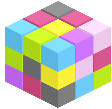
1.2.0 Release
The newest version is written by CommonJS style, which means you can easily use it in browserify project. See details here
Showcase
Origin:
- Input Text Rendering: http://codepen.io/nosir/details/IxBJn
- GIF Animation Rendering: http://codepen.io/nosir/details/mdiHe (Safari only)
- Pixel Isometirc Flappy Bird: http://codepen.io/nosir/details/rzaLA
- Cube Generator: http://codepen.io/nosir/details/ganrh
User Contributed:
- Github Contribution Chart Isometric View Chrome Extension: Github Project URL by @jasonlong
- Online Voxel Builder: http://ngryman.sh/obelisk-buildr by @ngryman
- Snake Game: http://codepen.io/sfaedo/full/AwGjg (Use ← → Key) by @Sebastian Faedo
- Mario 3D voxel: http://jsdo.it/cx20/bQtQ by @cx20
- Conway's Game of Life: http://codepen.io/safx/full/Ewcym by @safxdev
- Node Server-side Image Rendering with node-canvas: Github Project URL by @pose
- Animations with Angular.js: Github Project URL by @Wildhoney
- Perlin Noise Map: http://codepen.io/slobaum/pen/zhmFL by @slobaum
- More on CodePen
Getting started
Simply include obelisk.js in your project
<script src="//path/to/obelisk.min.js"></script>
CDN url
https://unpkg.com/[email protected]/
In JavaScript
// create a canvas 2D point for pixel view world
var point = new obelisk.Point(200, 200);

// create view instance to nest everything
// canvas could be either DOM or jQuery element
var pixelView = new obelisk.PixelView(canvas, point);

// create cube dimension and color instance
var dimension = new obelisk.CubeDimension(80, 100, 120);
var gray = obelisk.ColorPattern.GRAY;
var color = new obelisk.CubeColor().getByHorizontalColor(gray);

// build cube with dimension and color instance
var cube = new obelisk.Cube(dimension, color, true);

// render cube primitive into view
pixelView.renderObject(cube);
For more details, check the tutorial part 1: To build the first cube, or try the code yourself
Tutorials
Step by step:
- Part 1: To build the first cube
- Part 2: Coordinate system
- Part 3: Primitives
- Part 4: Color
- Part 5: Dimension
Sample code for building all primitives:
- Cube: http://jsfiddle.net/nosir/ygWEW/
- Pyramid : http://jsfiddle.net/nosir/ZVURu/
- LineX, LineY, LineZ: http://jsfiddle.net/nosir/gnbqwr2L/
- Brick: http://jsfiddle.net/nosir/6MuVr/
- SideX, SideY: http://jsfiddle.net/nosir/bLsew/
- SlopeNorth, SlopeEast, SlopeSouth, SlopeEast: http://jsfiddle.net/nosir/28B9G/
Development (Browser)
Browserify
Obelisk.js can be used from browserify project. Simply:
$ npm install obelisk.js
In your JavaScript
var obelisk = require('obelisk.js');

// Now you can do the same as above
Want to build the project locally?
$ git clone https://github.com/nosir/obelisk.js.git
$ npm install
Build
$ gulp build
Develop
$ gulp browserify:watch
Advanced Usage (Node.js)
Node.js
Also you can use it in your Node.js canvas project
As node.js
canvasdependency can be tricky to install (binary dependency on Cairo) we are not adding it as a project dependency. You will need to add thecanvasdependency explicitly on your project:
$ npm install canvas
$ npm install obelisk.js
In your JavaScript
// load Node Canvas dependency
var Canvas = require('canvas');

// load obelisk.js module
// here we need the Canvas as a module parameter
var obelisk = require('obelisk.js')(Canvas);

// create a Node Canvas instance
var canvas = new Canvas(600,450);

// Use obelisk the same way you will use it in the browser ...

// Save canvas to a file
canvas.createPNGStream().pipe(fs.createWriteStream('./figure.png'));
For more details, check the Node.js Canvas example.
Get in Touch
- Build any cool stuff? Please feel free to add it here: User Contributed Showcase
- Bugs & Suggestions: open an issue
- Twitter: @rison
Changelog
See details here: release notes.
References
Pixel art is a form of digital art, where images are edited and displayed on the pixel level. The isometric projection is commonly seen in games to provide a 3D view without using any real 3D processing.
- Isometric projection http://en.wikipedia.org/wiki/Isometric_projection
- Flood fill implementation http://en.wikipedia.org/wiki/Flood_fill
- Pixel grapic - Eboy http://eboy.com
License
Obelisk.js is released under the MIT License
관련 프로젝트 살펴보기
불러오는 중…