neohiro/ExploitProtection
neohiro/ExploitProtection has 86 GitHub stars and 10 forks. GitHot measured 0 stars in 24 hours. Last checked 2026-11-15 00:05 UTC. Last push 2026-10-13.
측정된 스타 증가
- in 24h
- 0
- in 7 days
- 기록 수집 중
- in 15 days
- 기록 수집 중
- in 1 month
- 기록 수집 중
서로 겹치는 기간의 순증가량이며 일별 합계가 아닙니다. 측정값이 없으면 비워 둡니다. 스타는 관심도를 나타내며 품질을 보장하지 않습니다.
소개
Windows Exploit Protection Settings (Ultimate) GUI
보안README.md
OriginalWindows Exploit Protection Settings


This repo contains ultimate security configurations against hacking such as memory space access, malware, credential theft - including some denial of service attacks + rootkit deployments: milsec for more than 100 Microsoft Windows programs. Following apps are protected (click categories to show list):
Web Browsers
- Google Chrome
- Mozilla Firefox
- Internet Explorer
- Librewolf
- Opera
- Safari
- Thorium
- Edge
- DuckDuckGo
- Brave
- Waterfox
- Tor Browser
Media Tools
- Audacity
- butt audio streaming
- Virtual DJ
- Traktor
- Photoshop
- Groove Music
- Winamp
- foobar2000
- iTunes
- Windows Media Player
- NDIRecord
- StreamDeck
- Yamaha Steinberg USB
- vMix64
- BlackMagic Video
- VLC Media Player
Communication Apps
- Skype
- Lync
- Pidgin
- Telegram
- MS Outlook
- Thunderbird
- Windows Live Mail
- Google Talk
- Slack
- Wire
- Armcord (a Discord client)
- Discord
- Zoom
Gaming
- Steam
- Ubisoft
- BlueStacks X
- EA - Electronic Arts
- GOG Galaxy (edit version number in .XML file accordingly)
- EasyAntiCheat
- The Sims 4
- Cyberpunk 2077
- Firestorm (for Second Life)
- Radegast
Networking
- dnscrypt-proxy
- Tor
- Torifier
- DragonFruit Connect (OnionFruit)
- WARP 1.1.1.1
- OpenVPN
- WireGuard
- VPN Unlimited
- Comodo Internet Security
- YogaDNS
Common Software
- Notepad++
- Rainmeter
- Obsidian
- OneNote
- Acrobat Reader PDF
- Sumatra PDF
- Foxit PDF Reader
- Java
- MS Access
- MS Excel
- MS PowerPoint
- MS Word
- MS Wordpad
- MS Notepad
- PowerShell
- PowerShell ISE
- Visio
- WinZip
- WinRAR
- 7Z
- ...
Microsoft Services
- Literally all (!) debloated Windows programs from boot. Beyond recommendations (took a few bluescreens >.<)
- OneDrive
- File Explorer
- Smartscreen
- Windows Settings
- Task Manager
- Windows Store
- Command terminal
- search index
- SSH
- svchost
- smss
- csrss
- lpcapsvc
- conhost
- dashost
- OOBEbroker
- WMI
- wininit
- winlogon
- WerFault
- lsalso & lsass
- and many more (everything on Windows 10 & 11)
Other Executables
- Adobe (services)
- AMD (GPU driver)
- Citrix Workspace App
- Crash_handler
- DuckyRGB
- Edge Webview2 (works for Citrix Workspace, DuckDuckGo, Edge...)
- Everything
- Element
- Garmin Express
- Front
- Faststone viewer
- HP (drivers)
- Intel (drivers)
- irfanview64
- Jellyfin
- KeePassXC & proxy
- Open SSL
- NVIDIA
- MPV
- µTorrent
- Qbittorrent
- Qt Web Engine
- Real Converter
- RealPlay
- Realtek Audio
- SwitchDefaultDeny(x64)
- SyncThing
- Thunderbolt
- ...
Check separate settings when specific features don't work as they are fully tested & all programs will start.
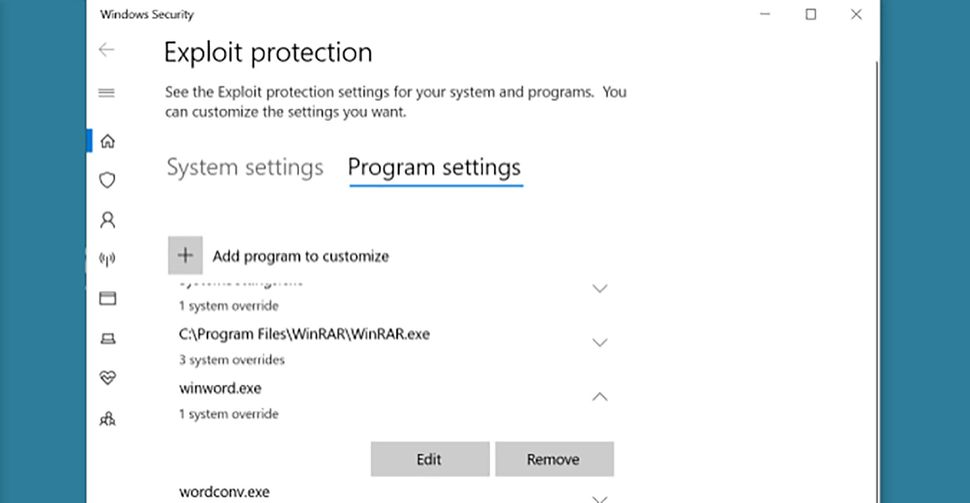
Windows Settings > Security & Privacy > Windows Security > App & browser control > Exploit protection settings > Program settings
Help update XploitProtection.xml and keep this repo growing with new entries. This list & extra security settings below are focused on Windows Home & Pro consumers, gamers & small businesses (including privacy geeks) where agility is everything. By using PoE (process of elimination) while applying WEPS and keeping the .xml file here up to date, together we keep the most complete list online.
Windows Exploit Protection Manager
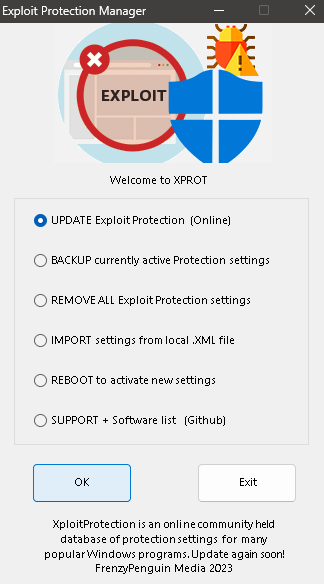
The standalone GUI (you can also use Python to run this script) brings dramatic improvements to the interface that Windows offers today - WEPS Manager excels in speed for bulk actions & repetitive implementations, running tighter security with no trouble: remove & import settings again whenever you need & be up to date in a few seconds.
Automatic Updates
Run the .exe file to change WEPS quickly. Update every so often (this will not remove any existing settings) & reboot to activate, also after manually importing with this command:
Set-ProcessMitigation -PolicyFilePath "$HOME\Downloads\XploitProtection.xml"
Backup, Remove & Import
Some installations require temporarily removing protection: reboot & install the software, run again or import your own local XML. After restart, these policies block intrusions like botnets, cache exploits and more!
Troubleshooting
When you run a hardened version of Windows, Powershell ISE does not work and/or you have no direct internet connection, please use the .exe file in combination with an offline download of the .xml (via it's import function) which remains functional in most cases.
Protect now!
Security Upgrades
- Use encrypted DNS (f.e. 9.9.9.9, dnslow.me,...) via Windows network settings or a third-party program
- windows_hardening.cmd (includes mimikatz exploit protection, debloater & more STIG security)
- https://github.com/AndyFul/Hard_Configurator (will further harden Windows beyond the extreme STIG standards)
- https://github.com/AndyFul/ConfigureDefender (interactive protection)
- Things not to forget during a new Windows install
Windows Tools
- https://github.com/Sycnex/Windows10Debloater (debloat Windows 10 & 11)
- https://www.thewindowsclub.com/ultimate-windows-tweaker-5-for-windows-11
Merged Repositories
- https://github.com/jdgregson/Exploit-Protection-Settings as to support Microsoft Office
- Added https://github.com/Strana-Mechty/ExploitProtection-Templates including Adobe, Telegram & more
- Calibrated with original https://github.com/microsoft/ExploitProtectionConfiguration
⭐ Star & help others find better protection.
📄 License
This project's code is released under a restrictive custom license — see LICENSE for details. The bundled mitigation database (XploitProtection.xml) aggregates community settings credited in Merged Repositories above.