
muxinc/truckload
소개
Migrate your videos to any supported service
창작 및 미디어측정된 스타 증가
- in 24h
- 0
- in 7 days
- +1
- in 15 days
- 기록 수집 중
- in 1 month
- 기록 수집 중
서로 겹치는 기간의 순증가량이며 일별 합계가 아닙니다. 측정값이 없으면 비워 둡니다. 스타는 관심도를 나타내며 품질을 보장하지 않습니다.
README.md
Original
Truckload
Migrate your video collection to a new platform with ease.
Getting started
First, clone the repository and install dependencies:
git clone https://github.com/muxinc/truckload.git
cd truckload
npm install
Next, create a .env.local file in the root directory with your API keys and other configuration settings:
cp .env.example .env.local
Finally, start the app:
npm run start:dev
This will start server instances for the Next.js app and PartyKit.
About Workflow
Truckload uses the Vercel Workflow SDK to orchestrate video migration jobs. Workflows and steps are defined using 'use workflow' and 'use step' directives. In development, workflows run locally via the built-in workflow runtime.
About the PartyKit server
PartyKit is a comprehensive solution for real-time sync within your application.
In this app, we're using it to receive status updates from the video migration background jobs. Truckload uses a local PartyKit server on port 1999 to receive these notifications and pipe them back to the front-end for status updates.
How it works
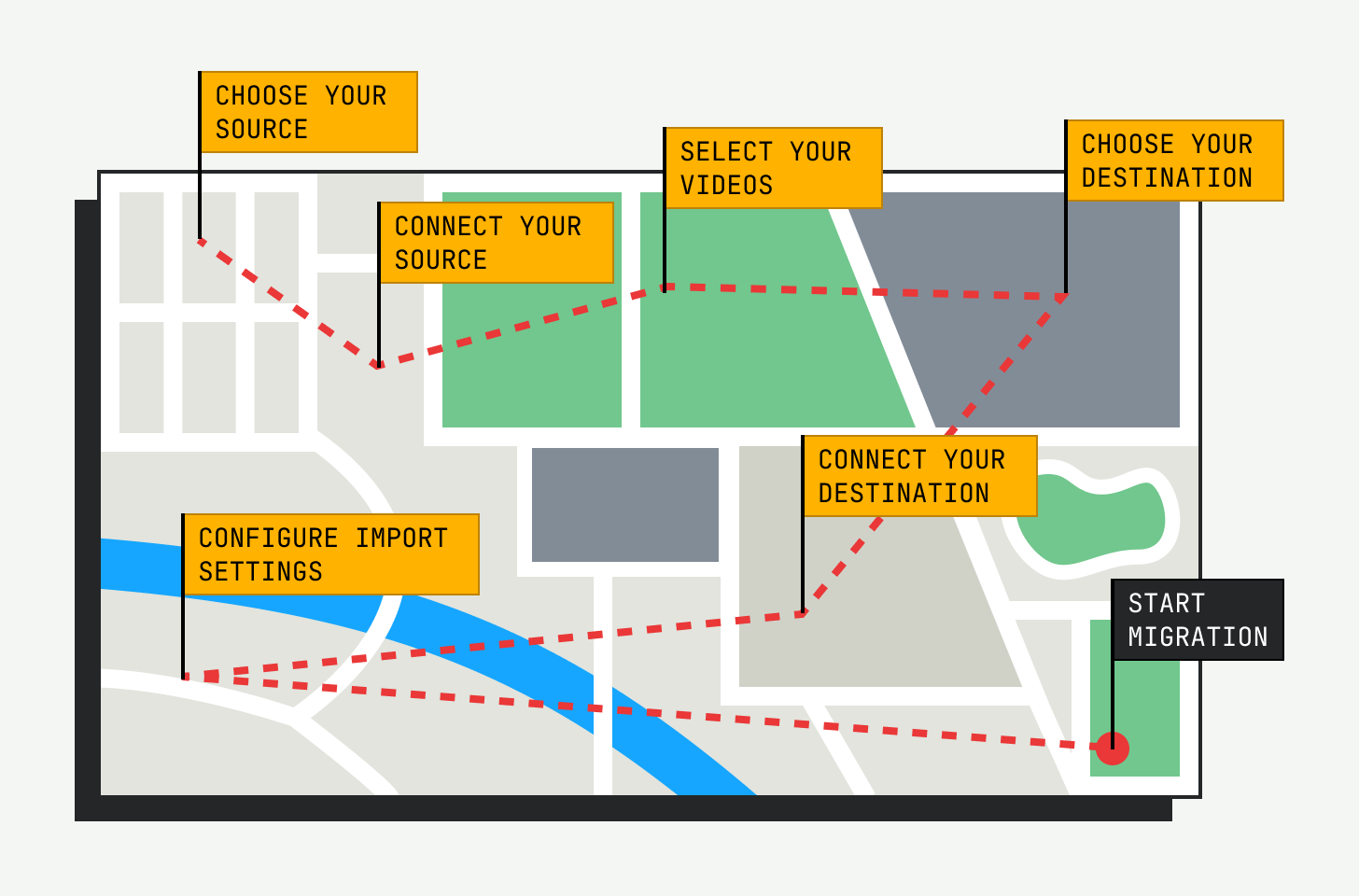
Truckload uses a simple workflow to migrate videos from one platform to another. Here's a high-level overview of the process:
Authentication requirements
When using this app to migrate videos to a new platform, you'll need to authenticate with both the source and destination services to ensure that you have the necessary permissions to perform the desired actions (e.g. fetching video metadata, creating master files, uploading videos, etc.)
Here's a list of the authentication requirements for each service:
| Provider | Requirements | Resources |
|---|---|---|
| Amazon S3 | Access Key and Secret, bucket name, region | AWS SDK v3 API docs |
| Api.video | API Key | API docs |
| Cloudflare Stream | API Token, Account ID | API docs |
| Vimeo | Access Token | API docs |
| Mux | Token ID and Secret | API docs |
How asset status is tracked
After transferring a video to Mux, the workflow polls the Mux API until the asset status is ready (or errored). This eliminates the need for webhooks and ngrok tunnels during local development.
관련 프로젝트 살펴보기
불러오는 중…