
muesli/beehive
muesli/beehive has 6,488 GitHub stars and 325 forks. GitHot measured -1 stars in 24 hours. Last checked 2026-11-08 23:08 UTC. Last push 2023-02-25.
많은 벌이 함께하는 유연한 이벤트·에이전트 및 자동화 시스템 🐝
측정된 스타 증가
- in 24h
- -1
- in 7 days
- 업데이트 지연
- in 15 days
- 업데이트 지연
- in 1 month
- 업데이트 지연
서로 겹치는 기간의 순증가량이며 일별 합계가 아닙니다. 측정값이 없으면 비워 둡니다. 스타는 관심도를 나타내며 품질을 보장하지 않습니다.
README.md
OriginalBeehive


Beehive is an event and agent system, which allows you to create your own agents that perform automated tasks triggered by events and filters. It is modular, flexible and really easy to extend for anyone. It has modules (we call them Hives), so it can interface with, talk to, or retrieve information from Twitter, Tumblr, Email, IRC, Jabber, RSS, Jenkins, Hue - to name just a few. Check out the full list of available Hives in our Wiki.
Connecting those modules with each other lets you create immensly useful agents.
Here are just a few examples of things Beehive could do for you:
- Re-post tweets on your Tumblr blog
- Forward incoming chat messages to your email account
- Turn on the heating system if the temperature drops below a certain value
- Run your own IRC bot that lets you trigger builds on a Jenkins CI
- Control your Hue lighting system
- Notify you when a stock's price drops below a certain value

Installation
Packages & Binaries
- Arch Linux: beehive (AUR)
- Linux Static 64bit
- Linux Static armv6
- macOS 64bit
- Windows 64bit
You can find even more official releases here.
Deployment Tools
- Docker:
docker run --name beehive -d -p 8181:8181 fribbledom/beehive - Ansible
From source
Beehive requires Go 1.13 or higher. Make sure you have a working Go environment. See the install instructions.
The recommended way is to fetch the sources and run make.
git clone --recursive https://github.com/muesli/beehive.git
cd beehive
make
You can build and install the beehive binary like other Go binaries out there (go get)
but you'll need to make sure Beehive can find the assets (images, javascript, css, etc).
See the Troubleshooting/Notes section for additional details.
Run beehive --help to see a full list of options.
Configuration
Think of Hives as little plugins, extending Beehive's abilities with events you can react on and actions you can execute.
Just as examples, there's a Twitter plugin that can
- react to someone you follow posting a tweet (an event)
- post a new tweet for you (an action)
- ...
or an RSS plugin that lets you
- monitor RSS feeds and react on new feed items (another event)
or an email plugin that gives you the ability to
- send emails (another action)
Each Hive lets you spawn one or multiple Bees in it, all working independently from another. That allows you to create separate plugin instances, e.g. one email-Bee for your private mail account, and another one for your work email.
Creating Bees
Sounds complicated? It's not! Just for fun, let's setup Beehive to send us an
email whenever an RSS feed gets updated. Start beehive and open http://localhost:8181/
in your browser. Note that Beehive will create a config file beehive.conf
in its current working directory, unless you specify a different file with the
-config option.
Note: If you built Beehive with go build instead of make you will have to
start beehive from within its source directory in order for it to find all the
resources for the admin interface. Also see the Troubleshooting & Notes section
of this README.
The admin interface will present you with a list of available Hives. We will need to create two Bees here, one for the RSS feed and one for your email account.

Setting up a Chain
Now we will have to create a new Chain, which will wire up the two Bees we just created. First we pick the Bee & Event we want to react on, then we pick the Bee we want to execute an Action with. The RSS-Bee's event gives us a whole set of parameters we can work with: the feed item's title, its links and description among others. You can manipulate and combine these parameters with a full templating language at your disposal. For example we can set the email's content to something like:
Title: {{.title}} - Link: {{index .links 0}}
Whenever this action gets executed, Beehive will replace {{.title}} with
the RSS event's title parameter, which is the title of the feed item it
retrieved. In the same manner {{index .links 0}} becomes the first URL of
this event's links array.
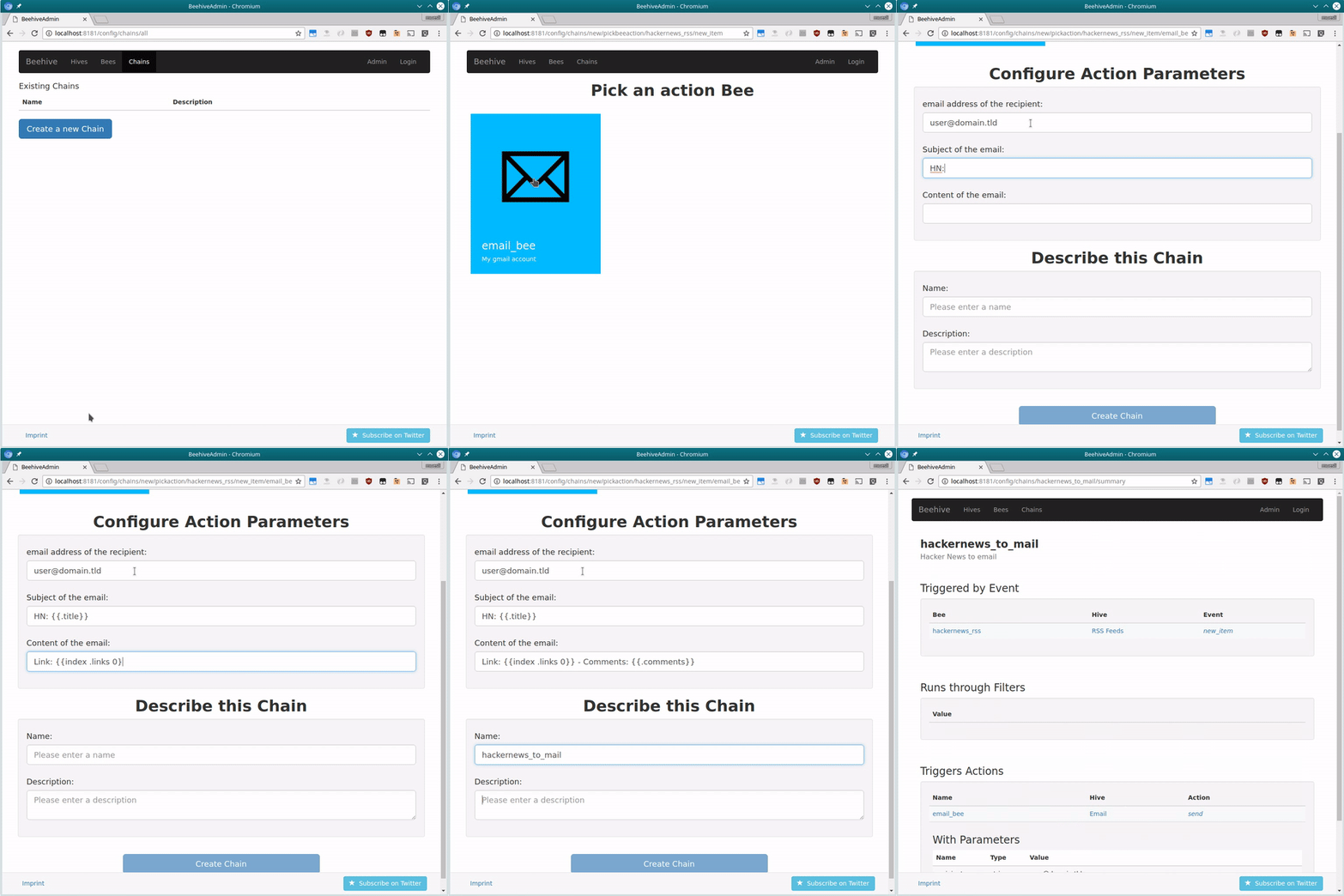
That's it. Whenever the RSS-feed gets updated, Beehive will now send you an email! It's really easy to make various Bees work together seamlessly and do clever things for you. Try it yourself!
You can find more information on how to configure Beehive and examples in our Wiki.
Troubleshooting & Notes
The web interface and other resources are embedded in the binary by default.
When using make noembed, Beehive tries to find those files
in its current working directory, so it's currently recommended to start Beehive
from within its git repository, if you plan to use the web interface.
Should you still not be able to reach the web interface, check if the config
directory in the git repository is empty. If that's the case, make sure the
git submodules get initialized by running git submodule update --init.
The web interface does not require authentication yet. Beehive by default accepts all connections from the loopback device only.
If you want to bind Beehive to a different interface/address, run Beehive with
the -bind and -canonicalurl parameters. For example:
beehive -bind "192.168.0.1:8181" -canonicalurl "http://192.168.0.1:8181"
or
docker run --name beehive -d -e CANONICAL_URL="http://192.168.0.1:8181" -p 8181:8181 fribbledom/beehive
Development
Need help? Want to hack on your own Hives? Join us on IRC (irc://freenode.net/#beehive) or Gitter. Follow the bees on Twitter!
관련 프로젝트 살펴보기
n8n-io/n8n
네이티브 AI 기능을 갖춘 Fair-code 워크플로 자동화 플랫폼입니다. 시각적 구성과 사용자 지정 코드를 결합할 수 있으며, 직접 호스팅하거나 클라우드에서 사용할 수 있고 400개 이상의 연동을 제공합니다.
209,914 스타langgenius/dify
하나의 협업 워크스페이스에서 에이전트 워크플로와 RAG 파이프라인을 구축하고, 풍부한 AI 모델과 도구를 지원합니다. 클라우드, VPC 또는 자체 호스팅으로 배포할 수 있어 팀은 스택을 다시 구축하지 않고 프로토타입에서 프로덕션으로 이동할 수 있습니다.
160,680 스타microsoft/PowerToys
Microsoft PowerToys는 Windows의 생산성과 사용자 지정 기능을 향상하는 유틸리티 모음입니다
140,755 스타stablyai/orca
Orca는 에이전트 집단(예: Grok Bot, Claude Code)과 함께 작업하는 곳입니다. 본인의 구독으로 어떤 코딩 에이전트든 실행할 수 있습니다. 데스크톱, 모바일, 원격 런타임에서 사용할 수 있습니다.
120,141 스타