
mtli/PhotoSketch
소개
Photo-Sketching 코드: 이미지에서 윤곽선을 추론합니다 :dog:
창작 및 미디어측정된 스타 증가
- in 24h
- 0
- in 7 days
- 0
- in 15 days
- 0
- in 1 month
- 기록 수집 중
서로 겹치는 기간의 순증가량이며 일별 합계가 아닙니다. 측정값이 없으면 비워 둡니다. 스타는 관심도를 나타내며 품질을 보장하지 않습니다.
README.md
OriginalPhoto-Sketching: Inferring Contour Drawings from Images

This repo contains the training & testing code for our sketch generator. We also provide a [pre-trained model].
For technical details and the dataset, please refer to the [paper] and the [project page].
Setting up
The code is now updated to use PyTorch 0.4 and runs on Windows, Mac and Linux. For the obsolete version with PyTorch 0.3 (Linux only), please check out the branch pytorch-0.3-obsolete.
Windows users should find the corresponding .cmd files instead of .sh files mentioned below.
One-line installation (with Conda environments)
conda env create -f environment.yml
Then activate the environment (sketch) and you are ready to go!
See here for more information about conda environments.
Manual installation
See environment.yml for a list of dependencies.
Using the pre-trained model
- Download the pre-trained model
- Modify the path in
scripts/test_pretrained.sh - From the repo's root directory, run
scripts/test_pretrained.sh
It supports a folder of images as input.
Train & test on our contour drawing dataset
- Download the images and the rendered sketch from the project page
- Unzip and organize them into the following structure:
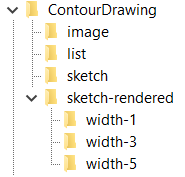
- Modify the path in
scripts/train.shandscripts/test.sh - From the repo's root directory, run
scripts/train.shto train the model - From the repo's root directory, run
scripts/test.shto test on the val set or the test set (specified by the phase flag)
Citation
If you use the code or the data for your research, please cite the paper:
@article{LIPS2019,
  title={Photo-Sketching: Inferring Contour Drawings from Images},
  author={Li, Mengtian and Lin, Zhe and M\v ech, Radom\'ir and and Yumer, Ersin and Ramanan, Deva},
  journal={WACV},
  year={2019}
}
Acknowledgement
This code is based on an old version of pix2pix.
관련 프로젝트 살펴보기
불러오는 중…