
microsoft/promptflow
microsoft/promptflow has 11,261 GitHub stars and 1,128 forks. GitHot measured +1 stars in 24 hours and +4 in 7 days. Last checked 2026-11-05 06:13 UTC. Last push 2026-10-31.
고품질 LLM 앱을 구축하세요. 프로토타이핑과 테스트부터 프로덕션 배포 및 모니터링까지 지원합니다.
측정된 스타 증가
- in 24h
- +1
- in 7 days
- +4
- in 15 days
- 업데이트 지연
- in 1 month
- 업데이트 지연
서로 겹치는 기간의 순증가량이며 일별 합계가 아닙니다. 측정값이 없으면 비워 둡니다. 스타는 관심도를 나타내며 품질을 보장하지 않습니다.
README.md
OriginalPrompt flow
[!WARNING]
Prompt flow in Microsoft Foundry and Azure Machine Learning will be retired on April 20, 2027. Prompt flow is no longer recommended for new development. Migrate existing Prompt flow applications and deployments to Microsoft Agent Framework before April 20, 2027.Prompt flow container images are no longer receiving updates, including security and package updates. This applies to Prompt flow runtime images, including promptflow-runtime, promptflow-runtime-stable, and promptflow-python.
After April 20, 2027, Prompt flow, including the web authoring experience in Microsoft Foundry and Azure Machine Learning, the VS Code extensions, and related Prompt flow container images, will no longer be supported or available.
If your application depends on Prompt flow deployments or runtime images, plan to move those workloads to supported alternatives such as Microsoft Agent Framework before the retirement date. For migration guidance, see the Prompt flow migration guide and migration code samples.










Welcome to join us to make prompt flow better by participating discussions, opening issues, submitting PRs.
Prompt flow is a suite of development tools designed to streamline the end-to-end development cycle of LLM-based AI applications, from ideation, prototyping, testing, evaluation to production deployment and monitoring. It makes prompt engineering much easier and enables you to build LLM apps with production quality.
With prompt flow, you will be able to:
- Create and iteratively develop flow
- Create executable flows that link LLMs, prompts, Python code and other tools together.
- Debug and iterate your flows, especially tracing interaction with LLMs with ease.
- Evaluate flow quality and performance
- Evaluate your flow's quality and performance with larger datasets.
- Integrate the testing and evaluation into your CI/CD system to ensure quality of your flow.
- Streamlined development cycle for production
- Deploy your flow to the serving platform you choose or integrate into your app's code base easily.
- (Optional but highly recommended) Collaborate with your team by leveraging the cloud version of Prompt flow in Azure AI.
Installation
To get started quickly, you can use a pre-built development environment. Click the button below to open the repo in GitHub Codespaces, and then continue the readme!

If you want to get started in your local environment, first install the packages:
Ensure you have a python environment, python>=3.9, <=3.11 is recommended.
pip install promptflow promptflow-tools
Quick Start ⚡
Create a chatbot with prompt flow
Run the command to initiate a prompt flow from a chat template, it creates folder named my_chatbot and generates required files within it:
pf flow init --flow ./my_chatbot --type chat
Setup a connection for your API key
For OpenAI key, establish a connection by running the command, using the openai.yaml file in the my_chatbot folder, which stores your OpenAI key (override keys and name with --set to avoid yaml file changes):
pf connection create --file ./my_chatbot/openai.yaml --set api_key=<your_api_key> --name open_ai_connection
For Azure OpenAI key, establish the connection by running the command, using the azure_openai.yaml file:
pf connection create --file ./my_chatbot/azure_openai.yaml --set api_key=<your_api_key> api_base=<your_api_base> --name open_ai_connection
Chat with your flow
In the my_chatbot folder, there's a flow.dag.yaml file that outlines the flow, including inputs/outputs, nodes, connection, and the LLM model, etc
Note that in the
chatnode, we're using a connection namedopen_ai_connection(specified inconnectionfield) and thegpt-35-turbomodel (specified indeployment_namefield). The deployment_name filed is to specify the OpenAI model, or the Azure OpenAI deployment resource.
Interact with your chatbot by running: (press Ctrl + C to end the session)
pf flow test --flow ./my_chatbot --interactive
Core value: ensuring "High Quality” from prototype to production
Explore our 15-minute tutorial that guides you through prompt tuning ➡ batch testing ➡ evaluation, all designed to ensure high quality ready for production.
Next Step! Continue with the Tutorial 👇 section to delve deeper into prompt flow.
Tutorial 🏃♂️
Prompt flow is a tool designed to build high quality LLM apps, the development process in prompt flow follows these steps: develop a flow, improve the flow quality, deploy the flow to production.
Develop your own LLM apps
VS Code Extension
We also offer a VS Code extension (a flow designer) for an interactive flow development experience with UI.
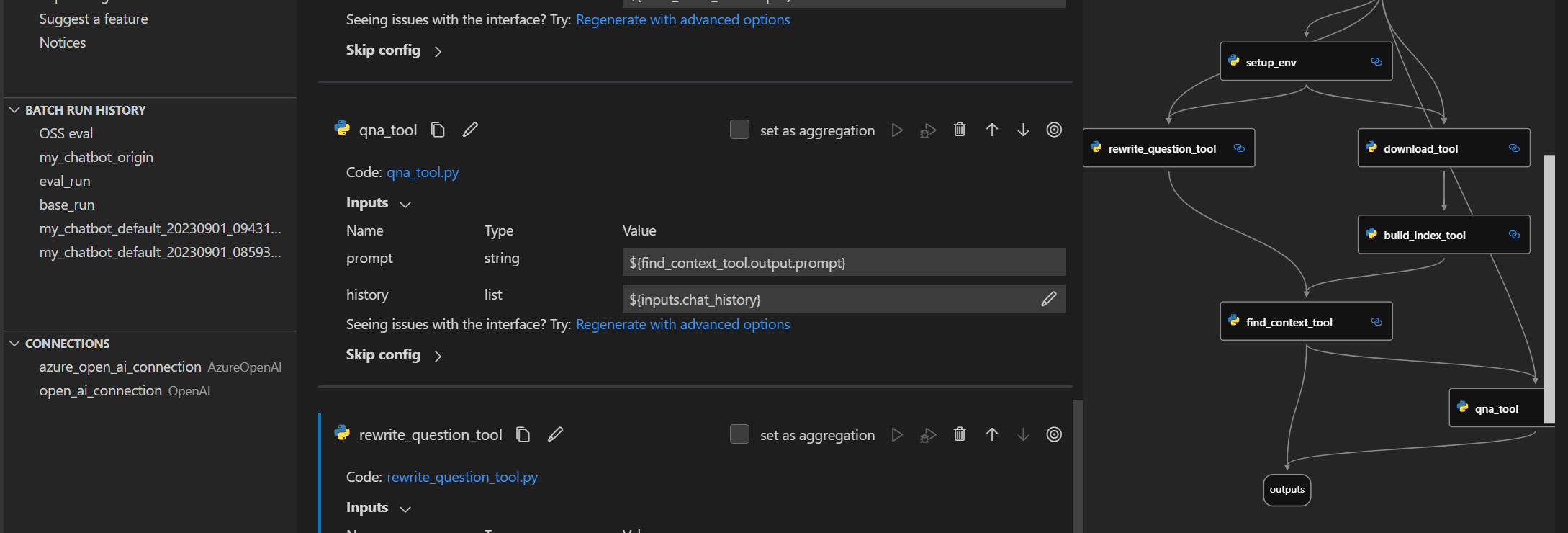
You can install it from the visualstudio marketplace.
Deep delve into flow development
Getting started with prompt flow: A step by step guidance to invoke your first flow run.
Learn from use cases
Tutorial: Chat with PDF: An end-to-end tutorial on how to build a high quality chat application with prompt flow, including flow development and evaluation with metrics.
More examples can be found here. We welcome contributions of new use cases!
Setup for contributors
If you're interested in contributing, please start with our dev setup guide: dev_setup.md.
Next Step! Continue with the Contributing 👇 section to contribute to prompt flow.
Contributing
This project welcomes contributions and suggestions. Most contributions require you to agree to a Contributor License Agreement (CLA) declaring that you have the right to, and actually do, grant us the rights to use your contribution. For details, visit https://cla.opensource.microsoft.com.
When you submit a pull request, a CLA bot will automatically determine whether you need to provide a CLA and decorate the PR appropriately (e.g., status check, comment). Simply follow the instructions provided by the bot. You will only need to do this once across all repos using our CLA.
This project has adopted the Microsoft Open Source Code of Conduct. For more information see the Code of Conduct FAQ or contact [email protected] with any additional questions or comments.
Trademarks
This project may contain trademarks or logos for projects, products, or services. Authorized use of Microsoft trademarks or logos is subject to and must follow Microsoft's Trademark & Brand Guidelines. Use of Microsoft trademarks or logos in modified versions of this project must not cause confusion or imply Microsoft sponsorship. Any use of third-party trademarks or logos are subject to those third-party's policies.
Code of Conduct
This project has adopted the Microsoft Open Source Code of Conduct. For more information see the Code of Conduct FAQ or contact [email protected] with any additional questions or comments.
Data Collection
The software may collect information about you and your use of the software and send it to Microsoft if configured to enable telemetry. Microsoft may use this information to provide services and improve our products and services. You may turn on the telemetry as described in the repository. There are also some features in the software that may enable you and Microsoft to collect data from users of your applications. If you use these features, you must comply with applicable law, including providing appropriate notices to users of your applications together with a copy of Microsoft's privacy statement. Our privacy statement is located at https://go.microsoft.com/fwlink/?LinkID=824704. You can learn more about data collection and use in the help documentation and our privacy statement. Your use of the software operates as your consent to these practices.
Telemetry Configuration
Telemetry collection is on by default.
To opt out, please run pf config set telemetry.enabled=false to turn it off.
License
Copyright (c) Microsoft Corporation. All rights reserved.
Licensed under the MIT license.
관련 프로젝트 살펴보기
affaan-m/ECC
에이전트 실행·제어 프레임워크를 위한 성능 최적화 시스템. Claude Code, Codex, Opencode, Cursor 등을 위한 스킬, 본능, 메모리, 보안, 연구 우선 개발을 제공합니다.
297,824 스타NousResearch/hermes-agent
당신과 함께 성장하는 에이전트
260,854 스타multica-ai/andrej-karpathy-skills
Andrej Karpathy가 관찰한 LLM 코딩의 함정을 바탕으로 Claude Code의 동작을 개선하는 단일 CLAUDE.md 파일입니다.
229,851 스타firecrawl/firecrawl
웹과 그 너머의 데이터로 AI 에이전트를 강화합니다. 초지능을 위한 라이브러리를 구축하고 있습니다. 🔥
198,759 스타