
meshahid973/localtify
소개
Spotify style local music player with playlists, downloads, Discord RPC, custom themes, and pixel-art covers.
창작 및 미디어What you can do
- Play and organize local audio with playlists, albums, search, queues, shuffle, and repeat.
- Personalize the player with themes, covers, and a cover studio.
- Import music and use the available YouTube or public Spotify import tools.
- Optional Discord Rich Presence, scrobbling, synchronized lyrics, and MusicBrainz tagging.
측정된 스타 증가
- in 24h
- 0
- in 7 days
- 0
- in 15 days
- 기록 수집 중
- in 1 month
- 기록 수집 중
서로 겹치는 기간의 순증가량이며 일별 합계가 아닙니다. 측정값이 없으면 비워 둡니다. 스타는 관심도를 나타내며 품질을 보장하지 않습니다.
README.md
Originallocaltify
Your music. Your computer.
A local-first desktop music player with albums, playlists, custom artwork, themes, listening stats, and desktop playback controls. No account or subscription required.
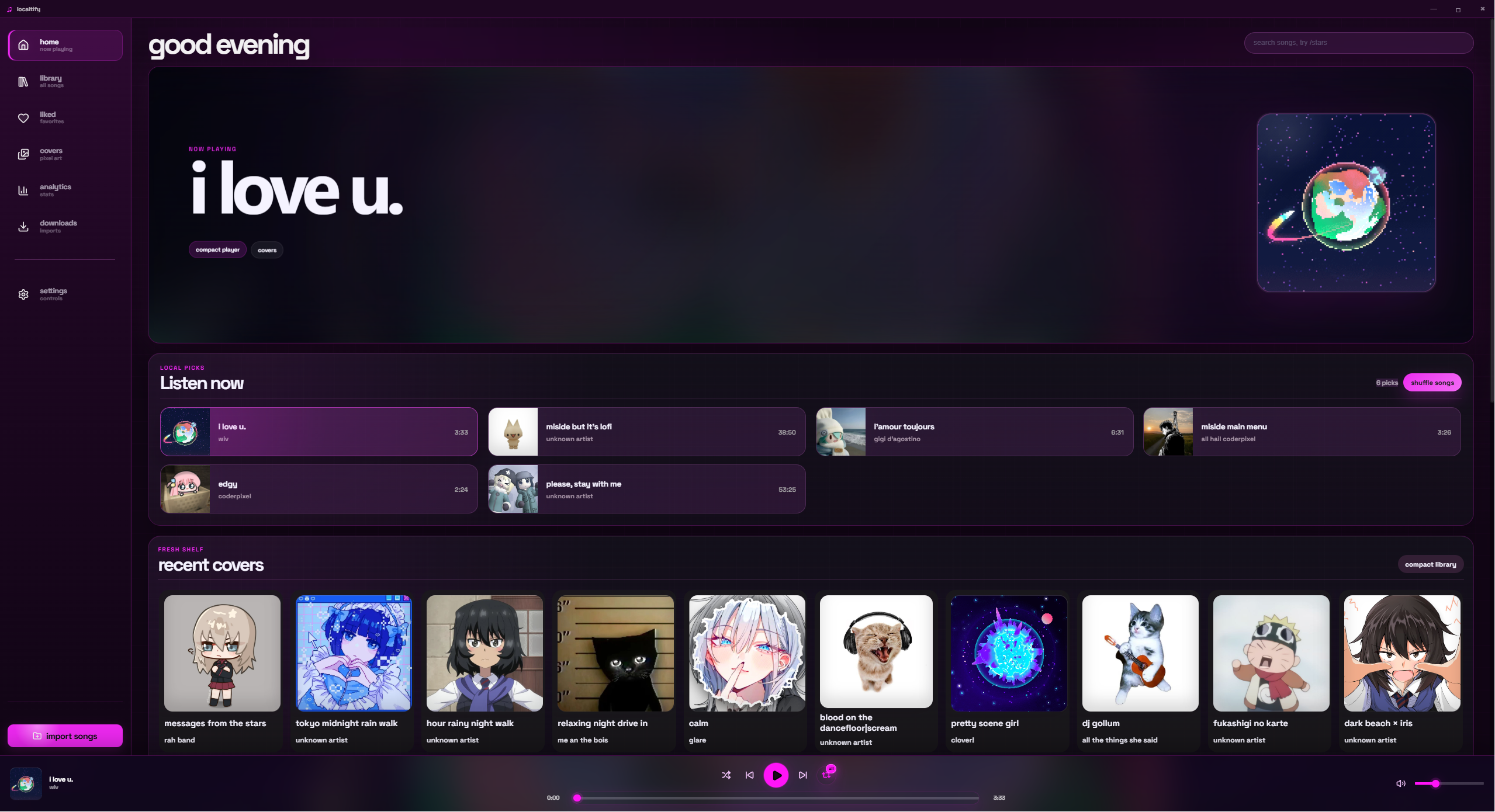
Features
- Play and organize local audio with playlists, albums, search, queues, shuffle, and repeat.
- Personalize the player with themes, covers, and a cover studio.
- Import music and use the available YouTube or public Spotify import tools.
- Optional Discord Rich Presence, scrobbling, synchronized lyrics, and MusicBrainz tagging.
- Optional local audio analysis, similarity suggestions, radio, and Daily Mixes.
The app does not stream an online music catalog. Import/download features connect to external services only when you use them.
Installation
Download a release for your operating system:
| Platform | Package |
|---|---|
| Windows | Installer (.exe) |
| Linux | AppImage, Debian (.deb), or RPM (.rpm) |
Open the installed app and import your music. macOS native binaries are tested in CI, but check Releases for currently published installers.
Android (experimental)
The experimental Android companion copies your library from the desktop app over home Wi-Fi for offline playback. Download the release-signed APK from Releases.
See the Android installation and pairing guide for building an APK, installing it on a phone, pairing with your computer, updating, and troubleshooting.
Development
Use Node.js 22, npm, and Git.
git clone https://github.com/meshahid973/localtify.git
cd localitfy
npm ci
npm run dev
Create a local .env from .env.example only if you need optional configuration.
| Command | Purpose |
|---|---|
npm run check |
Type checking, app tests, build, and codebase checks |
npm run release:check |
Full validation and performance budgets |
npm run dist |
Standard Windows installer |
npm run dist:linux |
Standard Linux packages |
npm run rust:build |
Build optional native compute kernels |
npm run rust:test |
Native/JavaScript parity tests |
npm run rust:benchmark |
Compare opt-in kernels with JavaScript |
Rust kernels are experimental and disabled by default. The regular installer does not require them. See Native kernels and release testing for opt-in settings and packaging.
Privacy
Your library and audio analysis stay local. Online lyrics, MusicBrainz tagging, downloads/imports, and scrobbling are optional integrations. Enabling a lookup can send song metadata to the corresponding service; a local .lrc sidecar file needs no lyrics lookup. MusicBrainz file tagging is applied only after review. Browser-cookie access for downloads is disabled by default.
Discover is opt-in. Explicit song/artist searches go directly to YouTube Music using its web catalog, with MusicBrainz and iTunes as fallbacks; explicit Similar songs requests send only a selected video ID. Optional Last.fm recommendations use library metadata. Download matching may send the requested title and artist to YouTube Music. Artwork lookups for visible recommendations may send track titles and artist names to YouTube Music and Deezer; images are requested from approved source hosts. Optional Fanart.tv support uses MusicBrainz identifiers and the operator’s own LOCALTIFY_FANART_API_KEY environment variable (see https://fanart.tv/get-an-api-key/). Deezer and Fanart.tv images are display-only; no automatic file tagging or download embedding using these sources. Apple remains metadata-only. Covers → Tools → Find album art online opens the Cover Search Engine with the chosen song’s artist and album; it does not scrape or call that service’s private API. Review provider terms and any required approvals before distribution. The artwork provider strategy follows the public API approaches documented by Beets and MusicBrainz Picard. No Liner account, server, cover proxy, signing keys or audio transport is used. Only download material you are authorized to save. The catalog implementation adapts patterns from Liner under authorization reported by the project maintainer; provider interfaces may change or become unavailable.
Compatibility and source
src/— React/TypeScript renderer and feature moduleselectron/— Electron, playback services, SQLite, and the trusted IPC bridgenative/— optional NAPI-RS compute kernelstests/andscripts/— automated validation and development tooling
The repository's historical spelling, window.localitfy, localitfy:* IPC channels, and com.meshahid973.localitfy app ID are compatibility contracts. Renaming them requires a separately tested migration.
For contributions and architecture rules, see CONTRIBUTING.md. For reporting security issues, see SECURITY.md. The project is licensed under MIT.
관련 프로젝트 살펴보기
불러오는 중…