
mainsail-crew/mainsail
소개
Mainsail은 Klipper를 사용하는 3D 프린터를 관리하고 제어하는 인기 있는 웹 인터페이스입니다.
창작 및 미디어What you can do
- Responsive Web Interface: Optimized for desktops, tablets and mobile devices
- Printer Farm: Supports multiple 3D printers
- Localization: Choose between 12 different languages
- File Manager: Delete, rename and upload your G-Code and config files
측정된 스타 증가
- in 24h
- -1
- in 7 days
- +3
- in 15 days
- +6
- in 1 month
- 기록 수집 중
서로 겹치는 기간의 순증가량이며 일별 합계가 아닙니다. 측정값이 없으면 비워 둡니다. 스타는 관심도를 나타내며 품질을 보장하지 않습니다.
README.md
Original

Mainsail
Makes Klipper more accessible by adding a lightweight, responsive web user interface, centred around an intuitive and consistent design philosophy.








Getting Started
Visit docs.mainsail.xyz/setup to get started with Mainsail.
Mainsail is also available in remote mode on http://my.mainsail.xyz. Find out more.
Documentation
Visit docs.mainsail.xyz to view the full documentation.
You can find the latest release notes here.
Screenshots
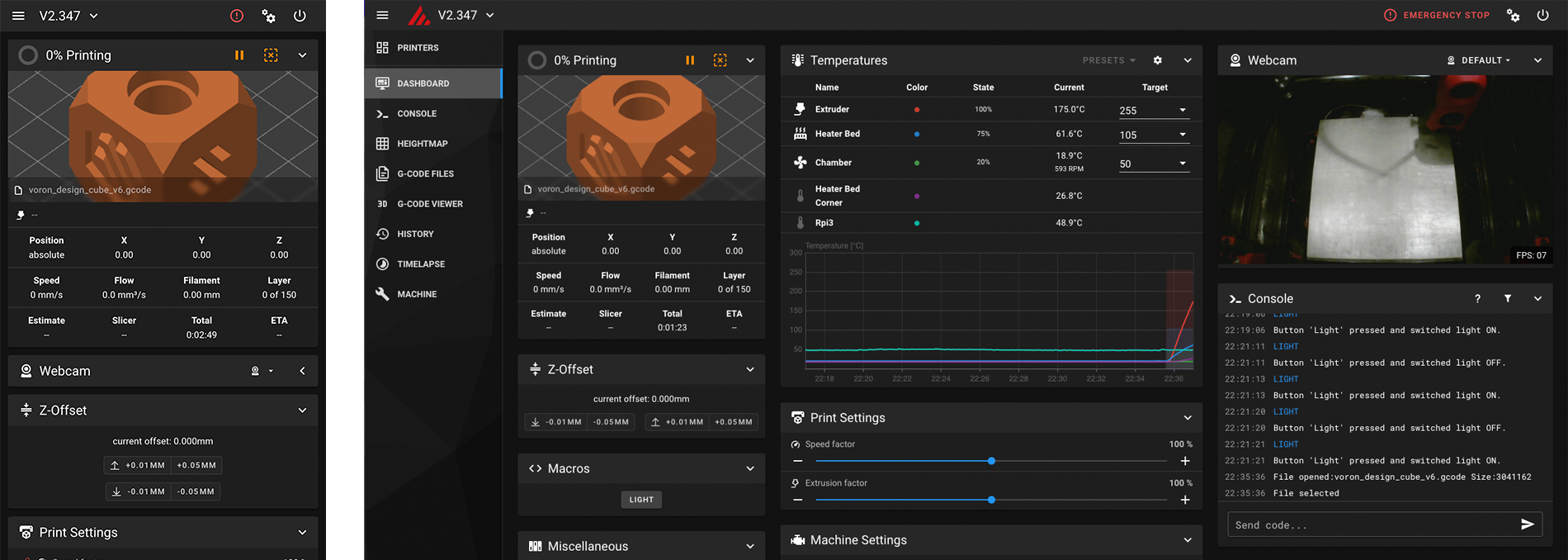
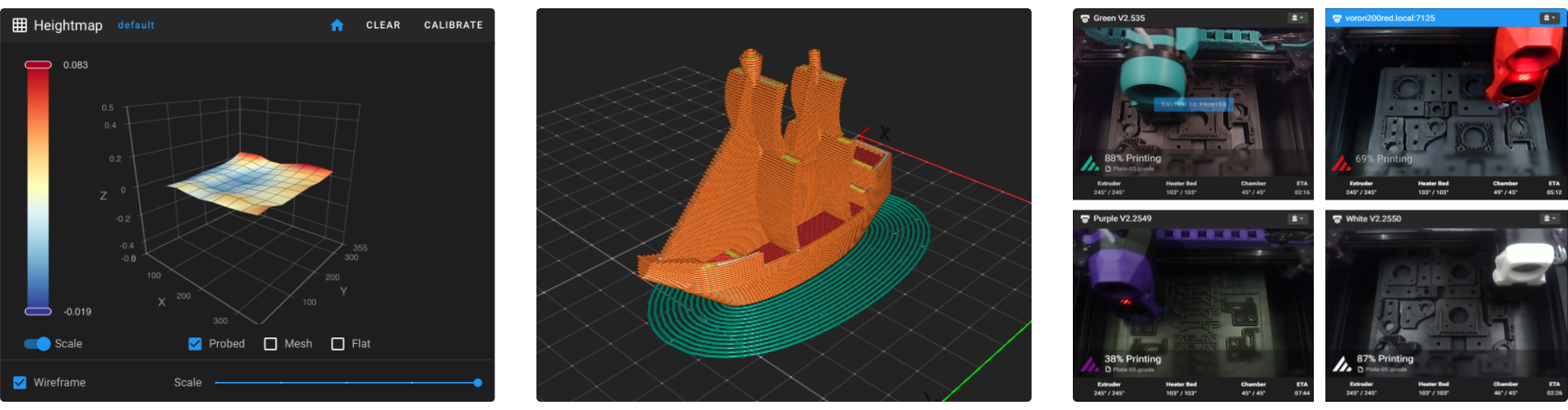
Features
- Responsive Web Interface: Optimized for desktops, tablets and mobile devices
- Printer Farm: Supports multiple 3D printers
- Localization: Choose between 12 different languages
- File Manager: Delete, rename and upload your G-Code and config files
- File Editor: Edit G-Code, config, and markdown files with syntax highlighting in your browser
- Print History: See your previous prints and their status
- Statistics: View how much time your printer has been in use and the number of jobs that have succeeded or failed
- Job Queue: Queue multiple jobs and add them directly from your slicer
- Temperature Presets: Manage different temperature presets for easy preheating
- Bed Mesh Visualisation: View your bed using a 3D mesh graph
- G-Code Viewer: View a 3D render of your print and follow the progress
- Multi-Webcam Support: View your print from different angles with multiple webcams
- Timelapse Integration: Automatically record a timelapse of your print using moonraker-timelapse
- Power Control: Control power devices such as relays, TP-Link and Tasmota devices, and more
- Powerful Macro-Management: Manage your macros on a micro level
- Configurable Dashboard: Create your own personal dashboard
- Theming Support: Customizable user interface including logos, backgrounds, and custom CSS
- Additional Sensors: Add extra sensors to the temperature graph
- Exclude Objects: Exclude parts of your print (not officially supported by Klipper yet)
Help and Support
Do you need help or just want to talk? Join our active community on Discord!
Did you find a bug or did you thought of a feature? Please create an Issue in GitHub and let us know.
Official Sponsors

BIGTREETECH is the official mainboard partner of Mainsail. BIGTREETECH is committed to developing innovative and competitive products to better serve the 3D printing community.
Support Mainsail
Mainsail is primarily developed and maintained by meteyou. To keep the project going he invests his free time, almost every day. To motivate him (☕🍺😜) there are several ways to support him:


Contributing
Contributions to Mainsail are always welcome!
- 📥 Pull requests and 🌟 Stars are always welcome.
- Read our contributing guidelines to get started, or find us on Discord, we will take the time to guide you.
Looking for a first issue to tackle?
- We tag issues with
 when we think they are well suited for people who are new to the codebase or OSS in general.
- Talk to us, we'll find something that suits your skills and learning interest.
Credit, sources and inspiration
- Kevin O'Connor for the awesome 3D printer firmware Klipper
- Eric Callahan (arksine) for Moonraker (Klipper API). Without Moonraker, Mainsail would not be possible.
- lixxbox for the Mainsail logo & Docs
- Vue.js: The Progressive JavaScript Framework
- Vuetify: Material Design Component Framework for Vue.js
Massive thanks to the whole Voron Design community. Without them such a project would not be possible.
관련 프로젝트 살펴보기
불러오는 중…