
lirantal/is-website-vulnerable
lirantal/is-website-vulnerable has 2,043 GitHub stars and 127 forks. GitHot measured 0 stars in 24 hours and +2 in 7 days. Last checked 2026-11-13 16:14 UTC. Last push 2026-10-27.
측정된 스타 증가
- in 24h
- 0
- in 7 days
- +2
- in 15 days
- 기록 수집 중
- in 1 month
- 기록 수집 중
서로 겹치는 기간의 순증가량이며 일별 합계가 아닙니다. 측정값이 없으면 비워 둡니다. 스타는 관심도를 나타내며 품질을 보장하지 않습니다.
소개
finds publicly known security vulnerabilities in a website's frontend JavaScript libraries
보안README.md
Originalis-website-vulnerable
finds publicly known security vulnerabilities in a website's frontend JavaScript libraries


Many thanks to  for supporting open source security
About
Finds publicly known security vulnerabilities in a website's frontend JavaScript libraries.
Usage
Command line
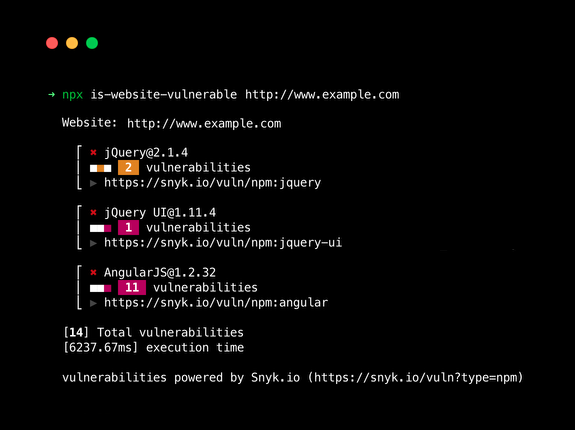
Using Node.js's npx to run a one-off scan of a website:
npx is-website-vulnerable https://example.com [--json] [--js-lib] [--mobile|--desktop] [--chromePath] [--cookie] [--token]
The CLI will gracefully handle cases where the URL to scan is missing by prompting you to enter it:
$ npx is-website-vulnerable
Woops! You forgot to provide a URL of a website to scan.
? Please provide a URL to scan: › https://example.com
...
Exit codes
If the CLI detects an error, it will terminate with an exit code different from 0.
Exit Code 0: Everything is fine. No vulnerabilities found.
Exit Code 1: An error happened during the execution. Check the logs for details.
Exit Code 2: Vulnerabilities were found. Check the logs for details.
Docker
To build and run the container locally:
# Clone Repo:
git clone https://github.com/lirantal/is-website-vulnerable.git

# Change to repo's cloned directory:
cd is-website-vulnerable

# Build Image locally:
docker build --no-cache -t lirantal/is-website-vulnerable:latest .

# Run container:
docker run --rm -e SCAN_URL="https://www.google.com/" lirantal/is-website-vulnerable:latest
SCAN_URL is an environment variable and its value must be replaced with the desired URL during Docker run. Docker container will exit once the scan has been completed.
If you wish to provide command line arguments to is-website-vulnerable and customize the run, such as providing --json or other supported arguments, you should omit the environment variable and provide the full command. Here is an example:
docker run --rm lirantal/is-website-vulnerable:latest https://www.google.com --json
:warning: A modern version of Chrome is assumed to be available when using is-website-vulnerable. It may not be safe to assume that this is satisfied automatically on some CI services. For example, additional configuration is necessary for Travis CI.
GitHub Action
Create .github/workflows/is-website-vulnerable.yml with the url that you want scanned:
name: Test site for publicly known js vulnerabilities

on: push
jobs:
  security:
    runs-on: ubuntu-latest
    steps:
      - name: Test for public javascript library vulnerabilities
        uses: lirantal/is-website-vulnerable@main
        with:
          scan-url: "https://yoursite.com"
Install
You can install globally via:
npm install -g is-website-vulnerable
Learn Node.js Security

Contributing
Please consult CONTRIBUTING for guidelines on contributing to this project.
Author
is-website-vulnerable © Liran Tal, Released under the Apache-2.0 License.
Documentation
- Project documentation - development, testing, architecture, and conventions.
관련 프로젝트 살펴보기
trimstray/the-book-of-secret-knowledge
영감을 주는 목록, 매뉴얼, 치트시트, 블로그, 팁, 원라이너, CLI/웹 도구 등을 모은 컬렉션.
258,201 스타Hack-with-Github/Awesome-Hacking
해커, 펜테스터, 보안 연구자를 위한 다양한 Awesome 목록 모음.
125,430 스타swisskyrepo/PayloadsAllTheThings
웹 애플리케이션 보안과 모의 침투 테스트/CTF에 유용한 페이로드 및 우회 방법 목록.
82,654 스타caddyserver/caddy
빠르고 확장 가능한 멀티플랫폼 HTTP/1-2-3 웹 서버이며, 자동 HTTPS를 지원합니다
79,025 스타