
levelsio/superlevels
소개
제가 만든 아주 뛰어난 Chrome 확장 프로그램입니다. 심각한 보안 위험을 초래하는 악성 코드나 스파이웨어가 가득한 외부 확장 프로그램을 설치하는 것보다 안전합니다. 이 확장 프로그램은 오픈 소스이므로 설치하기 전에 AI를 활용해 소스 코드를 읽고 확인할 수 있으며, 원하는 대로 맞춤 설정할 수도 있습니다!
보안측정된 스타 증가
- in 24h
- 0
- in 7 days
- +1
- in 15 days
- 기록 수집 중
- in 1 month
- 기록 수집 중
서로 겹치는 기간의 순증가량이며 일별 합계가 아닙니다. 측정값이 없으면 비워 둡니다. 스타는 관심도를 나타내며 품질을 보장하지 않습니다.
README.md
Original🚀 superlevels
by @levelsio

Please star SuperLevels if you like it!
A super Chrome extension that replaces 12+ separate extensions with one open-source, privacy-respecting package.
Most Chrome extensions are closed-source malware/spyware-filled garbage that form a massive security risk. This one is open source and you can read and check the source code (with AI) before you install it, and customize it to your liking!
Demo
Security
Before installing any Chrome extension, you should verify it's safe. This extension is fully open source so you can audit every line of code yourself — or let AI do it for you:
- Clone this repo or point your AI tool at the source code
- Use Cursor, Claude Code, Codex, or any AI coding tool
- Ask it: "Analyze this Chrome extension for security vulnerabilities, malware, spyware, data exfiltration, and any suspicious behavior"
- Read the report before you install
You should do this for every Chrome extension you use. Most extensions are closed-source and can't be audited — this one can.
Features
🚮 Tab Cleaner
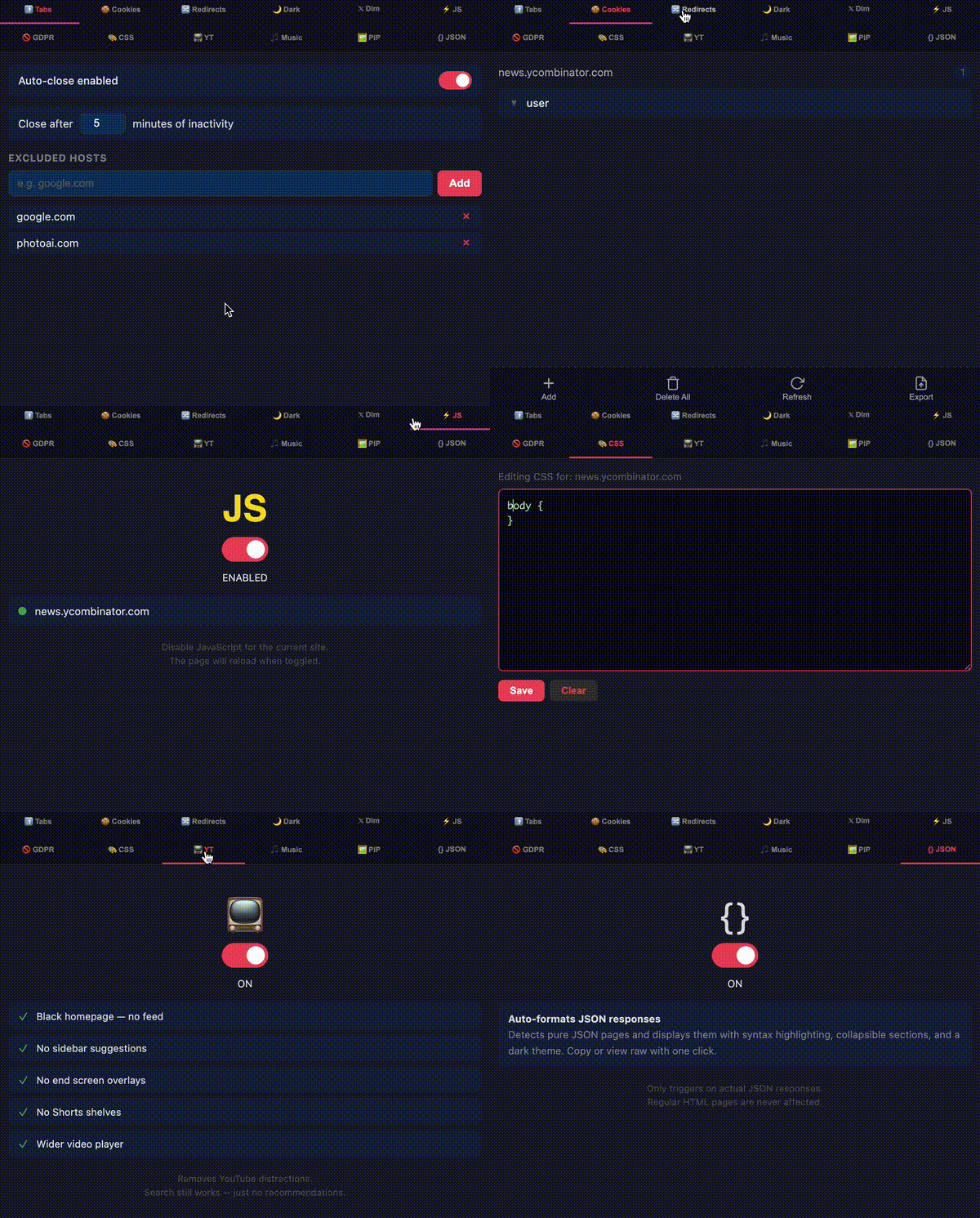
Automatically closes inactive tabs after a configurable timeout (default: 5 minutes). Set excluded hosts to keep important tabs alive. View and re-open recently closed tabs.
🍪 Cookie Editor
Full cookie manager for the current site. View, edit, add, and delete cookies. Export cookies as JSON. Expand any cookie to see and modify all fields including domain, path, SameSite, secure, and httpOnly flags.
🔀 Redirect Tracer
See every redirect hop your browser took to reach the current page. Shows status codes (301, 302, 307, etc.) with a visual chain. Copy the full redirect chain to clipboard.
🌙 Dark Mode
Instant dark mode for any website using CSS filter inversion. Adjustable brightness. Toggle per-site or globally. Images and videos are automatically re-inverted so they look normal.
𝕏 X Dim Mode
Custom dim theme for X/Twitter with 7 color palettes: Dim, Slate, Jade, Plum, Dusk, Ember, or a custom hue. Live preview in the popup.
⚡ JS Toggle
Disable JavaScript per-site with one click. Useful for debugging, reading articles without popups, or testing progressive enhancement. Page reloads automatically.
🚫 GDPR Cookie Consent Dismisser
Auto-hides and auto-clicks cookie consent banners. Supports OneTrust, CookieBot, Didomi, Quantcast, GDPR plugins, and dozens more frameworks. Toggle off if a site breaks.
🎨 Live CSS Editor
Write custom CSS for any website, applied in real-time as you type. Saved per-domain. Supports tab key for indentation.
📺 YouTube Unhook
Removes YouTube distractions: no homepage feed, no sidebar suggestions, no end screen overlays, no Shorts. Search still works — just no algorithmic recommendations.
🫛 Photopea No Ads
Hides the 320px ad column on photopea.com and expands the editor to the full window width (Photopea sizes the editor from window.innerWidth - 320, so a main-world script reports the window as 320px wider). Toggle in the popup.
🎶 TikTok Login Skipper
Gets rid of TikTok's "Log in to TikTok" popup that covers videos, dims the page and blocks clicks/scrolling for logged-out visitors. The modal is hidden instantly with CSS and its Skip button is clicked — but Skip only swaps in a "When's your birthday?" step that keeps the page locked, so the extension also undoes the locks TikTok applies while the modal is open: the inert attribute on #app, #app { pointer-events: none }, and the modal's focus lock. Clicking TikTok's own Log in button still opens the popup normally. Toggle in the popup.
🗄 No Paywall
Opens paywalled news articles straight on archive.is — e.g. an nytimes.com article goes to archive.is/https://www.nytimes.com/.... Only article URLs redirect (homepages and section fronts don't), tracking params are stripped so existing snapshots match, and links clicked from an archive page open the original. The site list (NYT, WSJ, FT, Bloomberg, Economist, plus Dutch, German, French, Italian, Spanish and Nordic papers like NRC, Volkskrant, Spiegel, Zeit, Le Monde, Corriere, El País) is editable in the popup.
🎵 Music Recognizer
Shazam-like music identification for any tab. Captures 10 seconds of audio and identifies the song via ACRCloud (free signup, bring your own API key). Results link to YouTube. History of recognized songs.
🖼 Picture-in-Picture
Pop the largest video on the current tab into a floating PiP window with one click.
🗺 Google Maps Links
Re-adds clickable Maps links and map preview cards to Google Search results.
🖼 View Image
Adds a "View Image" button back to Google Images, linking directly to the full-size original image.
{} JSON Formatter
Auto-detects pure JSON response pages and formats them with syntax highlighting, collapsible sections, and a dark theme. Copy or view raw with one click. Never triggers on regular HTML pages.
Install
- Download or clone this repo
- Open Chrome and go to
chrome://extensions/ - Click Manage Extensions if you're not already there
- Enable Developer mode (toggle in the top right corner)
- Click Load unpacked
- Select the
superlevelsfolder - The 🚀 icon appears in your toolbar — you're done!
Privacy
- No data collection. Everything stays local in
chrome.storage.local. - No analytics, no tracking, no phone-home.
- The only external network request is the Music Recognizer, which sends a short audio clip to ACRCloud — and only when you explicitly click "Listen" and provide your own API keys.
- All source code is right here. Read it, audit it, fork it.
License
MIT
관련 프로젝트 살펴보기
불러오는 중…