
kopecmaciej/vi-sql
kopecmaciej/vi-sql has 216 GitHub stars and 14 forks. GitHot measured 0 stars in 24 hours and +2 in 7 days. Last checked 2026-11-22 19:51 UTC. Last push 2026-11-12.
What you can do
- Multi-tab SQL editor — syntax highlighting, autocomplete, query history, and $EDITOR integration
- Table data view — filter, sort, inline and batch edit, add/delete rows, copy rows as JSON/CSV, follow foreign keys, find references
- Vim mode — hjkl navigation and multi-key sequences (gg, dd, yy, yrj, yrc, gd, gr) across the entire UI
- Schema browser — tables, structure, indexes, DDL; create, rename, and drop objects via keybindings
측정된 스타 증가
- in 24h
- 0
- in 7 days
- +2
- in 15 days
- 기록 수집 중
- in 1 month
- 기록 수집 중
서로 겹치는 기간의 순증가량이며 일별 합계가 아닙니다. 측정값이 없으면 비워 둡니다. 스타는 관심도를 나타내며 품질을 보장하지 않습니다.
소개
Terminal UI for SQL databases
데이터README.md
Original
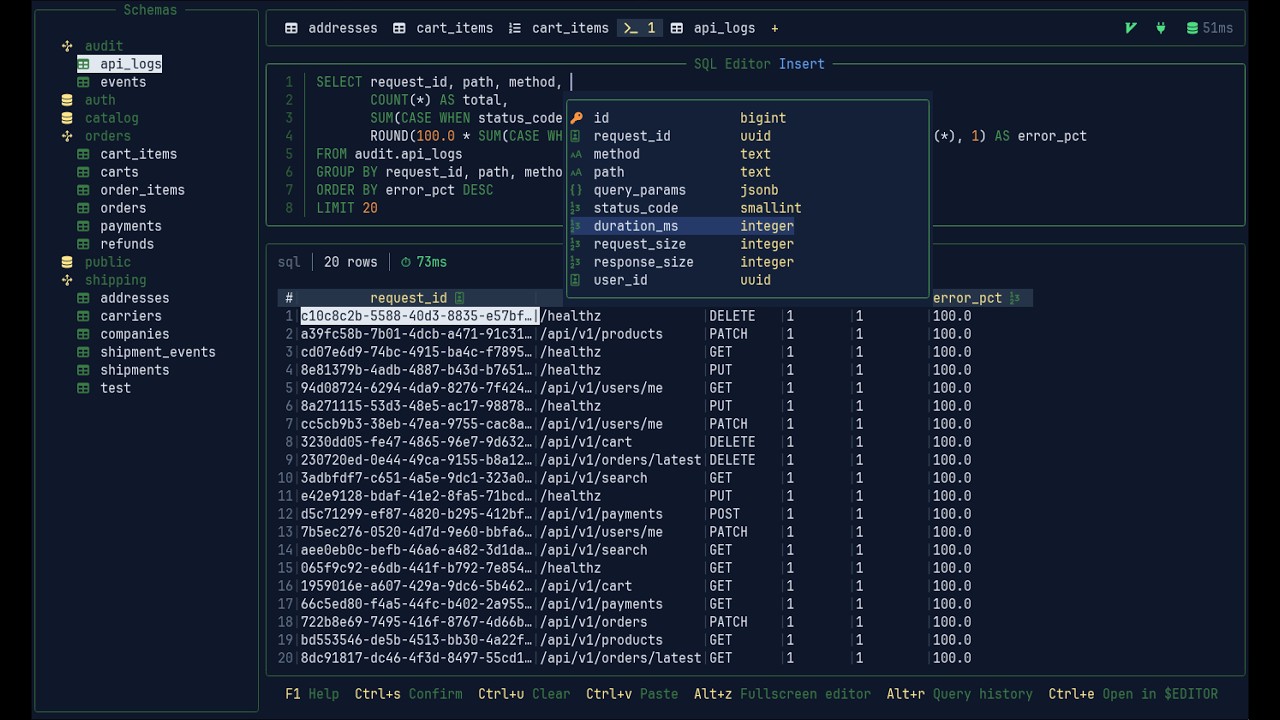
A terminal UI for SQL databases built with passion. Browse schemas, run queries, edit rows, inspect query plans, and expose your session to AI tools via a built-in MCP server.

 |
 |
 |
Introductory video
Features
- Multi-tab SQL editor — syntax highlighting, autocomplete, query history, and
$EDITORintegration - Table data view — filter, sort, inline and batch edit, add/delete rows, copy rows as JSON/CSV, follow foreign keys, find references
- Vim mode —
hjklnavigation and multi-key sequences (gg,dd,yy,yrj,yrc,gd,gr) across the entire UI - Schema browser — tables, structure, indexes, DDL; create, rename, and drop objects via keybindings
- EXPLAIN / EXPLAIN ANALYZE — query plan viewer with cost and timing breakdown
- Import / Export — CSV, JSON, SQL INSERT, and Markdown
- MCP server — AI assistants (Claude, Cursor, etc.) can browse your schema and draft queries in the editor; query execution is opt-in
- Auto-update — update to the latest release from inside the app via the actions palette
- Encrypted connections — AES-256-GCM encryption; supports OS keyring, master password, or env var
- Themes — multiple built-in themes, fully customizable via YAML
Install
Installing with cURL:
curl -fsSL https://vi-sql.com/install.sh | sh
You can also pin a specific version:
VI_SQL_VERSION=v0.0.3 curl -fsSL https://vi-sql.com/install.sh | sh
If you use Homebrew, installation is straightforward:
brew install vi-sql
Precompiled binaries are available on the releases page.
Building from source
Requires Go 1.25+.
git clone https://github.com/kopecmaciej/vi-sql.git
cd vi-sql
make build
Uninstall
curl -fsSL https://vi-sql.com/uninstall.sh | sh
The script prompts before removing each artifact: the binary, config directory, log file, and any keyring entry.
Quickstart
Run vi-sql and enter your connection details on the welcome screen, or connect directly with a DSN:
vi-sql --connect postgres://user:pass@localhost/mydb
vi-sql --connect mysql://user:pass@localhost/mydb
vi-sql --connect file:/home/user/data.db
Or by saved connection name:
vi-sql --connection-name mydb
Jump straight to a table:
vi-sql --jump public/users
Config and data paths vary by OS. Run vi-sql --paths to see the exact locations on your system (Config, Keybindings, Styles, Icons, and Log).
MCP server
vi-sql ships an HTTP MCP server that AI tools (Claude Code, Cursor, etc.) can connect to while the app is running. Enable it from the options page and point your client at http://localhost:9741/mcp.
See the MCP documentation for setup, available tools, and configuration options.
Troubleshooting
See the troubleshooting documentation for common issues and fixes.
License
Apache 2.0
관련 프로젝트 살펴보기
불러오는 중…