
knight0x07/ImpulsiveDLLHijack
소개
대상 바이너리에서 DLL 하이재킹을 탐지하고 악용하는 과정을 자동화하는 C# 기반 도구입니다. 탐지된 하이재킹 경로는 이후 레드팀 작전에서 무기화하여 EDR을 우회하는 데 사용할 수 있습니다.
보안측정된 스타 증가
- in 24h
- 0
- in 7 days
- 0
- in 15 days
- +1
- in 1 month
- 기록 수집 중
서로 겹치는 기간의 순증가량이며 일별 합계가 아닙니다. 측정값이 없으면 비워 둡니다. 스타는 관심도를 나타내며 품질을 보장하지 않습니다.
README.md
OriginalImpulsiveDLLHijack
C# based tool which automates the process of discovering and exploiting DLL Hijacks in target binaries. The Hijacked paths discovered can later be weaponized during RedTeam Operations to evade EDR's.
1. Methodological Approach :
The tool basically acts on automating following stages performed for DLL Hijacking:
- Discovery - Finding Potentially Vulnerable DLL Hijack paths
- Exploitation - Confirming whether the Confirmatory DLL was been loaded from the Hijacked path leading to a confirmation of 100% exploitable DLL Hijack!
Discovery Methodology :
- Provide Target binary path to ImpulsiveDLLHijack.exe
- Automation of ProcMon along with the execution of Target binary to find Potentially Vulnerable DLL Hijackable paths.
Exploitation Methodology :
Parse Potentially Vulnerable DLL Hijack paths from CSV generated automatically via ProcMon.
Copy the Confirmatory DLL (as per the PE architecture) to the hijack paths one by one and execute the Target Binary for predefined time period simultaneously.
As the DLL hijacking process is in progress following are the outputs which can be gathered from the Hijack Scenario:
- The Confirmatory DLL present on the potentially vulnerable Hijackable Path is loaded by the Target Binary we get following output on the console stating that the DLL Hijack was successful - DLL Hijack Successful -> DLLName: | <Target_binary_name>
- The Confirmatory DLL present on the potentially vulnerable Hijackable Path is not loaded by the Target Binary we get following output on the console stating that the DLL Hijack was unsuccessful - DLL Hijack Unsuccessful -> <DLL_Path>
Entry Point Not Found Scenarios:
- The Confirmatory DLL present on the potentially vulnerable Hijackable Path is not loaded by the Target Binary as the Entry Point of the DLL is different from our default entry point "DllMain" throwing an error - "Entry Point Not Found", we get following output on the console stating that the DLL Hijack was hijackable if the entry point was correct -> DLL Hijack Successful -> [Entry Point Not Found - Manual Analysis Required!]: <Hijack_path>
- The Confirmatory DLL present on the potentially vulnerable Hijackable Path is executed by the Target Binary even after the Entry Point of the DLL is different from our default entry point "DllMain" throwing an error "Entry Point Not Found", we get following output on the console stating that the DLL Hijack was success even after the entry point was not correct -> DLL Hijack Successful -> [Entry Point Not Found]: <Hijack_path>
Note: The "Entry Point not found" Error is been handled by the code programmatically no need to close the MsgBox manually :) # Rather this would crash the code further****
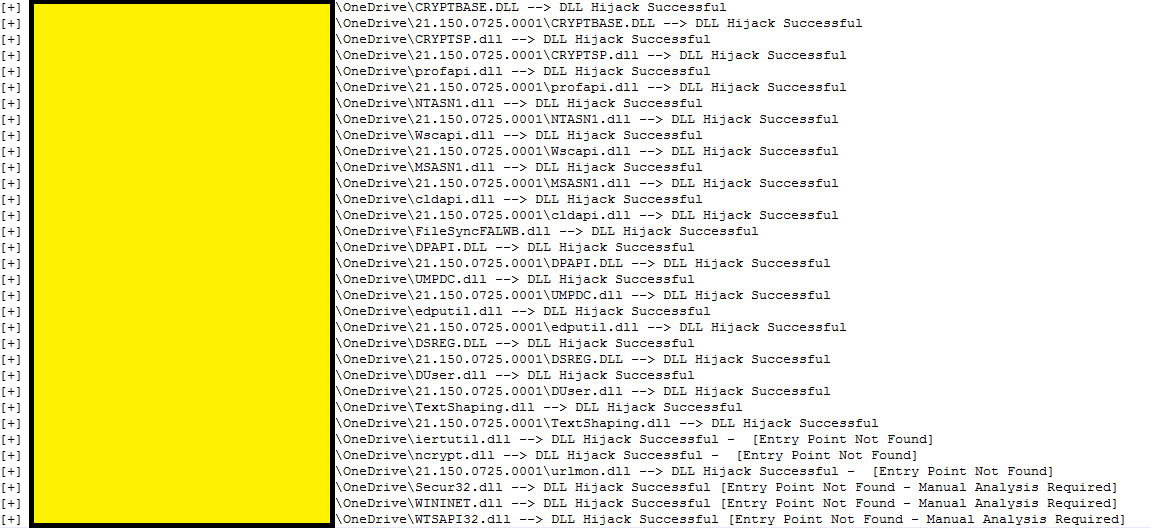
Once the DLL Hijacking process is completed for every Potentially Vulnerable DLL Hijack path we get the final output on the console as well as in a text file (C:\DLLLogs\output_logs.txt) in the following format:
- <DLLHijack_path> --> DLL Hijack Successful (if the Hijack was successful)
- <DLLHijack_path> --> DLL Hijack Unuccessful (if the Hijack was unsuccessful)
- <DLLHijack_path> --> DLL Hijack Successful [Entry Point Not Found - Manual Analysis Required] (if the Entry point was not found but can be successful after manual analysis)
- <DLLHijack_path> --> DLL Hijack Successful [Entry Point Not Found] (if the hijack was successful even after the entry point was not found)
- <DLLHijack_path> --> Copy: Access to Path is Denied (Access denied)
**These Confirmed DLL Hijackable paths can later be weaponized during a Red Team Engagement to load a Malicious DLL Implant via a legitimate executable (such as OneDrive,Firefox,MSEdge,"Bring your own LOLBINs" etc.) and bypass State of the art EDR's as most of them fail to detect DLL Hijacking as assessed by George Karantzas and Constantinos Patsakis as mentioned in there research paper: https://arxiv.org/abs/2108.10422
2. Prerequisites:
- Procmon.exe -> https://docs.microsoft.com/en-us/sysinternals/downloads/procmon
- Custom Confirmatory DLL's :
- These are DLL files which assist the tool to get the confirmation whether the DLL's are been successfully loaded from the identified hijack path
- Compiled from the MalDLL project provided above (or use the precompiled binaries if you trust me!)
- 32Bit dll name should be: maldll32.dll
- 64Bit dll name should be: maldll64.dll
- Install NuGet Package:** PeNet** -> https://www.nuget.org/packages/PeNet/ (Prereq while compiling the ImpulsiveDLLHijack project)
Note: i & ii prerequisites should be placed in the ImpulsiveDLLHijacks.exe's directory itself.
Build and Setup Information:
ImpulsiveDLLHijack
- Clone the repository in Visual Studio
- Once project is loaded in Visual Studio go to "Project" --> "Manage NuGet packages" --> Browse for packages and install "PeNet" -> https://www.nuget.org/packages/PeNet/
- Build the project!
- The ImpulsiveDLLHijack.exe will be inside the bin directory.
And for Confirmatory DLL's:
- Clone the repository in Visual Studio
- Build the project with x86 and x64
- Rename x86 release as maldll32.dll and x64 release as maldll64.dll
Setup: Copy the Confirmatory DLL's (maldll32 & maldll64) in the ImpulsiveDLLHijack.exe directory & then execute ImpulsiveDLLHijack.exe :))
3. Usage:

4. Examples:
Target Executable: OneDrive.exe
Stage: Discovery

Stage: Exploitation
- Successful DLL Hijacks:

- Unsuccessful DLL Hijacks:

- DLL is not loaded as the entry point is not identical! Manual Analysis might make it a successful DLL Hijack :)

- DLL Hijack successful even after unidentical entry point!

Stage: Final Results and Logs
- C:\DLLLogs\output_logs.txt:
Thankyou, Feedback would be greatly appreciated! - knight!
관련 프로젝트 살펴보기
불러오는 중…