
kgrzybek/sample-dotnet-core-cqrs-api
kgrzybek/sample-dotnet-core-cqrs-api has 3,062 GitHub stars and 678 forks. GitHot measured 0 stars in 24 hours, +1 in 7 days, and +1 in 15 days. Last checked 2026-11-21 15:35 UTC. Last push 2024-02-27.
측정된 스타 증가
- in 24h
- 0
- in 7 days
- +1
- in 15 days
- +1
- in 1 month
- 기록 수집 중
서로 겹치는 기간의 순증가량이며 일별 합계가 아닙니다. 측정값이 없으면 비워 둡니다. 스타는 관심도를 나타내며 품질을 보장하지 않습니다.
소개
Clean Architecture를 사용해 raw SQL과 DDD로 구현한 .NET Core REST API CQRS 샘플입니다.
데이터README.md
OriginalSample .NET Core REST API CQRS implementation with raw SQL and DDD using Clean Architecture.
CI

Give a Star! :star:
If you like this project, learn something or you are using it in your applications, please give it a star. Thanks!
Description
Sample .NET Core REST API application implemented with basic CQRS approach and Domain Driven Design.
Architecture Clean Architecture

CQRS
Read Model - executing raw SQL scripts on database views objects (using Dapper).
Write Model - Domain Driven Design approach (using Entity Framework Core).
Commands/Queries/Domain Events handling using MediatR library.
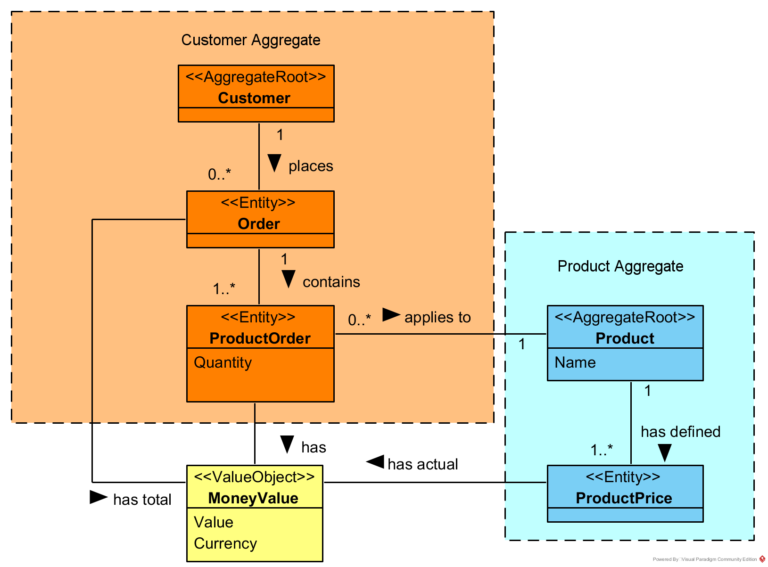
Domain
Validation
Data validation using FluentValidation
Problem Details for HTTP APIs standard implementation using ProblemDetails
Caching
Using Cache-Aside pattern and in-memory cache.
Integration
Outbox Pattern implementation using Quartz.NET
Related blog articles
Simple CQRS implementation with raw SQL and DDD
Domain Model Encapsulation and PI with Entity Framework 2.2
How to publish and handle Domain Events
Handling Domain Events: Missing Part
Cache-Aside Pattern in .NET Core
How to run application
- Create empty database.
- Execute InitializeDatabase.sql script.
- Set connection string (in appsettings.json or by user secrets mechanism).
- Run!
How to run Integration Tests
- Create empty database.
- Execute InitializeDatabase.sql script.
- Set connection string using environment variable named
ASPNETCORE_SampleProject_IntegrationTests_ConnectionString
- Run tests from project src/Tests/SampleProject.IntegrationTests
관련 프로젝트 살펴보기
불러오는 중…